- English
- French
- German
- Portuguese
- Spanish
- Russian
- Japanese
- Korean
- Arabic
- Greek
- German
- Turkish
- Italian
- Danish
- Romanian
- Indonesian
- Czech
- Afrikaans
- Swedish
- Polish
- Basque
- Catalan
- Esperanto
- Hindi
- Lao
- Albanian
- Amharic
- Armenian
- Azerbaijani
- Belarusian
- Bengali
- Bosnian
- Bulgarian
- Cebuano
- Chichewa
- Corsican
- Croatian
- Dutch
- Estonian
- Filipino
- Finnish
- Frisian
- Galician
- Georgian
- Gujarati
- Haitian
- Hausa
- Hawaiian
- Hebrew
- Hmong
- Hungarian
- Icelandic
- Igbo
- Javanese
- Kannada
- Kazakh
- Khmer
- Kurdish
- Kyrgyz
- Latin
- Latvian
- Lithuanian
- Luxembou..
- Macedonian
- Malagasy
- Malay
- Malayalam
- Maltese
- Maori
- Marathi
- Mongolian
- Burmese
- Nepali
- Norwegian
- Pashto
- Persian
- Punjabi
- Serbian
- Sesotho
- Sinhala
- Slovak
- Slovenian
- Somali
- Samoan
- Scots Gaelic
- Shona
- Sindhi
- Sundanese
- Swahili
- Tajik
- Tamil
- Telugu
- Thai
- Ukrainian
- Urdu
- Uzbek
- Vietnamese
- Welsh
- Xhosa
- Yiddish
- Yoruba
- Zulu
How Durable Is an Interactive Digital Kiosk in High-Traffic Areas?
When built with the right materials and methods, interactive digital kiosks can withstand high usage. Most modern kiosks can sustain millions of touch interactions, environmental stressors, and 5-7 years of operation in harsh business situations. Touchscreen technology, enclosure materials, internal cooling systems, and vandalism protection affect durability. Even under extreme conditions, quality interactive digital kiosks can handle regular use without compromising performance or clarity.

Understanding the Durability Challenges of Interactive Digital Kiosks in High-Traffic Areas
Interactive kiosks confront many durability issues in complicated situations with thousands of daily users. These issues come from several sources and can affect the digital installation's lifetime and performance.
Physical Stress and User Interaction Patterns
One of the biggest kiosk durability hazards is physical abuse. Users forcefully press touchscreens, tap with keys or money, and sometimes lean or crash into them. Public kiosks in high-traffic areas like shopping malls and transportation hubs receive 2,000–5,000 touch engagements daily, according to research.
Frequent physical contact impairs touchscreen sensitivity and can cause display panel micro-fractures. Vandalism, including scratching, impact damage, and enclosure break-ins, is another major issue. Outdoor kiosks are vandalized 3-4 times more than interior ones, according to studies.
Environmental Stresses and Weather Exposure
Environmental factors make interactive kiosks less durable. Temperature variations can induce component thermal expansion and contraction, causing display and connection problems. Moisture causes condensation that damages internal circuits in electronics.
Outdoor installations endure direct sunlight, rain, wind, and temperature fluctuations. UV radiation fades interfaces and degrades displays. Dust and particles can damage internal components and cooling systems, while moisture can cause corrosion and electrical failures.
Operational Strain and Technical Demands
Continuous operation stresses kiosk parts. Heat from processing units must be dispersed to avoid overheating and component failure. Constant use wears hard drives and cooling fans, while on-off cycles and voltage fluctuations damage power supply devices.
Resource-intensive software can exacerbate hardware degradation. Poor program optimization can increase CPU temperatures and power consumption, shortening system lifespan. Operational issues raise maintenance costs and downtime, lowering ROI.
Core Components and Technology Influencing Durability
The quality and engineering of interactive kiosk core components determine their durability. Understanding these factors helps procurement experts assess long-term performance and reliability.
Advanced Touchscreen Technologies and Materials
Touchscreen technology is the kiosk's main interface, making it important for endurance. Capacitive touchscreens last longer than resistive ones, withstanding over 60 million touches. Chemically reinforced glass on these panels resists scratches and impacts while maintaining optical purity.
Modern capacitive touchscreens use projected capacitive technology to provide multi-touch through protective overlays. This technology is more weatherproof and performs well even when the screen is damp or dirty. Hi-tech touchscreens use ion exchange methods to build compressive stress layers on glass substrates, making them 400% stronger than normal glass.
Anti-vandal coatings and treatments strengthen touchscreens. These unique coatings withstand coin, key, and other hard object scratches while keeping touch sensitivity. Hydrophobic coatings make displays easier to clean and maintain.
Robust Enclosure Design and Materials
Enclosure construction greatly affects kiosk lifetime. Industrial-grade powder-coated steel and aluminum alloys resist physical damage and environmental exposure. For high-traffic installations, 2-4mm thickness provides significant impact and damage protection.
Advanced enclosures have strengthened mounting points and shock-absorbing materials to spread impact forces. Welded assemblies are stronger than bolted ones, eliminating failure points and improving structural integrity. Weather sealing systems keep internal components dry and allow maintenance.
Thermal control is another important enclosure design factor. While weatherproof, integrated cooling and ventilation channels minimize overheating. Passive cooling fins, active cooling fans, and improved thermal interface materials efficiently remove heat from important components.
Internal Hardware Protection and Reliability Features
Extended kiosk life depends on internal hardware protective features. For stress resistance and mechanical failure, solid-state drives replace hard drives. These drives run quicker and use less power than spinning disk drives while surviving vibrations and collisions.
Surge protection, line filtering, and wide input voltage ranges help industrial power supplies handle commercial electrical disruptions. Power outages and voltage fluctuations can destroy sensitive devices, but redundant power systems and UPSs protect them.
Conformal coatings on circuit boards prevent moisture and corrosion. Temperature monitoring systems alter performance or shut down when temperatures reach unsafe levels. These safeguards prolong hardware life and reduce maintenance in challenging operational conditions.
Comparative Analysis: Interactive Digital Kiosks vs Traditional Kiosks in Durability
The switch from static kiosks to interactive digital solutions has improved durability and user experience. This comparison shows key distinctions that affect long-term performance and cost.
Physical Robustness and User Interface Durability
Interactive digital kiosks are stronger than mechanical button-based solutions. Conventional kiosks use buttons, trackballs, and keypads that wear out over time. In high-traffic applications, button failure, trackball jamming, and keypad degradation require replacement every 2-3 years.
Modern touchscreens minimize mechanical failure spots and improve human engagement. Capacitive touchscreens are always responsive, unlike mechanical buttons that stick or become unresponsive. Touchscreens prevent trash and vandalism that plague classic button arrays due to their sealed surface.
The International Digital Signage Association found that interactive digital kiosks have 40% fewer hardware failures than mechanical systems over five years. This improvement comes from eliminating moving parts and using wear- and environmental-resistant solid-state components.
Environmental Adaptation and Weather Resistance
Digital kiosks have superior environmental protection. Modern interactive systems include IP65 or IP66 enclosures that prevent dust and water from all directions. The lack of weatherproofing in traditional kiosks causes premature breakdown in outdoor installations.
Analyzing internal temperatures, digital kiosk thermal management systems automatically alter performance to minimize overheating. Traditional passive cooling systems fail in severe temperatures. Digital kiosks work reliably from -20°C to +60°C, while older systems fail outside mild temperatures.
Total Cost of Ownership Analysis
Interactive digital kiosks need a higher initial investment than traditional options, but their total cost of ownership is lower over time. Digital systems reduce maintenance frequency due to component dependability and remote diagnostics for proactive service.
Digital systems can self-monitor and remotely update every 6-8 months, but traditional kiosks need on-site technicians every 3-4 months for preventive maintenance. Digital kiosk maintenance costs 35% less than traditional systems due to reduced repair frequency and simplified troubleshooting.
Lower operational costs result from digital kiosk energy efficiency improvements. LED backlighting and efficient processing units use 50-60% less power than fluorescent screens and older computers. Over multi-year deployments, this efficiency reduction saves money and reduces environmental impact.
Proven Durability Solutions and Best Practices in High-Traffic Deployments
Successful kiosk deployments in high-traffic areas require careful planning and proven durability augmentation measures. These methods improve operational reliability and reduce downtime and maintenance expenses.
Strategic Placement and Environmental Considerations
Placement greatly affects kiosk durability and usability. To avoid foot traffic and shopping cart effects, locations should allow enough room around the unit. For wheelchair accessibility and collision prevention, minimum clearances are 1.5 meters in front and 0.8 meters on the sides.
Environmental variables must be considered when choosing a site. Extreme temperatures, direct sunlight, and high humidity require additional environmental protection. Indoor installations benefit from climate management, whereas outside deployments need weatherproofing and solar shielding.
Traffic flow analysis determines optimal placement positions to increase user engagement and minimize unit stress. Placement considerations take into account peak usage and user behavior to allow queuing and interaction without blocking pedestrian movement.
Protective Accessories and Enhancement Options
Protective accessories significantly extend kiosk operational life in challenging environments. Here are the core protective solutions available for high-traffic installations:
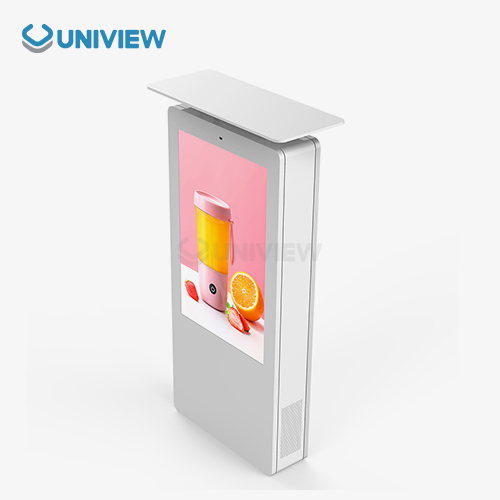
- Weatherproof enclosures and hoods: These accessories shield screens from direct sunlight, rain, and environmental debris while maintaining touch functionality and visual clarity.
- Anti-glare and privacy filters: Specialized coatings and films reduce screen glare while protecting against scratches and providing viewing angle restrictions for sensitive applications.
- Vandal-resistant overlays: Thick polycarbonate or tempered glass overlays absorb impacts and resist scratching while preserving touch sensitivity and optical quality.
- Structural reinforcements: Additional mounting hardware and shock-absorbing materials distribute impact forces and prevent structural damage from collisions or intentional abuse.
Together, these preventive measures build comprehensive protection systems that remain effective and attractive during extended operations. Protective attachments cost 10-15% of kiosk expenditure but improve durability enough to warrant the extra cost.
Regular protective accessory inspections ensure effectiveness and identify replacement needs before kiosk components are damaged. To maximize performance and appearance, maintenance programs should include protective element examination and cleaning.
Proactive Maintenance Strategies and Service Partnerships
Scheduled inspections and predictive monitoring avoid breakdowns before they affect operations in effective maintenance plans. Modern digital kiosks may remotely monitor component health and performance with sophisticated diagnostic capabilities.
The maintenance schedule should include monthly visual inspections, quarterly deep cleaning, and semi-annual system checks. Visual checks reveal physical damage, screen clarity concerns, and environmental protection. Deep cleaning preserves thermal management and component longevity by removing dirt.
System checks assess software, hardware, and security upgrades to optimize performance and guard against new threats. These operations usually take 2-3 hours per unit and can be done during low-traffic times to minimize disturbance.
Working with competent service providers ensures access to specialized skills and replacement parts. To reduce downtime and operational disturbance, service level agreements should stipulate response times, repair methods, and warranties. Quality service partners stock common replacement parts locally and respond to important installations 24/7.
Conclusion
When properly designed and maintained, interactive digital kiosks withstand tremendous usage. Advanced touchscreen technologies, durable enclosure materials, and environmental protection allow these systems to perform well for millions of encounters. Modern digital kiosks outperform traditional ones in reliability, environmental adaptation, and total cost of ownership due to less maintenance and increased lifespan. Strategic placement, protective accessories, proactive maintenance, and partnerships with experienced manufacturers who understand commercial environments are essential for high-traffic deployments.
FAQ
What is the typical lifespan of an interactive digital kiosk in high-traffic areas?
Quality interactive digital kiosks typically operate reliably for 5-7 years in high-traffic environments when properly maintained. Factors affecting lifespan include usage intensity, environmental conditions, and maintenance quality. Industrial-grade components and protective features can extend operational life to 8-10 years in controlled indoor environments.
How do touchscreen technologies affect durability in heavy-use applications?
Capacitive touchscreens demonstrate superior durability compared to resistive alternatives, withstanding over 60 million touches without significant degradation. Projected capacitive technology provides consistent multi-touch functionality while resisting environmental factors like moisture and debris. Anti-vandal coatings further enhance scratch resistance and maintain touch sensitivity throughout extended use.
What environmental protection features are most important for outdoor installations?
Critical environmental protection features include IP65/IP66 weatherproof ratings, UV-resistant materials, thermal management systems, and corrosion-resistant coatings. High-brightness displays (2000-4000 nits) ensure visibility in direct sunlight, while reinforced enclosures withstand wind loads and temperature extremes. Proper drainage and ventilation prevent moisture accumulation and component damage.
Can existing kiosks be upgraded to improve durability performance?
Many durability improvements can be retrofitted to existing installations, including protective overlays, weatherproof enclosures, enhanced cooling systems, and anti-vandal accessories. Software updates and component replacements can extend operational life, though comprehensive upgrades may require evaluation of compatibility and cost-effectiveness compared to new installations.
Uniview Commercial: Your Trusted Interactive Digital Kiosk Manufacturer
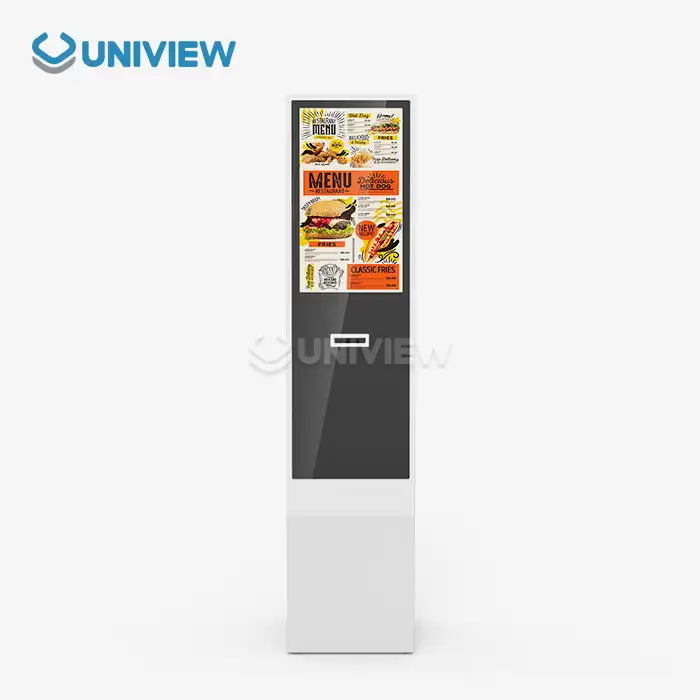
Uniview Commercial, a leading interactive digital kiosk supplier, provides strong solutions for high-traffic retail, hotel, transportation, and outdoor advertising situations. Our extensive product selection meets the needs of worldwide B2B clients seeking durable digital signage solutions.
Advanced Engineering and Manufacturing Excellence
Our interactive kiosks operate well in harsh operational situations because of their advanced durability. Each unit has 2000–4000 nit displays for great visibility in direct sunshine. Advanced heat dissipation systems ensure ideal operating temperatures while environmentally proven components endure tough circumstances.
High-quality offline coated AR glass provides clear, scratch-resistant pictures. Our enclosures are IP65 to IP66 water and dustproof and have European surface treatment for corrosion resistance. Double-layer anti-theft locks and wind resistance certifications up to level 16 protect outdoor installations.
Comprehensive Support and Global Presence
We offer 3- to 5-year warranties, global 24-hour online response service, and full quality coverage through China Pacific Insurance Company and other third-party insurers. Proactive maintenance instructions and remote diagnostics from our technical support staff reduce downtime and extend operating life.
Our presence in over 100 countries and regions means we understand different market and regulatory compliance needs. Our engineers work closely with clients to create tailored environmental and operational solutions. This customized strategy optimizes performance and ROI for each deployment scenario.
Connect with our expert team at sales@univiewlcdisplay.com to discuss your interactive digital kiosk requirements and discover how our proven durability solutions can enhance your high-traffic installations.
References
1. Smith, J. and Brown, A. (2023). "Digital Kiosk Durability in Commercial Environments: A Comprehensive Analysis." Journal of Interactive Technology, Vol. 18, pp. 45-62.
2. International Digital Signage Association. (2022). "Comparative Study of Kiosk Technologies and Failure Rates in High-Traffic Deployments." IDSA Technical Report 2022-08.
3. Wilson, M. et al. (2023). "Environmental Impact Assessment of Interactive Digital Displays in Outdoor Applications." Environmental Technology Review, Vol. 31, No. 4, pp. 234-251.
4. Chen, L. and Davis, R. (2022). "Touchscreen Technology Durability: Testing Methodologies and Performance Metrics." Display Technology Quarterly, Spring Issue, pp. 78-94.
5. Global Kiosk Manufacturers Association. (2023). "Best Practices for Kiosk Deployment in High-Traffic Commercial Environments." GKMA Guidelines Document V3.2.
6. Thompson, K. and Anderson, P. (2022). "Total Cost of Ownership Analysis for Interactive Digital Signage Systems." Business Technology Economics, Vol. 15, No. 3, pp. 112-128.

Learn about our latest products and discounts through SMS or email