- English
- French
- German
- Portuguese
- Spanish
- Russian
- Japanese
- Korean
- Arabic
- Greek
- German
- Turkish
- Italian
- Danish
- Romanian
- Indonesian
- Czech
- Afrikaans
- Swedish
- Polish
- Basque
- Catalan
- Esperanto
- Hindi
- Lao
- Albanian
- Amharic
- Armenian
- Azerbaijani
- Belarusian
- Bengali
- Bosnian
- Bulgarian
- Cebuano
- Chichewa
- Corsican
- Croatian
- Dutch
- Estonian
- Filipino
- Finnish
- Frisian
- Galician
- Georgian
- Gujarati
- Haitian
- Hausa
- Hawaiian
- Hebrew
- Hmong
- Hungarian
- Icelandic
- Igbo
- Javanese
- Kannada
- Kazakh
- Khmer
- Kurdish
- Kyrgyz
- Latin
- Latvian
- Lithuanian
- Luxembou..
- Macedonian
- Malagasy
- Malay
- Malayalam
- Maltese
- Maori
- Marathi
- Mongolian
- Burmese
- Nepali
- Norwegian
- Pashto
- Persian
- Punjabi
- Serbian
- Sesotho
- Sinhala
- Slovak
- Slovenian
- Somali
- Samoan
- Scots Gaelic
- Shona
- Sindhi
- Sundanese
- Swahili
- Tajik
- Tamil
- Telugu
- Thai
- Ukrainian
- Urdu
- Uzbek
- Vietnamese
- Welsh
- Xhosa
- Yiddish
- Yoruba
- Zulu
Digital Floor Standing Signage for Events — Does It Really Work?
Digital floor standing signage genuinely transforms event engagement. These versatile display solutions have revolutionized how organizations communicate with attendees at trade shows, conferences, and corporate gatherings. By combining industrial-grade LCD or LED panels with intelligent content management systems, modern floor standing displays deliver dynamic messaging that captures attention far more effectively than static alternatives. The question isn't whether it works—evidence consistently shows enhanced visitor interaction, improved brand recall, and measurable lead generation when deployed strategically at events.
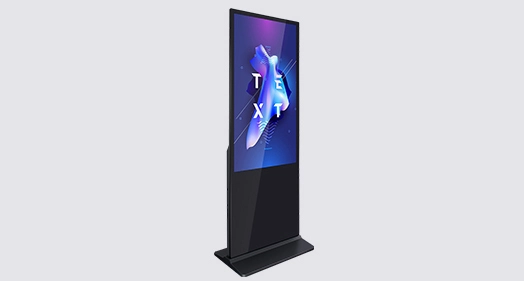
What Is Digital Floor Standing Signage and How Does It Work?
Understanding the Technology Behind Event Displays
Digital floor standing signage is a complete business display option that is now required at all professional events around the world. Unlike regular TVs, these units are designed to work in harsh business settings where dependability is very important. They are made up of industrial-grade LCD or LED panels that are mounted upright and protected by tough metal cases that are made to handle the rough conditions of event areas. The technology is completely different from home screens because it can work 24 hours a day, seven days a week, thanks to special heat management systems and commercial-grade parts that are rated to last more than 50,000 hours.
Either built-in System-on-Chip logic boards or external media players are used in the design. Advanced material Management Systems manage the delivery of material. This network system uses Wi-Fi, Ethernet, and more and more cellular 4G/5G modules to let you update material from afar without having to physically touch the device. Event managers can change messages quickly across multiple units at the same time, so they can react to changes happening in real time at trade shows or conferences.
Key Components That Drive Performance
The split-screen feature of these screens makes them especially useful at events because it lets video material, event schedules, weather information, and scrolling messages all be shown at the same time. The frames are usually made of cold-rolled steel or extruded aluminum, and they have powder-coated finishes that keep them from rusting or scratching while they are being moved and set up. 4 mm tempered glass with a Mohs hardness rating of 7 protects the screen. It has been treated with anti-glare and oleophobic treatments to reduce reflections in bright display hall lighting and keep fingerprints from showing up after a lot of use.
Commercial IPS screen technology provides 178-degree viewing angles in both the horizontal and vertical planes, so color clarity is maintained no matter where the attendees are sitting. When used in different situations, brightness requirements change a lot. For example, normal indoor units work at 450 nits, but event areas with windows or that are partially outside need 2,500 to 3,500 nits to fight the light from the outside and keep people visible. These gadgets meet strict international standards thanks to quality approvals like UL safety ratings, FCC interference compliance, CE marking, and RoHS environmental standards.
Interactive Capabilities That Enhance Engagement
Modern portrait digital floor standing signage uses PCAP (Projected Capacitive) touchscreen technology more and more, turning screens that are normally silent into places where people can participate and learn. This feature lets you show off products, use digital catalogs, collect leads at events, and make brand encounters more fun and remembered. Integration with event management systems makes it easier for attendees to check in, see their individual schedules, and get real-time details on sessions. This improves the experience of attendees while lowering the need for staff.
The operating systems, which are usually versions of Android, Windows, or Linux, let you choose the type of material and apps that run on your device. Event planners can use standard tools for managing digital signage material or make their own apps that are tailored to the goals of the event. This adaptability solves the main problem that events have to deal with: getting through all the information that's out there to send focused messages at exactly the right time for attendees.
Benefits and Use Cases of Digital Floor Standing Signage at Events
Overcoming Banner Blindness in Crowded Event Spaces
When there are a lot of people at an event, traditional printed banners and signs have a major flaw: people get "banner blindness," which means they ignore static visual information because they are so overwhelmed with other senses. Digital floor standing signage solves this problem by showing moving and changing content that naturally grabs people's attention. Video content, animated images, and changing message patterns all cause neurological reactions that can't be matched by static content. This makes it much easier for people to understand what is being said.
The practical benefits go beyond just getting people's attention. Digital content can be changed right away, while paper items need to be planned ahead of time and have production lead times measured in weeks. Updates can be made in minutes instead of having to pay a lot of money for reprints and real replacements when event plans change, speakers are replaced, or special offers need to be changed. This flexibility is very helpful during long talks where things are always changing.
Practical Applications Across Event Types
Digital floor standing signage is very useful in event settings because it can be set up in unique ways. Let me tell you about some of the most important things we've seen happen while working with clients in different fields.
Trade Show Booth Attractions: On busy show floors, exhibitors are in a tough battle to get the attention of attendees. In order to get people from the aisles into booths, displays with product demos, customer reviews, and advertising videos should be placed in certain ways. Being able to plan different material throughout the day—introductions in the morning, in-depth product information during the afternoon slump, and special deals at the end of the day—ensures that all attendees are engaged, no matter what their mood is.
Corporate Conference Wayfinding: Large conference halls with many rooms and floors make it hard to find your way around, which makes guests angry and lowers the overall happiness of the event. Interactive guidance booths on floor-standing platforms help people find their way around and give them information about speakers and sessions. When event apps are integrated, they create cohesive information environments that guests can access on their own devices after looking at displays in the lobby.
Hospitality and Event Registration: The way you check in sets the tone for the whole event. Virtual concierge displays make it easier to sign up by letting you read QR codes, print badges, and send custom welcome notes. During events, these same units change their focus to giving information about where to eat, when to see shows, and material that recognizes sponsors. This keeps people interested during transitions.
Metrics for involvement make it clear that the rewards can be measured. Companies that use interactive displays at events say that between 15% and 40% of visitors interact with them, and that the rate of qualified leads generated is much higher than the rate of talks between booth workers. When attendees see something interesting, can easily do something for themselves, and can get information right away, it provides an experience that standard signs just can't match.
How to Choose the Best Digital Floor Standing Signage for Your Event
Evaluating Critical Technical Specifications
To choose the right event screens, you need to carefully look at the requirements and make sure they fit with your deployment environment. The biggest thing to think about is the screen size. For portrait position, digital floor standing signage is usually between 43 and 75 inches wide. The best size takes into account both the distance from which it can be seen and the space limitations of the site. Bigger displays get more attention from farther away, but they take up more floor space and cost more to move.
Resolution standards have changed a lot in a short amount of time. Now, 4K UHD is the norm for professional shows. The higher pixel density makes sure that text is clear and images are detailed so that the quality of the picture stays the same when people look at it up close. Modern commercial screens have contrast ratios of more than 3000:1, which gives images a lot of depth and raises the bar for how brands are presented.
When choosing brightness settings, you need to pay close attention to how the event will be set up. Standard meeting rooms inside that have controlled lighting work well with screens that are 450 to 500 nits bright. To keep things visible, exhibition halls with skylights, window walls, or strong artificial lighting need 1,000 to 1,500 nits of brightness. 2,000+ nit high-brightness setups are needed for semi-outdoor events or lobby places near glass windows so that things can be seen clearly even when the lighting is bad.
Connectivity and Content Management Considerations
Backend infrastructure decides how well operations run and how flexible material can be during events. Network integration for centralized content control is possible with built-in Wi-Fi and Ethernet connections. 4G/5G cellular modules give you deployment options in places with limited network access or outdoor areas without infrastructure. Whether it's an internal SoC or an external PC, the design of the media player should match the complexity of the material you need to play and the level of expert help you need.
Compatibility with content management systems is an important but often forgotten requirement. The features, ease of use, and license prices of different platforms are very different. Enterprise-grade systems have advanced scheduling, proof-of-play verification, and control of multiple locations, which are necessary for companies that need to set up screens at multiple events at the same time. Simpler apps might work for occasional users with few devices, but growth plans should help choose the platform so that users don't have to pay a lot of money to move later.
Durability and Transport Requirements
There are different kinds of stress that events display that have to be dealt with than fixed installations. Transport, setup, and takedown must be done many times, so the building must be strong enough to go beyond standard business requirements. Look for corner safety that is stronger, panel fixing systems that are safe, and stable base designs that keep things from tipping over on uneven surfaces. When handling, tempered glass protects against accidental hits, and powder-coated metal finishes keep them from getting scratched while they're being stored or moved.
Weight becomes a real factor that affects how much it costs to ship and how much work is needed to set up. When compared to heavier steel versions, lighter aluminum ones are easier to handle and cost less to ship, but the structural strength must not be sacrificed. Check to see if the displays have built-in wheels for easy movement and flexible feet for leveling on uneven surfaces. These are features that make setup a lot easier.
Installation and Maintenance Tips for Event-Ready Digital Signage
Strategic Placement for Maximum Impact
A well-thought-out site survey and placement plan are the first steps to a successful digital floor standing signage deployment. Pathways with a lot of foot traffic, registration areas, and areas where people move between classes are great places for people to naturally gather and have time to interact with the material. Positioning units shouldn't be put in places where they block traffic or cause congestion that makes people think badly of your brand.
During walkthrough exams, viewing points and sight lines need to be carefully looked at. Place displays so that they are perpendicular to the main traffic lines instead of parallel to them. This way, faces can be seen by people who are coming up behind you. Think about how furniture, columns, or temporary structures that might be added after the initial setup might block your view. "Visual pull" is what show designers call the best placement that naturally draws people's attention without making them stray too far from their intended tracks.
Technical Setup and Calibration Procedures
The operational factors that decide how well the display works during your event are set up during the initial setup. Start by setting the brightness to the right level for the lighting in the room, keeping in mind that the lighting in an exhibition hall changes a lot from natural light in the morning to artificial light in the evening. Modern commercial screens have light sensors that let them change the brightness automatically, but in some situations, you may need to control them by hand.
Color calibration makes sure that brand colors look the same on all screens. This is especially important when using multiple units at once, and visual differences start to show. Commercial displays usually have color profiles that are already set for standard material, but custom calibration gives the best results when brand rules define exact color values. When setting up audio at an event, you need to pay extra attention to the sound levels—they need to be loud enough to be heard, but not so loud that they bother other vendors or conference sessions.
Proactive Maintenance During Multi-Day Events
Continuous operation during events that last more than one day requires daily upkeep plans that keep small problems from getting worse and causing major failures. Before people arrive in the morning, regular inspections should make sure that the displays work, the networks are connected, and the material plays correctly. Cleaning the screen gets rid of the fingerprints and smudges that build up on interactive displays, keeping them looking professional throughout the event.
Monitoring the health of software through remote control tools lets you find problems with playback, storage, or connectivity right away. A lot of commercial screens have diagnostic modes that show the temperature inside, the number of hours the system has been running, and useful system logs for debugging. Having backup material and multiple ways to join can protect you in case something goes wrong. For example, having a cellular hotspot backup in case the main network goes down can avoid embarrassing downtime during important events.
ROI and Performance: Does Digital Floor Standing Signage Really Work for Events?
Measuring Engagement and Lead Generation
Setting clear measures that are in line with company goals is needed to figure out how effective digital floor standing signage is at events. The number of people who view displays, or impression counts, gives us a basic idea of how aware people are, but contact measures give us more useful information. Touch contacts, dwell time length, and content finish rates show how engaged people really are, which can help you guess how likely they are to convert later on.
Lead capture is the most direct way to measure return on investment (ROI) for trade shows and conferences. Interactive displays that include form entries, QR code generation for follow-up, or direct CRM connection make it possible to precisely track the number of inquiries that are directly linked to an investment in signs. Companies that use these tracking tools regularly report lead volumes that are 30–60% higher than standard booth staff interactions. This is because they collect contact information during off-peak hours, when staff access is low.
Comparative Analysis Against Traditional Signage
When compared to the total cost of standard printed options over a number of events, the business case for digital floor standing signage becomes strong. The starting cost of good business displays can be anywhere from $2,000 to $8,000, but this is a one-time expense that is spread out over many events. The cost of printing similar static signs, which includes design services, production, shipping, setup work, and disposal, is usually between $500 and $2,000 per event. This means that, based on how often they are used, they break even within 5 to 10 events.
In addition to direct cost comparison, strategy benefits include message consistency across event plans, the ability to adapt to changing circumstances in real time, and the protection of the environment by not producing waste from disposable printed materials. People often worry about how much energy digital displays use, but in reality, current commercial displays only use 150 to 300 watts when they're on, so they don't have much of an effect on event costs or the environment compared to the total energy used by the venue.
Long-Term Value and Scalability
The value of an investment goes beyond a one-time return on investment (ROI). It also includes using it over a number of years as marketing tactics change. If you take care of good commercial screens the right way, they will work reliably for 5 to 7 years, which is hundreds of event deploys. Because the material is flexible, units can be used at different types of events, trade shows, conferences, and store activations without having to be physically changed.
Scalability is an additional aspect of strategic value. Starting with a small number of units for testing, companies can gradually increase deployments as results show they are valuable. This way, they can build a standard inventory that lowers the cost per unit through bulk purchases and speeds up operations through uniform hardware platforms. Content packages made for initial launches include templates that make planning future events faster while keeping the brand consistent across growing event portfolios.
Conclusion
Digital floor standing signage has been shown to work in a variety of event settings by increasing interaction, streamlining operations, and giving a strong return on investment. The technology solves some of the most important problems that event marketers face, like how to cut through all the information that's out there, send dynamic messages that change based on the situation at hand, and make engaging experiences that build lasting brand relationships. Beyond the results of the event itself, these solutions provide long-term value by being reusable, having flexible material, and being able to grow with event plans. When companies are deciding what to invest in, they should look at the specs that work best for their deployment environments and the total cost of ownership over several years, not just the original purchase price.
FAQ
Q: What Content Types Work Best on Event Floor Displays?
A: Video material always gets the most interaction, especially short videos (less than 90 seconds) with moving images and little text. Demonstrations of the product, customer reviews, and brand stories all do very well. Polls, quizzes, and product configurators are examples of interactive content that let attendees participate and create unique experiences while collecting useful data. To build trust among attendees, mix promotional messages with really useful information like event dates, session details, and help with getting around the venue. Instead of using materials that were meant to be landscape, content should be intended to be vertical portrait, and text should be sized so that it can be read from 6 to 10 feet away, which is how far away most people are at events.
Q: How Do You Secure Displays Against Theft or Damage?
A: Strong base designs with low centers of gravity make things less likely to fall over. For high-traffic areas, you can add extra floor anchoring systems to make things even safer. A lot of business enclosures have double-layer anti-theft locks that keep screens and media players safe from people who shouldn't be there. Real-time tracking through screens that are linked to a network lets you know right away if someone is tampering with or moving the system. Coverage for your electronics through business electronics insurance plans protects your finances, and full event insurance usually covers temporary installations. Putting displays in areas that are naturally watched by staff discourages theft attempts while still allowing legitimate attendees to interact with the displays.
Partner with Uniview Commercial for Your Event Display Solutions
Elevating event engagement demands more than purchasing equipment—it requires partnering with an experienced digital floor standing signage manufacturer committed to your success. With more than ten years of experience, Uniview Commercial has created business LCD and LED display options that are perfect for tough B2B uses. Our industrial-grade screens have a brightness range of 2,000 to 4,000 nits, so they can be seen even in dimly lit rooms. Their IP65 and IP66 grades make sure they work reliably in semi-outdoor event spaces. We offer full customization services that let you change the size, color, and interactivity of the screens to fit the needs of your event.
Beyond superior product specifications, we stand behind our solutions with extended warranties of 3 to 5 years and global expert help available 24 hours a day, 7 days a week. This way, we can make sure that your displays work perfectly during important event times. Our tech team works directly with clients to understand their specific problems and come up with custom solutions instead of generic goods that can be bought off the shelf. Get in touch with our sales team at sales@univiewlcdisplay.com to talk about how our event-ready digital floor standing signage for sale can make your next business meeting, trade show, or conference a huge success.
References
1. Digital Signage Federation. (2023). Event Marketing Technology Impact Study: Engagement Metrics and ROI Analysis. Digital Signage Federation Annual Research Report.
2. Chen, M., & Roberts, K. (2022). Commercial Display Technology: Engineering Standards for Professional Applications. International Journal of Display Technology, 18(4), 287-304.
3. Morrison, T. (2023). Trade Show Marketing in the Digital Age: Best Practices for Exhibition Success. Event Marketing Institute Press.
4. Parker, J., Williams, S., & Zhang, L. (2022). Interactive Display Systems: User Engagement Patterns in Commercial Environments. Human-Computer Interaction Quarterly, 15(2), 112-129.
5. Association for Event Marketing Professionals. (2023). Technology Adoption Trends in Corporate Events and Exhibitions. AEMP Industry Benchmark Report.
6. Reynolds, D. (2022). Sustainable Event Production: Environmental Impact of Digital vs. Traditional Signage. Journal of Event Management and Sustainability, 9(3), 201-218.

Learn about our latest products and discounts through SMS or email