- English
- French
- German
- Portuguese
- Spanish
- Russian
- Japanese
- Korean
- Arabic
- Greek
- German
- Turkish
- Italian
- Danish
- Romanian
- Indonesian
- Czech
- Afrikaans
- Swedish
- Polish
- Basque
- Catalan
- Esperanto
- Hindi
- Lao
- Albanian
- Amharic
- Armenian
- Azerbaijani
- Belarusian
- Bengali
- Bosnian
- Bulgarian
- Cebuano
- Chichewa
- Corsican
- Croatian
- Dutch
- Estonian
- Filipino
- Finnish
- Frisian
- Galician
- Georgian
- Gujarati
- Haitian
- Hausa
- Hawaiian
- Hebrew
- Hmong
- Hungarian
- Icelandic
- Igbo
- Javanese
- Kannada
- Kazakh
- Khmer
- Kurdish
- Kyrgyz
- Latin
- Latvian
- Lithuanian
- Luxembou..
- Macedonian
- Malagasy
- Malay
- Malayalam
- Maltese
- Maori
- Marathi
- Mongolian
- Burmese
- Nepali
- Norwegian
- Pashto
- Persian
- Punjabi
- Serbian
- Sesotho
- Sinhala
- Slovak
- Slovenian
- Somali
- Samoan
- Scots Gaelic
- Shona
- Sindhi
- Sundanese
- Swahili
- Tajik
- Tamil
- Telugu
- Thai
- Ukrainian
- Urdu
- Uzbek
- Vietnamese
- Welsh
- Xhosa
- Yiddish
- Yoruba
- Zulu
How to Choose the Best Indoor Free Standing Digital Display?
The technical requirements, working surroundings, and business goals must all be carefully considered when selecting the best indoor free standing digital display. These self-supporting sign solutions get rid of the structural problems that come with wall-mounted units. They can be moved and placed in a variety of places, such as stores, company lobbies, hospitality events, and transportation hubs. For the best indoor vision, look for commercial-grade LCD or LED panels with A+ grade IPS technology, brightness levels between 350 and 700 nits, strong metal casings with tempered glass protection, and built-in content management systems in an indoor free standing digital display. Knowing about screen resolution, energy efficiency, connectivity choices, and the total cost of ownership will help you make sure that your investment gives you a good return on investment and can handle high-traffic areas 24 hours a day, 7 days a week.

Understanding Indoor Free Standing Digital Displays: Definition and Core Features
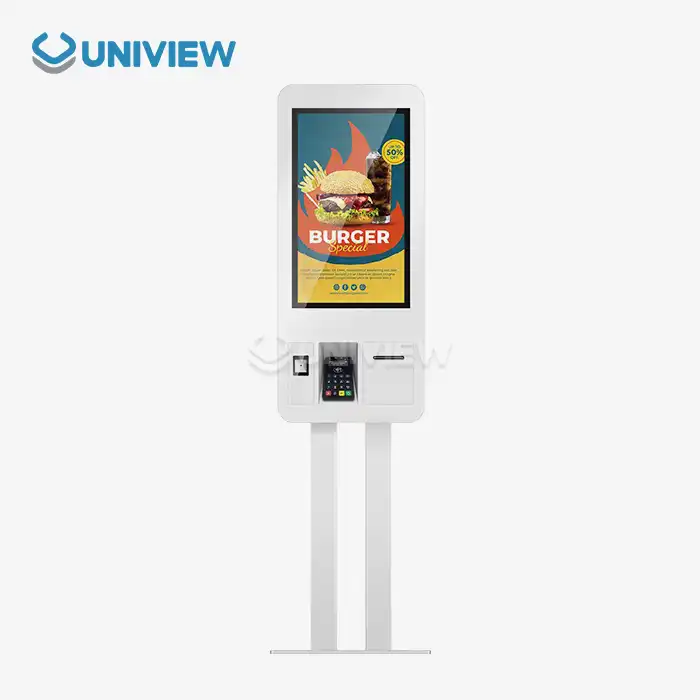
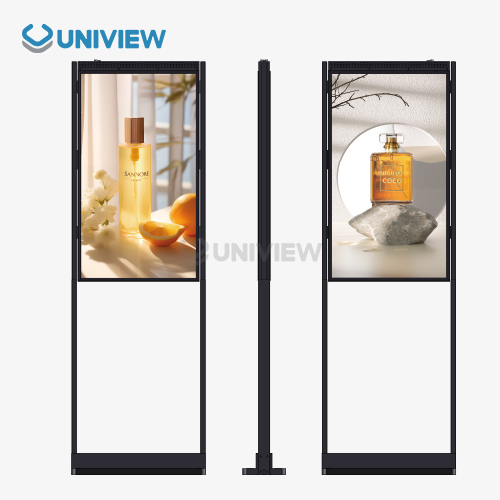
A self-contained, vertically oriented, indoor free standing digital display is specialist commercial signage. These panels employ industrial-grade parts that function 24/7, unlike consumer TVs modified for corporate usage. They are structurally independent and don't need drilling, wall strengthening, or architectural alterations, thus the moniker "free-standing". This makes them ideal for glass-walled structures, rental spaces, and historic buildings where permanent installation isn't feasible.
What Makes These Displays Different from Standard Monitors?
Because of its construction, an excellent indoor free standing digital display differs from home screens. A professional A+ screen with IPS or VA technology powers the gadget. Its horizontal and vertical viewing angles are 178 degrees. This keeps the colors right and ensures that the picture can be viewed from anywhere, which is crucial in situations where people stroll from various directions.
Most enclosures use powder-finished cold-rolled steel or aluminum alloy profiles. They feature corrosion resistance and structural durability that consumer-grade plastic housings lack. Screen safety is 4mm to 6mm thermally toughened glass with a Mohs hardness of 7 that can be struck in public. To make this protected layer legible under different lighting conditions, anti-glare or anti-reflective coatings are typically used.
For indoor usage, the brightness range is 350-700 nits (cd/m²), providing sufficient light without discomfort or glare. Indoors, brighter light wastes energy and tires eyes. Commercial-grade cooling systems maintain a 0°C–50°C working temperature in the thermal management system. Most consumer displays can't operate 24/7, but this technology can.
Core Functional Features That Drive Business Value
There are several elements in modern indoor free standing digital display units that are directly related to work. Split-screen capabilities enable you to watch video, stills, and moving text tickers simultaneously, allowing you to deploy more complex messaging techniques without additional hardware. Dual-OS compatibility, generally for Android and Windows, lets you connect and use your content management system with other applications.
Besides HDMI inputs, there are USB connections for local content updates, LAN linkages for network content management, and additional Wi-Fi and 4G/5G modules for distant content deployment. This connection design lets you update advertising information in numerous areas, eliminating the need for costly printing and extended delivery times of typical poster campaigns.
The built-in media player, which may be a SoC or industrial PC, renders content inside, so you don't need external tools, and cable management is easy. The store-and-forward function keeps data visible during network outages. This maintains brand stability by continuing the message. All of these technological elements convert a basic screen into a sophisticated communication system that can adapt to corporate demands.
Critical Decision Factors When Choosing an Indoor Free-Standing Digital Display
To choose the right indoor free standing digital display signage option, you need to carefully look at a lot of technical and operational factors. Your choice framework should match the device's powers with specific deployment scenarios. This will make sure that the investment leads to real performance improvements instead of just copying static signage that is already there.
Defining Your Usage Scenario and Environment
varied corporate environments have varied visible demands and audience engagement patterns. Retail shoppers walk a lot and glance at products briefly. This requires displays to be 55 to 86 inches and feature moving content that draws attention in three to five seconds. People check in at corporate halls while sitting motionless, and viewing distances are larger. Medium-sized screens (43–65 inches) may display greater detail.
Hotel, conference, and other hospitality venues require displays that connect with booking systems and event preparations. Displays must support content management systems. Because transportation hubs are open longer hours and have changing lighting conditions due to natural sunlight, displays require sensors to adjust brightness.
Knowing how much light is present where you want the system is crucial. Rooms with several windows or skylights may require 700 nits or more. However, regulated lighting in interior corridors suits 350-500 nit displays. Instead of using generic advice, a site study and several ambient lux measurements may help you choose the proper specifications.
Screen Technology Comparison: LCD versus LED
You must pick between LCD and LED technologies based on visual quality, power utilization, and cost. LCD panels with LED lighting are most prevalent for displays under 100 inches. They have realistic colors, high resolutions (1920x1080 Full HD or 3840x2160 4K), stability, and affordable costs.
Direct-view LED displays employ independent LED modules to provide them with increased brightness and practically limitless scalability for video walls. For single-unit panels that stand alone inside and have appropriate brightness and clarity for most message purposes, LCD technology is cheaper. LED is best for semi-outdoor usage or displays larger than 98 inches, when LCD panels cost more due to their manufacturing.
Minimum viewing distance impacts resolution. The norm for viewing distances above 8 feet is Full HD (1920x1080), whereas 4K (3840x2160) is preferable for interactive applications and small conference spaces. Overspending on 4K capabilities when consumers are far away doesn't help; changing resolution to fit use patterns saves money.
Energy Efficiency and Operational Cost Considerations
Energy usage is a major expense of ownership as the firm is operational 24/7. Commercial screens utilize 150 to 400 watts, depending on screen size and brightness. Large multi-unit configurations may increase yearly power expenditures. Automatic brightness changes based on ambient light sensors may save energy usage by 30 to 40% compared to versions that remain at a predetermined brightness.
Other maintenance is needed than the screen. It also adds content player parts, OS modifications, and a full cleaning. Open component displays may be repaired in the field, reducing downtime and servicing costs. Protected units must be replaced when a part fails. Warranty conditions should encompass how to prevent panels from burning in and how they are utilized in enterprises, not only for household operations.
Thermal regulation affects component lifespan. High internal display temperatures accelerate capacitor and backlight degradation. Quality commercial buildings feature active cooling systems to maintain a pleasant temperature. But cheaper versions just feature passive cooling systems that are appropriate for occasional usage. Asking about operating temperature and cooling system distinguishes business-grade technology from consumer displays in commercial enclosures.
Procurement Guide: How to Buy the Best Indoor Free Standing Digital Display
Effective indoor free standing digital display purchasing involves more than simply product selection. Supplier evaluation, negotiation, and product integration are also included. Structured implementation reduces risks and maximizes funds.
Identifying Reliable Suppliers and Manufacturers
You can save money and get technical help by dealing directly with manufacturers, but they normally have higher minimum order quantities for short runs. Authorized distributors get manufacturer assistance but can't handle as many orders. They charge 15–25% more than the manufacturer. The trade-off allows first-time distributors or firms without the technical expertise to interact directly with manufacturers.
A seller's credibility must be verified beyond marketing promises. Ask clients in the same industry and location for references and chat to them about deployment issues and continuing support. Supplies are crucial since displays endure for years, and guarantees and parts are scarce if a company goes bankrupt.
Ask for detailed specification sheets with light uniformity percentages, color gamut coverage (sRGB/Adobe RGB percentages), and MTBF ratings during technical approval. Advertising words that aren't clear enough to measure suggest firms are remaking consumer products. Genuine company sellers provide rich technical documentation to aid integration planning.
Total Cost of Ownership Analysis
For five years, the purchase price has covered just 40–60% of automobile ownership expenditures. Installation prices depend on site readiness. Add $300 to $800 per slot for screens that require energy or network infrastructure. Content creation expenses, whether from in-house or contracted creative services, are monthly and may exceed gear wear for complicated messaging initiatives.
A monitor that runs 24/7 costs $160 to $350 per year, or $800 to $1,750 over five years, at an average business rate of $0.12 per kWh. Maintenance costs $200–$400 a year, including cleaning, part replacement, and software licensing. These continuing expenditures typically exceed the hardware investment. Even if they cost more, versions with longer-lasting parts and reduced energy consumption are cheaper.
When something is obsolete, disposal expenses arise. Commercial screens should be appropriately treated as electronic waste instead of being trashed. Proper recycling adds $50–150 per unit to lifetime costs. Some firms provide take-back arrangements to meet environmental objectives and cover disposal.
Ensuring System Integration and Compatibility
Displays are now part of digital signage systems. Your CMS compatibility with new hardware determines whether you can use your present software configuration or need to embrace both platforms. Big CMSs like BrightSign, Scala, and ScreenCloud maintain device compatibility lists. Make sure your desired display is on the proper lists before buying.
Network equipment requires more than internet access. Remotely managed displays require static IP addresses or DHCP reservations, VLAN segmentation for security, and firewall rules to connect with other devices outside the network. Avoid post-release connection issues that hinder activation by discussing IT infrastructure requirements with your network administration team upon purchasing.
Scaling planning considers system expansion and feature modifications. Choose displays with field-updatable software and expandable storage to manage future content complexity without replacing hardware. Selecting suppliers who update their product ranges rather than discontinuing products early may prevent premature obsolescence.
Practical Setup and Maintenance Tips for Indoor Free-Standing Digital Displays
The dependability of operations for an indoor free standing digital display and the usefulness of content are directly affected by how well they are installed and maintained over time. Systematic methods for both steps will help you get the most out of your sign investment.
Installation Best Practices for Optimal Performance
Checking the electricity equipment is the first step in getting the site ready. Displays need their own circuits so that power changes from other devices don't affect their performance. Putting in separate circuits with surge protection protects parts from power quality problems that shorten their life. Putting displays close to network access points cuts down on wire runs and makes it easier to fix problems with connections.
Safety rules and exposure must be balanced when placing things physically. Leaving 36-inch gaps around screens keeps them out of the way of escape routes and makes sure there is enough air flow for temperature management. Fixing independent units to the floor or walls stops them from falling over in places with a lot of foot traffic. This is especially important in places where kids are present or where accidental touch is likely to happen.
Calibration steps improve picture clarity for certain situations in the environment. Factory brightness settings often go above and beyond what is needed for controlled indoor lighting, which wastes energy and speeds up the decline of the backlight. Lowering the brightness to the level needed for good vision increases the life of parts and lowers the cost of running. Changing the color temperature to fit the lighting (usually between 5500K and 6500K for commercial areas) makes the picture look better and makes the viewer feel more comfortable.
Routine Maintenance and Performance Monitoring
Regular cleaning stops dust from building up, which lowers the quality of the picture and makes cooling less effective. Cleaning the screen once a month with cotton cloths and alcohol-free cleaners made for anti-reflective coatings keeps it clear without hurting the protected coatings. Ventilation entry and exit ports need to be checked and cleaned with compressed air every three months to keep the airflow levels that help with thermal management.
Performance tracking through CMS systems finds new problems before they become operational ones. By keeping track of daily working hours, changes in internal temperature, and light output levels, you can see patterns of wear and tear that point to the need to replace parts before they break down. Displays that are getting close to 50,000 hours of use usually lose brightness over time. Planning to replace them before they break down during busy business times is the best way to avoid this.
Optimization of content management keeps viewers interested while reducing technical load. Setting up content changes for times when there isn't much traffic on the network keeps it from getting too crowded and makes sure the updates go smoothly. Putting in place energy-saving modes that turn off or dim displays when the business is closed saves 40–50% on power costs and improves the life of parts. Periodic content performance analysis that finds messages that get a lot of attention helps improve creative strategy, making sure that displays keep adding value to the business and don't just sit there and be forgotten.
Conclusion
Technical requirements must be balanced against operating needs and financial limits when choosing the best indoor free standing digital display. Prioritizing commercial-grade parts like A+ panels, strong casings, and industrial heat management guarantees 24/7 performance that consumer-grade options can't keep up with. When you look at the total cost of ownership instead of the initial purchase price, you can see that designs that use less energy and are easier to keep are better for the economy than models that are cheaper but have higher running costs. Displays that work well are part of complete content strategies that are backed by the right CMS platforms. This turns hardware investments into useful communication tools that can change over time. By carefully thinking about how the signs will be used, how reliable the suppliers are, the best ways to place them, and how to keep them in good shape, companies can make sure that their digital signage investments pay off over many years by increasing engagement and streamlining operations.
FAQ
Q: What is the typical lifespan of an indoor free standing digital display?
A: Commercial-grade indoor free standing digital display screens usually work for 50,000 to 70,000 hours before they need important parts replaced. That's about 6 to 8 years of nonstop operation, 24 hours a day, seven days a week. The actual lifespan depends on how it is used. Displays that are kept at a steady temperature and low light levels often last longer than 80,000 hours. LCD backlight deterioration is the main thing that limits how long it can last; brightness power drops by about 30% after the stated lifespan. Keeping temperatures under control and setting screens to the lowest effective light levels can make them last a lot longer. When consumer screens are used for business purposes, they usually break after 20,000 to 30,000 hours because they don't get enough cooling, and the parts aren't made to work continuously.
Q: Can indoor free standing digital displays operate in semi-outdoor or high-humidity environments?
A: Standard indoor free standing digital display units are designed for climate-controlled settings with humidity levels between 20 and 80% non-condensing and temperatures between 0 and 40 degrees Celsius. When used in semi-outdoor spaces like covered building doors or atriums that don't have climate control, screens are exposed to temperature and humidity changes that are higher than what is recommended. This speeds up the breakdown of components. Specialized semi-outdoor types have conformal coating on the circuit boards, sealed compartments for the parts, and wider temperature ranges (-20°C to 50°C) for better weather protection. For real outdoor use, displays need to be very bright (2,500 nits or more) and have an IP65 or IP66 grade for safety against water and dust. This makes the prices a lot higher. Putting standard indoor displays in partially outdoor areas voids guarantees and usually causes them to break down early, within 12 to 18 months.
Q: What warranty terms should I expect from quality suppliers?
A: Good commercial display providers give warranties that cover all parts, labor, and panel burn-in for at least three years. Premium makers usually offer coverage for 5 years, with the opportunity to stretch it to 7 years for an extra fee. Warranty terms should clearly support 24/7 continued running without hourly limitations that invalidate coverage. Panel-specific coverage that addresses burn-in (image retention) is important for apps that show static content; base warranties sometimes don't cover burn-in, so you need extra coverage. Response times vary. Premium support acknowledges messages 24 hours a day and delivers parts the next business day in major markets. Standard terms allow 3–5 business days. Find out if the guarantee covers service on-site or if the unit has to be sent to a repair facility. Sending big displays to a repair facility costs $200 to $400 and causes longer downtime.
Q: How do I determine the right screen size for my space?
A: The viewing distance method helps you choose the right screen size: ideal screen diagonal (inches) = viewing distance (feet) ÷ 2. 43-55-inch screens work best for people standing 10 feet away from the screen, while 65-75-inch screens work best for people standing 20 feet away. This method makes sure that the text can be read and that viewing angles are easy without making the user move their head too much. By looking at traffic patterns, you can tell if people are viewing while they are still (in lobbies, waiting rooms, or hallways) or moving (in store aisles, or while they are walking down the aisles). People who can still see larger screens with more detailed content, while people who are moving need bigger graphics on screens that are the right size for their 3–5 second attention spans. Space limitations and personal taste may make the best size less important. Make sure that the ceiling height is enough to handle the total height of the display, which includes the base stand and usually adds 6 to 12 inches to the screen height.
Q: What content management capabilities should I prioritize?
A: Some important features of a content management system are the ability to update content in multiple locations from a central location, the ability to schedule messages based on time (for example, breakfast menus vs. lunch specials), and the ability to show different types of content at the same time in multiple zones. When compared to complicated systems that need specialized knowledge, user-friendly interfaces that require little training save money on ongoing labor costs. It's easier to set up and keep up to date if it works with your current IT infrastructure and supports your network security standards and authentication against company directories. Analytics tools that keep track of how well content performs, how long it stays up, and how engaged viewers are help with ongoing improvement. Cloud-based platforms get rid of the need for on-premises servers, but they rely on being connected to the internet. On the other hand, local server options keep operations running even when the network goes down, but they need to be maintained, and IT infrastructure investments need to be made.
Partner with Uniview Commercial for Your Indoor Free Standing Digital Display Needs
Uniview Business is a reliable indoor free standing digital display manufacturer that offers industrial-grade signage options made to work in busy business settings 24 hours a day, seven days a week. Our screens have high-quality A+ grade IPS panels with brightness levels that are best for indoor use (350–700 nits). They are covered by tempered anti-glare glass and housed in metal cases that won't rust. We offer a wide range of customization services to meet your exact business needs. These include custom screen sizes, mounting setups, and content management systems that are fully integrated. Our global support infrastructure is spread out in more than 100 countries and guarantees expert help 24 hours a day, 7 days a week. It's backed by extended warranties that last 3 to 5 years and coverage through China Pacific Insurance Company. Get in touch with our sales team at sales@univiewlcdisplay.com to talk about your project needs and get detailed specs that show why system installers and brand owners all over the world choose Uniview Commercial as their top indoor free standing digital display provider.
References
1. Miller, J. (2023). Commercial Display Technology: Engineering Specifications and Deployment Best Practices. Digital Signage Press.
2. Chen, L. & Rodriguez, M. (2024). "Total Cost of Ownership Analysis for Commercial Digital Signage Deployments," Journal of Retail Technology, 18(2), 145-167.
3. International Digital Signage Association. (2024). Industry Standards for Commercial Display Reliability and Performance Metrics. IDSA Technical Publications.
4. Thompson, R. (2023). Visual Communication in Commercial Environments: Design Principles and Technology Integration. Business Media Publishing.
5. Zhang, W. et al. (2024). "Thermal Management Systems in Commercial LCD Displays: Impact on Operational Longevity," Applied Electronics Engineering Quarterly, 31(4), 89-104.
6. Digital Signage Federation. (2023). Best Practices Guide for Digital Signage Procurement and Deployment. DSF Professional Resources Series.

Learn about our latest products and discounts through SMS or email