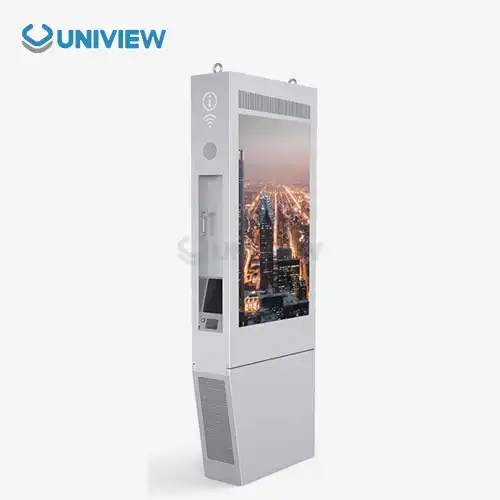
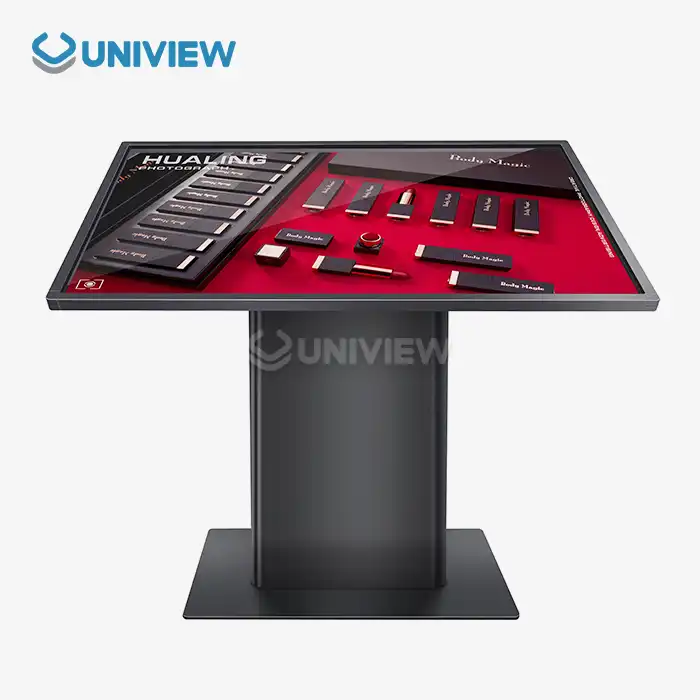
Systematic battery management protocols, regular cleaning schedules, and proactive hardware inspections are essential for rechargeable digital signage displays. This is to make sure they work well and last a long time. These portable ad tools need special care that focusses on the battery, the environment, and software updates. Proper maintenance lowers the total cost of ownership and increases operational uptime for businesses in the retail, hospitality, transportation, and outdoor advertising sectors.
Understanding Rechargeable Digital Signage Displays and Their Maintenance Needs
Cell phones and tablets with built-in lithium-ion batteries are digital devices that you can charge. The goal of these people is to provide people in all kinds of businesses with different ways to talk to each other. Using the newest LCD or LED technology, these gadgets let companies show ads without needing to set up permanent power systems.
Important Parts That Break a Lot
People can make good plans for keeping things up when they know these basic parts. These devices wouldn't work at all if they didn't have their batteries. Lithium-ion cells can usually be charged 500 to 1,000 times before they lose most of their charging ability. If LED and LCD screens are not protected from UV rays, changes in temperature, and being touched, they will lose brightness and colour.
The amount of maintenance that is needed depends a lot on the environment. Dust, static electricity, and temperature changes from HVAC systems can make it harder to keep indoor installations working. The units that are outside have to deal with harder conditions, like UV radiation, water, very hot and very cold temperatures, and physical vibration from traffic or wind. These environmental stressors cause things to break more quickly, so they need to be checked more often.
Finding Important Maintenance Signs
Early detection of maintenance needs for rechargeable digital signage displays helps maintain system uptime and control costs. Poor battery performance can be shown by a battery that lasts for a shorter time, takes longer to charge, or has a housing that swells. Displays that have lower brightness, colour changes, dead pixels, and less touch sensitivity in interactive models are all signs that the display is not as good.
If performance metrics for a system show things like software crashes, problems with connectivity, or delays in booting up, there are often issues with hardware or software corruption that need to be fixed right away. Regular tests help keep an eye on these signs so that issues can be fixed before they get worse.
Key Maintenance Practices to Extend Battery Life and Device Performance
Care for your devices regularly improves their performance and lifespan. Since changing batteries is the most expensive part of device maintenance, battery management is the most crucial.
Newer, Better Battery Management
The best battery charging methods prolong life and prevent death. Keep a lithium-ion battery charged between 20% and 80% to extend its lifespan. Charge and drain them sparingly. Avoid it. It benefits them. A smart charger knows how much power a device needs to avoid overheating and damaging the battery.
Things that won't be used for a while be handled differently. Charge batteries to half capacity before storing them in a controlled environment. Charging the battery monthly prevents deep discharge and cell damage when it's not in use.
Storage at the right temperature extends battery life. Temperatures above 85°F (29°C) accelerate chemical breakdown in battery cells, while temperatures below 32°F (0°C) lower battery capacity and can permanently damage if charged when frozen.
Hardware and Display Safety Tips
Physical maintenance includes cleaning, safety, and environmental protection. Alcohol-free cleaners and microfiber cloths can damage screen coating if used improperly. Anti-glare coatings and touch-sensitive surfaces can be permanently damaged by harsh chemicals, rough materials, and water.
Make sure hardware is properly installed, outdoor unit seals are checked, and heat vents are clean to maintain your home. IP65 and IP66 enclosures need regular seal replacement and gasket checks to stay weatherproof. Without regular ventilation system cleaning, dust will block heat transfer.
Dealing with firmware/software
Software is checked regularly to ensure smooth operation and safety. Regular firmware updates improve display performance, safety, and power management. Databases must occasionally improve content management systems and clear caches to keep moving quickly.
Remote management lets you track and schedule device maintenance from one location. These systems automatically install updates, display performance data, and send predictive maintenance alerts based on usage and performance.
Troubleshooting Common Issues in Rechargeable Digital Signage Displays
Planned repairs save money, keep the system running, and ensure functionality. Knowing how things break speeds up diagnosis and repair.
Battery Problems and Solutions
Different battery issues require distinct solutions for rechargeable digital signage displays. Over months, capacity diminishes and becomes less useful. Replace batteries below 80% full to save money and maintain performance.
A device that won't charge usually has a bad power supply, port, or battery management system. Check power supply voltage, clean the charging port, and reset the battery management system. Thermal damage, corrosion, or swelling require immediate battery replacement for safety.
If problems are easily fixed, power management settings, background processes, broken parts, or power draws may waste energy. Strange power usage patterns help solve problems.
Identify quality and performance issues.
Display issues can be diagnosed by brightness changes or screen failure. Dead pixels usually result from display errors or screen impacts. Screen location and quantity indicate fixability. The brightness may be uneven if the LED is new, the power supply works, and the display is not hot.
If the ambient light sensor, display, or calibration is old, colours may be off. A professional colorimeter ensures screen colour consistency.
If touch sensitivity is off, check interactive display touch zones, calibration, and driver software. Touchscreen location must be controlled because moisture, dust, electromagnetic interference, and other environmental factors can affect touchscreen function.
Case Studies: Successful Maintenance Approaches in Real-World Applications
In the real world, customised maintenance plans have been shown to help with specific problems in a variety of industries and situations.
Stories of Success in the Retail Environment
A big retail store put 200 portable ads in multiple locations and set up a programme to centrally maintain them. Over two years, this reduced downtime by 60%. The programme included quarterly inspections at the site, remote monitoring systems, and set schedules for when batteries and parts that wear out should be replaced.
The maintenance plan focused on preventive care with monthly checks on battery health, cleanings every two weeks, and seasonal calibration. This method kept the display quality the same in all places and lengthened the average lifespan of devices from three to five years.
Transportation Hub Installations
Airports have a lot of people going through them, strict security needs, and needs to be open all the time. An international airport set up ruggedised portable displays with better maintenance routines like daily checks with the naked eye, weekly performance tests, and monthly all-out maintenance.
The maintenance programme included planning for redundancy with spare device pools and quick replacement procedures to keep information for passengers as uninterrupted as possible. While overseeing more than 150 displays at various terminal sites, this method managed to maintain 99.7% uptime.
Forms for Outdoor Events and Festivals
For temporary outdoor events, maintenance plans that take into account exposure to the weather, the stress of moving equipment, and the need for quick setup are necessary. Event planning businesses put together portable maintenance kits with things like extra batteries, cleaning supplies, and basic tools for fixing things so that problems can be fixed right away at the event.
Before the event, the devices have to be tested, the batteries have to be conditioned, and the protective housings have to be checked. Post-event maintenance includes deep cleaning, checking how well the device works, and replacing parts when necessary to make sure it is ready for the next deployment.
Best Practices for B2B Procurement Managers
When procurement managers plan ongoing operations, it helps them to know how their choices will affect maintenance. The cost of ownership should include the price of servicing the quality of service support and how easy it is to get replacement parts when choosing a supplier.
Picking a Seller and Offering Help
Suppliers should be evaluated based on their capability to support maintenance for rechargeable digital signage displays. This could include things like warranty coverage, parts availability, the quality of technical documentation, and training resources. Vendors that offer full maintenance programmes usually provide better long-term value, even though they are more expensive at first.
Service level agreements will keep the business going as long as they say how long it takes to respond, how to fix things, and when new parts will be ready. For global deployment situations, it is important to have vendors with support networks that work all over the world and use the same service methods everywhere.
Planning for Maintenance
Structured methods that combine the manufacturer's advice with the unique needs of each site are part of successful maintenance programmes. People can always improve and budget better if they use tools that track maintenance, performance metrics, and costs.
Training staff ensures that maintenance is always done the same way, no matter where it is or who is doing it. Basic troubleshooting, routine maintenance, and getting technical support for tough problems should all be taught.
Conclusion
For proper maintenance of rechargeable digital signage displays, a comprehensive approach encompassing battery management, environmental protection, and reactive troubleshooting is required. This includes both preventive maintenance and responsive problem-solving.ts of any successful programme. These two approaches together let businesses keep their devices working for as long as possible and make sure they can always rely on them to do their jobs. When procurement managers focus on maintenance issues when choosing vendors and structured care programmes, they get better total cost of ownership and operational performance. FollowDoing the right kind of maintenance on devices helps them last longer, reduces downtime, and keeps the display quality the same. This helps businesses reach their goals in a variety of deployment situations and is a good use of money.
FAQ
Q2: How often must rechargeable digital sign batteries be replaced?
A: It usually needs a new battery every 18–24 months, depending on charging, use, and temperature. If the battery lasts less than 60%, charges slower, or grows, replace it. Capacity tests every six months indicate when to replace.
Q2: Can these screens work without charging on AC power?
A: Most digital signs charge with AC power. This hybrid power mode lets devices work during power outages if the battery is charged. If you leave the AC on all the time, it may generate more heat, so improve airflow.
Q3: How can you avoid harming nature when putting something outside?
They need an IP65 or IP66 case for outdoor use. Check seals regularly to ensure their health. It also needs UV protection and a way to regulate temperature. Surge protectors, rust-proof hardware, and wind load considerations add protection. A monthly weatherproofing check is healthy for the environment.
Partner with Uniview Commercial for Superior Digital Signage Solutions
Uniview Commercial is a reliable maker of rechargeable digital signs. They provide high-tech portable advertising options and great ongoing support for their displays. Our high-end displays have a brightness of up to 4000 nits, IP66 weather protection, and longer warranties of 3 to 5 years supported by full global help. We offer professional maintenance training, real replacement parts, and around-the-clock tech support to make sure your investment always works its best. Our corrosion-resistant designs, ultra-clear AR glass technology, and 60dB operation (that won't disturb your environment) are all tried and true. Do you want to improve your digital advertising skills with high-quality, rechargeable screens? Email us at sales@univiewlcdisplay.com to talk about how we can make a solution just for you and learn why top brands trust Uniview Commercial for their digital signage.
References
1. Digital Signage Federation. (2023). "Battery Management Best Practices for Portable Digital Displays." Industry Standards and Guidelines Manual, 15th Edition.
2. International Display Technology Association. (2023). "Maintenance Protocols for Commercial LCD and LED Signage Systems." Technical Publication Series, Volume 8.
3. Smith, J. & Anderson, K. (2024). "Environmental Impact on Rechargeable Digital Advertising Displays." Journal of Commercial Display Technology, 18(3), 45-62.
4. European Committee for Digital Signage Standards. (2023). "Lifecycle Management of Portable Electronic Advertising Displays." Brussels: ECDSS Publications.
5. Roberts, M. et al. (2024). "Total Cost of Ownership Analysis for Battery-Powered Signage Solutions." International Conference on Digital Advertising Technology Proceedings, 234-251.
6. Chen, L. & Williams, R. (2023). "Troubleshooting Guide for Commercial Digital Display Systems." Technical Manual for Electronic Signage Professionals, 4th Edition.