Yes, if you choose and set up your digital signage stand correctly, they work really well for interactive kiosks. A well-made digital signage stand gives interactive kiosks the mobility, stability, and ergonomic positioning they need. These mounting options turn non-moving displays into dynamic tools for customer engagement that can be touched, and they keep the ability to move equipment to different settings. The way that display stands and interactive technology can work together opens up a lot of great options for businesses that want to be able to talk to customers in a variety of ways that don't cost a lot.
Understanding Digital Signage Stands and Interactive Kiosks
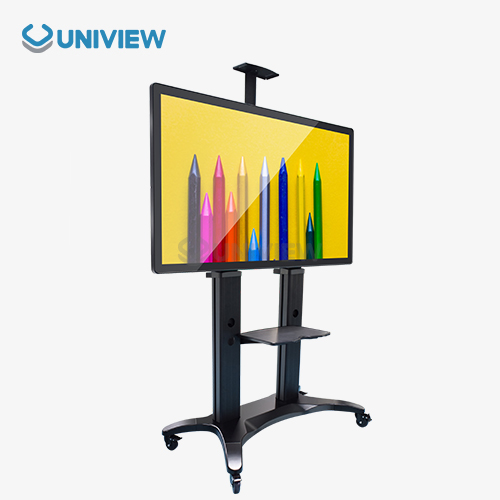
Digital signage stands are specialized mounting systems that are built to hold digital displays in a wide range of business settings. These solutions offer stable, customizable platforms that work with screens of different sizes while making sure that the best viewing angles and accessibility are always possible. Unlike wall mounts that don't move, portable display stands make it easy to change where the equipment is based on the needs of the business or the event.
Key Parts of Digital Display Mounting Systems
Modern display mounting solutions include several important parts that affect how well they work with interactive applications. The base structure gives basic stability and is usually made with weight or adjustable feet to keep it from tipping over when a person uses it. Height adjustment features let users get the best view of the screen, and cable management systems keep the look professional and make the setup safer.
Because they focus on user engagement, interactive kiosks are fundamentally different from regular digital signage. Customers can get information, do transactions, or use self-service options with these systems that have touchscreen technology. Adding touch features needs a way to mount the screens so that they can handle a lot of physical contact without losing their position or stability.
The synergy of interactive technology and mounting solutions
Strong display stands and interactive technology make a great combination that gets customers interested. This synergy gives businesses the power to use touchscreen solutions without having to install them permanently, which makes it easier for them to deploy across multiple locations quickly. The mobility feature is especially useful for retail spaces, trade shows, and short-term setups where the ability to change things quickly helps the operation run smoothly.
Key Considerations When Choosing Digital Signage Stands for Interactive Kiosks
Choosing the right mounting solutions for interactive applications requires a lot of thought about technical and operational factors. The decision must balance the needs of stability and mobility, make sure that touchscreen technology can be used, and meet standards for making things easy to use.
Load-Bearing and Stability Needs
Interactive applications demand exceptional stability due to constant user contact and potential force application during touch interactions. When people lean on or put pressure on a touchscreen while it's in use, how weight is spread around becomes very important. Quality mounting solutions include counterweights and designs with a low center of gravity to keep them from tipping or moving while in use.
The load-bearing capacity isn't just about the weight of the screen; it also includes the forces that happen when a user interacts with it. Premium stands are made with better materials and designs that can handle a lot of stress without breaking. These specifications are very important in places with a lot of foot traffic, where durability has a direct effect on the reliability of the operation.
Ergonomics and Easy Access
User accessibility requirements have a big impact on how mounting solutions are chosen. Being able to change the height makes it possible for a variety of people to use it, including people in wheelchairs, which is in line with ADA standards. Tilt mechanisms let you change the viewing angle just right to cut down on glare and make sure the touch accuracy is as high as possible in all lighting conditions.
When you set up your cables and peripheral devices, ergonomics are also something you should think about. Good mounting systems keep cables from getting tangled and looking neat. Adding hardware like payment terminals or printers to the design can make it more functional without making it look worse.
Comparing Digital Signage Stands With Other Mounting Solutions
The mounting solution landscape has a number of different options for interactive kiosk applications. Each one has its own pros and cons. Knowing these differences helps you make smart choices based on the needs of the business and how much money you have to spend.
Wall-Mounted vs. Portable Stand Options
While wall mounting systems save space and prevent theft, they also make it harder to move things around and install them in different ways. These fixes require making permanent changes to where they are installed, which makes it harder to move them to a different location. Interactive apps might have to deal with more wall stress because of user contact, which might mean they need to be mounted with special hardware or have the structure reinforced.
Portable stands are easier to set up and more flexible when it comes to how they can be used. These systems can be set up quickly in a lot of different places without having to make changes that will last forever. The mobility benefit lets businesses keep a professional look while moving their placements around based on traffic patterns and operational needs.
Built-to-order Kiosk Covers vs. All-Purpose Display Stands
Custom kiosk enclosures offer full integration and branding options, but they take a lot of money and time to get. These options fully protect the environment and are safe, but they make it harder to upgrade hardware and more expensive to replace it.
Digital signage stands are functional, cost-effective, and compatible with upgrades. These fixes work with different brands and screen sizes, making it possible for multiple locations to use the same setup. The flexibility makes it possible for technology to evolve without having to replace the whole system, which is more valuable in the long run.
Practical Guide to Procurement and Deployment for B2B Clients
To get mounting solutions for interactive applications to work, you need to carefully look at suppliers, specifications, and deployment plans. The process gets the best results by using technical assessment, vendor qualification, and implementation planning.
Criteria for evaluating and choosing a supplier
Vendor assessment should focus on the ability to make high-quality products, follow certification rules, and offer support after the sale. When you first use something and then keep using it, established suppliers usually give you a lot of paperwork, warranty coverage, and technical help that you can't put a price on. Quality certifications show that safety standards and requirements for compatibility have been met.
Support infrastructure is especially important for deployments in more than one location, where consistent performance and quick issue resolution affect the continuity of operations. For applications that are very important to the business, suppliers that offer local service networks and quick replacement programs are very helpful.
Best Ways to Deploy and Strategy
Careful planning around site preparation, installation steps, and user training needs is the only way to be sure that it all goes as planned. Site surveys should look at environmental factors, power availability, and traffic patterns in order to make the best placement decisions. Standardized installation steps make sure that everything is the same in different places. This also makes it faster and cheaper to set things up.
Maintenance planning keeps equipment working well for as long as it can during its operational lifecycle. Regular inspection schedules, cleaning methods, and preventive maintenance plans keep things from breaking down and looking professional. Documentation systems that keep track of maintenance activities help people make warranty claims and fix problems before they happen.
Uniview LCD Digital Signage Solutions: Your Trusted Technology Partner
Uniview Commercial is a top global maker of high-quality LCD and LED digital signage solutions. They have been bringing great manufacturing skills to the interactive display market for over ten years. Our wide range of products includes specialized mounting solutions for interactive kiosks. These are made with strong materials and have new design features that make them work better.
Cutting-Edge Technology and Making Sure the Work is Good
Our digital signage stands are made with high-quality materials and new engineering ideas so that they can work well in tough conditions. Every way of mounting is tested carefully to make sure it meets global safety standards and gives the stability and adjustability that interactive applications need.
These are the main benefits of our mounting solutions:
- Better Stability Design: Our stands have a stronger base and better weight distribution, which makes them super stable even with a lot of user interaction, all while looking sleek.
- Weather-Resistant Construction: The latest IP65 and IP66 rated parts that use European surface treatment technology make sure that interactive installations are very durable, both indoors and outdoors.
- Ergonomic Adjustability: The mechanisms that change height and tilt make it possible to set things up exactly right so that everyone can use it easily and the ADA guidelines are followed, no matter where it is installed.
- Premium Material Quality: The high-grade aluminum construction with finishes that resist corrosion makes sure the product stays reliable and looks professional even after a long time of use.
With these benefits, businesses can be sure that when they use interactive solutions, our mounting systems will make sure that customers have good, fun experiences.
Global Support and Ability to Personalize
Our presence in more than 100 countries and regions allows us to work with locals and respond quickly to global deployments. This large network maintains the same level of service across the board while also meeting the needs and wants of each area. Our technical support team is available online at any time, and our warranties of 3 to 5 years give you peace of mind.
Customization services offer personalized answers that meet certain branding and business needs. Our engineering team works closely with clients to come up with mounting solutions that work perfectly with their systems while also making them look better and work better.
Conclusion
If you are careful to choose one that is stable, adjustable, and compatible with your needs, a digital signage stand can be a great choice for an interactive kiosk. Adding flexibility to interactive technology makes it easier to get customers involved in retail, business, hospitality, and transportation settings. Quality mounting solutions are the basis for successful interactive deployments. They also keep the mobility and cost-effectiveness that modern businesses need. Buying high-quality display stands is a good way to make sure your business runs smoothly, customers are happy, and you get the money back that you spent on technology.
FAQ
Q: Can an interactive kiosk digital signage stand support weight?
A: Interactive kiosk stands should support 1.5 times the display and hardware weight. When considering capacity ratings, most quality stands can hold 50 to 200 pounds. Consider how the stand will be used. Make sure your hardware can handle it.
Q: Can your digital signage stands hold a larger or smaller screen?
A: Yes. Universal mounting systems with VESA mounting patterns can fit 32-75-inch screens and are good. You can get new technologies without buying a new stand. This protects your investment and increases its value.
Q: How can I ensure my interactive kiosks are ADA-compliant?
A: The ADA requires 28 to 34 inches of wheelchair height adjustability and a 30 by 48-inch floor space. Select ones with easy height adjustment. Look for stands with two height settings or that tilt to make sitting and standing easier.
Partner with Uniview Commercial for Premium Interactive Display Solutions
Uniview Commercial's wide selection of approved digital signage stands are made just for interactive kiosk use and will change how you interact with your customers. Our mounting solutions have a beautiful design and great stability, which makes sure they work perfectly in tough business settings. As a trusted maker of digital signage stands, we offer tailored solutions with great support and warranty coverage. Our procurement experts offer one-on-one advice based on the needs of your project. This helps ensure that resources are used in the best possible way for retail, business, and hotel settings. Uniview Commercial is a leader in the interactive display market because of their reliability and innovation. To talk about how to mount your interactive kiosk and how our products can help you get more customers, email us at sales@univiewlcdisplay.com.
References
1. Johnson, M. (2023). "Interactive Kiosk Design Principles and Mounting Solutions." Digital Signage Technology Review, Vol. 15, pp. 45-62.
2. Chen, L. & Rodriguez, A. (2022). "Ergonomic Considerations in Interactive Display Installations." Journal of Commercial Technology Applications, Issue 8, pp. 23-39.
3. Thompson, R. (2023). "Stability Requirements for Touch-Enabled Digital Signage Systems." International Conference on Display Technology Proceedings, pp. 156-171.
4. Williams, K. (2022). "Cost-Benefit Analysis of Mounting Solutions for Interactive Kiosks." B2B Technology Procurement Quarterly, Vol. 7, No. 3, pp. 78-94.
5. Anderson, S. et al. (2023). "ADA Compliance Guidelines for Interactive Digital Signage Installations." Accessibility Standards Review, Vol. 12, pp. 112-128.
6. Park, J. (2022). "Comparative Study of Digital Display Mounting Systems in High-Traffic Environments." Commercial Display Engineering Journal, Vol. 9, Issue 4, pp. 201-218.