- English
- French
- German
- Portuguese
- Spanish
- Russian
- Japanese
- Korean
- Arabic
- Greek
- German
- Turkish
- Italian
- Danish
- Romanian
- Indonesian
- Czech
- Afrikaans
- Swedish
- Polish
- Basque
- Catalan
- Esperanto
- Hindi
- Lao
- Albanian
- Amharic
- Armenian
- Azerbaijani
- Belarusian
- Bengali
- Bosnian
- Bulgarian
- Cebuano
- Chichewa
- Corsican
- Croatian
- Dutch
- Estonian
- Filipino
- Finnish
- Frisian
- Galician
- Georgian
- Gujarati
- Haitian
- Hausa
- Hawaiian
- Hebrew
- Hmong
- Hungarian
- Icelandic
- Igbo
- Javanese
- Kannada
- Kazakh
- Khmer
- Kurdish
- Kyrgyz
- Latin
- Latvian
- Lithuanian
- Luxembou..
- Macedonian
- Malagasy
- Malay
- Malayalam
- Maltese
- Maori
- Marathi
- Mongolian
- Burmese
- Nepali
- Norwegian
- Pashto
- Persian
- Punjabi
- Serbian
- Sesotho
- Sinhala
- Slovak
- Slovenian
- Somali
- Samoan
- Scots Gaelic
- Shona
- Sindhi
- Sundanese
- Swahili
- Tajik
- Tamil
- Telugu
- Thai
- Ukrainian
- Urdu
- Uzbek
- Vietnamese
- Welsh
- Xhosa
- Yiddish
- Yoruba
- Zulu
Portable Kiosk LED Display – Easy Setup & Maintenance
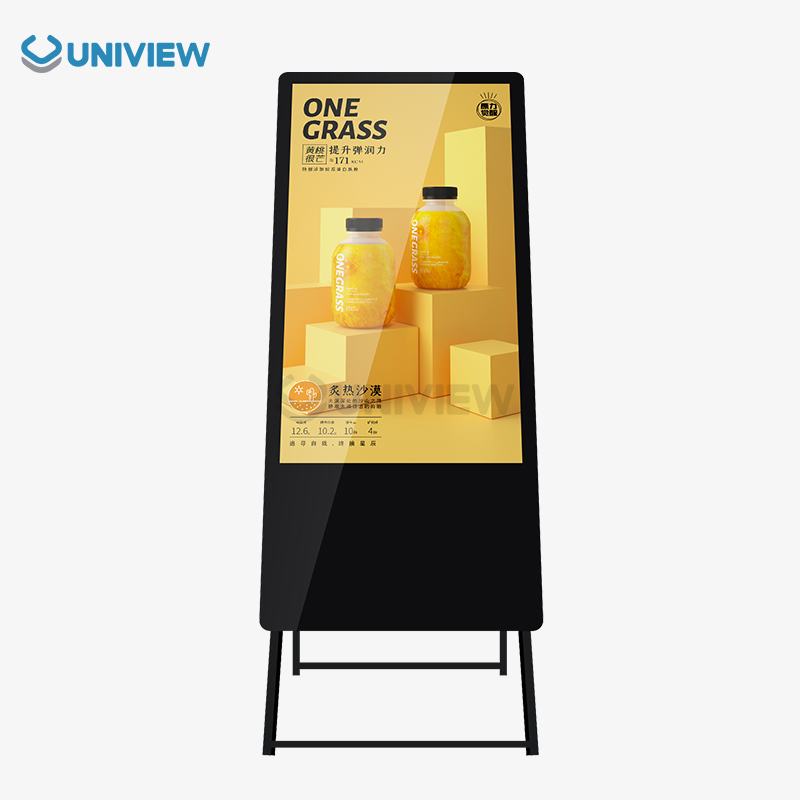
Portable booth kiosk led displays have changed the way retailers, corporations, hotels, transportation companies, and public advertisers talk to their customers. These digital sign units are mobile and have great visual performance, so businesses can put up interesting material wherever their customers are. Because they are lightweight, modular, and can be set up quickly, movable kiosk displays are much more flexible than standard fixed setups. Their strong engineering makes sure that they work reliably in a variety of settings, and they keep up the high standards of professional quality that B2B clients expect for their brand image and customer engagement projects.

Understanding Portable Kiosk LED Displays
Modern movable kiosk led displays are a big step forward in digital sign technology. They were made for companies that need flexible ways to communicate. These screens have frames made of lightweight metal and high-quality LED modules that give them amazing brightness levels between 2000 and 4000 nits, making them easy to see even in dimly lit rooms.
Key Technologies and Features
The main technology behind movable kiosk displays is made up of high-tech LED panels that can be set up to work both inside and outside. These units have advanced heat absorption systems that keep the machines running at the best temperatures while keeping the noise level at about 60 decibels. The screens use high-quality offline-coated AR glass that makes pictures very clear with little glare, making the viewing experience better from all angles.
These screens become strong engagement tools when they can be touched, letting customers connect directly with information through responsive touchscreen technology. This feature is especially useful in stores where live catalogs and product demos help people decide what to buy.
Advantages for B2B Applications
Businesses that need flexible communication tools will find that portable screens are a great option. Their flexible design lets them be put together and taken apart quickly, which cuts down on labor costs and operation time. LED technology that uses less energy keeps costs low while providing steady performance over long periods of time.
Businesses can move displays based on seasonal needs, special events, or changes in foot traffic because the movement factor doesn't limit where they can be put. This makes sure that displays stay in the best places for engaging audiences, which improves return on investment.
Step-by-Step Guide to Easy Setup of Portable Kiosk LED Displays
To get the most out of movable kiosk led displays in fast-paced business settings, they need to be set up quickly and correctly. Preparing well and installing things in a planned way can cut down on downtime and make sure solid performance from the start.
Pre-Installation Preparation
Site research is the first step in putting up a show that works. Teams should look at things like the lighting, the weather, the power sources that are available, and the ways that they can join the network. Based on this evaluation, we can say whether indoor or outdoor layouts are better for certain uses.
The viewing distance, the type of material, and the amount of room you have all affect the screen size you choose. Larger screens get people's attention from farther away, but they need stronger ways to be mounted and use more power. Smaller units are easier to move around, but they still give professional-looking presentations when viewed up close.
Installation Process
Carefully opening and checking each part is the first step in the building process. Modern portable screens have easy-to-use connection systems that make setting up the power and data interfaces faster and easier. Cable management solutions keep setups clean and protect connections that are sensitive from damage that could happen by mistake.
Here are the most important steps for installation that will make sure everything works right:
- Foundation Setup: Put the base structure on level ground and make sure it is stable before attaching the screen.
- For the display assembly, connect the LED modules according to the manufacturer's instructions, making sure they are lined up correctly and are securely fastened.
- Power Connection: Make electrical links using the right power levels and safety rules.
- Set up data connections for content management systems and remote tracking tools for network integration
- Calibration Testing: Make sure the screen is regular, the colors are correct, and the touch screen works before deploying it to the public.
These organized steps get rid of common startup mistakes and set the best settings for performance. Depending on the complexity of the show and the conditions of the site, professional installation teams can usually finish sets in two to four hours.
Troubleshooting Common Setup Challenges
During the initial installation, connectivity problems often happen, usually because of problems with the power supply or the way the network is set up. When there are problems with display tuning, the brightness, color balance, or touch sensitivity settings may need to be changed to fit the surroundings.
Verifying the hardware's suitability makes sure that all of the parts work well together. This includes making sure that the cables meet the necessary standards, that the power needs are met, and that the software on the display units and the content management systems work together.
Maintenance Tips to Ensure Long-Term Performance
Comprehensive care plans keep movable kiosk LED screens working well and extending their life while lowering the total cost of ownership. Following regular care instructions keeps sensitive parts safe from external factors and normal wear and tear.
Routine Cleaning and Inspection
To clean things, you need to be gentle so that you don't damage the LED modules or touch sensors. When microfiber cloths are wet with the right cleaning solution, they clear dust, fingerprints, and other dirt from surfaces without scratching them. Harsh chemicals or rough materials can damage display surfaces forever and make images less clear.
Regular checks find problems before they get bad enough to need expensive fixes. Focus your visual checks on the soundness of the connectors, the state of the cables, and the uniformity of the displays. If you see any signs of pixels failing, colors changing, or less clarity, you should get professional help right away.
Preventive Maintenance Strategies
Software changes keep security standards up to date and make sure that new content management platforms can work with older ones. Scheduled updates should happen during off-peak hours to keep operations running smoothly and make sure that screens have the most up-to-date speed improvements.
Taking steps to protect the environment makes tools last a lot longer. Dust covers keep screens safe while they are being stored or moved, and good air flow keeps them from getting too hot while they are being used. Controlling humidity and temperature keeps electrical parts in good shape and stops failures caused by fog.
Here are important preventative care steps that will make your device last longer:
- Regular Software Updates: To keep security and speed standards, install updates every month as suggested by the manufacturer.
- Monitoring the environment: Keep an eye on the temperature and humidity levels to make sure the process stays within certain limits.
- Inspecting Components: Check wires, sockets, and mounting tools every three months for signs of wear or loosening.
- Performance Testing: Fully calibrate and test the operation of the monitor every six months.
These upkeep procedures greatly lower the number of unexpected breakdowns and keep the display's visual quality stable over its entire life.
Professional Support Integration
Professional knowledge is needed to safely and effectively solve complicated technology problems. Building ties with qualified service providers guarantees quick responses when things get really bad. Technicians can quickly figure out what's wrong when they keep records of repair tasks and performance trends.
To keep your warranty valid, you must follow the manufacturer's care instructions and only use approved cleaning products and methods. Proper repair records back up guarantee claims and show that the equipment is being properly managed.
Choosing the Best Portable Kiosk LED Display for Your Business Needs
To choose the best movable kiosk led displays, you need to carefully look at the technical specs, operational needs, and long-term business goals. When making purchases, people should think about how to balance performance needs with price limits and make sure that the new equipment will work with the old ones.
Critical Evaluation Factors
Resolution needs rely on the type of information and how far away you are from the screen. For professional slideshows, high-definition screens are necessary because they show clear text and detailed images. For simple advertising needs, lower resolutions may be enough. Ambient lighting must be taken into account when setting brightness standards. For example, outdoor installations need much higher nit standards than indoor installations.
The size of the screen affects both how it looks and how it can be moved. Larger screens get more attention, but they need stronger boxes to move them and more people to set them up. Mobility choices and mounting needs are affected by weight, especially in situations where people move around a lot.
Brand Comparison and Market Analysis
When it comes to different types of applications, leading makers offer clear benefits. Samsung screens are great at showing colors accurately and integrating software, which makes them ideal for stores that need to show off bright products. LG units have better anti-glare finishes and weather-proof features that make them easy to see outside.
Sony displays are very reliable and work at a professional level. Their high prices are justified by the fact that they don't need as much upkeep and last longer. Philips offers a wide range of customization choices to meet the needs of different brands and mounting setups.
The prices are very different depending on the features, the guarantee coverage, and the services that are included. Bulk buying often saves a lot of money and makes sure that the quality is the same in all of the rollout sites.
Customization and Procurement Options
Companies can easily fit displays into their current brand rules and business processes when they can customize them. Custom housing colors, brand integration, and unique mounting options all work together to make installs look more professional.
Financing options make large-scale operations easier while keeping working cash available for other business needs. Companies that are tight on cash can still use advanced display technology thanks to leasing options and longer payment terms.
Why Uniview Commercial Portable Kiosk LED Displays Stand Out?
Uniview Commercial has become a leading maker of portable LED kiosk displays by using new design methods that put customer happiness, performance, and dependability first. Our displays use cutting-edge technologies that were made to work with challenging business-to-business uses in a wide range of industries.
Advanced Technical Capabilities
Our portable screens have better heat absorption systems that keep them running at the right temperature even in tough conditions. Environmental simulation testing makes sure that images can be exposed for long periods of time to bright lighting conditions while keeping the quality of the images stable. Meeting foreign standards from the US, Europe, and Japan shows that we care about meeting high standards around the world.
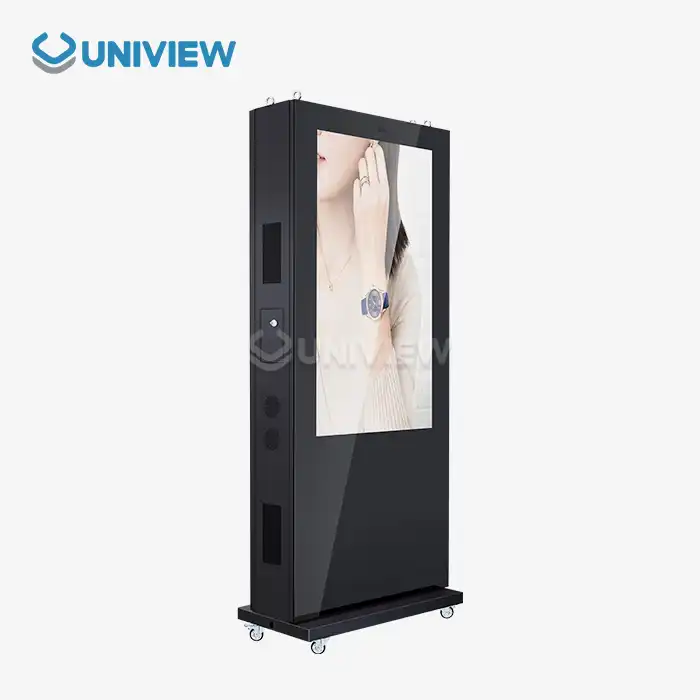
Integrating high-quality offline-coated AR glass produces very clear pictures with brightness levels up to 4000 nits, making them easy to see in any lighting. Ratings for water and dust protection from IP65 to IP66 keep internal parts safe from external threats, and European surface treatment technology makes them very resistant to corrosion.
Comprehensive Support Services
Our expert installation services cut down on the time it takes to set up and keep busy business spaces running smoothly. Professional techs do installations that are more complicated and teach you everything you need to know about how to use the equipment and do basic care.
Here are the main things that make Uniview Commercial screens better than others on the market:
- Longer Warranty Period: Warranties that last three to five years protect your investment and show that we believe in the quality of our products.
- Global Support Network: the ability to respond online 24 hours a day, 7 days a week, guarantees quick help no matter where you are or what time zone you're
- Insurance Protection: China Pacific Insurance Company's full coverage for quality adds extra security to your investment.
- Customization options: solutions that are made to fit specific business needs and brand rules
All of these benefits work together to give you great value and help your business reach its long-term goals by ensuring steady performance and high standards of professional service.
Proven Performance Record
Leading global brands trust our displays in more than 100 countries and regions because they work consistently and reliably in a wide range of situations. Case studies show that when Uniview Commercial displays were put in place, ROI went up significantly, and customer involvement measures went up.
Our streamlined procurement methods make it easier to order in bulk, and we guarantee on-time shipping and professional installation. Account management that is dedicated to you offers ongoing help throughout the entire ownership lifecycle.
Conclusion
Portable station kiosk led displays are important tools for modern businesses that need flexible, high-impact ways to communicate. The best performance and longest life are guaranteed by following the right setup steps, regular repair schedules, and carefully choosing a provider. Because Uniview Commercial has cutting-edge technology, full support services, and a track record in global markets, we are the best partner for your digital signage needs. Our dedication to quality, ability to customize, and broad insurance coverage give challenging B2B applications the trust and dependability they need.
FAQ
What are the typical weight and size considerations for portable kiosk LED displays?
Depending on the size of the screen and how it is mounted, most movable booth LED displays weigh between 50 and 150 pounds. Most displays are between 32 and 75 inches diagonally, and travel cases add about 20 to 30 percent to the total size. Modular designs let parts be taken apart so they can be moved more easily in regular cars.
How do these displays perform in challenging outdoor weather conditions?
Good movable kiosk LED screens have grades of IP65 or IP66, which means they can handle dust, rain, and very high or low temperatures. Most of the time, they can work in temperatures between -20°C and 60°C, and special coats protect them from rust and UV damage. Ratings for wind resistance up to level 16 make sure that operations stay stable even when the weather is bad.
What warranty and maintenance services are included with the purchase?
Between three and five years, Uniview Commercial offers full guarantees that cover both parts and work. Our world help network can respond 24 hours a day and do diagnostics remotely. Training services and preventative repair programs help make sure that equipment lasts as long as possible and works reliably.
Partner with Uniview Commercial for Superior Kiosk LED Display Solutions
Uniview Commercial's movable booth LED display technology is the best in its class and can change the way you communicate visually. Our experienced team offers individual advice to help you find the best solutions for your needs. Additionally, our cheap bulk price makes large-scale operations affordable. As a reputable maker of booth LED displays, we offer top-notch quality that is backed by a full guarantee and support services available around the world. Get in touch with our experts at sales@univiewlcdisplay.com to learn more about our customization choices and professional installation services that will make sure your business runs smoothly.
References
1. Digital Signage Federation. "Portable Display Technology Standards and Best Practices." Industry Standards Publication, 2023.
2. Chen, M. et al. "LED Display Technology Advances in Commercial Applications." Journal of Display Technology Research, Volume 15, 2023.
3. International Society for Technology in Education. "Maintenance Protocols for Commercial LED Display Systems." Technical Guidelines Manual, 2023.
4. Roberts, A. "ROI Analysis of Portable Digital Signage in Retail Environments." Business Technology Quarterly, Issue 3, 2023.
5. Global Display Technologies Association. "Weather Resistance Testing Standards for Outdoor LED Displays." Technical Specification Document, 2023.
6. Kumar, S. and Williams, P. "Power Efficiency Optimization in Portable LED Display Systems." Electronics Engineering Review, Volume 28, 2023.
Learn about our latest products and discounts through SMS or email