- English
- French
- German
- Portuguese
- Spanish
- Russian
- Japanese
- Korean
- Arabic
- Greek
- German
- Turkish
- Italian
- Danish
- Romanian
- Indonesian
- Czech
- Afrikaans
- Swedish
- Polish
- Basque
- Catalan
- Esperanto
- Hindi
- Lao
- Albanian
- Amharic
- Armenian
- Azerbaijani
- Belarusian
- Bengali
- Bosnian
- Bulgarian
- Cebuano
- Chichewa
- Corsican
- Croatian
- Dutch
- Estonian
- Filipino
- Finnish
- Frisian
- Galician
- Georgian
- Gujarati
- Haitian
- Hausa
- Hawaiian
- Hebrew
- Hmong
- Hungarian
- Icelandic
- Igbo
- Javanese
- Kannada
- Kazakh
- Khmer
- Kurdish
- Kyrgyz
- Latin
- Latvian
- Lithuanian
- Luxembou..
- Macedonian
- Malagasy
- Malay
- Malayalam
- Maltese
- Maori
- Marathi
- Mongolian
- Burmese
- Nepali
- Norwegian
- Pashto
- Persian
- Punjabi
- Serbian
- Sesotho
- Sinhala
- Slovak
- Slovenian
- Somali
- Samoan
- Scots Gaelic
- Shona
- Sindhi
- Sundanese
- Swahili
- Tajik
- Tamil
- Telugu
- Thai
- Ukrainian
- Urdu
- Uzbek
- Vietnamese
- Welsh
- Xhosa
- Yiddish
- Yoruba
- Zulu
What Features Matter in an Indoor Digital Standing Screen?
When selecting an indoor standing digital display, procurement managers must evaluate crucial features that directly impact business outcomes and operational efficiency. These versatile communication tools require careful consideration of display technology, build quality, connectivity options, and content management capabilities. The right indoor standing digital display combines commercial-grade components with user-friendly interfaces, offering brightness levels optimized for indoor environments, robust construction for continuous operation, and flexible mounting systems that accommodate various spatial requirements. Understanding these core features enables businesses to make informed decisions that maximize return on investment while ensuring seamless integration with existing digital signage infrastructures across retail, corporate, and hospitality environments.
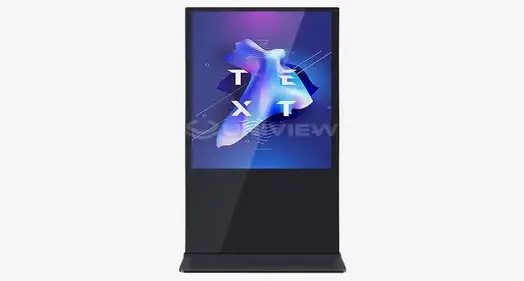
Understanding Indoor Standing Digital Displays: Core Features Explained
Hardware and software engineers have worked together very carefully to make modern indoor standing digital displays that are perfect for demanding business settings. These units can be used for a variety of tasks in store lobbies, corporate welcome areas, and factory floors, where reliable communication tools are important for running the business smoothly.
Display Technology and Visual Performance
The technology behind the screens is what makes an indoor digital sign system work. These systems are built around commercial-grade LCD and LED screens that are made to work nonstop for 16 to 18 hours a day without losing their performance. Unlike consumer screens, these business units use industrial-grade backlighting systems with MTBF values of more than 60,000 hours. This makes sure that the brightness and color accuracy stay the same over the course of their life.
Resolution standards are very important for both the impact of images and the usefulness of information. Full HD (1920x1080) screens are still the norm for most uses, but 4K (3840x2160) units are becoming more popular for high-end installations where picture quality is very important. The pixel density directly affects the viewing distance needed. Higher resolutions allow for closer watching without noticeable pixelation.
Interactive Capabilities and Touch Technology
To choose between touchscreen and non-touchscreen types, you need to carefully think about how the user will connect with the device. Either capacitive or infrared touch technologies are used in indoor standing digital displays that can be touched. Each has its own benefits. For interactive apps, capacitive screens offer precise multi-touch functionality, while infrared systems are the best choice for high-traffic areas because they are long-lasting and hard to damage.
Touch-enabled devices have special glass surfaces that are at least 7 Mohs hard, which means they are resistant to scratches and bumps that happen a lot in public places. These systems also have palm rejection technology and motion recognition features that make the user experience better while keeping up with cleanliness standards, which are becoming more important in places where the pandemic has occurred.
Connectivity and Integration Options
For modern indoor digital signs to work with current IT systems, they need a wide range of connectivity options. Standard connections include HDMI, USB, Ethernet, and Wi-Fi options that work with both local and cloud-based content management systems. Advanced units have more than one input, so they can play multiple sources of material at the same time and have picture-in-picture functions.
Network connectivity is necessary for multi-location deployments because it lets you change material remotely, keep an eye on the system, and do diagnostics. These features lower the cost of maintenance and make sure that messages are sent consistently across multiple sites. They also provide real-time performance data that helps operations make decisions.
Essential Performance Indicators for Effective Indoor Digital Standing Screens
Performance measures are closely linked to how well displays work and how well operations run in the long term. When procurement managers know about these signs, they can compare different options and set reasonable performance goals for their specific uses.
Brightness and Ambient Light Adaptation
For indoor spaces to be energy-efficient, the brightness levels need to be adjusted to match the lighting circumstances. Standard indoor standing digital displays work at 350 to 700 nits, which is bright enough for most shop and office settings with controlled lighting. Installations that face windows or rooms that get a lot of natural light need higher brightness levels, usually between 800 and 1200 nits, to keep things visible in all kinds of daylight.
By changing the brightness of the screen based on the amount of light in the room, automatic brightness monitors improve the user experience while lowering energy use. Together, these monitors and light control systems keep things from being too bright when it's not light outside. This makes parts last longer and lowers the cost of running the business.
Build Quality and Durability Considerations
Professional digital signage is different from consumer options because it is built with better materials and higher building standards. Industrial-grade metal frames keep the structure strong while still being light, which is important for mobile setups. Powder-coated finishes are good for keeping a professional look over time because they don't rust and look good for a long time.
Thermal management systems use smart fan control and heat disposal paths to keep things from getting too hot during long periods of use. These systems keep the right temperatures for operation while reducing noise. For indoor use, they usually keep sound emissions below 40 dB. Managing heat correctly affects how long a component lasts and makes sure it works the same way in all kinds of environments.
Content Management and Software Capabilities
Modern content management systems let you use dynamic marketing tactics that change based on what your business needs. Remote content planning is possible with cloud-based systems, which let marketing teams change messages in multiple places at the same time. A lot of the time, these systems come with review workflows, media asset management, and template files that make it easier to create and share content.
Split-screen features let you see different kinds of information at the same time, like video, text, and data feeds. This feature makes the best use of screen space and supports complicated messaging strategies that mix advertising content with informational shows like news, social media feeds, or the weather.
Comparative Insights: Indoor Standing Digital Displays vs Other Types
Knowing the pros and cons of the different display layouts helps users choose the best options for their needs and available space.
Flexibility and Placement Advantages
When it comes to placement, indoor standing digital displays are more flexible than wall-mounted ones. They can be strategically placed in high-traffic areas without having to be permanently installed. This movement benefit helps with seasonal ads, event-based messages, and the need to rearrange space, which is common in retail and restaurant settings.
Freestanding units can be used in places where putting them on the wall isn't possible because of the way the building is designed or because of a lease agreement. Moving displays around is a long-term benefit for businesses that are growing or changing their plan while still being able to send consistent brand messages.
Interactive Features Comparison
Touch-enabled standing screens are better for your body than interactive units that are placed on the wall because you can change the viewing angle and the height. These things need to be thought about a lot when it comes to ADA compliance and inclusive design standards that make sure people with different physical abilities can use the space.
The effects of engaging features on servicing need to be carefully thought through. Touch systems need to be calibrated and cleaned on a daily basis to keep up with cleanliness and responsiveness standards. Non-touch screens are easy to use and require less upkeep, but they still work well for visual conversation in idle messaging apps.
Leading Market Solutions
Well-known brands like Samsung, LG, and Philips continue to lead the business display market with new features and a history of dependability. Samsung's business displays use advanced panel technologies and come with full warranties, while LG's focus is on energy economy and smart connectivity features. Philips makes screens for harsh industrial settings that are built to last and work in specific ways.
New makers are coming up with competing alternatives that have features that can be customized and prices that are very low. These providers often offer shorter lead times and more flexible specs, which makes them good choices for specialized uses or projects on a budget that need proven performance without the high costs of premium brands.
Procurement Considerations: How to Choose the Right Indoor Standing Digital Display
Procurement strategies that work well balance short-term needs with long-term practical goals, making sure that the solutions chosen work well with current systems and with plans for future growth.
Business Needs Assessment and Application Requirements
A thorough needs assessment that finds specific use cases, content types, and speed standards is the first step to a successful deployment. In retail settings, the focus is on making things look good and letting customers connect with them so that they are more likely to buy. In business settings, the focus is on looking professional and integrating with existing communication systems.
The best screen size and quality depend on how busy the area is and how far away you are from the screen. Larger screens with higher brightness levels are better for places with a lot of foot traffic, while smaller units with better engaging features may be needed in more private settings to keep people interested.
Budget Planning and Total Cost of Ownership
The initial buying price is only one part of the total costs of owning an indoor standing digital display. The amount of energy used, the need for upkeep, and the cost of support services all have a big effect on long-term operating costs. LED backlighting technology in energy-efficient screens lowers electricity costs, and longer warranties protect against unexpected repair costs.
When you buy in bulk, you can save a lot of money on multi-unit operations and make sure that everything is the same everywhere. Volume prices usually start when you buy ten or more units, and the savings get bigger as you buy more. Letting things on lease or rent are other ways to pay for things that help you save money and get the newest technology.
Supplier Selection and Support Services
When choosing a vendor, you should give more weight to companies that have experience with business digital signs and offer a wide range of support services. Technical help, which includes reaction times 24 hours a day, seven days a week, and the ability to do diagnostics remotely, makes sure that there is little downtime during important operating periods.
Customization features let you make solutions that fit the needs of a specific application without lowering the reliability of the standard product. Suppliers who offer modification services can change standard goods to fit different mounting needs, weather conditions, or aesthetic preferences, while still providing guarantee coverage and support services.
Installation, Maintenance, and Long-Term Support Tips
For the display to last as long as possible and work at its best throughout its working lifetime, it needs to be installed correctly and maintained regularly.
Pre-Installation Planning and Site Assessment
A thorough site review finds any possible problems before the installation process starts. This avoids delays and makes sure that the best placement is made for maximum exposure and user access. During the planning stages, you need to think about things like electrical needs, network connections, and outdoor factors like light levels and temperature changes.
Professional installation services make sure that safety standards and maker instructions are followed, and they also protect both the equipment and the quality of the installation with warranties. Technicians with a lot of experience can spot possible problems and suggest changes that will improve performance or stop problems from happening in the future.
Routine Maintenance and Performance Optimization
Maintaining equipment on a regular basis keeps it running at its best and extends its life. Cleaning routines get rid of dust and other particles that can lower the quality of the picture and the efficiency of cooling. Firmware updates make sure that the device works with new software platforms and security standards.
As part of preventive maintenance, touch systems are periodically calibrated, network connections are checked, and the performance of the content management system is evaluated. These tasks find possible problems before they affect operations and make sure that all installs provide the same level of user experience.
Support Service Importance
With guaranteed response times and skilled technology help, comprehensive support agreements give you peace of mind and keep your business running. A lot of the time, these services come with online monitoring tools that let you fix problems quickly without having to send someone to your business.
Training programs for in-house staff make operations more efficient and less reliant on outside help for everyday chores. If you know how to do simple troubleshooting and content management tasks, you can fix small problems faster and save skilled help resources for bigger technical problems.
Conclusion
Selecting the right indoor standing digital display requires careful evaluation of technical specifications, operational requirements, and long-term support considerations. Display technology, build quality, and connectivity options form the foundation of effective digital signage solutions, while interactive capabilities and content management features determine user engagement potential. Successful procurement balances immediate needs with future scalability requirements, ensuring selected solutions provide lasting value through superior performance and reliable operation. The investment in professional-grade indoor digital signage delivers measurable returns through enhanced communication effectiveness, reduced operational costs, and improved customer engagement across diverse commercial applications.
FAQ
Q: What screen size works best for different business environments?
A: Choosing a screen size relies on how far away you want to see it and how much space you have. For close contact, 43-55-inch displays work best in retail settings. For maximum exposure, 65-75-inch displays may be needed in business lobbies. 75-inch or bigger screens are often used in transportation hubs and large business places so that people can see the messages from farther away.
Q: How do these displays integrate with existing digital signage networks?
A: HDMI, USB, Ethernet, and wireless links are all supported by modern indoor standing digital displays. Because they are compatible with APIs and use standard video formats, cloud-based content management systems can be easily added to current networks. Most professional units can work with more than one input source and can be integrated into bigger digital sign systems without needing to be redesigned.
Q: What energy efficiency features impact the total cost of ownership?
A: Compared to regular CCFL systems, LED backlighting technology uses a lot less energy, which usually cuts costs by 30 to 50 percent. Automatic brightness monitors change the brightness of the display based on the lighting conditions. This saves even more energy and makes the parts last longer. Displays that are Energy Star approved meet strict efficiency standards. You may be able to get energy rebates or tax breaks that help pay for the initial cost of buying these displays.
Partner with Uniview Commercial for Superior Indoor Standing Digital Display Solutions
Uniview Commercial delivers cutting-edge indoor standing digital display solutions engineered for demanding B2B environments across retail, corporate, and hospitality sectors. Our comprehensive product portfolio combines advanced LCD and LED technology with robust construction standards that ensure reliable operation in diverse commercial applications. As a leading indoor standing digital display manufacturer, we provide customizable solutions featuring high brightness levels from 2000 to 4000 nits, IP65-IP66 protection ratings, and compliance with international standards from Europe, America, and Japan. Our displays operate quietly at just 60 dB while maintaining superior image quality through high-grade AR glass and advanced thermal management systems. Contact our technical specialists at sales@univiewlcdisplay.com to explore tailored indoor standing digital display solutions backed by our comprehensive 3-5 year warranty and global 24-hour support services.
References
1. Digital Signage Federation. "Commercial Display Technology Standards for Indoor Applications." Professional Display Industry Report, 2024.
2. International Society for Display Technology. "Brightness Requirements and Energy Efficiency in Commercial Digital Signage. "Technical Standards Publication," 2024.
3. Commercial AV Solutions Magazine. "Touch Screen Technology Comparison: Capacitive vs Infrared Systems for Business Applications." Industry Analysis, 2024.
4. Retail Technology Review. "ROI Analysis of Interactive Digital Signage in Commercial Environments." Business Case Studies, 2024.
5. Professional Systems Network. "Installation Best Practices for Freestanding Digital Displays in Corporate Settings. "Technical Guidelines," 2024.
6. Digital Out-of-Home Association. "Content Management Systems Integration for Multi-Location Deployments." Industry White Paper, 2024.

Learn about our latest products and discounts through SMS or email