- English
- French
- German
- Portuguese
- Spanish
- Russian
- Japanese
- Korean
- Arabic
- Greek
- German
- Turkish
- Italian
- Danish
- Romanian
- Indonesian
- Czech
- Afrikaans
- Swedish
- Polish
- Basque
- Catalan
- Esperanto
- Hindi
- Lao
- Albanian
- Amharic
- Armenian
- Azerbaijani
- Belarusian
- Bengali
- Bosnian
- Bulgarian
- Cebuano
- Chichewa
- Corsican
- Croatian
- Dutch
- Estonian
- Filipino
- Finnish
- Frisian
- Galician
- Georgian
- Gujarati
- Haitian
- Hausa
- Hawaiian
- Hebrew
- Hmong
- Hungarian
- Icelandic
- Igbo
- Javanese
- Kannada
- Kazakh
- Khmer
- Kurdish
- Kyrgyz
- Latin
- Latvian
- Lithuanian
- Luxembou..
- Macedonian
- Malagasy
- Malay
- Malayalam
- Maltese
- Maori
- Marathi
- Mongolian
- Burmese
- Nepali
- Norwegian
- Pashto
- Persian
- Punjabi
- Serbian
- Sesotho
- Sinhala
- Slovak
- Slovenian
- Somali
- Samoan
- Scots Gaelic
- Shona
- Sindhi
- Sundanese
- Swahili
- Tajik
- Tamil
- Telugu
- Thai
- Ukrainian
- Urdu
- Uzbek
- Vietnamese
- Welsh
- Xhosa
- Yiddish
- Yoruba
- Zulu
Where to buy lcd floor-standing kiosks with touchscreens?
Companies can buy LCD floor-standing kiosks with touchscreens through a number of different outlets. Digital signage options from top brands like Uniview Commercial can be bought directly from the company, through registered distributors, or through system integrators who are experts in their field. Professional business-to-business (B2B) providers make interactive terminals that are specifically made for use in stores, transportation hubs, and corporate buildings. These high-tech machines have industrial-grade parts, strong casings, and special touchscreen technologies that make them ideal for use in a variety of business settings.
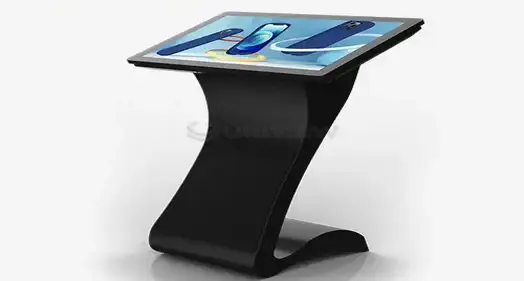
Understanding LCD Floor-Standing Kiosks with Touchscreens
Interactive digital terminals have changed the way companies give information and services to customers and how they interact with customers in many fields. These high-tech gadgets are the result of the best display technology, touch screen innovation, and industrial design.
Core Technology Architecture
Modern tablet booths use cutting-edge display technologies that make the images look great. Commercial-grade LCD screens have brightness levels between 350 and 2500 nits, so they can be seen clearly in a wide range of lighting situations. Most touchscreens use either Projected Capacitive (PCAP) technology for high sensitivity or Infrared (IR) systems to make them last longer in high-traffic areas.
The platform for industrial computing is what makes work effective. High-performance processors can run Windows 10/11 IoT Enterprise or Android 11/12. They also have watchdog timers that keep the system from freezing while it's running all the time. The Mean Time Between Failures (MTBF) scores for these systems are higher than 50,000 hours, which means they will always work well in demanding business settings.
Interactive Interface Capabilities
Professional touchscreen displays can recognize touches from more than one place and respond in less than 10 milliseconds. The 3–6 mm thick toughened glass surface, which has a Mohs hardness level of 7, protects against vandalism while keeping the brightness of the vision. Anti-glare and anti-fingerprint treatments improve the user experience by lowering shadows and keeping the screen clean for long periods of time.
Modern kiosks have extra parts built in, like thermal printers, barcode scanners, NFC readers, and payment handling units. These flexible parts add on to existing functions to help with certain business tasks like making transactions, selling tickets, and taking orders. When hardware and software work together without any problems, they make full self-service options that lower costs and make customers happier.
Critical Factors When Choosing LCD Floor-Standing Touchscreen Kiosks
To buy a kiosk successfully, you need to carefully look at its technical specs, how it works, and how much it costs altogether. Professional users have to look at a lot of factors to make sure that the device's features and their business goals are perfectly aligned.
Environmental Durability Standards
The operational setting has a big effect on how well and how long a booth lasts. For indoor uses, normal temperature ranges and modest durability requirements are common. For outdoor uses, higher protection levels are necessary. LCD floor-standing kiosks made to be used outside have grades of IP65 to IP66, which protect against dust and water entry.
When there is a lot of light or temperatures are very high, thermal control is very important. Modern cooling systems keep parts at the right temperature by using active air or passive heat absorption through aluminum alloy construction. Treatments that stop corrosion, which often use European surface treatment technologies, keep things from breaking down in the climate and make them last longer.
Performance and Connectivity Requirements
Processing power needs to match the apps and user loads that are planned. Entry-level machines use ARM-based computers that can show basic information and let users do simple things. Intel i5 or i7 processors with dedicated graphics are better for complex apps that need to handle multimedia material, real-time data processing, or connecting to corporate systems.
Ethernet, WiFi, and cellular modules are all available as network connection choices to fit a variety of deployment situations. Professional setups often need more than one way to link to make sure they can keep running. Security features like encrypted data transfer and secure boot methods keep private data safe and stop people from getting into system functions without permission.
Total Cost of Ownership Analysis
A full cost analysis looks at more than just the original buy price. It also includes the costs of setup, maintenance, and running the business. Professional installation makes sure that safety standards are met and that the system works at its best. Ongoing maintenance plans offer preventative care and quick fixes for technical problems.
Warranty coverage changes a lot from one provider to the next, ranging from normal one-year terms to five-year plans that cover everything. Premium warranties usually cover help around the world, the ability to get a new unit, and insurance security through third-party insurers. These choices for extended coverage lower long-term operating risks and give you a way to plan your budget for maintenance costs.
Where to Buy: Top Suppliers and Brands for LCD Floor-Standing Touchscreen Kiosks
There are well-known makers, expert system developers, and regional wholesalers in the global market for interactive kiosk products. Knowing the different ways to buy things and what each seller can do helps you choose the best source and make the best buying decisions.
Direct Manufacturer Relationships
Leading makers, such as Uniview Commercial, offer full solutions that include design help, customization options, and support networks around the world. Direct connections with manufacturers have many benefits, such as lower prices for large orders, faster contact for unique needs, and access to the newest technologies.
Professional makers keep large collections of products with a wide range of shapes, screen sizes, and feature arrangements, including options like the LCD floor-standing kiosk. Customization options go beyond just changing the way something looks. They also include specialized hardware integration, custom container designs, and the creation of custom software. These custom solutions are made to meet the specific needs of businesses that standard goods can't meet well.
Authorized Distribution Networks
Established distribution networks offer local help, lower shipping costs, and easier ways to buy things. When you buy directly from the maker, it takes longer to get your goods, but authorized distributors keep stock of popular options. Regional wholesalers often offer extra services like site inspections, help with installation, and professional support in the area.
Working with approved partners makes sure that the product is real and that the manufacturer's guarantee covers it. Verification of dealer permission stops fake goods and keeps people connected to official support channels. Professional wholesalers also offer services that add value, like financing choices, trade-in programs, and discounts for buying in bulk.
System Integrator Partnerships
System integrators are experts at putting together whole solutions, which can include making software, integrating back-end systems, and providing ongoing support services. These relationships are helpful for complicated projects that need custom software creation or connecting to business systems that are already in place.
Integrators with a lot of experience know what the needs of each business are and can suggest the best hardware setups for each application. They also offer project management services that include coordinating multiple providers and making sure that deployment timelines are met without any problems. When you work with system integrators for a long time, you can often get better prices and faster help with future projects.
Installation and Maintenance: Ensuring Long-Term Performance
Professional installation and planned upkeep programs make kiosks work better while causing the least amount of downtime. The best way to make sure that equipment lasts as long as possible and that users have the best experience is to follow the right rollout and ongoing care practices.
Professional Installation Standards
The structure will be stable, and the viewing points will be good if the base is prepared correctly. To put an LCD floor-standing kiosk, the surface must be level, the power must be connected correctly, and the traffic patterns of users must be thought through. Professional workers check the structure's strength, how the cables are arranged, and any external factors that might affect the system's long-term performance.
Local safety rules and laws must be followed when making electrical links. Power changes that could hurt sensitive electrical parts are stopped by dedicated circuits. Surge protectors and uninterruptible power sources offer extra defense against strange electrical events. To make sure links work, network connections need safe wire routing and multiple paths.
Preventive Maintenance Protocols
With regular upkeep, small problems don't get worse and turn into big failures. Touchscreen surfaces need special cleaning methods to keep them clear and sensitive to touch. Specialized cleaning products get rid of dirt and fingerprints without hurting anti-glare or fingerprint coatings.
Updates for the operating system, security changes, and apps are all part of software maintenance. Automated update systems make sure that security standards are met while minimizing the need for human action. Hardware diagnostics find possible problems with parts before they affect operation. This lets you repair them before they break down, which cuts down on downtime.
Environmental tracking systems keep an eye on things like temperature, humidity, and shaking levels while they're working, and this data can be displayed and monitored through an LCD floor-standing kiosk. Data logging lets you find patterns that could mean problems are starting to happen or that the conditions of the machine are not working at their best. Preventive maintenance based on facts about the surroundings makes parts last longer and keeps them performing at their best.
Comparing LCD Floor-Standing Kiosk Variants to Make an Informed Decision
Depending on the needs of the business and the funds, different kiosk layouts are used. Knowing the features of each version lets you make the best choice based on rollout scenarios and business goals.
Display Technology Comparisons
For indoor use, standard LCD panels offer great picture clarity and are very cost-effective. High-Tni liquid crystals in models with increased brightness keep the screen from turning black when used in full sunlight. Panels made for professionals by companies like LG, Samsung, and BOE offer better color accuracy and longer useful lives.
Resolutions range from Full HD 1080p for everyday use to 4K UHD for high-end setups that need the best picture quality. Higher images make it possible to see more details and improve the user experience, but they also need more computer power and bandwidth to send the information.
Ultra-slim double-sided designs make the most of limited room by maximizing information density. These specialized units have separate signal processing so that each side can show different material at the same time. Advanced thermal management keeps heat from building up between panels that are close together while keeping the slim profile look.
Environmental Adaptation Features
Indoor models use high-quality finishing and ergonomic design elements to highlight both looks and user experience. The powder-coated steel or brushed metal casings of these units usually go with interior design themes. Integrated wire handling and small-footprint designs make things look better while making them more useful.
Outdoor versions stress toughness and resistance to the elements. Better sealing keeps moisture out while keeping airflow going for temperature control. When LCD floor-standing kiosks are made to be used outside, they usually have stronger fixing systems that can handle wind loads of up to 16 levels of resistance.
Models that can withstand the weather come with extra features like systems that stop dampness, wider temperature ranges, and better resistance to vandalism. These safety steps make sure that the system works reliably even in harsh environments, and it still looks and works professionally.
Conclusion
To choose the best LCD floor-standing kiosk, you need to carefully look at its technical specs, the supplier's skills, and the total cost. A good procurement process strikes a balance between the need for instant usefulness, long-term operational needs, and price limits. Professional makers like Uniview Commercial offer complete solutions that include customization services, global support networks, and longer warranty coverage to make sure that the products are installed correctly and continue to work well in a wide range of business settings.
FAQ
Q: What are typical lead times for customized LCD floor-standing touchscreen kiosk orders?
A: Standard setups usually ship two to three weeks after an order is confirmed. Depending on how complicated they are, customized units that need custom casings, hardware integration, or software development may take 4 to 8 weeks. During the quotation process, manufacturers like Uniview Commercial give specific project timelines to make sure that delivery goals are reasonable.
Q: How do I ensure software compatibility with existing enterprise systems?
A: Professional kiosk makers give thorough technical specs, such as the operating systems they support, API documents, and integration instructions. A lot of companies offer services for pre-integration testing to make sure everything works together before the final release. Custom middleware solutions can also be made by system designers to make both software and business systems work with each other.
Q: What warranty and support options are available for commercial kiosk deployments?
A: Leading providers in the industry offer a range of warranty options, from basic one-year coverage to full five-year safety plans. Premium warranties usually come with global response help 24 hours a day, 7 days a week, new units, and coverage through third-party insurance companies. Uniview Commercial offers extended warranty choices that cover a wide range of quality issues to reduce operating risks and guarantee long-term dependability.
Partner with Uniview Commercial for Your LCD Floor-Standing Kiosk Requirements
Uniview Commercial makes interactive display options that are the best in the business and are made to work in tough industrial settings. Our wide range of products includes LCD floor-standing kiosks that can be customized and come with advanced touchscreen technology, industrial-grade construction, and high durability ratings. We offer custom solutions backed by 3–5 year warranties and professional help 24 hours a day, 7 days a week. Our manufacturing experience spans more than 10 years, and we have a presence in more than 100 countries around the world. Get in touch with our expert team at sales@univiewlcdisplay.com to talk about your specific needs and get cheap LCD floor-standing kiosk supply prices for your next business deployment project.
References
1. Digital Signage Technology Standards and Best Practices for Commercial Deployment—International Display Technology Association, 2023
2. Interactive Kiosk Market Analysis and Procurement Guidelines for B2B Applications - Commercial Technology Research Institute, 2024
3. Touchscreen Interface Design Principles for Industrial and Commercial Applications—Human-Computer Interaction Research Council, 2023
4. Environmental Durability Testing Standards for Outdoor Digital Display Equipment - Electronic Equipment Testing Laboratory Standards, 2024
5. Total Cost of Ownership Analysis for Commercial Interactive Display Systems - Business Technology Investment Research, 2023
6. LCD Panel Technology Specifications and Performance Metrics for Professional Applications—Display Manufacturing Association Technical Guidelines, 2024

Learn about our latest products and discounts through SMS or email