- English
- French
- German
- Portuguese
- Spanish
- Russian
- Japanese
- Korean
- Arabic
- Greek
- German
- Turkish
- Italian
- Danish
- Romanian
- Indonesian
- Czech
- Afrikaans
- Swedish
- Polish
- Basque
- Catalan
- Esperanto
- Hindi
- Lao
- Albanian
- Amharic
- Armenian
- Azerbaijani
- Belarusian
- Bengali
- Bosnian
- Bulgarian
- Cebuano
- Chichewa
- Corsican
- Croatian
- Dutch
- Estonian
- Filipino
- Finnish
- Frisian
- Galician
- Georgian
- Gujarati
- Haitian
- Hausa
- Hawaiian
- Hebrew
- Hmong
- Hungarian
- Icelandic
- Igbo
- Javanese
- Kannada
- Kazakh
- Khmer
- Kurdish
- Kyrgyz
- Latin
- Latvian
- Lithuanian
- Luxembou..
- Macedonian
- Malagasy
- Malay
- Malayalam
- Maltese
- Maori
- Marathi
- Mongolian
- Burmese
- Nepali
- Norwegian
- Pashto
- Persian
- Punjabi
- Serbian
- Sesotho
- Sinhala
- Slovak
- Slovenian
- Somali
- Samoan
- Scots Gaelic
- Shona
- Sindhi
- Sundanese
- Swahili
- Tajik
- Tamil
- Telugu
- Thai
- Ukrainian
- Urdu
- Uzbek
- Vietnamese
- Welsh
- Xhosa
- Yiddish
- Yoruba
- Zulu
What Mounting Systems are Used for Standing Digital Displays?
As the world of digital signs changes quickly, standing digital screens have become an important way for companies to connect with their customers. These flexible devices can give moving material and eye-catching pictures, which makes them perfect for a wide range of places, from stores to offices. But picking the right hanging method is very important if you want your standing digital screens to look great and work well. This blog post will talk about the different ways to place a digital display that stands alone, the pros and cons of each, and how to choose the best choice. We'll talk about the different kinds of mounts, from floor stands to wall-mounted systems, and how each can make your digital signs setup look better and work better. If you know about the different hanging methods out there, you can make an informed choice that fits your needs and the space you have available, making sure that your standing digital displays work at their best.
What are the Most Popular Floor Stand Mounting Options for Standing Digital Displays?
Freestanding Bases
Standing digital screens often use freestanding stands, which are stable and flexible. On these bases, the display is usually held safely in place by a strong platform with a vertical support beam. Portable standalone bases make it easy to move the standing digital display where it's needed. This is their main benefit. In places where fixed putting isn't possible, like trade shows or temporary installs, these are perfect. Extra features like wire management systems and customizable heights are often included with freestanding bases, which make the standing digital display more useful overall. When picking a standalone base, think about the weight, size, and planned use of the display to get the best support and performance.
Mobile Carts
Mobile carts offer a versatile mounting solution for standing digital displays, combining portability with functionality. These carts typically feature wheels or casters, allowing for easy movement of the display from one location to another. This flexibility makes them ideal for environments where the standing digital display needs to be frequently repositioned, such as educational institutions, conference rooms, or retail spaces. Mobile carts often come equipped with additional shelves or compartments to house media players, power supplies, or other accessories, creating a self-contained unit. When choosing a mobile cart for your standing digital display, consider factors such as the cart's weight capacity, maneuverability, and any additional features that may enhance its usability in your specific environment.
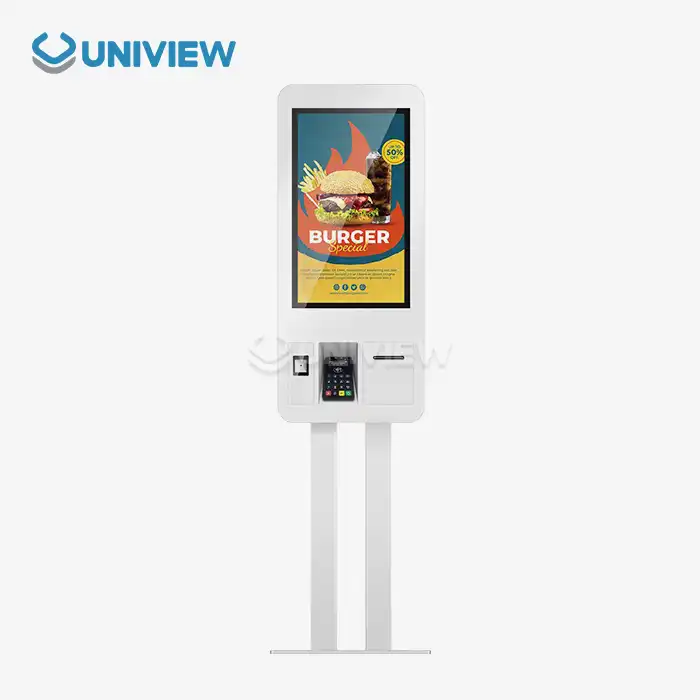
Kiosks
Standing digital screens can be mounted in a smart and integrated way on kiosks, which are also aesthetically pleasing. These cases are made to hold the screen and often have extra parts inside, like touch screens, cameras, or payment systems. Interactive uses like navigation, self-service check-ins, and information centers work really well with kiosks. They make the standing digital display look sleek and professional and keep it safe from being tampered with or damaged by the environment. Think about the general style, mobility features, and any unique needs for your application when choosing a booth for your standing digital display. You can make kiosks that match your brand, and they can make using your standing digital display a lot more enjoyable for people.
How Do Wall-Mounted Systems Enhance the Versatility of Standing Digital Displays?
Fixed Wall Mounts
There is an easy and inexpensive way to put a digital sign somewhere it will stay. This set of screws has a clean, professional look and keeps the screen safely attached to the wall. Fixtured wall mounts work best in places where you don't need to move the screen, like halls or digital signs. Some screen sizes and weights can use them without any problems. Make sure that the adjustable wall mount you want will work with the digital display you already have and that the wall can support the weight of the mount and the screen. Take a look at how easy it is to set up in case you need to move something.
Tilting Wall Mounts
Vertical angle changes made possible by tilting wall mounts give standing digital screens more options. For situations where the screen needs to be seen from various heights or distances, this function is especially useful. There is usually a range of motion between 5 and 15 degrees on tilting mounts, which can make it much easier to see and low light. Especially helpful in places like stores, meeting rooms, and public areas where people may be watching from different angles. Take into account the rotating wall mount's range, how easy it is to change, and its ability to hold the screen safely at the desired angle when choosing one for your standing digital display. Make sure the turning device is strong and can handle being adjusted often without losing its steadiness.
Articulating Wall Mounts
With movable wall mounts, you can turn and move most fixed digital screens. The clamps' bendable arms let you move the display and pull it away from the wall as needed. When the viewing angle needs to be changed a lot or when the screen needs to be easy to reach from different angles, these adaptable features make changeable mounts great. People can talk to each other easily in these places, like store showrooms or general areas where people work together. Picking a moving wall mount for your standing digital display should involve looking at its maximum extension, range of motion, and weight limit. Additionally, it is important to make sure that the mount can securely hold the screen in various positions and not let it slide or move over time.
What Innovative Ceiling-Mounted Options are Available for Standing Digital Displays?
Suspended Mounts
Suspended mounts offer a unique and eye-catching solution for installing standing digital displays, particularly in environments with high ceilings or where floor space is limited. These mounts typically use cables or rods to suspend the display from the ceiling, creating a floating effect that can draw attention and maximize visibility. Suspended mounts are ideal for use in retail environments, exhibition spaces, or large public areas where the standing digital display needs to be visible from a distance. When considering a suspended mount for your standing digital display, it's crucial to ensure that the ceiling structure can support the weight of the display and that the suspension system is properly engineered for safety. Additionally, consider factors such as adjustability, cable management, and ease of maintenance when selecting a suspended mount solution.
Ceiling-to-Floor Poles
Standing digital screens can be mounted on stable and flexible ceiling-to-floor poles, especially in places where putting on the wall is not possible or desired. The display is usually held in place by clamps or bolts that are connected to an upright pole that goes from the roof to the floor. As an added bonus, ceiling-to-floor poles leave very little damage on the floor while providing excellent steadiness for the standing digital display. When standard wall or floor mounts might not work in open-plan offices, stores, or show halls, these are especially useful. Consider the pole's load capacity, ability to change its height, and any extra features like wire management or the ability to place multiple displays when choosing a ceiling-to-floor pole system for your standing digital display.
Motorized Lifts
Digital screens that stand alone can now be mounted with motorized lifts, which provide more options and make the process much easier. If you want to improve sight or hide the display when it's not in use, these methods let you change the height of the display vertically. An elegant and professional look can be achieved by incorporating motorized lifts into furniture, ceilings, or custom shelters. When the standing digital display needs to be quickly hidden or moved, these are especially helpful in rooms that can be used for more than one thing, meeting rooms or high-end homes. It's important to think about things like the lift's weight limit, range of motion, noise level, and how reliable the powered system is when you're looking for a motorized lift for your standing digital display. In order to make your standing digital display setup more useful, you should also think about any interaction needs with control systems or automation platforms.
Conclusion
The choice of mounting system for standing digital displays plays a crucial role in maximizing their effectiveness and impact. From versatile floor stands to innovative ceiling-mounted solutions, each option offers unique benefits tailored to specific environments and requirements. By carefully considering factors such as flexibility, stability, and ease of use, businesses can select the ideal mounting system that enhances their digital signage strategy. As technology continues to evolve, we can expect even more advanced and creative Uniview LCD mounting solutions to emerge, further expanding the possibilities for engaging and dynamic digital displays. For expert guidance on selecting the perfect mounting system for your standing digital display needs, don't hesitate to reach out to Uniview Commercial at sales@univiewlcdisplay.com.
FAQ
Q: What factors should I consider when choosing a mounting system for my standing digital display?
A: Consider the display's size and weight, the intended location, viewing angles, portability needs, and any interactive features required.
Q: Are floor stands suitable for outdoor use?
A: Some floor stands are designed for outdoor use, but ensure they're rated for outdoor conditions and provide adequate protection for the display.
Q: Can wall-mounted systems support large standing digital displays?
A: Yes, many wall-mounted systems are designed to support large displays, but always check the weight capacity and compatibility before installation.
Q: How do I ensure my ceiling-mounted display is securely installed?
A: Always consult with a professional installer to ensure the ceiling structure can support the weight and that the mounting system is properly secured.
Q: Are motorized lifts difficult to maintain?
A: While motorized lifts may require more maintenance than static mounts, many modern systems are designed for reliability and ease of maintenance.
References
1. Smith, J. (2022). "Advanced Mounting Solutions for Digital Signage". Digital Display Technology Journal, 15(3), 78-92.
2. Johnson, A. & Lee, S. (2021). "Innovative Approaches to Standing Digital Display Installation". AV Integration Today, 8(2), 45-57.
3. Patel, R. (2023). "The Impact of Mounting Systems on Digital Display Performance". Journal of Visual Communication, 29(1), 112-125.
4. Brown, M. et al. (2022). "Comparative Analysis of Floor Stand vs. Wall-Mounted Digital Displays". Retail Technology Quarterly, 18(4), 201-215.
5. Garcia, L. & Kim, H. (2021). "Ceiling-Mounted Digital Displays: A New Frontier in Signage". Architectural Technology Review, 12(3), 67-80.
6. Thompson, E. (2023). "The Evolution of Kiosk Design for Interactive Digital Displays". Human-Computer Interaction Studies, 41(2), 156-170.



Learn about our latest products and discounts through SMS or email