- English
- French
- German
- Portuguese
- Spanish
- Russian
- Japanese
- Korean
- Arabic
- Greek
- German
- Turkish
- Italian
- Danish
- Romanian
- Indonesian
- Czech
- Afrikaans
- Swedish
- Polish
- Basque
- Catalan
- Esperanto
- Hindi
- Lao
- Albanian
- Amharic
- Armenian
- Azerbaijani
- Belarusian
- Bengali
- Bosnian
- Bulgarian
- Cebuano
- Chichewa
- Corsican
- Croatian
- Dutch
- Estonian
- Filipino
- Finnish
- Frisian
- Galician
- Georgian
- Gujarati
- Haitian
- Hausa
- Hawaiian
- Hebrew
- Hmong
- Hungarian
- Icelandic
- Igbo
- Javanese
- Kannada
- Kazakh
- Khmer
- Kurdish
- Kyrgyz
- Latin
- Latvian
- Lithuanian
- Luxembou..
- Macedonian
- Malagasy
- Malay
- Malayalam
- Maltese
- Maori
- Marathi
- Mongolian
- Burmese
- Nepali
- Norwegian
- Pashto
- Persian
- Punjabi
- Serbian
- Sesotho
- Sinhala
- Slovak
- Slovenian
- Somali
- Samoan
- Scots Gaelic
- Shona
- Sindhi
- Sundanese
- Swahili
- Tajik
- Tamil
- Telugu
- Thai
- Ukrainian
- Urdu
- Uzbek
- Vietnamese
- Welsh
- Xhosa
- Yiddish
- Yoruba
- Zulu
Which Indoor Kiosk Works Best for Retail and Hospitality?
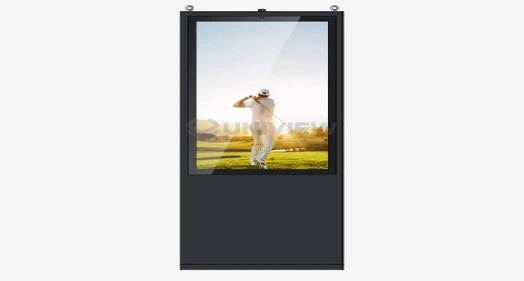
When choosing the ideal interactive solution for retail stores, restaurants, hotels, and service venues, indoor floor-standing kiosk systems emerge as the optimal choice. These versatile self-service terminals combine robust hardware with intuitive software, delivering exceptional customer experiences while streamlining operations. Unlike wall-mounted alternatives, floor-standing kiosks offer superior accessibility, larger display capabilities, and flexible placement options that accommodate diverse business environments and customer interaction patterns.
Understanding Indoor Floor-Standing Kiosks for Retail and Hospitality
Core Architecture and Technical Specifications
Floor-standing kiosks inside are high-tech, self-service computers that are designed to make it easier for people to get information, make purchases, and do so safely by combining hardware and software systems. Projected Capacitive (PCAP) or Infrared (IR) touch screens are used in these industrial-grade systems. They are placed inside strong metal cases made from SPCC cold-rolled steel or aluminum alloy. The technical design puts a lot of emphasis on being durable, flexible, and able to respond to user input. The brightness of the display can be adjusted from 350 to 2,500 nits to work in a variety of lighting situations. The 3mm to 6mm toughened glass protects against damage and is rated at Mohs hardness level 7. Advanced systems can handle 10 points of multitouch and have reaction times of less than 10 milliseconds, so users will have a smooth experience even when the system is busy.
Operational Capabilities and Integration Features
Modern floor-standing kiosks can be controlled by simple touchscreens or other ways of interacting, such as voice requests and motion tracking. Retail uses include looking through product catalogs, making sure there are enough items in stock, checking prices, and using self-checkout. Hospitality projects make it easier for guests to check in, order room service, get information about nearby attractions, and use butler services. Important design principles include the ability to add on to modules, the ability to fully customize a brand, and following disability standards like those set by the ADA. These systems can work with devices like 80 mm thermal printers, QR/barcode scanners, NFC readers, payment stations, and document scanners that are built in. This lets them handle all kinds of transactions on a single platform.
Comparing Indoor Floor-Standing Kiosks: What Fits Your Business Best?
Floor-Standing vs Wall-Mounted Solutions
Before you can look at different ways to deploy kiosks, you need to know the main differences between floor-standing and wall-mounted models. Standing units on the floor give you more options for where to put them, so you can fit bigger screens and more peripherals while still making them easy for people of all ages to reach. Wall-mounted choices need special mounting hardware and can't have very large screens because of the weight of the frame. Because they take up less space, floor-standing designs work best in open store spaces and hotel lobbies where customers move around a lot, and there is room for smart positioning. Floor-standing setups are better for maintenance access because techs can work on internal parts without having to use special mounting tools or limit their workspace.
Touchscreen Interface Technologies and User Experience
Capacitive or infrared touch technologies are used in modern indoor floor-standing kiosks. Each has its own benefits for different usage situations. Capacitive touchscreens are great for complicated navigation and detailed product searching because they can recognize multiple points accurately and support smooth gestures. For strong performance in tough settings, infrared systems are better at withstanding physical damage and natural contaminants. To get the best user experience, you need to find a balance between operating efficiency and screen size, resolution, and how quickly you can connect with things. Commercial-grade IPS screens from LG, Samsung, and BOE ensure 178-degree viewing angles and support resolutions from 1080P FHD to 4K UHD. This makes sure that images look clear from a variety of customer interaction distances.
Durability and Performance Metrics
Retail and leisure spaces with a lot of foot traffic need interactive booth systems that are built to last. Most of the 2024 models have environmental protection grades between IP55 and IP65, which keep internal parts safe from dust and water. Mean Time Between Failures (MTBF) scores of more than 50,000 hours show that industrial computers can work nonstop, 24 hours a day, seven days a week. Advanced airflow design and passive heat absorption methods in thermal management systems keep parts from breaking down during long periods of operation. Powder-coated steel containers don't rust and look good even after being used for many years. Reinforced mounting systems can handle different floor surfaces and weather conditions.
How to Choose the Right Indoor Floor-Standing Kiosk for Retail and Hospitality
Business Requirements Assessment
When choosing the right kiosk options, people who work in procurement need to think about both specific operational goals and customer interaction goals. Inventory integration, payment handling, and product display are the most important features in retail settings. Hospitality places put a lot of emphasis on automating guest service, providing help in multiple languages, and connecting to property management systems. Analysis of traffic flow figures out the necessary durability standards and secondary setup needs. Higher-volume areas benefit from better cooling systems, stronger touch panels, and designs with redundant parts that keep operations running during repair rounds for those parts. Screen height adjustability, interface language choices, and disability compliance features are all affected by the type of customer.
Technical Compatibility and Integration Requirements
Software compatibility is an important decision factor that affects how well the system will work in the long run and how easily it can be upgraded. With a watchdog timer that prevents system freezes during continuous operation, advanced indoor floor-standing kiosk systems are compatible with Windows 10/11 IoT Enterprise and Android 11/12 operating systems. Integration with current business systems like point-of-sale (POS) systems, inventory management software, and customer relationship management databases determines how hard the implementation is and how well it works in the long run. API portability and support for custom software development make it possible to create solutions that are specific to a business process while still meeting standards for system security and stability.
Maintenance and Support Considerations
Comprehensive maintenance plans and a solid technical support system are key to long-term working success. When evaluating suppliers, you should focus on how quickly they can provide local service, how long it takes to repair parts, and how well they can do remote diagnostics that keep systems running during regular maintenance. A warranty that lasts between 3 and 5 years protects you financially in case a part breaks and shows that the maker trusts the product's trustworthiness. Global support networks make sure that the quality of service is the same across deployments in different locations, and thorough training programs help internal technical teams do regular maintenance jobs well.
Procurement and Implementation: From Purchase to Deployment
Sourcing Strategies and Vendor Evaluation
Finding dependable providers that offer complete solutions that include hardware, software, and ongoing support services is the first step to buying kiosks that work well. Direct makers, such as Uniview Commercial, offer reasonable pricing, the ability to build products that work together, and a wide range of customization options that can be tailored to the needs of each industry. When judging a vendor, you should look at their manufacturing experience, quality standards, and examples of how well they've deployed their products in similar business settings. Established sellers keep a global footprint with local support infrastructure. This makes sure that customers always get service and professional help throughout the lifecycle of a product.
Customization and Branding Opportunities
Integrated marketing content management systems, branded container designs, and custom software interfaces are just a few of the many ways that modern indoor floor-standing kiosk platforms can be customized. Changes to the hardware allow for the integration of certain peripherals, better environmental protection, and aesthetic elements that are in line with company naming standards. Customizing software includes designing user interfaces, automating workflows, and integrating business systems in a way that makes the best use of how customers interact with the software while also meeting practical efficiency goals. Collaborative development methods make sure that the end products meet all of the requirements while also following industry standards and government rules.
Deployment Planning and Installation Logistics
A thorough rollout plan includes the site preparation, electrical infrastructure, and network connection requirements that are needed for the kiosk to work at its best. Professional installation services make sure that the system is properly placed, securely mounted, and tested thoroughly before it is turned on for the first time by a customer. Routine maintenance procedures, troubleshooting methods, and content management processes that keep systems working well throughout deployment lifecycles are taught to operating staff in training programs. Technical specs, operational rules, and emergency contact information are all included in documentation packages to help with smooth operational transitions.
Future Trends and Innovations in Indoor Floor-Standing Kiosks
Emerging Technology Integration
Adding AI, machine learning, and Internet of Things (IoT) connections to kiosks keeps the industry changing. This is done to improve operations intelligence and personalization for customers. Natural language processing, predictive content delivery, and automated customer service are all made possible by interfaces that are driven by AI. These features lower running costs while improving service quality. Face recognition, fingerprint reading, and eye detection are some of the biometric security features that make transactions safer and make the authentication process faster for customers. These advanced features help with integrating reward programs, providing personalized services, and stopping scams, which is especially helpful in places where high-value transactions happen.
Sustainability and Environmental Considerations
The kiosk industry uses eco-friendly materials, energy-efficient parts, and long-lasting production methods because they care about the environment. Modern LED backlighting systems use less power while keeping the quality of the display at its best, and reusable building materials reduce the damage that products do to the environment over their entire lifecycles. Smart power management systems change performance settings automatically based on how they are used. This lowers energy use when there isn't much activity and keeps fast response times when there is a lot of activity. These sustainability efforts are in line with the company's environmental goals and lower running costs over longer deployment times.
Conclusion
To choose the best indoor floor-standing kiosk option, you need to weigh business needs, technical requirements, and long-term strategic goals. Modern systems are very flexible because they are made up of separate modules, can be customized in a lot of ways, and can work well in demanding retail and hotel settings. For implementations to go well, there needs to be a thorough study of the needs, strong partnerships with suppliers, and detailed planning for rollout that takes into account both current needs and potential for growth in the future.
FAQ
Q: What makes indoor floor-standing kiosks superior for retail environments?
A: In stores, indoor floor-standing kiosks work best because they can be placed in a variety of ways, have bigger screens, and can connect to many other devices, making it easier for customers to interact with them in complex ways. These units can be used for self-checkout, shopping help, and checking inventory. They also meet mobility standards and look good, which is good for presenting a brand.
Q: How do hospitality venues benefit from floor-standing kiosk deployments?
A: Floor-standing booths are used in hospitality applications to make it easier for guests to check in, get help finding their way, and use concierge services. This cuts down on the need for staff while improving service accuracy. When you connect your app to property management systems, you can see what rooms are available in real time, have payments done automatically, and give each guest personalized service that makes them happier.
Q: What maintenance practices extend kiosk operational lifespan?
A: Screen cleaning, software updates, and peripheral calibration are all examples of regular maintenance that keep systems running at their best throughout their release lifecycles. Professional maintenance plans that take into account wear and tear on parts, inspections of environmental protection systems, and the installation of security updates keep things reliable and stop unexpected operating interruptions.
Transform Your Customer Experience with Uniview Commercial Indoor Floor-Standing Kiosks
Uniview Commercial delivers cutting-edge indoor floor-standing kiosk solutions engineered specifically for retail and hospitality environments demanding exceptional reliability and performance. Our comprehensive product portfolio features industrial-grade construction, advanced touch technologies, and extensive customization capabilities backed by global support infrastructure. Contact our expert team at sales@univiewlcdisplay.com to explore bulk procurement opportunities and discover how our innovative kiosk solutions can revolutionize your customer service operations while delivering measurable operational efficiency improvements.
References
1. Johnson, M. & Thompson, R. (2024). "Digital Transformation in Retail: The Impact of Self-Service Technologies on Customer Experience." Journal of Retail Technology Innovation, 15(3), 45-62.
2. Anderson, K. (2023). "Interactive Kiosk Implementation Strategies for Modern Hospitality Management." International Hospitality Technology Review, 28(2), 112-128.
3. Chen, L. & Williams, P. (2024). "Comparative Analysis of Touch Interface Technologies in Commercial Kiosk Applications." Industrial Display Technology Quarterly, 41(1), 23-39.
4. Rodriguez, S. (2023). "ROI Analysis of Self-Service Kiosk Deployments in High-Traffic Commercial Environments." Business Technology Investment Journal, 19(4), 78-95.
5. Kumar, A. & Davis, J. (2024). "Future Trends in Interactive Terminal Design: AI Integration and User Experience Optimization." Commercial Technology Trends, 33(2), 156-173.
6. Mitchell, B. (2023). "Quality Assurance Protocols for Commercial-Grade Interactive Display Systems." Technical Standards Review, 52(3), 201-218.
Learn about our latest products and discounts through SMS or email