- English
- French
- German
- Portuguese
- Spanish
- Russian
- Japanese
- Korean
- Arabic
- Greek
- German
- Turkish
- Italian
- Danish
- Romanian
- Indonesian
- Czech
- Afrikaans
- Swedish
- Polish
- Basque
- Catalan
- Esperanto
- Hindi
- Lao
- Albanian
- Amharic
- Armenian
- Azerbaijani
- Belarusian
- Bengali
- Bosnian
- Bulgarian
- Cebuano
- Chichewa
- Corsican
- Croatian
- Dutch
- Estonian
- Filipino
- Finnish
- Frisian
- Galician
- Georgian
- Gujarati
- Haitian
- Hausa
- Hawaiian
- Hebrew
- Hmong
- Hungarian
- Icelandic
- Igbo
- Javanese
- Kannada
- Kazakh
- Khmer
- Kurdish
- Kyrgyz
- Latin
- Latvian
- Lithuanian
- Luxembou..
- Macedonian
- Malagasy
- Malay
- Malayalam
- Maltese
- Maori
- Marathi
- Mongolian
- Burmese
- Nepali
- Norwegian
- Pashto
- Persian
- Punjabi
- Serbian
- Sesotho
- Sinhala
- Slovak
- Slovenian
- Somali
- Samoan
- Scots Gaelic
- Shona
- Sindhi
- Sundanese
- Swahili
- Tajik
- Tamil
- Telugu
- Thai
- Ukrainian
- Urdu
- Uzbek
- Vietnamese
- Welsh
- Xhosa
- Yiddish
- Yoruba
- Zulu
Which Wall-Mounted Digital Display Fits Your Space Best?
Choosing the perfect wall-mounted digital display requires careful consideration of your specific environment, audience needs, and technical requirements. Whether you're outfitting a corporate office, retail storefront, or transportation hub, the right display solution combines optimal screen technology, appropriate brightness levels, and robust construction to deliver exceptional performance. Professional-grade displays offer superior durability, advanced thermal management, and seamless integration capabilities that standard consumer screens simply cannot match in demanding commercial applications.

Understanding Wall-Mounted Digital Displays: Features and Benefits
Digital display systems that are placed on walls have changed the way companies talk to their customers by turning static messages into dynamic, interesting experiences. With their cutting-edge LCD and LED technologies, these high-tech devices are a big step up from traditional signs. They can display images that are crystal clear even in low light.
Core Components and Digital Clarity Advantages
Modern digital signage systems use screens made for constant use that are made to be industrial-grade. Unlike regular TVs, these screens use high-Tni liquid crystal technology that stops the feared "blackening" effect that happens when they are exposed to very high or very low temperatures. Combining anti-reflective glass coatings with optical bonding methods makes sure that vision is at its best and gets rid of the condensation problems that plague cheaper screens. When you compare digital screens to old-fashioned static boards, the visible difference is clear right away. High-resolution options from Full HD to 4K make images very clear, and new color reproduction technologies make images that are correct and bright, which grabs people's attention and shows professional quality. The performance of these screens stays the same even when the environment changes. This means that your message will be seen and remembered all day.
Advanced Features Enhancing Operational Efficiency
Businesses that want to get their audiences more involved will find that interactive features are a huge plus. Touch-enabled displays turn passive watching into active involvement, letting customers get specific information about products, move through directories, or complete deals directly through the interface. The ability to do this is especially useful in stores, where engaging displays can boost sales while making employees' jobs easier. Centralized content management systems make it easier to run businesses from various places with remote management. From a single dashboard, administrators can change messages, plan promotional campaigns, and check on the success of displays. This cuts down on operational costs and makes sure that brand messages are uniform. Smart sensors change the lighting levels automatically based on the environment. This improves sight while saving energy and making parts last longer.
Intelligent heat management systems keep working temperatures at the best levels while reducing power use and are used in energy-efficient designs. By lowering running costs and supporting company sustainability efforts, these features make digital displays an environmentally and financially sound choice for forward-thinking businesses.
Types of Wall-Mounted Digital Displays & How to Choose Based on Your Space
LED vs LCD Technology Comparison
Getting to the bottom of the main differences between LED and LCD technologies helps buying teams make choices that meet their needs. When the brightness level is 5,000 nits or higher, or very bright, LED screens work great in high-brightness situations. They are easy to see in full sunlight. These screens are better for outdoor locations or places with a lot of natural light because they use less power per unit of brightness than LCD screens. LCD technology provides better color clarity and picture quality, especially in places with controlled lighting. Stylish LCD screens today have advanced backlit systems that make them very bright while still reproducing colors perfectly. The main things that determine which technology to use are the installation space, the viewing distance, and your income. LED displays usually have higher starting prices, but they last longer and use less energy over time.
Indoor vs Outdoor Installation Requirements
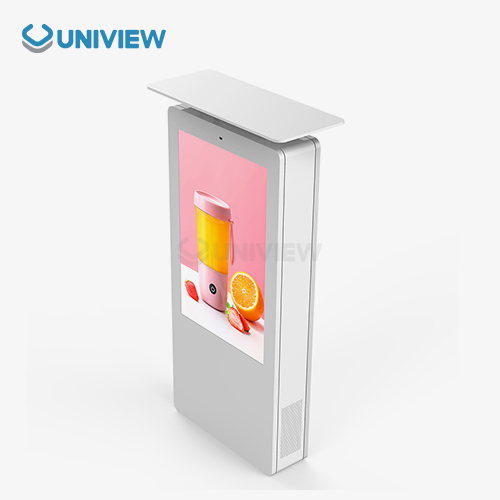
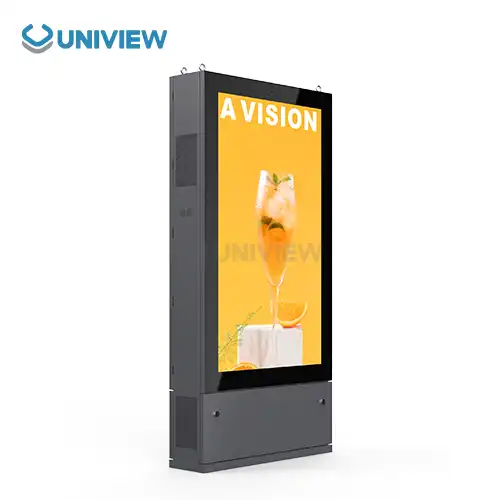
The environment has a big impact on the choice of a show. For example, outdoor installations need strong buildings and extra safety from the weather. To avoid moisture and dust entry, outdoor wall-mounted digital display units must have an ingress protection grade of IP65 or IP66. These screens have special heat management systems that keep them working in temperatures ranging from -40°C to +55°C. This means that they will always work, even when the weather changes. When it comes to indoor displays, environmental protection comes after aesthetic blending and dynamic features. These units usually have thinner outlines and run more quietly, which makes them good for places like offices, meeting rooms, and stores where noise levels are important. Because there is less stress on the environment, designs can be made that are more refined and work well with internal building.
Interactive vs Non-Interactive Considerations
Touchscreen ability is very useful in apps that need user input, but it makes things more complicated and requires more upkeep. Interactive displays work great in self-service booths, product listings, and apps that help people find their way. This is because they keep users interested, which is good for business. But touch-enabled surfaces need to be cleaned often, and fingerprints and smudges can make them harder to see. For straight broadcast uses like ads, announcements, and informational messages, non-interactive screens are reliable and easy to use. At the same time, these screens usually have a lower total cost of ownership and work very well when one-way contact meets business needs.
Sizing and Resolution Guidelines
The best display size relies on how far away you are viewing and how many people are watching. For longer viewing distances or bigger crowds, you need bigger displays. When looking at an image up close, the link between screen size and resolution is very important for keeping the beauty of the picture. Larger screens need higher resolutions to avoid pixelation. For professional installations, screens run from 32 inches for small meeting rooms to 86 inches for public areas or big conference rooms. Ultra-high-definition screens show a lot of detail for programs that need fine text or complicated graphics. Standard HD resolution, on the other hand, is good enough for simple messages and graphics programs.
Comparing Wall-Mounted Digital Displays: Making the Right Procurement Decision
Wall-Mounted vs Freestanding Options Analysis
Digital display installations that are installed on the wall are clearly better than those that stand alone, especially in places where room is limited. Mounting on the wall makes the best use of floor space and increases security against theft or damage by mistake. The permanent placement method also gets rid of mobility issues and makes sure that the best viewing views are achieved by carefully placing the equipment.
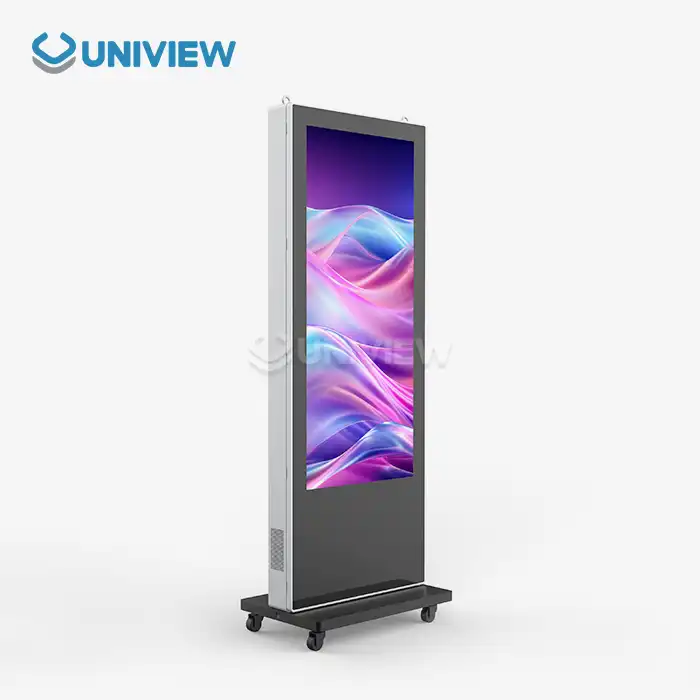
Freestanding displays are useful for temporary setups or rooms that need to be changed often, but they take up more floor space and could be dangerous in areas with a lot of foot traffic. Choosing between hanging options often relies on how the building is set up, how it is used, and any security issues that are unique to that installation site.
Different ways of putting are very different in how hard they are to install. For example, wall mounts need to be analyzed structurally to make sure they can support the weight of the display and wind loads. It is especially important to have a professional install bigger screens or set them in difficult places where safety and performance standards must be met.
Leading Brand Comparison and Selection Criteria
Samsung, LG, Sony, Philips, and NEC are some of the market stars. Each has its own benefits that make it better for different uses and prices. Samsung screens are the most reliable for businesses because they are well-built and come with full warranties. LG offers new features at reasonable prices, which makes them a good choice for setups that want to save money. Sony's advanced color reproduction technology produces high-quality images that are perfect for uses where visual accuracy is very important.
Philips focuses on healthcare and business uses with unique features like reducing blue light and making forms that are easy on the body. NEC makes tough electronics and gives you a lot of ways to customize them for professional setups. The brand you choose should match the needs of the application, your income, and your hopes for long-term support.
Different manufacturers have different quality standards, but tier-one names usually have better parts, longer warranties, and more thorough expert support. Even though expensive names cost more at first, they often have a lower total cost of ownership because they are more reliable and last longer.
Cost Analysis and Warranty Considerations
Investment costs include more than just the price of the original buy. They also include the costs of installation, integration, ongoing upkeep, and replacement in the future. The higher initial costs of professional-grade displays are justified by their longer working lifespans, lower upkeep needs, and better performance dependability. Instead of just looking at the initial purchase prices, budget analysis should take into account the total cost of ownership over the expected deployment time.
Warranty coverage varies a lot between brands and model levels, but commercial-grade screens usually come with full coverage for three to five years. There are choices for extended warranties that offer extra security for important installations where downtime has a big effect on business. Service terms should include reaction times, substitute processes, and the availability of technical help to keep operations running as smoothly as possible.
Installation and Integration: Ensuring a Hassle-Free Setup
Essential Tools and Mounting Methods
In order to ensure safety and best performance, a wall-mounted digital display installation must be done correctly. Professional setups use precise torque wrenches, level instruments, and structural analysis tools to make sure the mounting is safe and can handle the pressures of the environment. Wall anchoring systems need to be able to handle the weight of the show plus safety factors for wind loads and, if needed, earthquake activity.
Which mounting hardware to use varies depending on the type of material used to build the wall. For example, different types of anchors are needed for buildings made of steel, concrete, and composite materials. Professional builders check the structure's strength and ability to support weight before they start the job. They do this to make sure they follow all local safety and building rules.
Cable management systems keep power and data connections organized while keeping things looking neat. Cables are protected from damage from the environment by conduit systems, which also make them easy to reach for repair or upgrades in the future. Using the right grounding methods can keep you safe from electrical dangers and make sure your equipment works well outside.
System Integration and Compatibility
Compatibility between content management systems makes sure that they can work with existing IT infrastructure. These days' displays work with many different types of input and network standards, which lets them connect to company networks, digital signage software, and tracking systems that are far away. The ability to work with different APIs lets developers make custom software for specific uses or practical needs.
When adding displays to business systems, network security becomes very important. Regular security updates, secure communication methods, and access limits keep your system safe from online threats and make sure it works properly. Professional installation teams work with IT departments to make sure that the network is set up correctly and that security rules are followed.
Professional Installation vs DIY Approaches
Professional help is needed for complicated installs, especially ones that happen outside, have big screens, or connect to other systems. Professional fitters bring special tools, safety gear, and knowledge of how to deal with problems that might come up during installation. When you pay for skilled installation, you usually get better performance from the start and fewer guarantee claims.
For highly skilled teams with the right tools and safety training, simpler indoor installs may allow do-it-yourself methods. But if the equipment isn't installed correctly, the guarantee might not cover it. For this reason, it's a good idea to have professional installation done on expensive display equipment.
Future-Proofing Your Investment: Technology Trends & Energy Efficiency
Emerging Technology Integration
Digital signs are changing from simple display tools to smart conversation platforms thanks to artificial intelligence. AI-powered displays look at the demographics of the audience, change material based on viewing habits, and make sure that messages have the most effect possible. These smart features let content change on the fly, which increases interaction while lowering management costs.
Higher resolution standards are still changing, and now 8K screens are available for use in industries that need a lot of information. To support the cost of ultra-high-resolution technology, however, material access and bandwidth needs must match display capabilities. At the moment, most business apps work very well with 4K resolution, which gives users ways to improve as content ecosystems develop.
Modern interactive software systems let users have complex experiences that make digital screens and computers seem more like one thing. These platforms allow for complicated apps like videoconferencing, shared offices, and real-time data visualization, which turn screens into productivity tools instead of just messaging systems.
Energy Efficiency and Environmental Impact
Through LED backlighting, smart brightness control, and sophisticated power management features, modern wall-mounted digital display systems achieve amazing energy economy. These changes save a lot of money on running costs and help companies with their environmental efforts. Compared to earlier generations, energy use has gone down a lot, and brightness and picture clarity have gotten better.
Automatic brightness change adjusts based on the lighting conditions, using less power when there isn't much light while still allowing for good vision. Occupancy monitors can turn off screens when they are not being used, which saves even more energy without affecting the user experience. These features help buildings get green building certifications and meet the standards for environmental reports.
Modular Design and Scalability
Displays that are designed with the future in mind use flexible parts that can be upgraded without having to update the whole system. Media players that can be upgraded, storage systems that can be expanded, and interface parts that can be swapped out all make products last longer and meet changing needs. This method lowers the total cost of ownership while making sure that the system will continue to work with new technology.
Through unified control and standard interfaces, scalable software platforms allow for growth from single displays to deployments across an entire company. Cloud-based management tools let you handle installations around the world from afar while keeping user experiences consistent and keeping control in one place.
Conclusion
To get the most out of your investment, choosing the best wall-mounted digital display requires striking a balance between technical requirements, environmental needs, and operating goals. Professional-grade displays offer better performance, dependability, and connection options that make their price tag worthwhile by improving communication and lowering running costs.
As technology improves, these systems will continue to be useful because screens are becoming smarter, using less energy, and having more control options. The right choice of vendor, skilled installation, and full support plans are the building blocks for successful deployments that meet current needs and can adapt to future growth and technological progress.
FAQ
Q: What factors should I prioritize when selecting office digital displays?
A: For working settings, the most important things to consider when choosing a screen are its resolution, size, and ability to work with other devices. High-resolution screens make sure that text is clear and images look good, and the right size makes viewing lengths ideal for most meeting room setups. Integration with current show and videoconferencing systems makes it more useful and encourages more people to use it.
Q: How do modern displays compare to traditional boards in terms of energy efficiency?
A: Modern digital screens work better and use a lot less power than older models. LED illuminating systems can be very bright while using very little power, and the clever brightness control can change based on the environment. Many installations say that newer display technologies save 40 to 60 percent of the energy used by older ones, while adding the ability to control material dynamically and remotely.
Q: What customization options are available for bulk orders?
A: When you buy a lot of something, manufacturers usually let you change a lot of things about it, like the color of the enclosure, the mounting hardware, the software versions that come pre-installed, and the interfaces that are named. Different needs can be met with custom monitor sizes, higher environmental ratings, and different ways to link. These changes make sure that the parts fit perfectly in certain situations and still protect the manufacturer's guarantee.
Q: How often do outdoor displays require maintenance?
A: When placed and set up correctly, professional outdoor displays don't need much regular upkeep. In dusty places, air filtering systems may need to be cleaned every three to six months. Sealed designs, on the other hand, don't need any filter upkeep at all. Professional checks once a year make sure that operations keep running smoothly and find any problems before they become a problem. Most high-quality screens work regularly for 5 to 7 years with little maintenance.
Q: What warranty coverage should I expect from commercial displays?
A: Commercial-grade screens usually come with full guarantees that cover parts, labor, and on-site service for three to five years. Premium manufacturers give expert help 24 hours a day, seven days a week, and promise response times for important installations. You can get an extended warranty for extra safety, and some makers include insurance that covers damage from the environment or theft.
Partner with Uniview Commercial for Superior Wall-Mounted Digital Display Solutions
With cutting-edge LCD and LED signage solutions designed for challenging business uses, Uniview Commercial is your go-to source for wall-mounted digital display products. Our industrial-grade screens have advanced thermal management systems, can get as bright as 4,000 nits, and have strong IP66 weather protection grades that make sure they work well in a wide range of settings.
We have a lot of experience in the retail, business, hotel, and transportation industries, and we can make solutions that are specific to each one. We take care of the whole project, from the initial advice to professional installation and ongoing technical support. Our extended insurance coverage of 3–5 years and global 24-hour support network backs this up.
Email our technical experts at sales@univiewlcdisplay.com to talk about your unique needs and get personalized advice for your next digital signage rollout. Our team gives great value by offering high-quality products at low prices and providing unbeatable customer service. This is why people in over 100 countries believe us.
References
1. Digital Signage Market Analysis and Technology Trends Report 2024, International Digital Display Association
2. Commercial Display Performance Standards and Testing Protocols, Society for Information Display Technical Guidelines
3. Energy Efficiency in Commercial Digital Signage Systems, Institute of Electrical and Electronics Engineers Journal
4. Best Practices for Outdoor Digital Display Installation and Maintenance, Professional Display Manufacturers Alliance
5. Interactive Display Technology Integration in Corporate Environments, Business Technology Research Institute
6. Environmental Impact Assessment of Modern LED Display Systems, Sustainable Electronics Consortium

Learn about our latest products and discounts through SMS or email