- English
- French
- German
- Portuguese
- Spanish
- Russian
- Japanese
- Korean
- Arabic
- Greek
- German
- Turkish
- Italian
- Danish
- Romanian
- Indonesian
- Czech
- Afrikaans
- Swedish
- Polish
- Basque
- Catalan
- Esperanto
- Hindi
- Lao
- Albanian
- Amharic
- Armenian
- Azerbaijani
- Belarusian
- Bengali
- Bosnian
- Bulgarian
- Cebuano
- Chichewa
- Corsican
- Croatian
- Dutch
- Estonian
- Filipino
- Finnish
- Frisian
- Galician
- Georgian
- Gujarati
- Haitian
- Hausa
- Hawaiian
- Hebrew
- Hmong
- Hungarian
- Icelandic
- Igbo
- Javanese
- Kannada
- Kazakh
- Khmer
- Kurdish
- Kyrgyz
- Latin
- Latvian
- Lithuanian
- Luxembou..
- Macedonian
- Malagasy
- Malay
- Malayalam
- Maltese
- Maori
- Marathi
- Mongolian
- Burmese
- Nepali
- Norwegian
- Pashto
- Persian
- Punjabi
- Serbian
- Sesotho
- Sinhala
- Slovak
- Slovenian
- Somali
- Samoan
- Scots Gaelic
- Shona
- Sindhi
- Sundanese
- Swahili
- Tajik
- Tamil
- Telugu
- Thai
- Ukrainian
- Urdu
- Uzbek
- Vietnamese
- Welsh
- Xhosa
- Yiddish
- Yoruba
- Zulu
What Industries Benefit Most from Interactive Touch Screen Kiosks?
Interactive touch screen kiosks have revolutionized business operations across numerous sectors, with retail, healthcare, hospitality, transportation, and corporate environments leading the adoption. These digital solutions enhance customer engagement, streamline service delivery, and reduce operational costs while providing valuable data analytics. Modern interactive touch screen kiosk technology offers unprecedented customization opportunities, enabling businesses to create targeted user experiences that drive revenue growth and operational efficiency across diverse industry applications.

Understanding Interactive Touch Screen Kiosks
Advanced hardware and software are combined in an interactive touch screen kiosk to create dynamic, user-friendly self-service platforms. These high-tech systems use cutting-edge display technology and easy-to-use software tools to keep users interested while gathering useful, practical data.
Core Technologies and Components
Modern touch screen booths use both capacitive and infrared touch technologies. Each has its own benefits for different work settings. Capacitive screens are great for high-traffic indoor areas because they are very fast and can handle multiple touches. It lasts longer than other technologies, and infrared technology works well outside, where weather protection is important.
Software platforms make it possible to handle all kinds of material and connect them easily to other business systems. These systems allow for real-time updates, remote tracking, and thorough analytics that help companies improve how they deal with customers and run their operations.
Enhanced Functionality Through Peripherals
Extra parts that can be added make kiosks much more useful than just touch encounters. Integrated printers make it possible to print tickets and receipts, and barcode readers make it easier to keep track of goods and identify customers. Payment processing units allow for contactless transfers, which meet the needs of current customers who want safe and easy ways to pay.
Together, these modern parts make it easier to connect with customers, lower costs, and provide useful data that helps businesses make important choices. Because they collect data, interactive kiosks are very useful in competitive business-to-business (B2B) settings where operating efficiency has a direct effect on profits. This is because the data helps companies figure out things like customer behavior patterns, peak usage times, and service preferences.
Top Industries Leveraging Interactive Touch Screen Kiosks
Many different types of businesses can benefit greatly from using interactive kiosks, and each type of business can make apps that meet their unique operating needs and customer service goals. Touch screen technology today is very flexible, so it's possible to make custom solutions that solve problems in specific industries and give a clear return on investment.
Retail Industry Applications
Interactive booths are being used in stores for self-checkout systems, product information screens, and managing customer reward programs. During busy buying times, these systems cut down on wait times while giving customers detailed product information, information on availability, and personalized suggestions based on what they've bought in the past.
After installing kiosks, major retail chains say that checkout times have gone down by up to 30% and customer happiness has gone up by 25%. The technology lets staff move to more important customer service tasks while keeping the level of service good during busy times.
Healthcare Sector Integration
Facilities that provide healthcare use interactive screens to register patients, make appointments, and check insurance coverage. These systems make it easier for administrators to do their jobs while also collecting correct data and protecting patients' privacy when sharing private information.
Modern healthcare devices work with electronic health record systems, which makes it easier to share information and lessens the chance of making mistakes when entering it. Patients can fill out forms, update their medical records, and confirm their appointments without having to ask a staff member to do it for them. This increases operating efficiency while keeping high standards of healthcare quality.
Transportation and Hospitality Solutions
At transportation hubs, interactive screens let people buy tickets, find out about schedules, and get directions. These solutions help airlines, train systems, and public transportation networks keep track of the flow of passengers and shorten wait times at standard service counters.
Kiosks are used in hospitality places to check guests in, offer personal services, and give information about nearby attractions. Hotels say that their guests are happier and that the front desk staff has less work to do, which lets them focus on providing personalized service while still keeping operations running smoothly.
Case studies from these industries show real gains, such as higher sales conversion rates, shorter wait times for customers, and better resource management. These organizational benefits directly lead to higher profits and a better place in the market for each product or service.
How to Choose the Right Interactive Touch Screen Kiosk for Your Industry?
To choose the best kiosk option, you need to look at a lot of factors that are specific to your business, like the number of users you expect, the environment, and the functions you need that are in line with your operational goals. To make good buying choices, you need to weigh the original investment costs against the long-term business benefits and the need for growth.
Essential Technical Criteria
The size of the screen you choose relies on how complicated the content is and how far away you can see it. Larger screens are better for thorough product listings and complicated navigation systems, while smaller screens are better for simple purchases and information requests.
When choosing between indoor and outdoor placement choices, durability specs become very important. For outdoor installations, you need weather protection grades of IP65 or IP66, anti-glare coatings, and temperature control systems that work in a variety of weather situations. Indoor units focus on making the user interface flexible and blending in with the overall style of the building.
Software Flexibility and Integration Capabilities
Modern kiosk platforms must work well with business systems that are already in place, such as platforms for managing goods, managing relationships with customers, and accepting payments. Being able to work with more than one operating system makes upgrades easier in the future and simplifies long-term upkeep.
Content management systems should allow updates from afar, tracking in real time, and thorough analytics reports. These features allow for constant improvement of user experiences and give useful information about how customers behave and how well operations are running.
Vendor Reliability and Support Services
When you look at a vendor's steadiness, you should look at their track record, client references, and the areas where they offer help that match your business. Established makers usually offer full warranty plans, expert support services, and new parts that can be ordered right away. These things will protect your investment for a long time.
There are different ways to buy things, such as buying them directly or selling them. Each has its own financial benefits, which depend on the needs of the business and how often it needs to update its technology. A lot of the time, leasing programs include upkeep services and update paths that keep operations running smoothly while keeping the total cost of ownership low over multiple years.
Future Trends in Interactive Touch Screen Kiosks
New technologies like personalized personalization driven by AI, voice interface integration, and better connection through 5G and Internet of Things platforms are speeding up the evolution of interactive touch screen kiosks. By turning kiosks from static information screens into dynamic engagement platforms that change based on user choices, these innovations change the way industries work.
Artificial Intelligence Integration
Personalization engines that are driven by AI look at trends in how users behave to give them personalized content suggestions and easier ways to navigate. Machine learning algorithms improve conversion rates and shorten contact times by adjusting interface patterns based on demographic data and usage analytics.
Voice recognition technology lets you connect without using your hands. This makes it easier for people with disabilities to use technology and supports users who speak more than one language. Natural language processing makes it possible for conversational interfaces to be used instead of standard menu systems to walk users through complicated processes.
Enhanced Connectivity and IoT Integration
Real-time content sharing across spread kiosk networks is made possible by 5G connections. It also supports bandwidth-intensive apps like videoconferencing and augmented reality experiences. By integrating the Internet of Things, environmental monitors, inventory systems, and building management tools can be linked to kiosks to make operating ecosystems that are responsive.
These technological advances are in response to changing user needs for omnichannel experiences that work smoothly across all digital and physical touchpoints. Businesses are investing more and more in kiosk solutions that are flexible and won't break in the future. These solutions need to be able to change to new technologies and changing business needs.
Modern ways of buying things focus on hardware designs that can be put together in different ways and cloud-based software platforms that let you keep adding new features without having to change the whole system. This method protects investments in technology and keeps businesses competitive as consumer demands for more advanced interactive experiences grow.
Best Practices for Implementing Interactive Touch Screen Kiosks in Your Industry
Smart application plans put a lot of emphasis on designing kiosks with user-friendly interfaces and in line with disability standards, such as those set by the Americans with Disabilities Act. When launches go well, they balance how the system looks with how well it works to make engaging user experiences that lead to measurable business outcomes.
User Interface Design Principles
When designing an interface, the menu should be easy to use and adaptable to users with different levels of technical knowledge. Clear graphic hierarchies, uniform button placement, and sensible information flow all help users learn faster and be less frustrated during busy times.
Accessibility compliance goes beyond the bare minimum and includes things like multilingual support, text size adjustments, and voice advice choices that help a wide range of users. These methods to inclusive design show that an organization is committed to fair service delivery while also increasing the number of people who might use their services.
Strategic Placement and Environmental Considerations
Where kiosks are placed has a big effect on how often they are used and how well they work. High-traffic places give you the most exposure while still leaving enough room for people to wait in line and talk to each other comfortably. Lighting, noise, and how easy it is for people to get to affect how many people use something and how satisfied they are with it generally.
When installing something indoors, it's best to match the brand's aesthetics and current building elements to make the setting feel more cohesive. When deploying outside, you need to think about the weather, protection measures, and how easy it is to do maintenance so that the system works reliably in a range of situations.
Maintenance and Support Protocols
Maintenance programs that include regular software updates and guarantee services backed by the provider protect the investment value and make sure that the system keeps working well. Schedules for preventive maintenance include cleaning the hardware, optimizing the software, and installing security patches that keep the system running reliably.
Performance tracking systems keep track of how things are used, how often mistakes happen, and how satisfied users are. This information is used to guide efforts to keep making things better. These insights from data-driven analysis allow for proactive scheduling of repair and feature optimization that maximizes return on investment while minimizing practical disturbance during key business times.
Conclusion
Interactive touch screen kiosks are revolutionizing retail, healthcare, leisure, transportation, and business settings by making customers more interested and improving operating efficiency. These digital solutions cut down on labor costs while offering service 24 hours a day, seven days a week, and useful data that helps businesses make strategic decisions.
For implementation to go well, it's important to carefully look at the technical specs, vendor skills, and industry-specific needs that match up with practical goals. Today's kiosk technology lets you customize and integrate them in ways that have never been done before. This supports a wide range of business needs and protects the long-term value of your investment through scalable, future-proof systems.
FAQ
What are the typical costs for implementing interactive touch screen kiosks?
The price of an interactive kiosk depends a lot on the size of the screen, the surroundings, how complicated the software is, and how much customization is needed. Basic indoor units cost between $3,000 and $5,000. More advanced outdoor systems that can withstand the weather and have special accessories cost between $8,000 and $15,000. The total costs of execution include licensing software, installation services, and ongoing support contracts, which usually add 20 to 30 percent to the cost of buying the hardware in the first place.
How do I choose between indoor and outdoor kiosk models?
Indoor models focus on making the user interface responsive and blending in with the style of the current building. Outdoor units need to be rated IP65 or IP66 for weather protection, have anti-glare screens that can be read in full sunlight, and have temperature control systems. For each placement site, the right specs are chosen based on things like humidity, weather extremes, and security needs.
Can interactive kiosks be customized for specific industry requirements?
Modern kiosk systems let you make a lot of changes, like adding your own logo to the interface, connecting specific peripherals, and making your own software. Industries can add features like payment processing, biometric identification, printer integration, and business system connections that meet their specific operating needs and keep the user experience the same in all rollout sites.
Partner with Uniview Commercial for Premium Interactive Touch Screen Kiosk Solutions
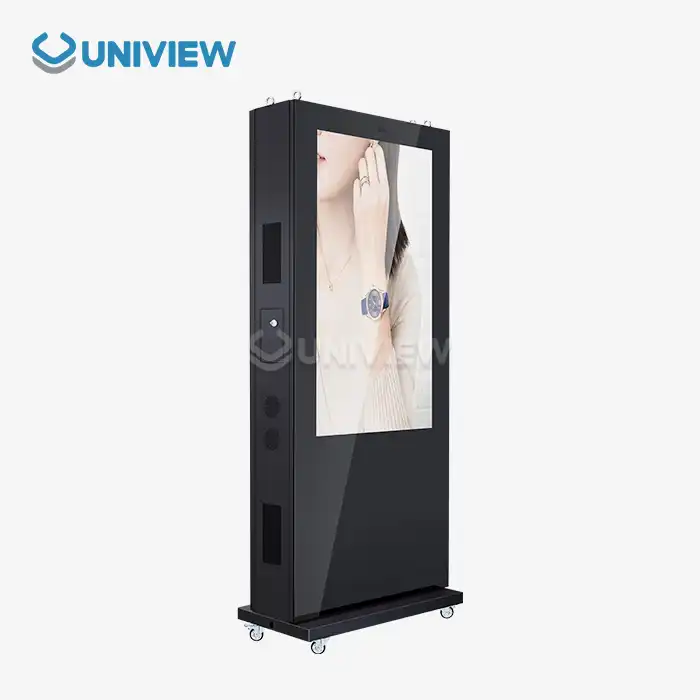
Uniview Business is the interactive touch screen kiosk provider you can trust. They offer cutting-edge digital signage solutions that are designed to work better in tough business settings. Our advanced production skills allow us to make very bright displays (2000 to 4000 nits), resistant to weather (IP65–IP66), and protected against corrosion according to European standards. This means they will work reliably even in tough circumstances.
Our full line of products includes touch screen displays that can be customized, video wall systems, and all-in-one interactive solutions. All of these come with a warranty that lasts between 3 and 5 years and expert help that is available 24 hours a day, 7 days a week. We know what the specific needs of retail, transportation, hospitality, and business projects are because we've worked with clients in over 100 countries.
Get in touch with our purchasing experts at sales@univiewlcdisplay.com to talk about your interactive touch screen kiosk needs and look into unique solutions that will give you a great return on your investment for your industry.
References
1. Digital Signage Industry Report: Interactive Kiosk Market Analysis and Growth Projections 2024-2029, Technology Research Institute
2. Customer Engagement Through Self-Service Technology: A Comprehensive Industry Study, Journal of Business Technology Solutions
3. Retail Automation and Interactive Display Implementation: Case Studies from Global Markets, International Retail Technology Association
4. Healthcare Digital Solutions: Patient Experience Enhancement Through Interactive Kiosk Technology, Medical Technology Review
5. Transportation Infrastructure Modernization: Interactive Kiosk Deployment Strategies and Outcomes, Public Transit Innovation Quarterly
6. Corporate Communication Technology: Interactive Display Solutions for Modern Business Environments, Business Technology Management Journal


Learn about our latest products and discounts through SMS or email