- English
- French
- German
- Portuguese
- Spanish
- Russian
- Japanese
- Korean
- Arabic
- Greek
- German
- Turkish
- Italian
- Danish
- Romanian
- Indonesian
- Czech
- Afrikaans
- Swedish
- Polish
- Basque
- Catalan
- Esperanto
- Hindi
- Lao
- Albanian
- Amharic
- Armenian
- Azerbaijani
- Belarusian
- Bengali
- Bosnian
- Bulgarian
- Cebuano
- Chichewa
- Corsican
- Croatian
- Dutch
- Estonian
- Filipino
- Finnish
- Frisian
- Galician
- Georgian
- Gujarati
- Haitian
- Hausa
- Hawaiian
- Hebrew
- Hmong
- Hungarian
- Icelandic
- Igbo
- Javanese
- Kannada
- Kazakh
- Khmer
- Kurdish
- Kyrgyz
- Latin
- Latvian
- Lithuanian
- Luxembou..
- Macedonian
- Malagasy
- Malay
- Malayalam
- Maltese
- Maori
- Marathi
- Mongolian
- Burmese
- Nepali
- Norwegian
- Pashto
- Persian
- Punjabi
- Serbian
- Sesotho
- Sinhala
- Slovak
- Slovenian
- Somali
- Samoan
- Scots Gaelic
- Shona
- Sindhi
- Sundanese
- Swahili
- Tajik
- Tamil
- Telugu
- Thai
- Ukrainian
- Urdu
- Uzbek
- Vietnamese
- Welsh
- Xhosa
- Yiddish
- Yoruba
- Zulu
Why Are Interactive Touch Screen Kiosks Popular in Public Spaces?
Interactive touch screen kiosks have changed public areas by providing easy-to-use self-service options that improve the user experience while lowering costs. These high-tech digital interfaces mix cutting-edge technology with easy-to-use design to make exchanges smooth in business, shopping, transportation, and hospitality settings. They're very popular because they make it easy to get information right away, speed up services, and collect useful information about users. This makes them necessary for managing public spaces and getting customers involved in modern business strategies.
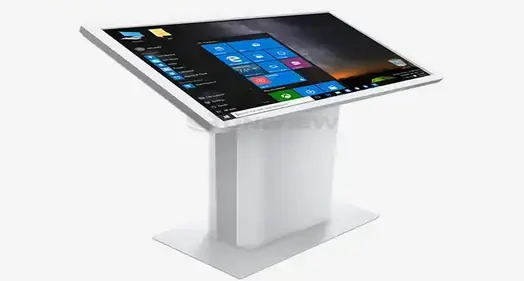
Understanding Interactive Touch Screen Kiosks: Features and Technology
Interactive touch screen booths are a big step forward in public interface technology. They use advanced hardware and software to give users experiences that are dynamic and flexible. Several types of technology are combined in these systems to make exchanges smoother and more useful than standard static information screens.
Advanced Touch Technology and Hardware Components
Modern interactive booths use cutting-edge touch technologies that make sure users can connect with them accurately and quickly. The market is dominated by capacitive touchscreens because they are more sensitive and can recognize more than one touch. This lets users explore displays with natural movements like pinching, swiping, and clicking. As an option, infrared touch technology can be used. This works especially well in harsh outdoor settings where reliability is very important. The hardware base is made up of powerful computers that can run complicated programs and multimedia material at the same time. High-performance CPUs make sure that things run smoothly even when they're being used a lot, and advanced graphics processing makes sure that screens look clear and colorful, which grabs people's attention. Memory and storage parts are the right size to handle large content stores and the data collection needs of users.
Connectivity and Integration Capabilities
Connectivity choices are an important part of current interactive kiosks. Wi-Fi, Ethernet, and cellular links make it possible to update material in real time, watch it from afar, and easily connect it to other business systems. These connections support cloud-based content management, which lets managers change data on many kiosks at once from one central place. Integration features go beyond simple connectivity and include support for printers, payment systems, barcode readers, and cameras, among other peripherals. Because they are so flexible, kiosks can do many things, such as handing out information, processing transactions, and writing documents. Integrating APIs into kiosks lets them connect to analytics platforms, customer relationship management systems, and libraries of goods. This makes digital ecosystems that are complete.
Why Interactive Touch Screen Kiosks Solve Public Space Challenges?
Many operational problems in public areas are hard to solve with standard service delivery methods. Users get frustrated when there are long wait times, not enough staff, and inconsistent service quality. For building managers, this means higher running costs. These basic problems can be solved smartly with interactive touch screen kiosks.
Streamlined Service Delivery and Reduced Wait Times
Interactive booths cut wait times by a huge amount because they let users get information and do deals on their own. Self-service booths for directory services and advertising information have cut wait times in shopping malls by an average of 40 to 60 percent. People can check plans, buy tickets, and get real-time information at transportation hubs without having to wait in line at counters run by people. The self-service model works especially well during busy times when human resources staff are stretched thin. The performance of kiosks stays the same no matter how many people use them, so users always get quick service, even when the kiosks are busy. This dependability makes customers happier overall and puts less stress on the staff that is already there.
Enhanced Data Collection and Analytics
Interactive booths are great for gathering information about how people behave, what they like, and how they interact with things. Touch interactions, session lengths, and content choices give facility managers practical information that helps them improve services and make the user experience better. This information helps stores figure out how customers get from one place to another, what kinds of products people like, and what yearly trends are happening. Analytics can also be used to improve operations. For example, booths can show you when service is slowing down, when usage is at its highest, and what material works best. This knowledge lets people make decisions based on facts, which leads to better strategies for allocating resources and delivering services.
Comparative Insights: Interactive Touch Screen Kiosks vs Traditional Solutions
When choosing between interactive touch screen kiosks and standard static displays, it's important to think about how engaging they are, how flexible they are in terms of operation, and what they offer in the long run. By understanding these differences, businesses can make smart financial choices that meet their unique operational needs.
Engagement Quality and User Experience
The level of interaction with interactive booths is much better than with static displays. Users actively connect with content instead of idly viewing it, which makes them more interested in what they're seeing and remembering. Touch interfaces let users have more customized experiences by giving them access to information that is important to their wants and interests. Traditional flat screens are cheap, but they don't offer many ways to interact with the audience and cannot be changed to fit the needs of each user. These work well for showing basic information, but they aren't flexible enough to give users a unique experience or let them give comments. In current digital settings where users expect dynamic, responsive interfaces, the one-way communication approach makes them less useful.
Maintenance Requirements and Operational Considerations
When it comes to care, interactive kiosks need more complex steps than regular displays. These steps include software changes, hardware calibration, and managing peripheral devices. However, online tracking often cuts down on the need for on-site repair visits, as many problems can be fixed through remote diagnostics and updates. These days, kiosks have built-in self-diagnostic tools that find problems before they affect the user experience. Traditional displays usually don't need as much upkeep, but they don't have as many monitoring tools, which makes it harder to figure out what's wrong. Their ease of use can be helpful in places where there isn't a lot of professional support, but it means they can't do as much or reach as many people.
Environmental Durability and Form Factor Considerations
Environmental factors have a big impact on kiosk purchase choices. For outdoor use, screens must have an IP65 or IP66 grade for security, be able to show 2000 to 4000 nits of brightness, and be able to handle temperatures from -20°C to 60°C. Outdoor interactive booths have to be able to handle all kinds of weather while still being able to respond to touches and show clear images. Form factors and design choices are wider when it comes to indoor settings. Wall-mounted, freestanding, and desk designs give you options for how to use the room and make things easier for users to reach. Indoor booths can put an emphasis on looks and user comfort while still meeting basic operation needs.
Procurement Considerations for Interactive Touch Screen Kiosks
To buy a kiosk successfully, you need to plan for a lot of things, like technology needs, evaluating vendors, and long-term operating issues. Knowing these things will help you get the best results on your investments and run your business successfully.
Defining Use Cases and Operational Requirements
A clear description of the use case is the key to successfully purchasing kiosks. Before comparing vendors, businesses need to be clear on their goals, the types of people they want to use their products, and the features they need. While transportation hubs focus on helping people find their way and showing them schedules, retail spaces might put more emphasis on looking through product catalogs and showing promotional material. An operational environment evaluation looks at things like available room, power, network connections, and security needs. Strong building and better security features are needed in places with a lot of foot traffic, while climate-controlled spaces may put more emphasis on looks and user comfort. These things have a direct effect on the hardware requirements and how it needs to be installed.
Vendor Selection and Certification Requirements
Reputable makers give important guarantees about the quality of their products, their adherence to standards, and their ongoing support services. International certifications like CE marking, FCC compliance, and UL rating show that safety and efficiency standards are being met. These licenses are especially important for businesses that work in controlled fields or need specific proof of compliance. The ability to provide after-sales help has a big effect on the long-term success of an operation. Full insurance coverage, quick technical help, and local service options make sure that the kiosk works well and has little downtime throughout its lifetime. Companies that work in different time zones or areas can get more value from vendors that offer help 24 hours a day and global service networks.
Budget Planning and Financial Considerations
A complete budget plan includes more than just the cost of the original buy. It also includes the costs of setup, customization, training, and ongoing upkeep. Installation costs change a lot depending on the needs of the place, the power infrastructure, and the need to link to a network. Custom software creation or interface needs can add a lot of money, which should be planned for in the beginning. Kiosk deployments can be easier for businesses with small capital budgets if they can get financing options like leasing agreements and bulk savings. Many sellers offer flexible payment terms that work with your business's cash flow needs and give you access to cutting-edge technology solutions.
Future Trends and Strategic Advantages of Interactive Touch Screen Kiosks
As artificial intelligence, Internet of Things connections, and advanced analytics get better, the interactive kiosk business keeps changing quickly. These changes in technology open up new ways to improve the user experience and make operations run more smoothly.
AI Integration and Personalization Capabilities
Adding artificial intelligence to kiosks lets them give smart user help, make personalized suggestions, and offer information before it's needed. Machine learning algorithms look at trends in how people use a system to find the best ways to arrange its elements, put its material, and provide its services. Voice recognition features make things more accessible while lowering the need for touch interactions. AI-powered data gives you more information about what users want, how to run your business more efficiently, and what material works best. Predictive maintenance can find hardware problems before they affect users, which cuts down on downtime and maintenance costs. Through programmed learning and improvement processes, these smart systems keep getting better at what they do.
IoT Connectivity and Smart Building Integration
With Internet of Things connection, kiosks can work with smart building systems, security systems, and weather controls without any problems. Sharing real-time data between kiosks and building control systems makes the best use of space, energy, and security measures. This integration makes complete digital environments that make building management more efficient as a whole. Integration of smart buildings also allows materials to change dynamically based on the surroundings, the number of people in the building, and the time of day. Kiosks can change the brightness of their screens, the material they show, and the services they offer instantly based on the user's wants and the current situation.
Conclusion
Interactive touch screen kiosks are now commonplace in public places because they improve the user experience, make operations run more smoothly, and give useful data information. Their advanced technology, along with useful features like shorter wait times and easier access to services, makes them appealing investments for businesses in the retail, leisure, transportation, and workplace sectors. As AI and the Internet of Things (IoT) become more integrated, they will offer even more benefits and possibilities. Public places will continue to become more digital, and interactive booths will become more important for making user experiences quick, fun, and based on data.
FAQ
What are the primary benefits of interactive touch screen kiosks in public spaces?
Interactive touch screen kiosks have many benefits, such as shorter wait times, service access 24 hours a day, seven days a week, uniform service quality, and the ability to collect useful data. They make self-service choices possible, which cuts down on staffing needs and boosts customer happiness through quick, personalized interactions.
How do I select the right interactive touch screen kiosk for outdoor environments?
When choosing an outdoor booth, you should think about how resistant it is to the elements, such as having an IP65 or IP66 grade, a high-brightness display (2000 to 4000 nits), being able to handle high temperatures, and being built so that it can't be broken into. Anti-glare coatings and materials that don't rust ensure long-lasting performance in harsh weather situations.
What maintenance practices maximize interactive kiosk lifespan and performance?
Software changes, screen cleaning, hardware calibration, and checking of secondary devices are all part of regular maintenance. Remote tracking systems find problems before they get too bad, and regular preventative maintenance stops big problems before they happen. With regular upkeep, kiosks can last up to seven to ten years and still work at the same level of quality.
Partner with Uniview Commercial for Your Interactive Kiosk Solutions
Uniview Commercial is ready to change the look of your public place with state-of-the-art interactive touch screen kiosks that are built to last. As a top maker of interactive touch screen kiosks, we offer solutions that can be tailored to your needs. Our products have high-brightness displays (2000–4000 nits), IP65/IP66 protection, and construction that doesn't rust. Our presence in more than 100 countries around the world guarantees solid support, and our 3–5 year insurance and 24-hour response service provide complete peace of mind. Get in touch with sales@univiewlcdisplay.com to talk about your unique needs and find out how our cutting-edge digital signage options can help you engage your customers and run your business more efficiently.
References
1. Digital Signage Federation. "Interactive Kiosk Technology Standards and Best Practices in Public Environments." Journal of Digital Display Technology, 2023.
2. Smith, J. and Rodriguez, M. "Customer Engagement Through Interactive Touch Screen Systems: A Comprehensive Analysis." International Review of Retail Technology, 2023.
3. Thompson, A. "The Impact of Self-Service Kiosks on Public Space Management and User Experience." Public Facilities Management Quarterly, 2023.
4. Chen, L. et al. "Environmental Durability Requirements for Outdoor Interactive Display Systems." IEEE Transactions on Consumer Electronics, 2023.
5. Williams, K. "ROI Analysis of Interactive Kiosk Deployments in Transportation and Hospitality Sectors." Business Technology Review, 2023.
6. Anderson, P. "Future Trends in Interactive Public Interface Technology: AI Integration and IoT Connectivity." Technology Forecast Magazine, 2023.


Learn about our latest products and discounts through SMS or email