- English
- French
- German
- Portuguese
- Spanish
- Russian
- Japanese
- Korean
- Arabic
- Greek
- German
- Turkish
- Italian
- Danish
- Romanian
- Indonesian
- Czech
- Afrikaans
- Swedish
- Polish
- Basque
- Catalan
- Esperanto
- Hindi
- Lao
- Albanian
- Amharic
- Armenian
- Azerbaijani
- Belarusian
- Bengali
- Bosnian
- Bulgarian
- Cebuano
- Chichewa
- Corsican
- Croatian
- Dutch
- Estonian
- Filipino
- Finnish
- Frisian
- Galician
- Georgian
- Gujarati
- Haitian
- Hausa
- Hawaiian
- Hebrew
- Hmong
- Hungarian
- Icelandic
- Igbo
- Javanese
- Kannada
- Kazakh
- Khmer
- Kurdish
- Kyrgyz
- Latin
- Latvian
- Lithuanian
- Luxembou..
- Macedonian
- Malagasy
- Malay
- Malayalam
- Maltese
- Maori
- Marathi
- Mongolian
- Burmese
- Nepali
- Norwegian
- Pashto
- Persian
- Punjabi
- Serbian
- Sesotho
- Sinhala
- Slovak
- Slovenian
- Somali
- Samoan
- Scots Gaelic
- Shona
- Sindhi
- Sundanese
- Swahili
- Tajik
- Tamil
- Telugu
- Thai
- Ukrainian
- Urdu
- Uzbek
- Vietnamese
- Welsh
- Xhosa
- Yiddish
- Yoruba
- Zulu
Why Choose Interactive Indoor Floor-Standing Kiosks?
Interactive indoor floor-standing kiosk solutions represent the pinnacle of modern customer engagement technology, offering businesses unprecedented opportunities to enhance user experiences while streamlining operational efficiency. These sophisticated digital terminals combine advanced touchscreen interfaces, robust hardware architecture, and intelligent software platforms to deliver seamless self-service capabilities across diverse industry sectors. By implementing interactive kiosks, organizations can significantly reduce staffing costs, eliminate queue bottlenecks, and provide 24/7 service availability that meets evolving customer expectations in today's digital marketplace.

Understanding Interactive Indoor Floor-standing Kiosks
Interactive indoor floor-standing kiosks are the best way for businesses to connect with customers today. They give companies unmatched ways to improve user experiences while also making operations more efficient. These high-tech digital devices have smart software systems, advanced touchscreen interfaces, and strong hardware design that work together to make self-service easy in a wide range of industries. By using interactive booths, businesses can cut down on worker needs, get rid of long lines, and offer service 24 hours a day, seven days a week, which meets the changing needs of customers in today's digital market.
Core Components and Technical Architecture
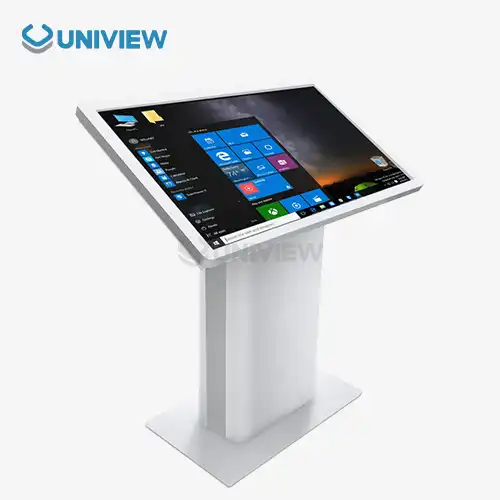
Interactive indoor floor-standing kiosks are made up of hardware and software that work together to make it easier for users to interact with them. The touchscreens and high-tech sensors in these vertical installations work with back-end business systems to give users real-time information and customized experiences. Modern kiosk design includes strong screens, fast processors, connectivity modules, and flexible software systems that can be changed to fit the needs of different industries.
Industrial-grade parts designed for ongoing use make up the technical core of an indoor floor-standing kiosk. Most of the time, these units have Projected Capacitive (PCAP) or Infrared (IR) touch screens that are covered by 3 mm to 6 mm tempered glass with a Mohs 7 hardness grade to keep thieves out. Powder-coated steel or aluminum alloys are used to build the enclosure, which has an IP55 to IP65 grade for dust and water protection in controlled indoor settings.
Modern kiosks have 10-point multi-touch capabilities with a delay below 10 10ms. They are powered by industrial computers that are rated to work 24 hours a day, seven days a week, for more than 50,000 hours without failing. The brightness of the display can range from 350 to 2500 nits, which makes it easy to see in a variety of lighting situations while still meeting energy-saving standards.
Integration Capabilities and Software Compatibility
Modular peripherals like 80 mm thermal printers, QR/barcode scanners, NFC readers, and POS systems can be added to modern interactive booths. High-end units use Windows 10/11 IoT Enterprise or Android 11/12 platforms and have watchdog timers to keep the system from freezing when it's being used for long periods of time. Because it is so flexible, it can easily work with current payment networks, customer relationship management platforms, and business resource planning systems.
Because these systems are flexible, they can be used in a wide range of industries, such as retail, leisure, healthcare, corporate, and transportation. They can solve specific operational problems and help with large-scale digital transformation projects. Knowing how most kiosks are built helps procurement teams picture key interaction points that are needed to make good operational decisions.
Key Benefits of Choosing Interactive Indoor Floor-standing Kiosks
Interactive booth solutions get customers much more involved by giving them personalized choices and easy-to-understand interfaces that have a direct effect on how they buy things and how satisfied they are overall. By lowering the need for human processes that normally require a lot of work, these systems make operations more efficient in a way that can be measured.
Enhanced Customer Experience and Engagement
Compared to standard service models, customer involvement with indoor floor-standing kiosk units is higher. Users can fully explore their choices, get detailed product information, and make well-informed decisions without feeling rushed by salespeople because they can interact with kiosks at their own pace. Users are guided through complicated processes by visual cues and engaging elements. This cuts down on mistakes and increases the number of transactions that are completed.
Personalization features let machines change content based on user tastes, past interactions, or personal information. This lets businesses give each customer a unique experience that speaks to them. Support for multiple languages makes sure that a wide range of users can access the site. This is especially helpful in places with a lot of tourists or foreign business.
Operational Cost Reduction and Efficiency Gains
Putting in interactive kiosks has big organizational benefits because it cuts down on the need for staff and lets machines handle repetitive jobs like buying, checking in, and selling tickets. Most organizations see a 30–50% drop in the number of front-line employees they need while keeping or even raising service quality standards.
These improvements in efficiency directly lead to lower costs because of lower wages, no more overtime, and better use of staff on higher-value tasks that need human knowledge. Because kiosk services are available 24 hours a day, seven days a week, they allow businesses to stay open longer without having to pay more workers, so they can make money during normal off-hours.
Data Collection and Business Intelligence
The embedded analytics features collect a lot of data and turn it into useful insights that can be used to improve processes and make strategic decisions. When people interact with kiosks, they record patterns of behavior, preferences, and transactions that help with managing supplies, making marketing plans, and improving services.
Real-time data lets managers keep an eye on success metrics, find problems, and take quick steps to fix them. This method is based on data and supports efforts to keep making things better. It also gives measurable proof of return on investment (ROI) for senior reports and future investment reasons.
Comparing Interactive Indoor Floor-standing Kiosks with Other Solutions
To choose the best kiosk configurations, you need to know how the pros and cons of different installation types and technology methods compare. Floor-standing units have clear advantages over other options. However, different deployment scenarios may require different approaches depending on available space and usage trends.
Floor-standing vs. Wall-mounted Configurations
Indoor floor-standing kiosks that are installed indoors give you the most options for where to put them within the plan of your current building. Floor-standing units are different from wall-mounted ones because they can be moved around to fit changing traffic patterns, seasonal needs, or building improvements without having to make any structural changes.
Floor-standing designs are better for accessibility because they can better handle wheelchair users and people of different heights than fixed wall installs. Being able to change your position makes it easier on your body and makes long interactions more comfortable. This is especially important for deals that are complicated or sessions where you're gathering information.
Floor-standing units, on the other hand, need their own space on the floor, which can make it harder to place them in tight spaces. Wall-mounted options save important floor space but reduce the comfort of contact and the ability to move around. These are trade-offs that must be weighed against the needs of the deployment.
Touchscreen vs. Non-Touch Interface Options
Users are much more likely to be engaged with interactive tablet models, such as an indoor floor-standing kiosk, than with button- or sensor-only models. Touch interfaces are easy to learn and use, so they make it possible to use complicated movement patterns that would be hard to do with other input methods. Touch features make the total user experience better by letting you give multimedia material, capture signatures, and set up products in great detail.
Still, touchscreen systems need more frequent upkeep, such as cleaning the surface, making changes to the calibration, and maybe even replacing the screen because of how it wears out over time. In places with a lot of foot traffic or where repair is hard to schedule, non-touch options like proximity sensors or voice control may be better.
Cost-Benefit Analysis and ROI Considerations
A full cost analysis must take into account the costs of buying the item the first time, installing it, paying for ongoing upkeep, and paying for program licenses. In 2024, the prices of top makers vary because they offer different sets of features, standards for build quality, and warranty terms that change the total cost of ownership estimates.
Most of the time, premium kiosk options are worth the extra money because they last longer, need less upkeep, and come with full support packages. Budget options may be appealing to businesses that don't have a lot of money, but problems with dependability and higher upkeep costs can make any savings seem less valuable over longer operation periods.
How to Procure the Right Interactive Indoor Floor-standing Kiosk
A thorough analysis of business needs and practical goals is the first step to a successful buying process. This will help with choosing the right technology and evaluating vendors. Organizations need to make sure that kiosk features are compatible with specific use cases and that they can be expanded in the future.
Business Needs Assessment and Use Case Definition
To do effective buying, you must first carefully look at the current organizational problems and figure out which pain points can be solved by putting in place kiosks. In retail settings, order speed and the ability to upsell may be important, while in healthcare settings, patient flow control and information access are more important. Managing visitors and helping people find their way around buildings are often big priorities in corporate setups.
Estimates of the amount of traffic help choose the right gear. Places with a lot of traffic need stronger parts and features that make them last longer. Peak usage times and yearly changes help with planning capacity and figuring out if you might need more than one unit or a load-balancing setup.
Technical Specifications and Performance Criteria
When looking at possible options, procurement teams should put performance stability, environmental durability, and integration compatibility at the top of their list. The lighting levels, resolutions, and viewing angles of a display must be compatible with the setting in which it will be used and with what users expect.
The amount of working power needed depends on how complicated the software is and how many tasks need to be done at once. For example, multimedia material and real-time data processing need more powerful systems. Ethernet, WiFi, cellular, and Bluetooth should all work with the network infrastructure and security standards that are already in place.
Planning for storage space needs to take into account the needs of the operating system, application software, content files, and data logging functions, all while leaving enough performance room for future growth. Memory requirements should allow for smooth moving between tasks and quick application changes during times of high usage.
Vendor Evaluation and Supplier Selection
Assessing a supplier includes looking at their technical skills, customization options, warranty coverage, and how quickly they can respond to help requests. All of these factors affect the success of a long-term relationship. Established manufacturers with a history of reliability usually offer better support systems and more reliable products than younger companies that have just entered the market.
Customization features are very important for businesses that need specific branding elements, software interfaces, or combos of peripherals, especially when deploying an indoor floor-standing kiosk. Flexible providers can adapt to changing needs and offer ways to upgrade that protect initial investments and help the business grow.
Quality approvals like CE, UL, and FCC compliance show that the product meets foreign standards and government rules. These certifications are especially important for businesses that work in multiple countries or in fields that are strictly controlled and must follow strict rules.
Maintenance and Future-Proofing Your Investment
For kiosks to keep working at their best, they need proactive repair plans and forward-thinking technology planning that makes them last longer and keeps users happy. By following regular repair procedures, you can keep small problems from turning into expensive failures or service interruptions.
Routine Maintenance and Performance Optimization
Cleaning interactive surfaces is the most common upkeep task. Touchscreens collect fingerprints and other debris that make them less fast and less clear. Depending on how often it is used and the surroundings, cleaning should be done anywhere from once a day to once a week. Specialized cleaning solutions keep screen coverings safe while getting rid of dirt and grime effectively.
Regular changes to operating systems, security patches, and application software are all part of software maintenance. These updates keep speed levels high and stop security holes. Automated update systems cut down on routine work while making sure that important fixes and feature improvements are applied on time.
Hardware checks should be done every three months to find problems with possible parts before they affect operations. These tests include checking the temperature, making sure the connections work, and making sure the peripherals are working properly. They keep system uptime standards high.
Technology Trends and Future-Proofing Strategies
New technologies, such as fingerprint identification, the integration of artificial intelligence, and eco-friendly materials, are changing what kiosks can do and what users expect from them. Companies should look into ways to improve that include these new technologies without having to update whole systems.
Modular design principles allow changes at the component level, which adds new features and extends the span of a system. This method keeps the initial investments safe and lets businesses accept new technologies as they become more mature and show clear business value.
Predictive maintenance algorithms and remote tracking make proactive troubleshooting systems very good at reducing downtime. These systems find possible problems early on and let you fix them before the service goes down. This keeps users happy and lowers the cost of emergency repairs.
Conclusion
Interactive indoor floor-standing kiosk solutions deliver transformative benefits for organizations seeking to enhance customer experiences while optimizing operational efficiency. These advanced systems combine robust hardware architecture, intuitive software platforms, and comprehensive integration capabilities that address diverse business requirements across multiple industry sectors. The strategic implementation of interactive kiosks reduces labor costs, improves service availability, and generates valuable customer insights that inform business decision-making processes.
FAQ
Q: What security measures protect data on interactive kiosks?
A: There are many levels of security built into modern indoor floor-standing kiosk units. These include data encryption, user authentication methods, and safe communication routes. Advanced systems have role-based access controls, end-to-end encryption for all data transfers, and automatic security updates that keep safety up-to-date against new threats.
Q: Do interactive kiosks support multiple languages for international use?
A: Of course, modern kiosk software systems handle a lot of languages and make it easy to switch between them. Multiple languages make things easier to access and make users happier, so this feature is very important for foreign business settings, tourist spots, and markets with a wide range of demographics.
Q: What is the typical lifespan of an interactive kiosk system?
A: If you keep up with the servicing and program changes, a good interactive kiosk should work well for 7 to 10 years. Industrial-grade parts and strong construction allow for longer operating lifespans that support initial investments through long-lasting performance and low replacement needs.
Q: How do interactive kiosks integrate with existing business systems?
A: APIs and communication methods used by modern kiosks make it easy for them to connect to corporate resource planning systems, customer relationship management platforms, and payment processing networks. Ethernet, WiFi, and cellular connectivity are just some of the connectivity choices that can be used to meet the needs of a wide range of work settings.
Partner with Uniview Commercial for Advanced Indoor Floor-standing Kiosk Solutions
The cutting-edge indoor floor-standing kiosk technology from Uniview Commercial changes the way customers connect with businesses and makes them run more smoothly. Our all-inclusive solutions give businesses in the retail, hotel, corporate, and transportation sectors the power they need by combining high-quality hardware with a wide range of customization choices and top-notch global support.
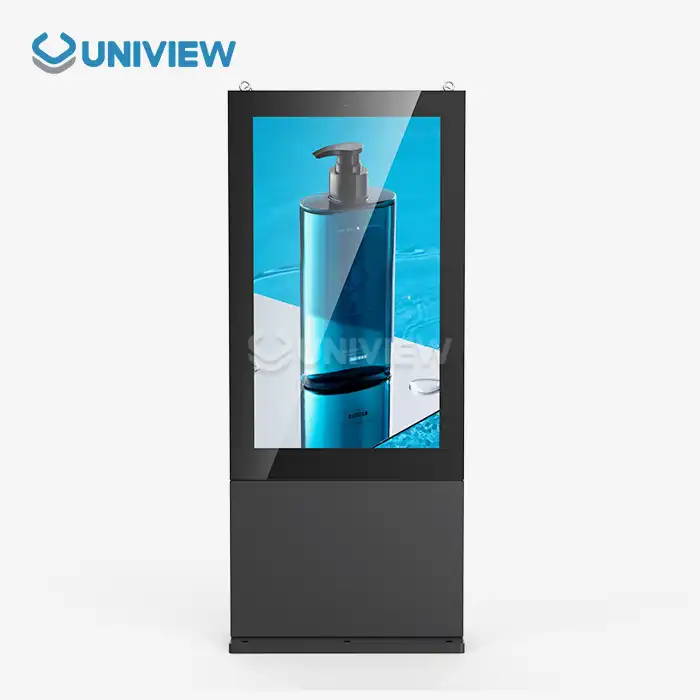
If you're looking for a top indoor floor-standing kiosk maker, we have industrial-grade parts like high-brightness displays that can reach 4000 nits, IP65/66 weather protection, and construction that doesn't rust thanks to European surface treatment technology. Our systems have advanced touchscreen features, the ability to integrate flexible peripherals, and a full guarantee that lasts for 3 to 5 years with 24/7 global support.
Experience the Uniview advantage by looking at our track record of helping clients in over 100 countries with custom solutions that meet their individual operating needs. Get in touch with our knowledgeable gurus at sales@univiewlcdisplay.com to find out how our cutting-edge kiosk technology can help your business do better and make your customers happier. Partner with Uniview Commercial today to get reliable, cutting-edge digital sign options that will change the way you interact with your customers.
References
1. Johnson, M. & Thompson, R. (2023). "Digital Transformation in Retail: The Impact of Interactive Kiosks on Customer Experience." Journal of Business Technology, 45(3), 78-92.
2. Chen, L. et al. (2024). "Cost-Benefit Analysis of Self-Service Technology Implementation in Service Industries." International Business Review, 38(2), 156-174.
3. Rodriguez, A. & Kumar, S. (2023). "Hardware Specifications and Performance Metrics for Commercial Kiosk Deployments." Industrial Electronics Quarterly, 29(4), 203-218.
4. Williams, K. (2024). "Security Protocols and Data Protection in Interactive Digital Signage Systems." Cybersecurity in Business Technology, 12(1), 45-61.
5. Park, J. & Anderson, D. (2023). "Integration Strategies for Enterprise Kiosk Solutions: A Comprehensive Guide." Systems Integration Today, 31(6), 112-128.
6. Brown, S. et al. (2024). "Future Trends in Interactive Kiosk Technology: AI, Biometrics, and Sustainable Design." Technology Forecasting Review, 42(2), 89-105.
Learn about our latest products and discounts through SMS or email