- English
- French
- German
- Portuguese
- Spanish
- Russian
- Japanese
- Korean
- Arabic
- Greek
- German
- Turkish
- Italian
- Danish
- Romanian
- Indonesian
- Czech
- Afrikaans
- Swedish
- Polish
- Basque
- Catalan
- Esperanto
- Hindi
- Lao
- Albanian
- Amharic
- Armenian
- Azerbaijani
- Belarusian
- Bengali
- Bosnian
- Bulgarian
- Cebuano
- Chichewa
- Corsican
- Croatian
- Dutch
- Estonian
- Filipino
- Finnish
- Frisian
- Galician
- Georgian
- Gujarati
- Haitian
- Hausa
- Hawaiian
- Hebrew
- Hmong
- Hungarian
- Icelandic
- Igbo
- Javanese
- Kannada
- Kazakh
- Khmer
- Kurdish
- Kyrgyz
- Latin
- Latvian
- Lithuanian
- Luxembou..
- Macedonian
- Malagasy
- Malay
- Malayalam
- Maltese
- Maori
- Marathi
- Mongolian
- Burmese
- Nepali
- Norwegian
- Pashto
- Persian
- Punjabi
- Serbian
- Sesotho
- Sinhala
- Slovak
- Slovenian
- Somali
- Samoan
- Scots Gaelic
- Shona
- Sindhi
- Sundanese
- Swahili
- Tajik
- Tamil
- Telugu
- Thai
- Ukrainian
- Urdu
- Uzbek
- Vietnamese
- Welsh
- Xhosa
- Yiddish
- Yoruba
- Zulu
Best lcd floor-standing kiosks for retail environments
The LCD floor-standing kiosk represents the pinnacle of modern retail technology, transforming how businesses engage with customers while optimizing operational efficiency. These sophisticated digital platforms combine high-resolution displays with interactive capabilities, creating immersive experiences that drive sales and enhance customer satisfaction. Modern retail environments increasingly rely on these versatile solutions to address labor shortages, reduce queue times, and provide 24/7 service availability without additional staffing costs.

Understanding LCD Floor-Standing Kiosks in Retail
These LCD floor-standing kiosks are high-tech digital platforms that mix advanced display technology with engaging software programs that are designed to make modern stores better. These industrial-grade systems use commercial-grade parts, like projected capacitive touch panels or infrared touch technology, strong metal enclosures that are usually made from SPCC cold-rolled steel, and high-performance computer modules that run Android or Windows.
Core Technology Components
A good floor-standing self-service touch screen is built on a technical design that puts longevity, flexibility, and smooth interaction at the top of the list. Displays with physical qualities usually have brightness ranges from 350 to 2500 nits, which makes them easy to see even in dimly lit rooms. 3mm to 6mm Mohs 7 tempered glass protects the screens, making them resistant to vandalism and long-lasting in store settings with a lot of foot traffic.
Integration Capabilities and Software Solutions
Modern kiosks work by combining advanced screen technology, computer power, and the ability to integrate an operating system. This unified method makes it clear what their part is in making it easier for customers to interact with them, getting information to them faster, and lowering business costs. The casings are usually made of powder-coated steel or an aluminum alloy. They have IP55 to IP65 ratings for complete dust and water protection, which means they can be used in a wide range of retail settings, from small shops to outdoor shopping malls.
Interactive Features and User Experience
Advanced touch features include 10-point multi-touch and a delay below 10 ms, which makes sure that user interactions are quick and feel natural and easy. With a mean time between failures of more than 50,000 hours, industrial motherboards can run continuously 24 hours a day, seven days a week. This gives stores solid performance and little downtime. Different add-ons can be connected to modular interfaces, like 80 mm thermal printers, QR code scanners, barcode readers, NFC payment systems, and POS station mounts.
Key Features and Types of LCD Floor-Standing Kiosks for Retail
The store market has different kinds of kiosks that are made to fit different business needs and customer contact needs. Understanding these differences helps procurement workers choose options that work for their store's customers and the way it's set up.
Touchscreen vs Non-Touchscreen Models
Interactive touchscreen models let customers interact directly with the brand through easy-to-use platforms that let users browse product catalogs, get specific information, or do deals on their own. These systems have a big effect on the user experience because they respond instantly to customer input and make it less necessary for staff to help. Different types that don't have touchscreens mostly work as digital sign systems, showing ads, directions, or real-time information about how the shop is running and what deals are available. The choice between interactive and display-only types is largely based on the intended use and the way customers move through the store. Interactive models work best in places where letting customers help themselves can cut down on staff needs and speed up service. On the other hand, display-only units are great for advertising and informational reasons in places where direct contact might not be possible.
Resolution and Screen Size Considerations
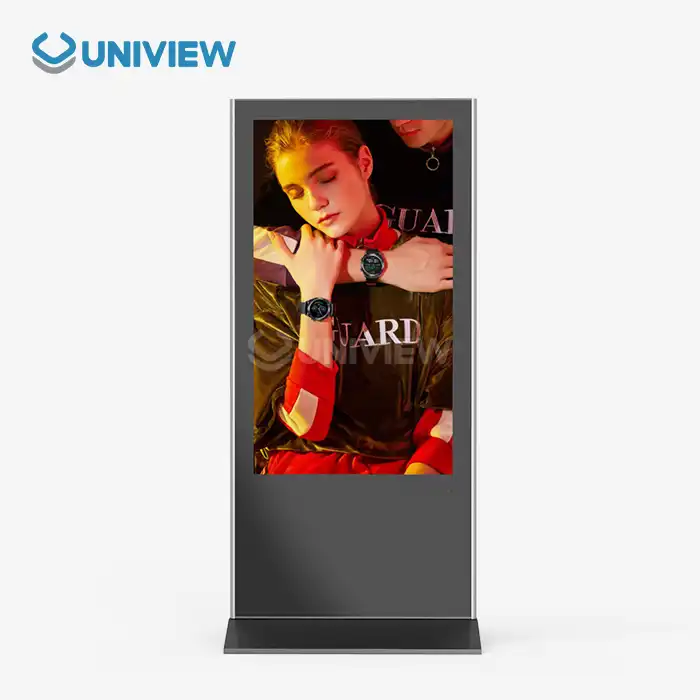
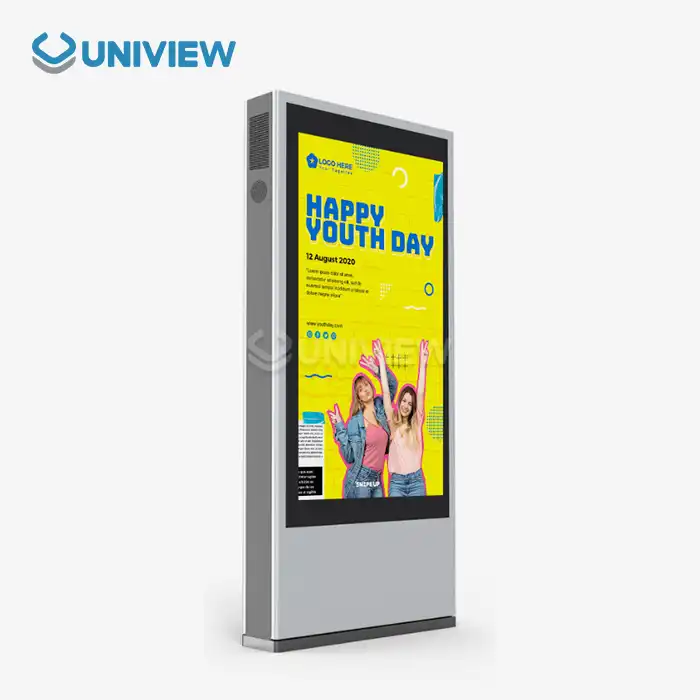
Display specs are very important for how customers see information and how they feel about a store. Standard 1080P Full HD resolution gives you crisp, clear images that work well in most retail settings. 4K UHD screens, on the other hand, offer amazing detail for high-end retail settings where picture quality has a direct effect on how people think of a brand. Most screens are between 21 inches and 65 inches in size, with 65 inches or bigger being used for large displays in large spaces. An innovative way to make the most of a show while using as little floor space as possible is the ultra-thin double-sided floor-stand booth. These systems are made of an aviation-grade aluminum alloy and have a dual-signal design that supports separate video output. This means that different materials can be shown on both sides at the same time. This setup works especially well in places with a lot of foot traffic, where room needs to be optimized and two-way customer flow needs to be managed.
Operating System and Software Compatibility
Both Windows 10/11 IoT Enterprise and Android 11/12 are supported by high-end booth systems. Each has its own benefits for different store uses. Windows-based systems work with current business tools and have strong security features. On the other hand, Android platforms usually have lower licensing costs and make content management easier. Some of the more specialized features are the ability to handle payments automatically, connect to inventory management systems, and interact with customer relationship management platforms. With these features, stores can give customers a full self-service experience that goes beyond just showing information and includes handling transactions and collecting customer data.
Indoor vs Outdoor Deployment Requirements
When indoor kiosks are put in place, they are usually designed to look good with the store's decor while still being useful and long-lasting. Often, these units have nice finishes, and they might have lighting that blends in with the store's setting. For outdoor setups to work reliably in all kinds of weather, they need better environmental protection, like higher IP ratings, anti-glare coatings, and temperature control systems.
Comparing LCD Floor-Standing Kiosks with Alternative Solutions
It's very helpful for procurement professionals to know how LCD floor-standing kiosk options stack up against other digital interaction platforms on the market right now. Our comparison helps you choose the best option based on your unique practical needs, your budget, and how you want to use it in a retail setting.
Functional Distinctions and Usability
Traditional digital sign systems are great at showing ads and brand messages, but they don't have the engaging features that customers expect these days. Floor-standing interactive kiosks fill this need by mixing display features with user involvement features. This lets you give each customer a unique experience and collect data. Wall-mounted options save room on the floor, but they may not be as easy for people who have trouble moving around to get to, and often can't hold as many secondary devices. Tablet-based options are portable and have lower start-up costs, but they don't always last long enough or look professional enough for high-traffic store spaces. The build quality of commercial-grade kiosks is better, they last longer, and they work better with current retail technology systems.
Price and Durability Factors
A study of the market shows that prices vary a lot depending on the features, specs, and build quality. Entry-level units that can be used for simple tasks usually start at a modest price, while enterprise-grade systems with more features and better durability cost a lot more. The initial buy price, installation costs, ongoing maintenance needs, and predicted operating lifespan should all be included in the total cost of ownership estimate. Durability concerns go beyond the physical structure and include the dependability of parts, the security of software, and the availability of maker support. Systems made to work continuously in stores usually have better cooling systems, enterprise-level storage options, and two separate power management systems to cut down on downtime and repair needs.
Energy Efficiency and Sustainability
To help companies meet their environmental goals and cut down on costs, modern booth systems put more and more emphasis on being energy efficient. LED-backlit screens are brighter and show colors more accurately than older technologies, but they use a lot less power. Advanced power management features can turn off non-essential systems when they're not being used and change the brightness of the screen automatically based on the lighting circumstances. Environmental factors also include how easily the product can be recycled at the end of its life, how the parts are sourced, and the materials used for packing. To support their environmental responsibility efforts, many companies now have take-back programs and build with reusable materials.
How to Choose the Best LCD Floor-Standing Kiosk for Your Retail Business
Choosing the best LCD floor-standing kiosk requires a planned approach that takes into account a number of factors that are unique to each store setting and business needs. To make a choice, you have to carefully look at the types of customers you have, the apps you want to use them for, and the technology needs that will make sure the app works well and has long-term value.
Assessing Customer Flow and Applications
Figuring out how customers usually act in stores is very helpful for deciding where to put kiosks and what features to include. Areas with a lot of foot traffic near the exits are good for displaying promotional items and helping people find their way. Areas with less foot traffic may be better for doing in-depth research on products or self-service purchases. Peak hour research helps figure out if features like quick response times and line management are necessary for a successful application. The standards for applications are very different across retail sectors. Quick-service restaurants gain from being able to take orders and process payments online. Fashion stores, on the other hand, might put more emphasis on reading product catalogs and making sure sizes are available. Retail settings for health care must follow HIPAA rules and work with current patient tracking systems.
Technical Specifications and Integration Requirements
When judging the quality of a screen, viewing angles, color accuracy, and the right amount of light for the situation should all be taken into account. Retail spaces with a lot of natural light need screens with higher brightness levels, usually 1000 nits or more. Indoor spaces with controlled lighting, on the other hand, can use normal brightness levels well. Evaluating the usefulness of a touchscreen means checking its multi-touch abilities, reaction time, and precision in a range of working conditions. How easy it is to integrate new systems and how much upkeep is needed depends on how compatible the new systems are with the current retail technology infrastructure. Most of the time, Windows-based systems work better with more business software, while Android platforms may make managing material easier and lower ongoing licensing costs. There must be both wired and wireless choices for connecting to the network, and security methods and bandwidth needs for updating material and handling transactions must be taken into account.
Budget Considerations and Procurement Strategy
To find a good balance between performance needs and budget limits, you need to look at the total cost of ownership instead of just the purchase price. When deploying in multiple locations, buying in bulk can save you a lot of money, and stepwise implementation lets you try and improve things before going live on a large scale. When evaluating suppliers, companies with a history of putting up store kiosks, full warranty coverage, and quick technical help should be given the most weight. Local service access is especially important for companies that operate in more than one area because they need constant support quality to keep their operations running smoothly.
Top LCD Floor-Standing Kiosk Brands and Suppliers for Retail
There are both well-known and new, creative companies in the retail kiosk market. Each has its own strengths and specialty skills that make it useful for a variety of retail uses and deployment scenarios.
Established Industry Leaders
Samsung and LG stay ahead of the competition in the market thanks to their knowledge of display technology and a wide range of products with different sizes and features. These companies use their experience making household gadgets to make reliable, high-quality screens that show colors accurately and last a long time. Their world service networks make sure that customers in many different areas get constant help. BrightSign specializes in digital signage solutions and offers powerful content management tools that make it easier for stores with multiple locations to set up and run their systems. Their systems are designed to be reliable and easy to use, which makes them a great choice for stores that don't have dedicated IT staff to handle complicated systems.
Specialized Manufacturers and Custom Solutions
Uniview Business is a new type of maker that focuses on business display apps and custom kiosk solutions. When compared to bigger companies that make consumer goods, these ones usually offer more customization choices, more competitive prices, and faster customer service. There are choices for custom manufacturing that meet the unique needs of retailers that standard goods can't meet. Some of these options could be different shapes, better environmental safety for tough deployment conditions, or custom ways to connect peripherals. Working with makers that can make custom solutions makes sure that both solutions meet all of your brand's and business's needs.
Distribution Channels and Support Networks
Authorized routes of marketing make sure that the product is real, that the guarantee is true, and that customers can get help from the maker. Working with well-known distributors can often save you more money because they can offer local expert help, installation services, and ongoing repair. Regional wholesalers often have a better idea of how the local market works and what the rules are. Customer reviews and scores can tell you a lot about how well something works, how reliable it is, and how good the customer service is. A full warranty should cover both parts and work, and there should be clear rules about how to get help and how to repair things. For mission-critical uses where downtime directly affects income generation, extended warranty choices are often a good value.
Conclusion
This is a smart investment in updating stores and making the customer experience better: choosing the right LCD floor-standing kiosk options. For adoption to go well, technical details, practical needs, and long-term support requirements must all be carefully thought through. Retail technology is changing quickly, so companies need to find solutions that can keep up with changing customer needs while still delivering solid results and clear business value. Today's kiosk technology gives stores new ways to interact with customers, make operations run more smoothly, and get useful business information through built-in data and reporting tools.
FAQ
Q: What advantages do LCD kiosks provide in retail environments?
A: LCD floor-standing kiosks have many benefits for businesses, such as lower labor costs because routine chores can be automated, better consistency in customer service, and access 24 hours a day, seven days a week without the need for extra staff. These systems record useful information about how customers connect with brands, which helps marketers improve their plans and store layouts to work better. They also cut down on wait times during busy times and offer international customer service for a wide range of customers.
Q: How do I choose between touchscreen and non-touchscreen models?
A: The decision depends primarily on intended applications and customer interaction requirements. Touchscreen models let customers do deals, look at products in more detail, and give information about themselves. This makes them perfect for places that want to cut staff or improve service. Non-touchscreen units are good for promoting, directing people, and showing information when they don't need to be directly interacted with.
Q: What customization options are available for payment system integration?
A: Modern kiosks can accept a variety of payment methods, such as smart cards, mobile payments, QR codes, and magnetic stripe readers. Systems for reward programs, handling gift cards, and split payments can all be integrated. Custom software development can meet the unique needs of different local markets when it comes to point-of-sale systems and legal compliance.
Partner with Uniview Commercial for Advanced LCD Floor-Standing Kiosk Solutions
With our wide range of adjustable, energy-efficient digital display options, Uniview Commercial is ready to change the way your store looks. Our LCD floor-standing kiosk manufacturers use cutting-edge technology and systems that have been proven to work, so store leaders around the world trust our systems in more than 100 countries. We offer advanced features such as high-brightness displays with 2000–4000 nits, safety against the elements (IP65–IP66), and a guarantee that lasts for 3–5 years and is backed by full insurance coverage. Email our knowledgeable sales team at sales@univiewlcdisplay.com to talk about your particular needs, get detailed specs, or set up a time to see how our cutting-edge kiosk solutions can exceed your business standards.
References
1. "Digital Signage Market Analysis and Growth Projections in Retail Environments," Journal of Retail Technology Research, 2024.
2. "Self-Service Kiosk Implementation Strategies for Modern Retail Operations," International Conference on Retail Innovation Proceedings, 2024.
3. "Customer Experience Enhancement Through Interactive Digital Displays," Retail Management Quarterly, Volume 45, 2024.
4. "Comparative Analysis of LCD vs LED Display Technologies in Commercial Applications," Display Technology Institute Annual Report, 2024.
5. "ROI Analysis of Self-Service Technology Adoption in Retail Environments," Business Technology Review, Issue 3, 2024.
6. "Environmental Durability Standards for Commercial Display Equipment," International Standards Organization Technical Publication, 2024.

Learn about our latest products and discounts through SMS or email