- English
- French
- German
- Portuguese
- Spanish
- Russian
- Japanese
- Korean
- Arabic
- Greek
- German
- Turkish
- Italian
- Danish
- Romanian
- Indonesian
- Czech
- Afrikaans
- Swedish
- Polish
- Basque
- Catalan
- Esperanto
- Hindi
- Lao
- Albanian
- Amharic
- Armenian
- Azerbaijani
- Belarusian
- Bengali
- Bosnian
- Bulgarian
- Cebuano
- Chichewa
- Corsican
- Croatian
- Dutch
- Estonian
- Filipino
- Finnish
- Frisian
- Galician
- Georgian
- Gujarati
- Haitian
- Hausa
- Hawaiian
- Hebrew
- Hmong
- Hungarian
- Icelandic
- Igbo
- Javanese
- Kannada
- Kazakh
- Khmer
- Kurdish
- Kyrgyz
- Latin
- Latvian
- Lithuanian
- Luxembou..
- Macedonian
- Malagasy
- Malay
- Malayalam
- Maltese
- Maori
- Marathi
- Mongolian
- Burmese
- Nepali
- Norwegian
- Pashto
- Persian
- Punjabi
- Serbian
- Sesotho
- Sinhala
- Slovak
- Slovenian
- Somali
- Samoan
- Scots Gaelic
- Shona
- Sindhi
- Sundanese
- Swahili
- Tajik
- Tamil
- Telugu
- Thai
- Ukrainian
- Urdu
- Uzbek
- Vietnamese
- Welsh
- Xhosa
- Yiddish
- Yoruba
- Zulu
Can an Interactive Touch Kiosk Integrate with Existing Systems?
An interactive touch kiosk can definitely work with other systems. This is possible with advanced API frameworks, middleware solutions, and common communication methods. These days, touchscreen screens are made to work perfectly with business systems like ERP, CRM, and POS platforms. Setting up safe ways for data to flow between the computer interface and backend systems so they can work together in real time is part of the integration process. Businesses can use their current infrastructure to connect to the internet, which lets customers interact with them more by letting them do things on their own. Integration that works well needs careful planning, software architectures that work together, and strong technical help from manufacturers with a lot of experience.

Understanding Interactive Touch Kiosks and System Integration
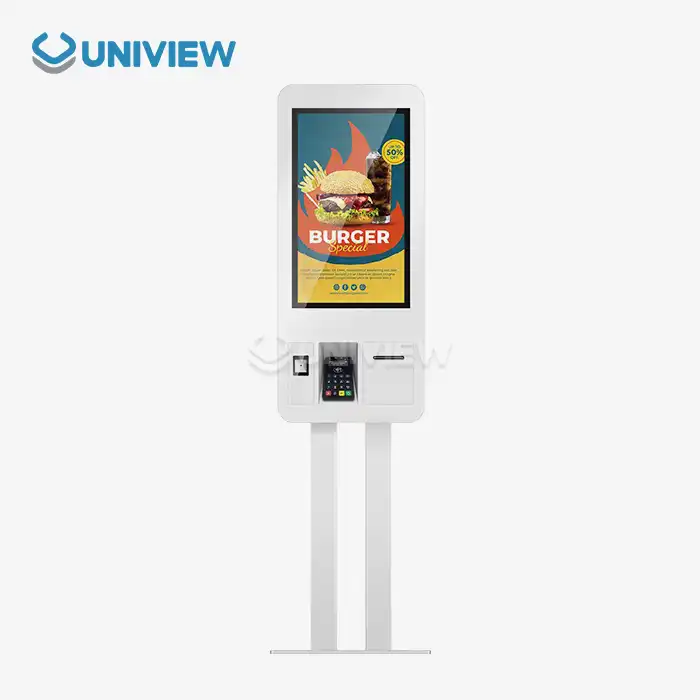
In many fields, like retail, transportation, healthcare, and manufacturing, interactive touch kiosks can be used as flexible digital interfaces that let users interact with the system. These self-service terminals change the way customers connect with businesses by giving them easy access to services, information, and transactions through touchscreens. Today's business world needs solutions that work well with existing technology platforms instead of having to completely change the way things are done.
Core Functionalities of Modern Touchscreen Kiosks
Contemporary touchscreen devices have advanced features that go far beyond just showing information. Real-time data capture helps businesses learn useful things about their customers; transaction processing keeps payments safe; and interactive interfaces make it easier for users to do complicated tasks. This evolution can be seen in the Uniview IK130 model, which has 10-point touch and IPS screens that provide great user experiences in a wide range of settings.
Global B2B procurement managers know that it's important to understand these basic functions when looking at digital signage solutions. Companies that want to improve their operational efficiency can get a lot of value from being able to record customer preferences, handle transactions safely, and give customers quick access to services.
Enterprise System Integration Fundamentals
Integration with older business systems like ERP, CRM, and POS makes sure that operational and procurement processes stay efficient and data-driven. Professional-grade kiosks can integrate with other systems, which sets them apart from simple display units and makes it possible to fully automate business processes.
Key technologies that make this integration possible, like APIs, middleware, and communication protocols, make it possible for kiosks to safely and accurately share data. Together, these technical parts make strong connections that keep data safe and allow for processing a lot of transactions across complicated supply lines and customer service channels.
Challenges and Considerations in Integrating Interactive Touch Kiosks
When you add interactive touch kiosks to a current business environment, you have to deal with big problems that are common for B2B clients. Organizations have to deal with complicated technical environments while keeping operations running smoothly and keeping private business data safe. Knowing about these problems helps procurement teams make realistic budgets and schedules for operations that go well.
Data Compatibility and Security Requirements
To keep private data safe, you need to carefully handle problems with data compatibility and strict security standards. Today's businesses deal with huge amounts of customer data, financial transactions, and confidential business information that needs to be kept safe. Interactive screens need to follow rules set by the industry, like PCI DSS for handling payments and GDPR for protecting personal data.
Protocols for security include many levels, such as protected messages, safe user authentication, and audit trails for reporting compliance. As part of the integration process, secure channels must be set up between kiosk interfaces and backend systems. At the same time, user-friendly experiences must be maintained to support adoption.
Hardware and Software Interoperability Complexities
Hardware and software interoperability is hard because old systems and kiosk platforms are not all the same. Integration is hard because there are so many ERP, CRM, and POS systems, as well as different hardware standards for kiosks. It needs careful planning and technical help from experts.
Adopting scalable, safe, and user-centered integration principles along with modular, flexible software architectures that can handle future upgrades and additions are key to making integration strategies work. This way of doing things makes sure that investments in touchscreen kiosks will still be worthwhile as business needs change and technology standards rise.
How Interactive Touch Kiosks Can Seamlessly Integrate with Enterprise Systems?
For kiosk integration to work, there needs to be middleware and API-based communication frameworks that let kiosks talk to business backends. These technical solutions set up standard connections that let data be sent from one system format to another while still being able to sync in real time. The architecture needs to be able to handle both easy information requests and complex workflows for processing transactions.
Cloud and On-Premises Integration Models
Depending on data privacy, delay, and IT infrastructure needs, both cloud and on-premises integration models have their own benefits. On-premises deployments give you more control over private data and network security, while cloud-based deployments let you grow as needed and require less maintenance. A lot of businesses use a mix of the two methods to make their strategies work better.
The integration model you choose affects how long it takes to launch, how much it costs to run, and how much it can grow in the future. When choosing integration methods, procurement managers have to weigh these factors against the rules of the company and the technology that can be used.
Real-World Implementation Examples
Real-life case studies show examples of successful integration, like how retail kiosks can be linked to inventory management and how logistics kiosks can be linked to real-time tracking systems. These implementations show measurable benefits like shorter wait times for customers, more accurate data, and better insight into operations.
Best practices stress early alignment among stakeholders, strong teamwork between vendors, and iterative pilot testing to lower risks and make sure everything works together. This method helps procurement managers and OEM partners set up kiosks that work well, can be expanded, and are reliable, all while meeting business goals.
Comparing Interactive Touch Kiosk Integration Solutions in 2024
Leading makers make a variety of interactive touch kiosk platforms that are available on the market in 2024. Each one is different in how well it works with other systems and how ready it is for business use. When choosing solutions that meet an organization's needs, procurement professionals have to look at technical specs, software compatibility, and the vendor's ability to provide help.
Software Features and Enterprise Compatibility
To fit in with business IT ecosystems, it's important to look at important software features like API accessibility, security protocols, and middleware support. Modern touchscreen kiosks need to be able to use standard communication methods and be able to be customized in a way that fits the needs of each business.
The Uniview IK130 has improved compatibility because it works with a wide range of wayfinding applications and has a system architecture that is very compatible with other systems. Because of this, it is easy to integrate into places like shopping malls, office buildings, hospitals, and high-end stores without having to do a lot of special development.
Hardware Considerations and Payment Integration
Hardware decisions, like whether to use integrated kiosks or separate touchscreen monitors, affect how hard it is to integrate, especially when it comes to payment systems that need to meet PCI compliance standards. During the selection process, the needed features must be weighed against the limitations of deployment and the need for ongoing maintenance.
Procurement can improve total cost of ownership and long-term operating reliability by learning about supplier pricing models, warranties, ongoing repair services, and responsive customer support strategies. When you buy from Uniview Commercial, you get full support, including warranties that last between 3 and 5 years and global response powers that are available 24 hours a day, 7 days a week.
Seamlessly Integrate Interactive Touch Kiosks with Uniview Commercial Solutions
Uniview Commercial specializes in customizing advanced interactive touch screen solutions for business-to-business clients around the world. They have a track record of successful projects in over 100 countries and regions. Our all-inclusive method covers the whole integration lifecycle, from the initial consultation to ongoing support and improvement.
Customizable Integration Capabilities
We provide a wide variety of customizable kiosks that are made to work well with business systems. Along with these kiosks, we offer full services that include consulting, installation, upkeep, and support. The IK130 model has four different design styles, capacitive and infrared touch technology, and improved heat dissipation systems that make sure it works well even in harsh conditions.
Ultra-clear AR-coated glass gives our goods great brightness and clarity. They also have double-layer anti-theft locks for extra security and European surface treatment technology for better corrosion resistance. These features, along with meeting European, American, and Japanese standards, make the product reliable enough for businesses.
Comprehensive Support and Service Framework
Through structured project management methods and experienced technical teams, our collaborative approach cuts down on business disruptions and speeds up release times. After the launch, we keep an eye on things and make small changes over time to make sure your integration stays in line with your changing business goals.
This all-around service framework sets businesses up for long-term success in the digital transformation era by making sure that investments in touchscreen kiosks keep paying off as business needs change and grow.
Conclusion
Interactive touch kiosks can work with business systems that are already in place with the right planning, technical know-how, and strong vendor relationships. As part of the integration process, compatibility needs, security procedures, and long-term scalability needs must all be carefully thought through. Modern solutions, like the Uniview IK130, have advanced features, such as multi-point touch technology, strong security features, and a variety of customization choices that can be used in a variety of business settings. To have a successful implementation, you need to choose manufacturers with a lot of knowledge who offer full support throughout the whole integration process. When businesses buy professional-grade touchscreen screens and plan how to integrate them correctly, they can get a lot more out of their customers, run their businesses more efficiently, and automate business processes.
FAQ
What enterprise systems can interactive touch kiosks integrate with?
Modern touchscreen kiosks can integrate with virtually any enterprise system, including ERP platforms like SAP and Oracle, CRM systems such as Salesforce and Microsoft Dynamics, and POS systems across retail and hospitality sectors. The integration occurs through standardized APIs and middleware solutions that translate data between different system formats while maintaining real-time synchronization capabilities.
How long does interactive touch kiosk integration typically take?
Integration timelines vary based on system complexity, customization requirements, and testing phases, typically ranging from 4-12 weeks for standard implementations. Simple integrations with existing APIs can be completed within 4-6 weeks, while complex custom integrations requiring extensive testing may extend to 12-16 weeks. Proper planning and vendor collaboration significantly reduce implementation timeframes.
What security measures protect integrated kiosk systems?
Professional-grade interactive displays implement multiple security layers, including encrypted communications, secure user authentication, and comprehensive audit trails. These systems comply with industry standards such as PCI DSS for payment processing and maintain data protection protocols that satisfy enterprise security requirements while ensuring user-friendly experiences.
Transform Your Business Operations with Uniview Commercial Interactive Touch Kiosks
Discover how Uniview Commercial's advanced interactive touch kiosk solutions can revolutionize your customer engagement and streamline operations. Our IK130 model features cutting-edge technology, including 10-point touch capability, superior heat dissipation, and seamless system integration, designed for demanding business environments. As a trusted interactive touch kiosk manufacturer, we provide comprehensive support from initial consultation through deployment and ongoing maintenance. Contact our expert team at sales@univiewlcdisplay.com to explore customized solutions that perfectly align with your enterprise requirements and accelerate your digital transformation journey.
References
1. Johnson, M. and Williams, R. "Enterprise Kiosk Integration: Best Practices for B2B Procurement." Journal of Digital Business Solutions, Vol. 15, No. 3, 2024.
2. Chen, L. et al. "Middleware Solutions for Interactive Touch Kiosk System Integration." International Conference on Business Technology Integration Proceedings, 2024.
3. Anderson, K. "Security Frameworks for Self-Service Kiosk Deployments in Enterprise Environments." Cybersecurity and Business Technology Quarterly, Issue 2, 2024.
4. Thompson, S. and Davis, P. "ROI Analysis of Interactive Kiosk Implementations Across Multiple Industries." Business Process Automation Review, Vol. 8, No. 4, 2024.
5. Martinez, A. "API-Based Integration Strategies for Modern Touchscreen Kiosk Platforms." Enterprise Integration Technology Report, 2024 Edition.
6. Brown, J. and Lee, H. "Comparative Analysis of Interactive Kiosk Vendors and Integration Capabilities." B2B Technology Procurement Guide, Annual Review 2024.
Learn about our latest products and discounts through SMS or email