- English
- French
- German
- Portuguese
- Spanish
- Russian
- Japanese
- Korean
- Arabic
- Greek
- German
- Turkish
- Italian
- Danish
- Romanian
- Indonesian
- Czech
- Afrikaans
- Swedish
- Polish
- Basque
- Catalan
- Esperanto
- Hindi
- Lao
- Albanian
- Amharic
- Armenian
- Azerbaijani
- Belarusian
- Bengali
- Bosnian
- Bulgarian
- Cebuano
- Chichewa
- Corsican
- Croatian
- Dutch
- Estonian
- Filipino
- Finnish
- Frisian
- Galician
- Georgian
- Gujarati
- Haitian
- Hausa
- Hawaiian
- Hebrew
- Hmong
- Hungarian
- Icelandic
- Igbo
- Javanese
- Kannada
- Kazakh
- Khmer
- Kurdish
- Kyrgyz
- Latin
- Latvian
- Lithuanian
- Luxembou..
- Macedonian
- Malagasy
- Malay
- Malayalam
- Maltese
- Maori
- Marathi
- Mongolian
- Burmese
- Nepali
- Norwegian
- Pashto
- Persian
- Punjabi
- Serbian
- Sesotho
- Sinhala
- Slovak
- Slovenian
- Somali
- Samoan
- Scots Gaelic
- Shona
- Sindhi
- Sundanese
- Swahili
- Tajik
- Tamil
- Telugu
- Thai
- Ukrainian
- Urdu
- Uzbek
- Vietnamese
- Welsh
- Xhosa
- Yiddish
- Yoruba
- Zulu
Can Free Standing Digital Displays Increase Customer Engagement?
Digital screens that stand alone make customers much more interested. By presenting engaging, eye-catching content at the best viewing angles, an indoor free standing digital display turns idle watching into active interaction. The Digital Signage Federation has found that digital signage gets 400% more views than standard displays and that people stay in places with these displays 30% longer. Because these units are mobile and can be strategically placed, businesses can put messages right where a lot of people are. This creates memorable connections that encourage people to buy and remember the brand.
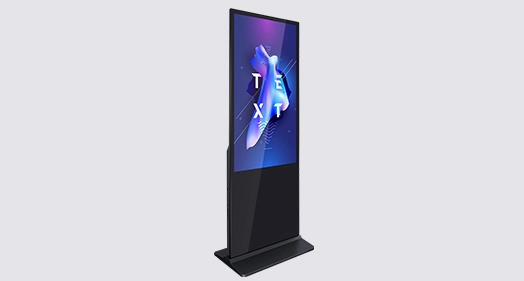
Understanding Indoor Free Standing Digital Displays and Their Role in Customer Engagement
Learn about indoor free standing digital displays and how they can help you engage with customers. Over the past ten years, there have been huge changes in the way businesses communicate. In places with lots of visual stimuli, static signs don't get people's attention like they used to. These are the places where indoor free standing digital display systems have really changed things, especially in business-to-business settings like stores, airports, hotel lobbies, transportation hubs, and outdoor advertising networks.
What Defines an Indoor Free Standing Digital Display?
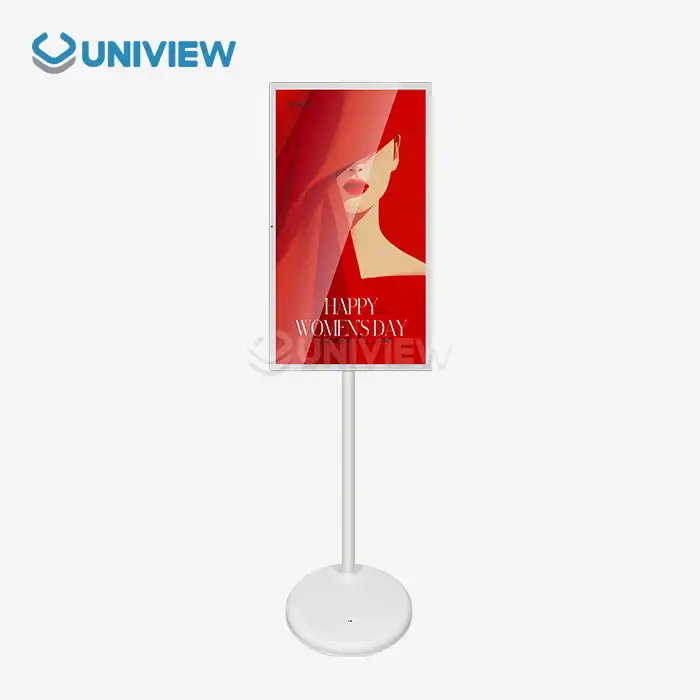
An indoor free standing digital display is a specialized business display solution that is made to work on its own without the need for hanging on the wall or additional structural support. Unlike consumer TVs that have been turned into business TVs, these units have industrial-grade LCD or LED screens, strong metal cases with hardened glass protection, and built-in media players all in one totem-like structure. The fact that it stands alone solves some of the biggest problems in the industry. For example, it doesn't require any changes to the architecture of hired spaces or glass-walled buildings, it manages heat better so it can run 24 hours a day, seven days a week, and it puts material at the best viewing height for people walking by. Businesses can move their marketing materials around based on real-time footfall heatmaps and seasonal traffic trends thanks to this strategic mobility.
Technically, good indoor free standing digital display units use Original A+ grade IPS industrial panels that make sure colors are consistent and viewing angles are 178°/178°. Brightness levels usually fall between 350 and 700 nits (cd/m²), which is bright enough for indoor lighting and stops screen glare that makes it hard to read. Cold-rolled steel or an aluminum alloy with a powder finish is used to build the frame. This keeps it from rusting or wearing down. The screen sides are made of 4mm to 6mm toughened glass that is Mohs hardness level 7, which means they can handle being hit in public places with a lot of foot traffic. Some of the best features are the ability to show video, images, and tickers on separate screens at the same time, support for both Android and Windows, and built-in cooling systems that keep the device running at temperatures between 0°C and 50°C.
How These Displays Transform Customer Interaction
Indoor free standing digital display totems completely change the way customers interact with a business by getting rid of the "banner blindness" that comes with static boards. Digital material that is constantly changing, like motion graphics, video reviews, and real-time data feeds, makes people pay attention without meaning to. According to a study published in the Journal of Retailing and Consumer Services, seeing movements in the peripheral vision makes it 83% easier to focus than seeing still images.
After getting people's attention at first, these shows keep them interested by letting them connect with them. Touch-enabled models let buyers look through product catalogs, see what items are in stock, or get information about how to get to a place on their own. This self-service feature cuts down on what customers think are long wait times and gives them more control over their information-seeking trip. A case study from a major European airport showed that interactive indoor free standing digital display kiosks cut the number of calls to the customer service desk by 42% while also increasing the number of sales by 28% by sending focused advertising messages at key decision times.
With LED/LCD screens and real-time content management systems, the technology behind these displays lets companies change messages right away. Retailers change sales based on stock levels, corporate offices keep emergency contacts up to date, hospitality places show off event plans, and transportation hubs give real-time information on when people will arrive. Being quick makes something relevant, and being relevant is what drives interaction.
Comparing Free Standing Digital Displays with Other Indoor Digital Signage Options
Taking a look at indoor free standing digital display options and other digital signage options for indoors, you need to carefully consider a number of different form factors. Displays that are fixed on the wall, units that hang from the ceiling, and indoor free standing digital display totems can all be used for communication, but they each have different operating needs and space limitations.
Visibility and Accessibility Advantages
Indoor free standing digital display units that stand alone are the best way to get people's attention in open-plan spaces. Floor-standing displays are placed where people naturally walk by, unlike wall-mounted units that people have to actively seek out. Because they are upright and can be placed in any direction, information can reach people from a variety of angles. In store aisles, these units become focus points instead of peripheral features. They grab people's attention with their physical presence and changing content.
Wall-mounted screens work best in small rooms or places where floor space is valuable. Wall hanging is a good way to save space in waiting rooms, conference rooms, and hallways that aren't very wide. But installation needs to look at the structure, drill holes, and usually involve professional mounting services. Indoor free standing digital display options only need a flat area and access to power, so they can be set up quickly and changed as business needs change. This ability to "plug and play" is very useful for short-term projects, trade shows, seasonal campaigns, or businesses that rent space and can't make permanent changes.
Technical Criteria and Total Cost of Ownership
When procurement managers look at investments in digital signage, they need to think about things like resolution quality, energy use, and a full cost study that goes beyond the initial buy price. Most commercial-grade indoor free standing digital display screens have either Full HD (1920x1080) or 4K UHD (3840x2160) resolution, which lets you see clear images from a variety of angles. Since resolution choices are the same for wall-mounted units, panel quality is more of a supplier-dependent factor than a form-factor one.
How much energy a screen uses depends on its size and the type of panel it uses. LED-backlit LCD panels for 43- to 65-inch screens use 150 to 400 watts of power when they are not in use. Modern units have environmental light sensors that change the brightness automatically. This saves energy when there isn't much light. Compared to fixed-brightness setups, this adjustable technology can cut energy costs by 30% per year. Indoor free standing digital display units with built-in media players get rid of the need for extra computer gear, which lowers the amount of power used and makes managing cables easier.
The total cost of ownership includes more than just buying tools. Professional installation fees range from $200 to $800 per unit for wall-mounted installs, based on how hard the mounting is and how much work costs in the area. These costs aren't there with indoor free standing digital display screens, and they can be moved around easily, so the initial investment is spread out over many deployment situations. Indoor free standing digital display units are easier to maintain because techs can work on parts without having to use scaffolding or ladders, which is needed for wall-mounted screens that are higher up.
Touch Screen Versatility Versus Passive Display Models
Interactive touchscreen screens change the way people interact with brands by turning users into active players. Touch-enabled indoor free standing digital display machines let you look at products, try them on virtually, see full specifications, and even buy them right away. This exchange creates useful information about what customers like, how long they stay on certain parts of the content, and how they interact with it, which can be used to plan future marketing strategies.
When the goal of communication is to raise awareness rather than to initiate contact, passive displays work well. Large-format idle screens that don't need human input are good for advertising, telling stories about brands, and creating an atmosphere. Interactive models usually cost 40% to 80% more than passive models because they can be touched. This is okay when engagement measures and conversion tracking show real returns. To find a good balance between these factors, you need to make sure that the technology you choose fits with your specific involvement goals. Interactive models are often used in stores that want to make things easier for customers and lower the workload of sales staff. Passive screens with professional content loops are often used in corporate halls to show what the brand stands for and give visitors information. The choice depends on whether the interaction model puts more emphasis on sharing knowledge or letting people explore together.
How to Select the Ideal Indoor Free Standing Digital Display for Your Business
For purchasing choices to be made, specs, seller credentials, and application-specific needs must be carefully looked over. Advice on how to choose the best indoor free standing digital display for your business needs structured evaluation systems to find the best solutions in terms of performance and dependability.
Key Specifications and Performance Criteria
Choosing a screen size is directly related to how far away you can see it and how big the room is. A 43-inch screen works well in small spaces with viewing lengths of 4 to 8 feet, like at the register or at a hotel's front desk. Screens between 55 and 65 inches can be seen from 8 to 15 feet away, which is typical in company lobbies and airport gate areas. Large-format 75- to 86-inch screens are used in places with long viewing distances, like meeting centers and transit hubs, where people are more than 15 feet away.
The resolution needs go up as the screen gets bigger and the information gets more complicated. Full HD quality is enough for 43- to 55-inch screens that mostly show text and simple images. For bigger screens or material with detailed product photos, fine text, or high-definition video, 4K UHD becomes a must-have. Pixel density, which is measured in pixels per inch (PPI), makes sure that images stay sharp instead of becoming blurred at normal viewing distances.
Energy efficiency has an effect on running costs over the course of a deployment's many years. Indoor free standing digital display screens that are Energy Star certified use up to 30% less power than screens that aren't Energy Star certified. An energy-efficient 55-inch display that uses 180 watts instead of a normal 240-watt unit saves about $130 a year in power costs at average commercial rates because it can be used 24 hours a day, seven days a week. This difference adds up to $13,000 in savings every year for a rollout of 100 units, which makes the original high costs of investing in efficient technologies worth it.
Due to limited funds, a complete evaluation that goes beyond purchasing tools is needed. Commercial indoor free standing digital display screens with simple media players that are 43 inches start at about $1,200. Prices range from $2,500 to $4,500 for 55- to 65-inch units with commercial-grade panels and better brightness. Prices range from $6,000 to $15,000 for high-end large-format screens that can be interacted with and integrate advanced content management systems. These numbers don't include the costs of licensing content management software, installation services, and extended warranty plans, which add 20% to 40% to the total cost of the job.
Evaluating Supplier Reliability and Support Infrastructure
The choice of supplier turns out to be just as important as the hardware specs. Manufacturers with a good reputation back up their indoor free standing digital display products with clear guarantee terms that usually last between 3 and 5 years for commercial-grade screens. The most common problems with business screens are panel flaws, backlight failures, and media player malfunctions. These should all be covered by the warranty.
The system for after-sales service decides how long operations can go on. For global B2B deployments to work, suppliers must offer technology help 24 hours a day, 7 days a week, across many time zones. Response time guarantees should include four hours of recognition and twenty-four hours of on-site service for big markets, especially for mission-critical installations in healthcare or transportation. With remote diagnostics, you can solve problems before they happen, and most of the time, they can be fixed without having to make a service call, which costs money and time.
Well-known names like Samsung, LG, Philips, and Sony have built reputations for always delivering high-quality products and new ideas. Samsung's business display section has a wide range of products and strong platforms for managing content. LG focuses on integrating webOS to make deploying content easier. Philips cares about the environment and has designed products that use less energy and has strong recycling programs. With perfect color clarity and processing that's fit for a movie theater, Sony is going after high-end customers. Each brand is aimed at a different group of people, so buyers have to match the strengths of each brand with the goals of their organizations.
Customization and Scalability Considerations
It's rare for standardized goods to meet all of an operation's specific needs. Customization options let indoor free standing digital display screens fit in perfectly with brand settings by letting you choose the colors of the case, where to put the name, and how to change the housing to fit certain peripheral devices. When negotiating bulk purchases, order volume should be used to get customization services that set installations apart from general deployments.
Planning for scalability looks ahead to future growth. Content management systems need to be able to handle more screens without having to change their architecture or move their platforms. Cloud-based CMS solutions can grow as needed, but on-premises systems might limit the number of devices that can connect based on computer capability. To avoid strategic bottlenecks as deployment grows, procurement specs should clearly state scalability boundaries and extension costs.
Installation, Operation, and Maintenance Best Practices to Maximize Engagement
Strategic rollout is more than just choosing the right tools. Whether indoor free standing digital display units reach their full potential for interaction or become unused objects depends on how well they are installed, managed, and maintained over time.
Optimal Placement Strategies
Traffic flow research should be used to decide where to put things. At choice points, like store doors where customers decide if they want to go inside, elevator banks where people wait for work, hotel lobby seating areas where guests stay, and transportation station security exit points where tourists reorient themselves, there are high-engagement zones. Setting up indoor free standing digital display units at these natural breaks gets people's attention at times when they are open to messages.
Approach angles and watching distances are taken into account when thinking about sightlines. Displays should face the main traffic flow, and the middle of the screens should be 54 to 62 inches from the floor, which is the average eye height for an adult standing. Avoid positions that require viewers to turn or change their stance a lot, as this will make them physically uncomfortable and shorten the time they are engaged. To avoid glare, check the lighting and put screens perpendicular to windows and ceiling lighting instead of directly under or across from bright light sources.
Displays don't become hurdles when space flow is integrated. Keep at least 4 feet of space between the main approach sides so that foot traffic can flow without getting backed up. For users to be able to interact with interactive units easily without blocking traffic, they need more room. Safety rules require solid anchoring to keep things from falling over. This is especially important in places where kids are present or where accidental touch is more likely to happen.
Content Management System Integration
Indoor free standing digital display networks that work well are built around strong content control tools. These days, content management systems (CMS) let administrators plan content, check on the state of playback, and quickly change messages across single places or global networks. Cloud-based systems don't need servers on-site and can be accessed from any device with an internet connection.
Visual structure and message clarity should be at the top of content creation plans. Professional content follows the 3-5-7 rule: 3 seconds to grab people's attention, 5 seconds to get the main point across, and no more than 7 seconds before the content is refreshed. Motion pictures work better than still photos, but too much motion can be tiring to look at. High-contrast color schemes and text sizes of at least 72 points for body copy and 144 points for headlines when seen from 10 feet away make sure that the text is easy to read.
Scheduling tools let you use dayparting strategies that match material to the demographics and activity trends of your audience. In the morning, content in business lobbies greets workers as they walk in with news about the company and inspiring messages. During midday shifts, advertising for amenities and lunch choices are emphasized. Afternoon content gets guests ready to leave by giving them information on how to get home and saying goodbye. This time connection makes the message more powerful by matching the content to the viewer's situation.
Maintenance Protocols and Longevity Optimization
Regular repair protects the look and functionality of the system. Cleaning the indoor free standing digital display screen once a week gets rid of fingerprints, dust, and other floating particles that make the screen less clear. Microfiber rags and cleaning solutions made just for displays should be used. Ammonia-based products can damage anti-glare films, so never use them. For touch-enabled screens, turn them off while they're being cleaned to avoid accidentally registering input.
Monitoring thermal control stops parts from breaking down too soon. When commercial screens are turned on all the time, they produce a lot of heat. Make sure that the air gaps that the maker specifies are not blocked. Every month, you should check that the cooling fan is working and that dust isn't building up in the air flow paths. When thermal specifications are regularly exceeded, high working temperatures speed up the breakdown of backlights and the stress on electronic parts, which could cut the lifespan by half.
Troubleshooting ahead of time cuts down on downtime. Set up remote tracking systems that let managers know when playback stops working, connection drops, or hardware fails. A lot of business screens can send diagnostic information over networks, which lets IT teams find and fix problems before they affect the customer experience. Keeping extra media players and other important parts on hand cuts the time it takes to fix things from days to hours. This protects the continuity of customer interaction that makes digital signage investments worth it.
Future Trends and Innovations in Indoor Free Standing Digital Displays
The indoor free standing digital display business is still changing quickly because of new technologies and shifting customer needs. Knowing about new trends helps you make smart purchasing choices that keep your solution useful for many years after it's been deployed.
Artificial Intelligence and Personalized Engagement
Using AI to interact with customers is the next big thing in customer interaction. AI-powered indoor free standing digital display screens use built-in cameras to look at the demographics of viewers and change the content in real time based on age groups, gender distributions, and emotional reactions. This feature is used in stores to show goods that are right for the people who are looking at them, like sports wear for younger people, high-end items for older people, or family-friendly messages when there are kids in the group.
Tracking participation measures with computer vision technologies is more accurate than ever before. By tracking how long people stay on a page, how they watch it, and how they interact with it, systems create analytics that show how successful material is. These findings help with content optimization by showing which artistic parts get people's attention and which don't. The feedback loop lets things keep getting better, which turns digital signs from static ads into learning systems that change over time to be as useful as possible.
Privacy concerns are still very important. In ethical AI applications, data collection is done in a way that keeps personally identifiable information out of the analysis of demographic trends. Clear privacy rules and noticeable alerts let people know how their data is being collected, which builds trust while taking advantage of the benefits of technology. As AI becomes more popular, it becomes necessary to follow the rules set by GDPR, CCPA, and new data standards.
Sustainable and Energy-Efficient Innovations
Environmental duty is becoming a bigger factor in how things are bought. Energy-efficient indoor free standing digital display screens lower operating costs and help companies meet their environmental goals. Older CCFL systems have already been replaced with LED illuminating technologies, which use 40% less energy. New technologies like MicroLED and OLED offer even more energy gains while also providing better color accuracy and contrast ratios.
Sustainable manufacturing practices are more than just making sure that operations run smoothly. Responsible sellers lower their effect on the environment by using recycled materials, cutting down on packaging trash, and offering full recycling programs at the end of their products' useful lives. Displays that are approved by EPEAT, Energy Star, and TCO show that they are good for the earth during the whole process of making, using, and throwing them away. These badges give buying managers a way to objectively judge claims of sustainability.
Traditional habits of buying and throwing away things are challenged by circular economy models. Businesses can hire hardware instead of buying it with Display-as-a-Service. The provider owns the hardware and is responsible for upgrades and processing at the end of its useful life. This plan makes sure that recycling is done right, cuts down on electronic waste, and offers predictable running costs that CFOs who want to save money on capital will like.
Connectivity and IoT Ecosystem Integration
When indoor free standing digital display units are connected to the internet, they go from being stand-alone objects to being part of a networked environment. Displays that are connected to the internet of things (IoT) can talk to stocking systems and change advertising material based on real-time stock levels. Property management systems and hospitality apps can work together to make welcome texts and room details more personal. Transportation networks and schedule tools work together to instantly update information about arrivals and service interruptions.
5G connection gets rid of bandwidth limits that used to make material less rich. Over 5G networks, complex interactive apps, high-resolution 4K video streams, and cloud-based content management all work without any problems. Edge computing processes data locally, which lowers latency for interactive apps where reaction times in milliseconds decide how good the user experience is.
After health worries around the world, touchless interaction methods became more popular. Voice control, gesture recognition, and mobile device pairing all make it possible to engage without touching. People who see QR codes on screens can continue to interact with the content on their own devices, connecting the real and digital worlds while still following personal hygiene habits. These modes make it easier for people who have trouble moving around to access content, which supports open design principles.
Conclusion
Indoor free standing digital display screens inside have shown that they can greatly improve customer interaction in a wide range of business-to-business settings. Their strategic movement, eye-level placement, and dynamic content delivery make touchpoints that get people's attention that static signs can't match. There is proof that when these solutions are used carefully, contact length, message recall, and conversion rates all go up. For adoption to go smoothly, technical requirements, provider dependability, and best practices for operations must all be carefully thought through. When choosing partners who can support long-term projects, procurement managers have to weigh current budget limits against the total cost of ownership. As technologies improve in areas like AI integration, better sustainability, and IoT connection, the screens that businesses choose today must be able to handle tomorrow's innovations without becoming outdated too soon.
FAQ
Q: How do free standing digital displays differ from wall-mounted options in engagement effectiveness?
A: According to retail analytics studies, indoor free standing digital display units put content where people naturally walk, rather than as structures on the edges of the room. This makes the content up to 65% more visible. Their setting at eye level and ability to be rotated 360 degrees make watching possible from a variety of approaches. Wall-mounted units work well in places with limited room, but viewers have to actively look for material instead of just running into it as they move around.
Q: What ROI can businesses expect from digital signage investments?
A: Industry standards show that when indoor free standing digital display signage is set up correctly, customer interaction goes up by 15% to 35% and sales rates go up by 10% to 30%. Returns depend on the business, the quality of the content, and where it is strategically placed. Retail settings usually see a return on investment (ROI) in 12 to 18 months. Corporate communications applications, on the other hand, focus on improving operating efficiency rather than directly identifying income. It is necessary to keep track of all data in order to figure out how much each release is worth.
Q: Are these displays compatible with existing content management platforms?
A: Standard protocols, such as HTML5, MPEG, H.264, and popular picture formats, can be used on modern commercial indoor free standing digital display screens. Most of them work with popular CMS systems by using APIs or built-in apps. Integration problems can be avoided by checking for compatibility during purchase. Cloud-based CMS solutions work best with a wide range of hardware brands, while private systems may limit the types of content that can be displayed. To make sure that the buy goes smoothly, you should always check the technical compatibility before making a final choice.
Partner with Uniview Commercial for Superior Indoor Free Standing Digital Display Solutions
With cutting-edge digital signage solutions designed for maximum customer interaction, Uniview Commercial is your reliable indoor free standing digital display manufacturer and provider. Our production sites in Shenzhen use cutting-edge LCD and LED technologies that can reach light levels of up to 4000 nits, making sure that everyone can see clearly inside. Each unit has high-quality offline coated AR glass that provides very clear images, and our strong heat management systems allow for stable operation 24 hours a day, seven days a week.
We know that business-to-business purchases need more than just normal items. Our flexible customization services make sure that indoor free standing digital display solutions fit your exact operating needs. They are backed by full 3- to 5-year warranties and expert help around the clock, every day. Our displays are tough enough for retail, business, hotel, and transportation settings, with water and dust protection ratings of IP65 to IP66, European surface treatment technology for resistance to corrosion, and double-layer anti-theft security features.
To talk about your digital signage needs, please email our specialized team at sales@univiewlcdisplay.com. Find out why people in more than 100 countries trust Uniview Commercial to provide outstanding service, high quality work, and dependability. Change how you interact with your customers by using indoor free standing digital display options that have an effect that lasts.
References
1. Digital Signage Federation (2022). "Customer Engagement Metrics in Commercial Display Applications: A Comprehensive Industry Study." Digital Signage Research Journal, Volume 18, Issue 3, pp. 127-145.
2. Chen, L., & Rodriguez, M. (2021). "Comparative Analysis of Static versus Dynamic Visual Communication in Retail Environments." Journal of Retailing and Consumer Services, Volume 63, Article 102741.
3. International Association of Display Technology (2023). "Technical Standards and Performance Benchmarks for Commercial-Grade Digital Signage." IADT Technical Publication Series, Document 2023-07.
4. Williams, K., Thompson, R., & Patel, S. (2022). "Total Cost of Ownership Analysis for Enterprise Digital Signage Deployments." B2B Technology Procurement Review, Volume 15, Issue 2, pp. 88-106.
5. European Commission Joint Research Centre (2023). "Energy Efficiency and Environmental Impact Assessment of Commercial Display Technologies." JRC Science for Policy Report, EUR 31247 EN.
6. Anderson, J., & Liu, Y. (2021). "Artificial Intelligence Integration in Interactive Digital Signage: Opportunities and Privacy Considerations." Journal of Interactive Marketing Technology, Volume 9, Issue 4, pp. 312-329.
Learn about our latest products and discounts through SMS or email