- English
- French
- German
- Portuguese
- Spanish
- Russian
- Japanese
- Korean
- Arabic
- Greek
- German
- Turkish
- Italian
- Danish
- Romanian
- Indonesian
- Czech
- Afrikaans
- Swedish
- Polish
- Basque
- Catalan
- Esperanto
- Hindi
- Lao
- Albanian
- Amharic
- Armenian
- Azerbaijani
- Belarusian
- Bengali
- Bosnian
- Bulgarian
- Cebuano
- Chichewa
- Corsican
- Croatian
- Dutch
- Estonian
- Filipino
- Finnish
- Frisian
- Galician
- Georgian
- Gujarati
- Haitian
- Hausa
- Hawaiian
- Hebrew
- Hmong
- Hungarian
- Icelandic
- Igbo
- Javanese
- Kannada
- Kazakh
- Khmer
- Kurdish
- Kyrgyz
- Latin
- Latvian
- Lithuanian
- Luxembou..
- Macedonian
- Malagasy
- Malay
- Malayalam
- Maltese
- Maori
- Marathi
- Mongolian
- Burmese
- Nepali
- Norwegian
- Pashto
- Persian
- Punjabi
- Serbian
- Sesotho
- Sinhala
- Slovak
- Slovenian
- Somali
- Samoan
- Scots Gaelic
- Shona
- Sindhi
- Sundanese
- Swahili
- Tajik
- Tamil
- Telugu
- Thai
- Ukrainian
- Urdu
- Uzbek
- Vietnamese
- Welsh
- Xhosa
- Yiddish
- Yoruba
- Zulu
How to Maintain Full Glass Dual-Sided Digital Signage?
A strategic method that combines regular surface cleaning, environmental tracking, software updates, and hardware checks is necessary for maintaining full glass dual-sided digital signage. To keep their clarity, performance, and life in tough store, transportation, and public advertising settings, these high-end displays need special care. Following the right maintenance steps will not only make your equipment last longer, but they will also keep the brightness levels constant, stop heat problems, and protect your investment in high-visibility advertising infrastructure.
Understanding Full Glass Dual-Sided Digital Signage Maintenance Basics
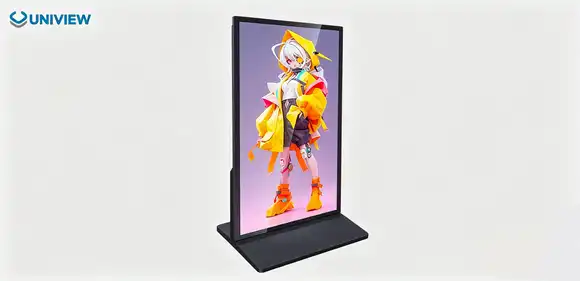
full glass dual-sided digital signage is distinguished from other types of advertising displays by its architectural elegance, but this sophistication comes with its own set of upkeep issues that procurement managers and building teams need to fully understand. These displays are different from standard sealed digital boards with thick plastic bezels because they have two high-brightness LCD screens inside an ultra-thin tempered glass chassis. This makes a striking "floating image" effect with a profile depth of less than 20mm.
What Makes Glass Displays Different
The way the building was done completely changes the upkeep needs. Optical Clear Adhesive bonding technology is used in these units to connect display panels directly to structural glass. This gets rid of the air holes that normally let dust and moisture get into regular signs. The sealed glass doors keep the inside parts safe while also making service points easy to get to. Technicians can reach important hardware through specially designed holes that don't affect the weatherproofing.
Common Maintenance Challenges
The biggest problem with outdoor setups is that they are exposed to the weather. When dust builds up on glass surfaces, the effect is less noticeable. Changing temperatures can hurt LCD performance and cause thermal blackening in less-than-stellar screens. Moisture getting in through broken seals damages electronics inside, and constant UV exposure speeds up the aging process of materials. Different stresses are put on indoor apps, such as fingerprints getting smudged in high-traffic places and static electricity pulling airborne particles to it.
Why Maintenance Strategy Matters
Not doing regular maintenance cuts down on working lifespan and lowers performance measures that have a direct effect on how well advertising works. If your monitor loses 30% of its brightness because the glass is dirty or the backlights aren't working right, it won't be able to grab people's attention, so your content investment is useless. Setting up custom upkeep schedules based on the installation setting stops these problems before they happen and keeps the high-end look that made the initial investment in glass technology worth it.
Essential Maintenance Procedures for Full Glass Dual-Sided Digital Signage
Maintenance programs that work well mix preventative care with quick troubleshooting to make sure that your full glass dual-sided digital signage keeps working well for as long as they're in use. The difficulty of these steps changes a lot between indoor and outdoor setups, because the environment affects how often and how strongly actions need to be done.
Routine Glass Surface Cleaning
Clarity of the glass directly affects how things look and how well they can be read. To clean toughened glass, you should start with dry microfiber cloths to get rid of dust and dirt that aren't stuck to the surface. When you're done dry cleaning, use pH-neutral glass cleaning products made for business displays instead of ammonia-based home cleaners, which can damage anti-reflective coatings. The Uniview D700P series has offline coated AR glass that needs to be cleaned gently to keep its very clear image qualities.
Outdoor systems need to be cleaned more often, usually every two weeks in cities where airborne pollutants build up quickly. Transportation hubs and shopping areas with a lot of foot traffic may need weekly maintenance to keep up a professional look. Cleaning indoor displays once a month usually works well, but places like hotels with open-air atriums or near doors need more frequent care.
Software and Firmware Management
Digital signs work like complex computers that need regular software updates to keep them running smoothly and protecting your information. Manufacturers release firmware patches that fix bugs, make it easier to use with content management systems, and improve the thermal management methods that keep LCD screens from getting too hot. Scheduling changes for times when there isn't much traffic keeps advertising campaigns running smoothly and makes sure that your displays get the latest speed improvements.
Checks of the health of the content management system make sure that both sides of the display get the right content feeds and that there is no signal loss or color shift. The systems with two signal inputs that control each panel separately need to be calibrated on a regular basis to make sure that the brightness levels and color accuracy are the same on both watching faces. These calibrations stop the common problem where one side looks noticeably darker or has color temperature differences that make it hard to show a brand well.
Hardware Inspection Protocols
Visual checks done once a month find early warning signs of problems before they get worse and cause the system to fail. Check the mounting gear for rust or loosening. This is especially important for installs that are hung, where a failure of the structure could be dangerous. Check the links between the cables and the weather sealing around service entry points. Water getting into electronics is still the main reason why outdoor digital signage fails so quickly.
Monitoring temperature gives you important information about how healthy a machine is. The Uniview D700P has automatic temperature control that changes the cooling systems based on the temperature outside and the amount of heat being made inside. Keeping an eye on these systems during checks makes sure they are working right and lets maintenance teams know if the cooling system is starting to break down so that LCD panels don't get damaged by heat. Units that are in full sunlight need extra care because solar heat gain plus heat output from internal components can be too much for systems that aren't well taken care of.
In different placement situations, the amount of upkeep needed depends on the environment. Extreme weather means that outdoor displays need to be inspected every three months to make sure they are structurally sound, that the seals are in good shape, and that the cooling system is working properly. Coastal sites have to deal with faster rusting from salt air, which means that metal parts and protective coatings need to be checked more often. Indoor systems usually don't need as many inspections, but they do benefit from professional checks every six months to make sure they're working at their best.
Technical Tips and Tools to Optimize Maintenance Efficiency
To make maintenance work more efficiently, you need to buy the right tools and teach your expert teams how to solve problems in a way that doesn't require them to rely too much on outside service providers. If you have the right tools and information, you can greatly reduce downtime and make your display system last longer.
Specialized Cleaning and Protection Products
Professional-grade cleaning kits made just for business digital displays work better than regular glass cleaners because they protect special layers and make the screen clearer. Usually, these kits come with lint-free microfiber cloths with the right weave thicknesses, spray bottles for controlling how much solution is used, and soft brushes for cleaning the frame without scratching the glass next to it. Anti-static cleaning products keep dust from re-settling on glass surfaces. This is especially helpful in places with a lot of foot traffic where wind is steady and particles are carried by the air.
Glass is more resistant to damage from the environment when protective coats are added during installation or as part of yearly care. Hydrophobic techniques make water beads and run off of glass surfaces. This keeps water spots from forming in outdoor works and makes cleaning easier. These treatments usually work for 12 to 18 months before they need to be reapplied. This makes them a cost-effective way to keep surfaces looking great with less cleaning needed.
Troubleshooting Common Hardware Issues
Getting better at fixing in-house cuts down on the cost of service calls and the amount of time that systems are down when problems happen. Display flickering from weak wire connections, uneven brightness from backlight LED degradation, and content playing mistakes from failed storage drives are all common issues. Keeping detailed troubleshooting guides for each of your display types on hand helps building teams quickly figure out what's wrong and fix it.
Performance problems caused by temperature are a big worry for outdoor setups. Technicians can tell the difference between normal operating reactions and real problems by knowing how the automatic brightness adjustment feature and temperature control systems work together. When it's very hot outside, displays may lower the brightness to protect internal parts. This is different from when the brightness goes away because the backlights or power sources are broken and need to be replaced.
When to Engage Professional Services
Some repair jobs can't be done by employees; they need to be done by manufacturer-certified techs with the right tools and training. To keep the sealed integrity of glass cases, replacing LCD panels that are broken or worn out requires clean-room processes and precise tools. When optical glue layers start to come apart, it takes factory-level knowledge to fix the problem without damaging the whole display unit.
By building relationships with qualified service providers ahead of time, you can be sure that you will get help quickly when something goes wrong. Uniview Commercial provides online help around the clock, seven days a week, and is backed by extensive service agreements that can be changed to fit the needs of different businesses. When complicated problems come up, these relationships are very helpful because they give people access to professional knowledge that helps solve problems quickly while still covering warranties.
Comparing Maintenance of Full Glass vs. Traditional Dual-Sided Signage
Understanding the differences in care needs between glass displays and common plastic or acrylic options helps to explain the higher cost while also setting realistic goals for ongoing upkeep. These comparisons show how important decisions affect the prices and reliability of long-term ownership for full glass dual-sided digital signage.
Durability and Surface Care Differences
Unlike plastic surfaces, tempered glass surfaces don't scratch as easily and keep their visual clarity over long service lives, even when cleaned regularly. Regular upkeep on traditional plastic housings causes tiny scratches that build up over time, making the screens look cloudy and lowering their professional appeal. Chemically strengthened glass used in high-end displays has a 7H hardness grade, which means it can handle hits and wear and tear that would damage softer materials forever.
How to clean different fabrics is very different. Glass can handle a wider range of cleaning products and rougher wiping methods without lasting damage, but plastic needs to be cleaned with very soft cloths and specific solution mixes. This tolerance means that repair tasks can be done faster and more efficiently, and there is a lower chance that damage will happen by mistake during regular care.
Cost-Benefit Analysis Over Product Lifecycle
Procurement teams are concerned about their budgets because the starting cost of full glass dual-sided digital signage is 20–40% higher than standard choices. Lifecycle cost analysis, on the other hand, comes to a different result when upkeep costs, replacement rates, and performance stability over normal deployment periods of 5 to 7 years are taken into account.
Glass screens protect the surroundings and keep heat in better, so parts need to be replaced less often. The sealed glass construction keeps out dust that damages electronics inside standard open-vent designs. This means that power sources and media players don't break down as soon. Better thermal management made possible by advanced heat absorption structures built into glass frames makes LCD panels last longer than fan-cooled traditional signs, whose mechanical cooling parts need to be maintained regularly and eventually replaced.
Energy Efficiency and Performance Consistency
For more consistent energy use patterns, well-maintained glass signs are better than standard options. Displays like the Uniview D700P have precise temperature control systems that make the best use of power by changing the cooling strength based on real thermal loads instead of leaving the cooling fans on all the time. This smart power management cuts down on working costs while keeping the display running at its best in a variety of environmental conditions.
Because LCD backlights are better at keeping heat in, glass screens tend to stay brighter over time. Higher internal temperatures in traditional signs speed up the decline of LEDs, which causes visible brightness loss within 18 to 24 months of heavy use. Glass screens that are kept in safe thermal settings keep their backlight performance for longer, so your material will still look good throughout the life of the equipment. There are high-brightness LCDs in outdoor glass screens that keep the brightness level between 2000 and 4000 nits for long periods of time, so they work reliably even in dim lighting.
Partnering with Trusted Suppliers for Maintenance Support and Services
The bond between the buyer and the manufacturer goes far beyond the original purchase. It has a huge impact on the long-term success of operations and the total cost of ownership. If you choose providers based only on the price of their equipment, you might miss out on important factors that will affect whether your investment in a display gives you the returns you expect over its lifetime.
Evaluating Supplier Technical Capabilities
The level of repair help that is available when problems happen is directly related to how knowledgeable the manufacturer is about display technology. Suppliers with a lot of engineering experience in LCD technology, thermal management, and weatherproofing can give you more than just simple repair tools. This knowledge is especially helpful when dealing with tough issues involving multiple systems that need to work together or strange external conditions that affect performance.
Global service infrastructure is very important for businesses that work in more than one country or area. Uniview Commercial has offices in more than 100 countries and areas, so they can provide the same level of help no matter where the installation is located. This regional reach gets rid of the annoying delays that happen when working with sellers who don't offer local service. This is because new parts have to be shipped internationally, and scheduling technician visits is a complicated process.
Comprehensive Maintenance Agreements
When compared to buying support services as needed, bundled service plans from makers are the better deal. As part of these deals, regular repair visits, faster reaction times for emergency calls, software updates, and cheaper replacement parts when parts break are common. The fixed yearly costs make budgeting easier and make sure that screens always get skilled care that stops many common failure modes.
Premium service deals are different from general support packages because they allow for more customization. Customized repair schedules that take into account building entry issues, seasonal traffic patterns, or special environmental challenges are helpful for businesses with particular operational needs. Uniview has a range of service terms to meet the needs of all of its customers. These range from basic guarantee coverage to full managed services where the maker takes full responsibility for the performance and maintenance of the display.
Warranty Protection and Extended Coverage
Knowing the terms of your insurance and how the way you maintain your vehicle affects its benefits will protect your investment from unexpected repair costs. Standard warranties usually cover flaws in the way the product was made and parts that break down under standard use. However, they don't cover damage caused by bad upkeep, being exposed to environments that are too harsh, or making changes without permission. Keeping records of upkeep activities and following the manufacturer's instructions helps keep the warranty current and makes it easier to file claims when covered failures happen.
For mission-critical setups where display failures cause a lot of business interruption or lost income, extended insurance choices are a great way to get peace of mind. The Uniview D700P series comes with a guarantee that lasts longer, from 3 to 5 years. It is backed by China Pacific Insurance Company's complete quality coverage. This insurance backing shows that the company that made the product is confident in its reliability and protects them financially in case something goes wrong during the longer covering time.
Conclusion
The surface must be kept clean, the surroundings must be protected, the software must be up to date, and the hardware must be in good shape in order to maintain full glass dual-sided digital signage. Because glass displays are made in a special way, they need to be cleaned with the right tools and methods to protect the optical layers and get the best brightness. Small problems can't turn into expensive fails that mess up advertising campaigns and hurt brand image if they are checked on a regular basis and early warning signs are found. Partnering with experienced manufacturers like Uniview Commercial gives you access to technical support, comprehensive service agreements, and a reliable infrastructure for back-up. This helps you get the most out of your display investment over a long period of time and in tough advertising environments like retail, transportation, and outdoor.
FAQ
Q: How often should we clean glass surfaces on outdoor displays?
A: In cities with low pollution levels, outdoor devices usually need to be cleaned every two weeks. Places with a lot of foot traffic, like those near roads or factories, may need weekly maintenance to look their best. The weather can also affect how often you need to clean. When it rains, dust naturally falls away, but when it's dry, it builds up. Indoor displays usually work well if they are cleaned once a month, unless they are outside or near doors where outdoor dirt and dust can get in easily.
Q: Does regular maintenance affect warranty coverage validity?
A: Maintaining your equipment properly actually protects your guarantee by showing that you are a responsible owner and stopping damage from carelessness. To keep the warranty effective, manufacturers require that specific upkeep steps listed in the product paperwork be followed. Keeping service logs of repair tasks shows that the item was properly cared for if a guarantee claim is needed. On the other hand, if you don't do the upkeep that was suggested or use the wrong cleaning products, your guarantee may not cover the costs of repairs that would have been covered otherwise.
Q: What early indicators suggest professional service is needed?
A: Several warning signs show that problems are starting to happen that need expert help. If you can see discoloration or dark spots on display screens, it means that the lighting isn't working right or that the bonding is coming apart. Strange noises coming from cooling systems mean that fan bearings are broken or there are blockages that need to be fixed before the LCD panels get too hot and damage them. Problems with the control system include content playing mistakes, freezing, or one panel not working while the other does. Temperature alerts from monitoring systems need to be looked into right away to keep sensitive parts from getting damaged by heat.
Partner with Uniview Commercial for Superior Display Solutions
Choose Uniview Commercial as your go-to full glass dual-sided digital signage provider to get the most out of your advertising and business operations. Our D700P line blends cutting-edge display technology with strong construction made for high-end indoor and outdoor settings that are tough. Through our global service network, we offer full maintenance support, longer warranties that cover up to 5 years, and 24-hour expert response to make sure that your displays keep working at their best throughout their active lifecycle. Our experienced engineering team can make repair plans that are special to your installation setting and operating needs. Get in touch with our sales team at sales@univiewlcdisplay.com to talk about how our knowledge of commercial display solutions can improve your advertising infrastructure while lowering long-term upkeep costs and increasing uptime in business, transportation, leisure, and retail settings.
References
1. Chen, W. & Liu, H. (2021). "Advanced Thermal Management Systems in High-Brightness Outdoor Digital Signage." Journal of Display Technology, Volume 17, Issue 8, pp. 654-668.
2. Morrison, R. (2022). "Optical Bonding Technologies for Commercial LCD Applications: Performance and Durability Analysis." International Display Manufacturing Conference Proceedings, pp. 234-247.
3. Schmidt, K. & Yamamoto, T. (2020). "Lifecycle Cost Analysis of Premium vs. Standard Digital Signage in Outdoor Advertising Applications." Digital Signage Federation Research Report, DSF-2020-03.
4. Anderson, P. (2023). "Maintenance Best Practices for Commercial Glass Display Systems." Facility Management Quarterly, Volume 45, Number 2, pp. 89-103.
5. Zhang, Q. et al. (2021). "Environmental Stress Testing and Durability Standards for Outdoor Digital Display Systems." IEEE Transactions on Consumer Electronics, Volume 67, Issue 4, pp. 301-315.
6. Williams, J. & Foster, M. (2022). "Preventative Maintenance Protocols for Dual-Sided Commercial Display Infrastructure." Retail Technology Review, Volume 12, pp. 45-59.
Learn about our latest products and discounts through SMS or email