- English
- French
- German
- Portuguese
- Spanish
- Russian
- Japanese
- Korean
- Arabic
- Greek
- German
- Turkish
- Italian
- Danish
- Romanian
- Indonesian
- Czech
- Afrikaans
- Swedish
- Polish
- Basque
- Catalan
- Esperanto
- Hindi
- Lao
- Albanian
- Amharic
- Armenian
- Azerbaijani
- Belarusian
- Bengali
- Bosnian
- Bulgarian
- Cebuano
- Chichewa
- Corsican
- Croatian
- Dutch
- Estonian
- Filipino
- Finnish
- Frisian
- Galician
- Georgian
- Gujarati
- Haitian
- Hausa
- Hawaiian
- Hebrew
- Hmong
- Hungarian
- Icelandic
- Igbo
- Javanese
- Kannada
- Kazakh
- Khmer
- Kurdish
- Kyrgyz
- Latin
- Latvian
- Lithuanian
- Luxembou..
- Macedonian
- Malagasy
- Malay
- Malayalam
- Maltese
- Maori
- Marathi
- Mongolian
- Burmese
- Nepali
- Norwegian
- Pashto
- Persian
- Punjabi
- Serbian
- Sesotho
- Sinhala
- Slovak
- Slovenian
- Somali
- Samoan
- Scots Gaelic
- Shona
- Sindhi
- Sundanese
- Swahili
- Tajik
- Tamil
- Telugu
- Thai
- Ukrainian
- Urdu
- Uzbek
- Vietnamese
- Welsh
- Xhosa
- Yiddish
- Yoruba
- Zulu
Comparison of commercial floor standing LCD digital signage panels
When evaluating floor standing lcd digital signage options for commercial deployment, businesses must consider various technical specifications, environmental requirements, and operational features that distinguish different panel solutions. Modern commercial-grade digital displays have evolved beyond simple advertising tools to become sophisticated interactive platforms that serve multiple functions across retail, hospitality, corporate, and transportation sectors. The selection process requires understanding how different manufacturers approach display technology, durability engineering, and system integration to deliver reliable performance in demanding commercial environments.
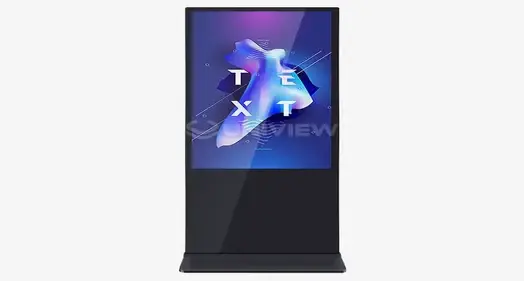
Understanding Floor Standing LCD Digital Signage Panels
Floor standing LCD digital signage screens are a specific type of business display technology that is made to send strong visual messages in public places. These self-contained units use advanced LCD screens and strong structural engineering to make display options that can be used in a variety of business settings.
Core Architecture and Design Principles
Currently available stand-alone digital screens are based on industrial-grade parts that are designed to work all the time. The main part of the display is usually a commercial IPS or VA screen, which has an MTBF (Mean Time Between Failures) of more than 60,000 hours to make sure it works well in harsh conditions. The weighted base plate design keeps the table from tipping over by chance while still looking good, meeting both safety worries and the need for a good presentation.
Professional display makers use thermally tempered glass faceplates that are 3mm to 6mm thick and have a Mohs hardness grade of 7 to protect their products from damage and theft that is common in public places. This way of building strikes a good mix between longevity and optical clarity, so the picture quality stays the same during long deployment times.
Hardware Integration and Computing Platforms
In order to serve a wide range of content management needs, modern floor standing LCD digital signage includes sophisticated computer design. ARM-based System on Chip (SoC) systems that run Android are cheap options for cloud-based sign apps, and x86 OPS (Open Pluggable Specification) modules work with Windows and Linux for more complicated interactive computing situations.
Intelligent fan control and heat disposal routes in advanced thermal management systems keep the inside of a machine at the best temperature, which is between 0°C and 50°C. Split-screen features let you see video, running text, and interactive tools all at the same time, which increases the amount of information you see and keeps your attention.
Key Comparison Dimensions of Floor Standing LCD Digital Signage Panels
To properly judge business display options, we need to carefully look at them across a number of performance factors. Procurement pros can find solutions that meet specific operating needs by learning how different makers handle brightness optimization, environmental protection, and connection choices.
Display Technology and Visual Performance
Brightness levels are a key difference between business display choices, especially when selecting floor standing lcd digital signage. 450 to 700 nits are usually needed in retail settings, while 2500+ nits are needed for setups facing windows to block direct sunlight. High-brightness setups use high-Tni liquid crystals that can handle 110°C to keep them from turning black when exposed to strong light.
When it comes to shopping, where brand uniformity is important, color accuracy is very important. Commercial panels with sRGB color range coverage of more than 99% make sure that the colors shown on the screen exactly match the colors of the goods being sold. This standard is very important for fashion stores, car dealerships, and expensive brand presentations where color accuracy has a direct effect on people's decisions to buy.
Surface treatments like Anti-Glare (AG) and Anti-Reflective (AR) coats make it easier to read in places with high lighting. These visual improvements cut down on reflections that could make it hard to see what's on the screen. This is especially important in places with lots of windows or light sources.
Environmental Protection and Durability Standards
When used in commercial settings, display equipment is exposed to harsh elements that need strong defense. The amounts of dust and moisture protection are shown by IP ratings. For example, IP5X ratings are good for most indoor uses, and IP65/66 ratings are better for semi-outdoor or high-humidity settings.
Conformal coatings on internal PCBs stop short circuits caused by electrical dust buildup. This is especially important in transportation hubs where electronic parts are constantly vibrating and flying particles are a threat. Ruggedized power sources can handle localized voltage changes that happen a lot in big infrastructure sites. This makes sure that the systems stay stable no matter what the electrical grid conditions are.
Temperature regulation systems take into account changes in the environment while controlling the heat that is generated inside by lighting units and computer parts. Centrifugal fan designs move air quickly and quietly, keeping noise levels below 60 dB. This makes them suitable for places that need to be quiet, like waiting rooms and business halls.
Connectivity and Integration Capabilities
These days, digital sign screens can connect to a number of different networks and information sources using a number of different protocols. You can join via HDMI, DisplayPort, or wirelessly. This lets you easily share material from central management systems or local media sources.
Cloud-based management platforms make it easier to watch and update material from afar by integrating networks. Real-time data integration for dynamic content like weather reports, social media feeds, and inventory changes is made possible by Ethernet connection. This improves customer interaction and business efficiency.
Comparing Floor Standing LCD Digital Signage Panels With Other Solutions
There are clear benefits to floor standing LCD digital signs compared to other display technologies, but each one is best for certain situations. Businesses can choose the right options for their implementation situations when they understand these differences.
Wall-Mounted vs. Freestanding Configurations
Freestanding displays are more flexible and can be used for short-term installs, seasonal campaigns, and places where hanging them on the wall wouldn't work. Because they are mobile, businesses can move displays based on traffic trends, sales needs, or changes in how the space is set up without having to make any structural changes.
Wall-mounted options are usually safer to install and take up less floor space, which makes them good for hallways or areas with a lot of foot traffic where upright units might get in the way. But wall mounting needs a structural study and skilled installation, which makes placement more difficult and costs more.
Different positioning methods have very different ideas about how to use space. For safety and mobility reasons, freestanding units need clearance zones. Wall-mounted displays, on the other hand, make the most of floor space by letting customers move around and showing off products.
LCD vs. LED Technology Comparison
When looking at something closely, LCD screens work great because the images and colors are very accurate. LCD technology's high pixel density makes it possible to display clear text and detailed images, which are necessary for apps like interactive directories, product catalogs, and wayfinding, where reading affects the user experience directly.
LED screens usually have better brightness levels and wider viewing angles, which makes them good for outdoor use and big setups. For standard business display sizes, especially in the 32-65 inch range, most common for floor standing LCD digital signage uses, the cost-per-pixel ratio frequently favors LCD solutions.
Differences in how much power different technologies use have a big effect on running costs over multiple years of usage. LCD screens usually use less power than similar LED grids, but this depends on how bright they are set and what they're showing.
Interactive vs. Static Display Capabilities
When interactive touchscreens are added to static advertising displays, they become tools for involvement that grab customers' attention and gather useful behavioral data. Projected capacitive (PCAP) touchscreens let you use multiple touches and respond to your actions on guide maps, product listings, and self-service apps.
Static screens put more effort into making images look good and information stand out than into making them touch-sensitive. This method usually gives better light levels and wider viewing angles while making things simpler and requiring less upkeep.
Whether to use an interactive or static configuration relies on the purpose of the setup and how the customer wants to connect with it. In retail settings, engaging product research is helpful, but in transportation hubs, information visibility is more important than touch interaction.
Procurement Considerations for B2B Buyers
Professional procurement of commercial display systems requires careful evaluation of supplier capabilities, total cost of ownership, and long-term support availability. Understanding these factors helps businesses make informed decisions that optimize both immediate deployment success and ongoing operational efficiency.
Supplier Evaluation and Certification Standards
Manufacturers with a good reputation follow international safety and quality standards, such as those set by UL, CE, FCC, and RoHS. These certificates show that a company cares about product safety, electromagnetic compatibility, and being good to the environment. They protect companies from liability and make sure that their products work with the current infrastructure.
Quality control methods in manufacturing have a big effect on how reliable and consistent something is over time. Established sellers use strict testing methods, such as burn-in, thermal cycling, and vibration testing, to find problems with their goods before they are sent to deployment areas.
Businesses that work in different places or time zones need to be able to provide global help. For mission-critical installations where downtime means lost income right away, suppliers that offer 24-hour expert support, local service partnerships, and full guarantee coverage give peace of mind.
Customization and Integration Services
Custom enclosure colors, logo integration, and unique mounting setups are just a few of the many customization options available from professional floor standing LCD digital signage providers. With these services, companies can keep their brand consistent while also meeting certain functional and aesthetic needs.
Software compatibility and the ability to integrate content management systems decide how hard the deployment is and how well it works in the long run. When suppliers offer pre-configured solutions for popular CMS platforms, it cuts down on the time and technical risks needed to set up and integrate systems.
Installation and testing services make sure that the system is set up correctly and that the guarantee is still valid. Professional installation teams know how to meet safety standards, make sure displays are accessible, and find the best places to put them so that they work best with the least amount of damage to operations.
Total Cost of Ownership Analysis
Over normal rollout cycles of 5 to 7 years, the purchase price is only one part of the total ownership costs. Long-term economics are affected by things like energy use, upkeep needs, and possible upgrading costs, which should be taken into account when buying something.
Differences in warranty coverage affect both the security you get right away and the costs of service over time. Extended protection choices that last between 3 and 5 years make service costs more regular and make sure that you can get help from the maker during the depreciation period.
Businesses can control their cash flow and get the newest technology with the help of financing choices like lease agreements and rental models. These other options usually come with upkeep and upgrade plans that make budgeting easier and make sure you can use the latest software systems.
Making the Right Choice: Factors to Evaluate Before Purchase
Selecting optimal floor standing lcd digital signage solutions requires a systematic evaluation of technical specifications, environmental requirements, and operational objectives. This assessment process ensures alignment between product capabilities and actual deployment conditions while optimizing return on investment.
Environmental Assessment and Site Requirements
The lighting conditions around you have a direct effect on the brightness and viewing angle needs. Indoor stores with controlled lighting can have lower levels of brightness while still having good vision. On the other hand, places that face windows need high levels of brightness to block out the light from the sun.
The best place to put the screen and how far away you should be to see it are affected by how traffic flows. For high-traffic areas, bigger screens and wider viewing angles make it easier to read the material from different angles. On the other hand, smaller screens that are better for close watching can be used in interaction zones.
Different operation settings have very different acoustic needs. Operating quietly below 40 dB is required in corporate halls and healthcare facilities. Higher noise levels are okay in shopping and transportation areas so that cooling systems can work harder and displays can be brighter.
Technical Specification Priorities
Resolution needs depend on how far away you are watching and what you are viewing. For close-up interactive apps and detailed product presentations, 4K screens have better picture quality, while Full HD resolution is fine for advertising material seen from farther away.
Specifications for connectivity should take into account both present needs and those that are expected to arise in the future. Multiple HDMI inputs, network connections, and USB ports let you connect a variety of content sources and additional devices, which makes the device more useful over time.
Adding support and security features to the mounts helps with both safety and preventing theft. Anti-tip designs keep things from falling over by mistake in high-traffic areas, and security locks and tamper-resistant enclosures keep valuable parts from being taken out or accessed by people who aren't supposed to.
Long-Term Support and Upgrade Planning
Firmware updates make sure that the device stays compatible with new content management platforms and security standards. When suppliers release regular software changes, they make products last longer while still meeting the highest standards of performance and security.
Long-term serviceability and operating continuity are affected by how easy it is to change parts. Manufacturers who keep extra parts on hand and offer upgrade choices for components protect the value of an investment and let performance improve over time.
Aligning technology roadmaps helps companies plan for future growth and the needs for system integration. Knowing the development priorities of suppliers and making sure that platforms work with each other helps make sure that original investments support long-term growth goals and technology progress.
Conclusion
Commercial floor standing lcd digital signage selection demands a comprehensive evaluation of technical capabilities, environmental requirements, and supplier support services. Modern solutions offer sophisticated features, including high-brightness displays, interactive capabilities, and robust environmental protection that enable deployment across diverse commercial applications. Success depends on matching specific operational requirements with appropriate technology solutions while ensuring access to reliable long-term support and maintenance services that protect investment value and operational continuity.
FAQ
Q: What brightness level do I need for my floor standing LCD display?
A: Standard business lighting in stores usually needs between 450 and 700 nits to make things clearly visible. For setups that face a window or are partly outside, you need between 2500 and 3000 nits to properly block direct sunlight. When choosing brightness levels, you should think about the lighting and eye point where you are.
Q: How do I ensure my digital signage investment provides long-term value?
A: Look for companies that give warranties that last between 3 and 5 years, expert help that works all over the world, and regular firmware changes. Look at the total cost of ownership, which should include how much energy it uses, how much upkeep it needs, and any possible upgrade choices. To make sure you always have help, choose providers with well-established service networks and a wide range of parts.
Q: Can floor standing lcd digital signage integrate with my existing content management system?
A: Standard connectivity methods, such as HDMI, network connectivity, and cloud-based control systems, are supported by most commercial screens. Before you buy, make sure it works with your specific CMS, and look for sellers that offer pre-configured integration options to make setup easier.
Q: What environmental protection do I need for my installation location?
A: When used indoors, basic dust protection (IP5X rating) is usually enough. For high-humidity or partially outdoor settings, IP65/66 grades are better. When looking at outdoor safety needs, you should think about temperature ranges, vibration levels, and potential exposure to dust or water.
Q: How important is interactive capability for commercial applications?
A: Interactive features get customers more involved and let them do things on their own, like find their way and look at products. Interactive displays, on the other hand, usually cost more and need more upkeep than standard displays. When making this choice, you should think about your unique goals for interacting with customers and your cash.
Partner with Uniview Commercial for Premium Floor Standing LCD Digital Signage Solutions
Uniview Commercial delivers industry-leading floor-standing LCD digital signage solutions engineered for demanding commercial environments worldwide. Our advanced manufacturing capabilities combine high-brightness displays (2000-4000 nits), IP65/66 environmental protection, and corrosion-resistant construction to ensure reliable performance across diverse applications. With comprehensive customization services, 3-5 year warranties, and 24-hour global support, we provide complete solutions that maximize your investment value. Contact our expert team at sales@univiewlcdisplay.com to discuss your specific requirements and discover why leading businesses choose Uniview Commercial as their trusted floor-standing LCD digital signage supplier for mission-critical installations.
References
1. Digital Signage Technology Standards and Best Practices for Commercial Applications, International Display Industry Association, 2023.
2. Commercial LCD Panel Reliability and Performance Metrics in High-Traffic Environments, Journal of Digital Display Technology, Volume 15, 2023.
3. Energy Efficiency Standards for Commercial Digital Signage Systems, Green Electronics Council, 2022.
4. Interactive Display Technologies: Comparative Analysis of Touch Screen Solutions for Commercial Use, Society for Information Display, 2023.
5. Environmental Protection Requirements for Electronic Displays in Public Spaces, Institute of Electrical and Electronics Engineers, 2022.
6. Total Cost of Ownership Analysis for Commercial Digital Signage Deployments, Digital Signage Federation, 2023.

Learn about our latest products and discounts through SMS or email