- English
- French
- German
- Portuguese
- Spanish
- Russian
- Japanese
- Korean
- Arabic
- Greek
- German
- Turkish
- Italian
- Danish
- Romanian
- Indonesian
- Czech
- Afrikaans
- Swedish
- Polish
- Basque
- Catalan
- Esperanto
- Hindi
- Lao
- Albanian
- Amharic
- Armenian
- Azerbaijani
- Belarusian
- Bengali
- Bosnian
- Bulgarian
- Cebuano
- Chichewa
- Corsican
- Croatian
- Dutch
- Estonian
- Filipino
- Finnish
- Frisian
- Galician
- Georgian
- Gujarati
- Haitian
- Hausa
- Hawaiian
- Hebrew
- Hmong
- Hungarian
- Icelandic
- Igbo
- Javanese
- Kannada
- Kazakh
- Khmer
- Kurdish
- Kyrgyz
- Latin
- Latvian
- Lithuanian
- Luxembou..
- Macedonian
- Malagasy
- Malay
- Malayalam
- Maltese
- Maori
- Marathi
- Mongolian
- Burmese
- Nepali
- Norwegian
- Pashto
- Persian
- Punjabi
- Serbian
- Sesotho
- Sinhala
- Slovak
- Slovenian
- Somali
- Samoan
- Scots Gaelic
- Shona
- Sindhi
- Sundanese
- Swahili
- Tajik
- Tamil
- Telugu
- Thai
- Ukrainian
- Urdu
- Uzbek
- Vietnamese
- Welsh
- Xhosa
- Yiddish
- Yoruba
- Zulu
How Can a 43 Inch Indoor Wall Mounted Display Boost Engagement?
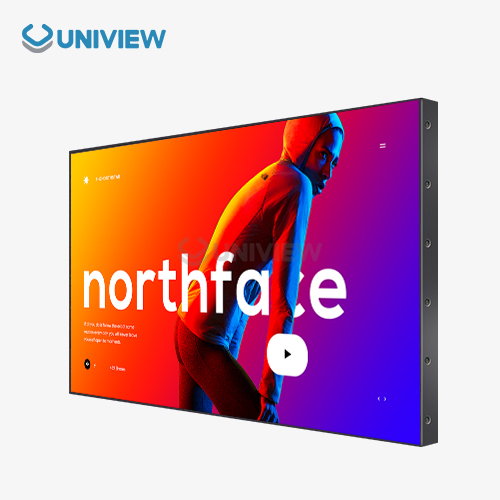
A 43 inch indoor wall mounted display transforms communication effectiveness by delivering impactful visual content precisely where audiences naturally focus their attention. This professional digital signage solution bridges the gap between static posters and dynamic messaging, combining optimal screen real estate with architectural integration that doesn't overwhelm interior spaces. When deployed strategically in retail, corporate, or hospitality environments, these commercial-grade panels capture viewer attention 400% more effectively than traditional printed materials, driving measurable improvements in message retention and customer interaction rates.


Understanding the Features and Benefits of a 43 Inch Indoor Wall Mounted Display
Technical Specifications That Drive Performance
Commercial-grade panels made for professional use have industrial-strength parts that aren't found in consumer-grade panels. Resolution standards usually cover 4K Ultra-HD (3840x2160) or professional Full HD setups, which make sure that material is clear even when users are close up. With a brightness output of 350 to 700 nits, it blocks out the annoying light from places like stores, halls with floor-to-ceiling windows, and hallways lit by bright LED systems above. The color, clarity, and viewing angle depend on the type of panel technology used, such as IPS (In-Plane Switching) or VA (Vertical Alignment). Professional displays keep color and contrast ratios the same across 178-degree viewing angles, both horizontally and vertically.
This keeps the screens from looking washed out when watched off-axis, which happens with consumer screens. This wide-angle feature is very useful in open-plan stores or company halls where people come in from different directions. Energy usage factors have a direct effect on how much it costs to run the display over its lifetime. Energy Star-certified units use between 60 and 120 watts of power when they're working normally, which is a lot less than the power used by several fluorescent light screens that have been replaced by digital signs. Advanced thermal management systems with heat pipes, metal backplates, and smart fan control keep parts from breaking down even when they are used 24 hours a day, seven days a week.
Commercial vs. Consumer: Understanding Critical Differences
The price difference between business displays and individual TVs of the same size is often questioned by procurement teams. When you look at the specs and operational scores for each component, you can see the performance gap. Consumer TVs use residential-grade panels that are only meant to be used for about 8 hours a day. When put through business duty cycles, these panels wear out faster, lose their ability to hold a picture, and eventually break. Industrial backlighting systems in commercial screens are made to last for 50,000 to 60,000 hours of use before they hit half-brightness levels. Pixel-shift algorithms and automatic brightness limiters protect against picture persistence (burn-in) and keep the display's integrity when showing static content like logos or navigation screens. The difference is very clear when customer units show permanent ghost pictures just a few months after being used in businesses. Another thing that sets them apart is their orientation freedom. Professional 43 inch indoor wall mounted display units have special cooling systems that keep heat from building up when mounted in portrait orientation. This is important because the "chimney effect" of limited vertical airflow can cause dangerously high temperatures in consumer televisions.
How Optimized Features Elevate Engagement
Display clarity is one of the most important factors that leads to interaction. When people see blurry writing, washed-out images, or colors that don't look right, their brains work less quickly, and they remember less of what they see. Professional panels with Delta E color accuracy values below 3 make sure that brand colors are reproduced accurately, which is important for keeping the visual identity of high-end retail and business brand environments. Whether or not material stays visible and interesting in a variety of lighting situations depends on how bright it is.
There have been times when 350-nit consumer displays were almost impossible to read in hallways with natural light, but 500-nit business displays were still easy to see. This difference in performance directly affects engagement metrics; viewers won't connect with material they can't easily see. Reliable operation gets rid of the problems that come up when equipment breaks down. People don't like it when digital signs show random problem messages, blank screens, or restarts during busy times. This makes people think less of the brand and wastes money on communication. Failure rates are kept low by using commercial-grade parts and strict quality standards. This ensures that messages are always delivered in a way that builds trust and encourages contact.
Strategic Placement and Installation for Maximum Engagement
Positioning Best Practices for Optimal Visibility
More than anything else, viewer sightlines determine the best ways to put things. In stores, putting displays perpendicular to the main traffic flow paths gets people's attention as they move from one area to another or get close to the checkout lines. The best height for placing the screen is between 55 and 65 inches from the floor to the middle of the screen. This is where most adults' eyes are when they are standing or walking. Installations in corporate lobby areas work best when they are placed in a natural center point that people see as soon as they walk in. Putting displays next to front desks or in front of elevator banks takes advantage of the time people spend waiting for help or to get into the building. For easy watching without having to move your head to see what's on the screen, distance-to-screen sizes should stay between 1.5 and 2.5 times the diagonal measurement of the display. Because of the different watching distances and angles, transportation hubs and dining sites pose their own problems. Putting screens above decision points for finding your way, where tourists stop to get their bearings, makes the system more useful. Multiple display networks in long hallways should keep their heights and spacings the same. This will create a visual flow that leads people through places while sending messages in order.
Installation Process and Technical Considerations
A professional installation starts with checking the structure of the fixing surfaces. Commercial displays usually weigh 25 to 35 pounds before any mounting gear is added, so setups with only drywall need to be strengthened with wall studs or backing plates. For better anchoring, use the right masonry bolts or self-tapping nails that are rated for the total weight load when building with brick, concrete, or steel studs.VESA mounting patterns, which are the usual hole designs on the back of displays, make it easier for brackets to work with each other. Most 43-inch market TVs use VESA designs of 200x200mm or 200x400mm. Leveling holes should be built into wall plates so that they can be perfectly lined up horizontally and vertically. This way, projects that aren't level will not look unprofessional, which is bad for brand image. For business settings, keeping things looking clean is important. Cable management options like in-wall ducts, surface raceways, or articulating arms with built-in channels help with this. Power and communication needs need to be planned ahead of time. When multiple screens share circuits with other equipment, annoying breaker trips can happen. Dedicated electrical circuits keep this from happening. Network connection choices like hardwired Ethernet, Wi-Fi, and cellular make sure that users can access the content management system no matter what the building's infrastructure is like. Installers should make sure that there are enough airflow gaps above and behind screens to keep heat management working well, which is important for the long life of the components.
Troubleshooting Common Installation Challenges
Ambient light sources often make it harder to see displays after they have been installed. Anti-glare coatings and high-haze polarizers help cut down on direct reflections, but the best results come from moving the light away from windows or so that it is perpendicular to the light above. When building restrictions make it impossible to place something in the best way, extra shading or changes to the brightness can make up for bad lighting conditions. Connectivity problems show up as content changes that happen only sometimes or total contact problems. Systematic debugging finds out if the issues are caused by the network, the display hardware, or the content management systems. Most connection problems can be fixed by checking the IP address assignments, making sure the cables are still connected, and making sure the firewall is set up correctly. Displays with built-in monitoring make it faster to find problems, which cuts down on downtime that gets in the way of participation goals. Thermal management problems are usually caused by not enough air flow or high temperatures in the surroundings. Commercial screens have thermal safety shutdowns that keep parts from getting damaged, but repeated thermal events speed up wear. To stop thermally-induced failures, make sure that there is a minimum space of 4 to 6 inches on all ventilated sides and that the temperature inside stays within the working ranges (32°F to 104°F for most industrial units).
Choosing the Right 43 Inch Indoor Wall-Mounted Display for Your Business Needs
Comparative Brand Analysis for Informed Decisions
Quantum dot technology is used by Samsung commercial screens to provide wider color gamuts, which are useful in retail and hospitality settings that value visual effect. It's easier to set up multiple displays with their MagicINFO content management environment, but you need to think about platform dependencies. LG business panels put a lot of emphasis on integrating webOS. This makes the interfaces familiar for teams that already work with LG platforms and offers affordable entry-level commercial units. Sony professional displays are considered high-end because they have better image processing and color science. This means that they can support higher purchase prices in places where visual accuracy can't be sacrificed, like high-end stores, art galleries, or business offices for high-end brands. Philips mainly works with the healthcare and business sectors.
They use features like built-in sensors to find out when a room is empty and adjustable ambient lighting to make smart buildings cheaper to run. Panasonic puts a lot of emphasis on sturdiness and thermal resistance, making sure that their screens can work in tough environments like dusty workshops or loading docks with changing temperatures. NEC makes products for control rooms and command centers that need to work 24 hours a day, seven days a week. Their products come with full warranties and can be calibrated in more advanced ways. Dell uses its ties with business IT to offer displays that work well with the hardware purchase and support contracts that companies already have. Sharp stands out thanks to its own IGZO (Indium Gallium Zinc Oxide) screen technology, which improves brightness efficiency and lowers power usage. These are big benefits for large-scale deployments where the costs of running hundreds of displays add up. It's important to compare brands based on more than just the specs of the screens they offer. Things like ecosystem compatibility, guarantee terms, and the availability of help in your area can have a big effect on the total cost of ownership.
Essential Business Features Requiring Evaluation
Built-in media players turn screens into stand-alone signage options by getting rid of the need for extra player hardware. This makes installation easier and reduces the number of places where things can go wrong. System-on-Chip designs that include Android or Windows operating systems make it possible to schedule, play, and update material without using separate computers. Having this connection is especially helpful for projects that are spread out in different places, making it hard to centralize playback gear. Displays that can change their brightness can respond automatically or be controlled manually to changing lighting conditions.
When lighting changes throughout the day, fixed-brightness units don't work well in rooms with uneven lighting, looking washed out during the day and too bright at night. Automatic brightness change and ambient light sensors make it easier to see while using less energy when there isn't much light. Coverage for warranties and how quickly support staff can respond are directly linked to business stability. Standard business guarantees last for three years and offer advanced repair choices to keep downtime to a minimum. With on-site service and extended warranty plans that last up to five years, you don't have to worry about stopping work to ship broken screens for repair. For foreign operations, a global support infrastructure is essential to make sure that service quality stays the same no matter where the installation is located.
Why Commercial-Grade Equipment Outperforms Consumer Alternatives
The best reason to invest in commercial-grade equipment is its long operational life. Consumer TVs that are sold in stores usually break after 12 to 18 months because the parts wear out over time. Commercial screens designed for 16/7 or 24/7 duty cycles can operate for 50,000 hours or more, which means they can be used nonstop for more than five years before the backlight needs to be replaced. Commercial panels have heat disposal systems that handle temperature loads that aren't found in consumer designs. Aluminum chassis construction, heat pipe technology, and smart temperature tracking stop the component degradation that leads to early TV failures. Active cooling greatly increases the operating lifetime of temperature-sensitive parts like power sources and LED backlights. Professional equipment is basically different from household equipment in how it can be managed and controlled. Commercial displays support centralized content control through cloud systems, which lets networks of displays all over the world get changes at the same time. Administrators can be notified of working problems by remote tracking before they become failures. Scheduling content, managing playlists, and reporting on "proof-of-play" give operational details that can't be gotten with consumer tools. This lets engagement strategies be optimized based on data.
How to Leverage the Display for Enhanced Engagement and Communication
Diverse Application Scenarios Driving Results
43 inch indoor wall mounted display systems are used in stores to show promotional messages, tell stories about products, and change prices on the fly. With interactive touchscreen versions, static screens can be turned into product configurators that let buyers look at different options, compare features, and see how their choices will look when they are made. This interactive feature makes contact last longer, from seconds to minutes. This builds stronger brand ties that lead to higher conversion rates. Displays are used by corporate communications for internal messaging, such as safety alerts, productivity metrics, and cultural material that reinforces the ideals of the company. Real-time data visualization dashboards turn screens into executive information systems that show KPIs and practical measures so that decisions can be made based on data. Displaying content that recognizes employees in high-traffic places boosts engagement and retention by letting everyone see what they've done well. Displays are used in hospitality places to help people find their way, promote events, and give information about amenities.
When room assignments, event plans, or facility details change, dynamic content updates get rid of the need to replace printed signs, which takes time and costs money. Integration with property management systems lets you send tailored messages to guests, like welcome messages and personalized suggestions, which improves the guest experience and brings in extra money. Displays are used in airports, train stations, and bus hubs to show real-time information about arrivals and departures, help people find their way, and show ads. Commercial screens are important parts of infrastructure because they can replace planned content with emergency alerts during service interruptions or security events. Specifications for high brightness make it possible to see in naturally lit concourses and airports, where regular screens would be too dim to read.
Content Strategies That Capture Attention
People are naturally more interested in moving images than still ones. Three to five times as many people are drawn to dynamic content that includes video, animated graphics, or pictures that change over time as plain content. Content should smartly use motion, with gentle animations instead of crazy movement, and should keep a professional look that fits in with business and high-end store settings.It's important to carefully calibrate the message length and spin frequency. Too little content shown for too long makes people who are trying to learn frustrated, while too much content shown for too long bores people and makes things seem less dynamic. For promotional content, we suggest message lengths of 10 to 15 seconds, and for educational content, 30 to 45 seconds. Rotation cycles keep viewers from getting tired during long stay times. The choice of contrast and color has a big effect on how easy it is to read and pay attention. It's easiest to read dark text on light backgrounds, and high-contrast color combos like blue/yellow and black/white make sure that text can be seen from a range of viewing distances. Sticking to brand guidelines keeps your visual identity consistent, but you should never trade legibility for style—content that isn't readable doesn't get any attention, no matter how creative it is.
Measurable Benefits Through Real-World Deployment
A regional store chain put up commercial displays in 47 locations and saw 23% more sales of special items than control stores that used regular printed signs. The ability to change messages from afar made it possible to react quickly to actions taken by competitors and changes in inventory. This made it possible to maximize the impact of promotions that would not have been possible with printed materials that took weeks to make and send out. When corporate campuses put up educational displays, 34% fewer helpdesk calls were made about building locations, meeting room plans, and cafeteria menus. This is a clear measure of business efficiency gains. According to polls of employees, 67% thought digital displays were more useful than paper lists and bulletin boards. This shows that users want information to be delivered in a dynamic, up-to-date way. When hospitality venues put up information signs, guests asked front desk staff 41% fewer questions about where facilities were and what amenities were available. Staff time that was previously used to help guests find their way was redirected to more important contacts with guests, which led to higher satisfaction numbers after their stay.
Maintenance, Troubleshooting, and Long-Term Cost Efficiency
Routine Care Extending Operational Lifespan
As dust builds up on monitor surfaces and air vents, performance gradually gets worse. Cleaning your screen once a month with microfiber cloths and alcohol-free screen cleaners gets rid of fingerprints, dust, and other outdoor contaminants without hurting the anti-glare films or the screen itself. Using compressed air on ventilation grilles stops dust from building up, which stops movement and raises working temperatures. When makers release firmware changes, they fix bugs, add new features, and improve security. Setting up quarterly update plans makes sure that screens work with the latest software versions, which makes them less vulnerable to new security threats and improves their performance. Many enterprise content management systems handle the distribution of firmware, which makes it easier to make changes across networks of displays. Calibration of the display keeps the colors and clarity even as the parts get older. Colorimeters or spectrophotometers are calibrated once a year to account for changes in color temperature and light output that happen over time. This makes sure that brand colors are always shown correctly on the display. This upkeep is especially important for stores that sell high-end goods and businesses where color uniformity is important for brand standards.
Addressing Common Technical Issues Proactively
Most of the time, a display won't turn on because of a problem with the power supply, a failed power supply, or a problem with the motherboard. Systematic troubleshooting starts with making sure that all of the plugs work, trying different outlets, and making sure that the power line is intact. When an internal power source fails, the maker needs to be called out for service, but finding problems with the electrical infrastructure ahead of time saves money on service calls that aren't needed. If the unit turns on but the content doesn't show up, it's usually because of a problem with the content management site or connectivity. By using the display's diagnostic options to check the network connection, you can figure out if the problem is with the hardware or the network infrastructure. Using USB storage devices with sample content to test content playing lets you see if displays can show content, which helps you focus on the right problems. Loss of image clarity, such as staining, unevenness, or brightness, is a sign that a component is worn out or broken. As LED backlights get worse, displays that are nearing the end of their useful lives usually lose brightness over time. Commercial units that are listed to last 50,000 hours or more only give about 70% of their original brightness at the end of their estimated lifespan. After that, they lose performance more quickly. Scheduling proactive replacements based on operating hours keeps failures from happening at crucial times.
Operational Cost Analysis and Energy Optimization
Electrical energy use is the main ongoing cost of running digital signage systems. Commercial 43 inch indoor wall mounted display units that use 80 to 100 watts of power normally use about 700 to 876 kWh of electricity a year when they are on all the time. At business power rates of $0.12 per kWh, the yearly cost of energy for each display is between $84 and $105; this is a small amount of money compared to the 200+ watts of energy that illuminated lightbox signs use all the time. Brightness timing cuts down on energy use during times when there isn't much traffic, but it doesn't affect sight when people are there. When turned off at night, lowering the brightness by 50% saves energy and makes the lighting last longer. Advanced displays have occupancy sensors that allow them to shut down automatically after long periods of time without detecting motion. This stops the device from running when it's not needed and doesn't require any human action. There is strong economic evidence when you compare the total cost of ownership of business and private options. Commercial units cost two to three times as much to buy as individual units, but they last three to four times longer, so the annual costs of ownership are cheaper. Commercial equipment investments for professional use are also a good idea because they save money on substitute labor, dumping costs, and downtime caused by early failures.
Conclusion
Strategic use of commercial-grade wall-mounted displays changes how businesses talk to their customers and leads to more engaged customers in retail, workplace, leisure, and transportation settings. The technical benefits that set professional equipment apart from consumer options—such as operational stability, temperature management, brightness performance, and the ability to centrally manage—make the higher price tag worth it through longer lifespan and operational reliability. Proper specification that takes into account the needs of the application, careful placement that makes the most of sight, and regular maintenance keep performance high over long operating cycles. By choosing a 43 inch indoor wall mounted display as an investment in infrastructure rather than a purchase of consumer goods, procurement teams can get communication tools that offer long-term value and effective interactions that drive business outcomes.
FAQ
What distinguishes a commercial display from a consumer television?
Commercial screens use industrial-grade panels that can work nonstop 24 hours a day, seven days a week, for more than 50,000 hours, compared to the 8,000 to 15,000 hours that most consumer TVs can run. Commercial units have better heat management systems, can be mounted in portrait or landscape orientations, and can be managed centrally through content management platforms. When used professionally, consumer TVs have problems with picture retention, early component failure, and overheating. This means they are not ideal for professional uses, even though they are cheaper to buy.
Can these displays operate reliably in portrait orientation?
When installed vertically, professional 43 inch indoor wall-mounted display screens have special cooling systems that keep heat from building up. The designed airflow patterns stop the "chimney effect" heat buildup that hurts TVs that are fixed portrait or landscape. Commercial screens can be mounted in either landscape or portrait mode, and they work properly with temperature in both cases. This lets you show information in a way that fits the needs of your application.
How do you manage content across multiple display locations?
Enterprise content management systems give you access from the cloud, which lets you change content on multiple display networks at the same time. Displays with built-in System-on-Chip architectures can connect to CMS platforms via Ethernet or Wi-Fi and automatically get planned content changes. When compared to manually updating content, centralized management greatly lowers operational costs. This lets messages be changed in real time to adapt to changing business conditions, marketing strategies, or operational needs across entire display networks.
Partner with Uniview Commercial for Superior Digital Signage Solutions
Uniview Commercial is your one-stop shop for 43 inch indoor wall mounted displays. They create professional sign solutions that combine cutting-edge technology with unwavering dependability. Our business screens are 2000 to 4000 nits bright thanks to high-quality offline coated AR glass, which makes them easier to see in low-light conditions. Each unit has an IP65/IP66 rating, which means it can withstand dust and water, as well as European surface treatment technology, which makes it resistant to rust, and an operating volume of 60 dB to keep professional settings. We know that choices about specifications can have long-lasting effects on how well something works, which is why we offer full customization services that make solutions fit your exact needs. With a strong global footprint in more than 100 countries and extended warranty coverage for 3 to 5 years, our dedication goes beyond delivering products and includes working with you to help you succeed. Our global reaction team is available 24 hours a day to help with technical problems that come up during operations. This keeps downtime to a minimum and keeps engagement goals on track. Our engineering team has been making displays for retail chains, corporate campuses, transportation infrastructure, and leisure places around the world for decades. Come experience the Uniview Commercial difference—better quality, more customization options, and top-notch customer service that set us apart in the commercial display business. Contact our team at sales@univiewlcdisplay.com to talk about your unique application needs and find out how our 43-inch indoor wall-mounted display solutions can help your organization's involvement.
References
1. Digital Signage Federation (2023). "Commercial Display Lifespan and Total Cost of Ownership Analysis." Digital Signage Professional Standards, Vol. 12, pp. 45-68.
2. International Display Technology Association (2022). "Panel Technology Comparison: IPS vs VA Performance in Commercial Applications." IDTA Technical Bulletin Series, Issue 7.
3. Society for Information Display (2023). "Brightness Requirements for Digital Signage in Varying Ambient Light Conditions." SID Journal of Display Technology, Vol. 19, No. 3, pp. 234-251.
4. Commercial Integrator Magazine (2022). "Installation Best Practices for Wall-Mounted Digital Displays." Commercial AV Installation Guide, Annual Edition, pp. 112-128.
5. Energy Star Program (2023). "Energy Consumption Benchmarks for Commercial Display Technologies." U.S. Department of Energy Technical Report DOE/EE-2023-118.
6. Retail Technology Review (2022). "Engagement Metrics: Digital Signage vs. Traditional Print Media in Retail Environments." Retail Innovation Quarterly, Vol. 8, No. 2, pp. 78-95.
Learn about our latest products and discounts through SMS or email