- English
- French
- German
- Portuguese
- Spanish
- Russian
- Japanese
- Korean
- Arabic
- Greek
- German
- Turkish
- Italian
- Danish
- Romanian
- Indonesian
- Czech
- Afrikaans
- Swedish
- Polish
- Basque
- Catalan
- Esperanto
- Hindi
- Lao
- Albanian
- Amharic
- Armenian
- Azerbaijani
- Belarusian
- Bengali
- Bosnian
- Bulgarian
- Cebuano
- Chichewa
- Corsican
- Croatian
- Dutch
- Estonian
- Filipino
- Finnish
- Frisian
- Galician
- Georgian
- Gujarati
- Haitian
- Hausa
- Hawaiian
- Hebrew
- Hmong
- Hungarian
- Icelandic
- Igbo
- Javanese
- Kannada
- Kazakh
- Khmer
- Kurdish
- Kyrgyz
- Latin
- Latvian
- Lithuanian
- Luxembou..
- Macedonian
- Malagasy
- Malay
- Malayalam
- Maltese
- Maori
- Marathi
- Mongolian
- Burmese
- Nepali
- Norwegian
- Pashto
- Persian
- Punjabi
- Serbian
- Sesotho
- Sinhala
- Slovak
- Slovenian
- Somali
- Samoan
- Scots Gaelic
- Shona
- Sindhi
- Sundanese
- Swahili
- Tajik
- Tamil
- Telugu
- Thai
- Ukrainian
- Urdu
- Uzbek
- Vietnamese
- Welsh
- Xhosa
- Yiddish
- Yoruba
- Zulu
How Do Interactive Kiosk Displays Support Omnichannel Retail?
Interactive kiosk displays are changing global shopping by connecting the digital and real experiences of customers in smart ways. These self-service devices use advanced touch technology, real-time data synchronization, and a strong connection to make shopping across multiple channels as easy as possible. An interactive kiosk display connects to inventory systems, customer relationship management (CRM) platforms, and payment methods so customers can browse goods, see what's in stock, make purchases, and get personalized suggestions—all while they are in the store. This coming together gets rid of the old hurdles between shopping online and shopping in stores, directly meeting the needs of today's consumers for freedom and speed.
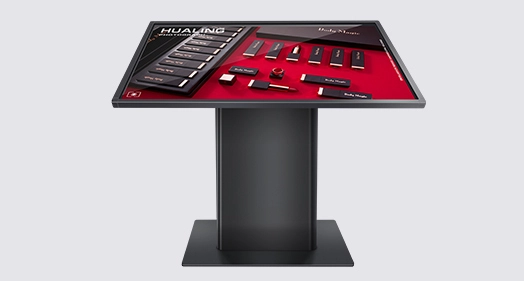
Understanding Interactive Kiosk Displays in the Omnichannel Retail Environment
Creating uniform, connected customer interactions across all channels is the key to making omnichannel shopping work. Interactive kiosk displays are important links between online shopping and physical stores because they let stores give customers the same brand experience wherever they choose to shop.
Core Components of Modern Interactive Kiosk Technology
Many advanced technologies are used in today's interactive kiosk displays to make sure they work well. Industrial-grade touchscreens are usually part of the hardware base. These can be capacitive models that respond to multiple touches and make browsing easy, or they can be resistive models that are durable in high-traffic areas. Embedded computing units handle contacts with customers, handle deals, and keep in touch with backend systems in real time. These terminals have extra parts like barcode scanners, receipt printers, card readers, and even biometric identification units. Together, they make full-service stations that can handle complicated store tasks on their own. Strong covers keep internal parts safe while keeping the device's good looks, and advanced heat management systems make sure it can run 24 hours a day, seven days a week, without losing performance.
Bridging Online and Offline Shopping Experiences
The real value of an interactive kiosk display comes from how well it can work with other systems. These terminals link straight to customer relationship management platforms, corporate resource planning systems, and inventory databases, so data can be shared instantly across all channels. Customers can get the same selection of products, price information, and special deals from a kiosk that they can get from mobile apps or e-commerce websites. This consistency gets rid of the stress of finding that the items you see online aren't available in the shop. From the comfort of a physical location, customers can look at product details, compare choices, read reviews, and even see their buying history and loyalty rewards. The interactive kiosk display puts the customer's whole digital storefront right at their fingertips while they're in the store, making the shopping experience truly seamless.
Operational Mechanisms Supporting Procurement Decisions
Procurement managers and technology teams can better evaluate options when they know how these systems work. Secure network connections, like wired Ethernet, Wi-Fi, or cellular, are needed for interactive kiosk displays to stay in touch with computers in the cloud or on-premise. This connection lets you instantly update your goods, make changes to your prices, and deal with customers in a way that is tailored to their needs based on your CRM data. Modular design is often used in software architecture, which lets stores change user interfaces, add third-party apps, and change functions as their business needs change. PCI-compliant encryption and user authentication methods keep private payment information safe, and people who aren't supposed to be there can't get in. These practical factors have a direct effect on solution selection, as businesses have to look at how well the solution fits with their current IT infrastructure, how easily it can be expanded in the future, and how well it follows the rules for their industry.
Key Benefits of Interactive Kiosk Displays for Omnichannel Retail
By using interactive kiosk display technology, you can change both how happy your customers are and how efficiently your business runs. Key performance factors have gotten a lot better for retailers in a lot of different types of stores after putting in targeted kiosks.
Elevating Customer Engagement Through Self-Service Functionality
Modern shoppers want to be able to do their shopping on their own time and easily. Customers can take charge of their experience with interactive kiosk displays, which let them look at goods at their own pace without having to wait for staff to help them. The ability to do things on your own is especially helpful during busy shopping times when the staff is limited. Customers can look through full catalogs of products, narrow down their choices based on certain criteria, read thorough product specs, and see content created by other users, like ratings and reviews. The touch screen lets you connect with the device in a way that feels natural and easy. Retailers who use interactive kiosk displays have seen higher average transaction values. This is because customers who interact with kiosks tend to look at more goods and find things they might not have found while looking normally. The technology also supports foreign interfaces, which makes it easier for a wider range of customers and tourists from other countries to access.
Streamlining Operations and Optimizing Workforce Allocation
In addition to helping customers, interactive kiosk displays make the store run better in a basic way. Kiosks free up staff members to do more valuable tasks, like giving specific advice, fixing difficult problems, and building relationships. They do this by automating routine tasks like looking up products, prices, supplies, and basic checkout procedures. By optimizing the staff, business costs are cut while service quality is raised in areas where people are most important. Express checkout lanes are made possible by kiosks that can handle payments. This cuts down on wait times and eases traffic during busy times. Targeted advertising content shown on interactive kiosk displays creates upselling and cross-selling possibilities with great accuracy, showing relevant deals based on viewing history and past purchases. Because kiosks are automatic, they also reduce the chance of mistakes made by people when processing transactions and entering data. This makes it easier to keep track of goods and balance finances.
Capturing Valuable Customer Insights Through Data Analytics
Every time a customer interacts with an interactive kiosk display, data is generated that stores can use to make smart decisions. These systems keep track of which goods customers look at the most, how long they look at each one, the search terms they use, and the paths that lead to finished sales versus sessions that are abandoned. This behavioral intelligence shows trends that could never be fully captured by just looking at things. Stores look at this information to find the best places to put products, improve their marketing strategies, make price changes on the fly, and make more accurate demand predictions. The detailed information lets marketers create personalized ads for groups of customers based on their actual tastes rather than guesses about their age or gender. Retailers can better handle their inventory when they know which items get a lot of interest but not many sales, which could mean that the prices are too high or there is missing information that kiosks can fill in. This strategy, which is based on data, changes how retailers understand and meet the wants of customers across all channels.
Types and Technologies of Interactive Kiosk Displays Tailored for Retail
When choosing the right kiosk technology, you need to think carefully about where it will be used, what it needs to do, and how it will be deployed. The market has a lot of different choices, each designed for a different situation and with its own set of features.
Indoor Interactive Kiosk Displays for Premium Retail Environments
For indoor applications, visual appeal and improving the user experience are the most important things. The high-resolution screens on these interactive kiosk displays show bright colors and can be seen from a wide range of angles. This makes for engaging user experiences that are true to brand identity. Sleek containers with high-end finishes like brushed metal, tempered glass, and unique colors go well with the high-end look of the shop. Most indoor machines work in climate-controlled environments, which lets makers focus on design and performance instead of strict environmental protection. Capacitive touchscreens are the most common type in this group. They allow responsive multitouch movements that are known to people who use smartphones. Screen sizes range from small 21-inch models that can be put on a table to huge 55-inch screens that can be put on a floor unit and stand out. Often, these systems come with extras like built-in cameras for virtual try-ons, NFC readers for contactless payments and scanning reward cards, and high-end sound systems for showing multimedia material. The controlled environment lets for advanced cable management, discreet mounting choices, and easy interaction with the structure of the store.
Outdoor Interactive Kiosk Solutions for High-Visibility Locations
For outdoor operations, engineering needs to be ruggedized so it can handle harsh circumstances. The weatherproof casings on these interactive kiosk displays have ratings of IP65 or IP66, which keep the interior parts safe from dust and water. Sunlight-readable screens with brightness levels between 2000 and 4000 nits make it possible to see even in full sunlight. They do this by using optical bonding and anti-reflective layers to cut down on glare. Intelligent thermal management systems that include both heating and cooling methods keep components working at their best temperatures even in the coldest and warmest temperatures (usually -20°C to +60°C). This keeps parts from breaking down and makes sure they work the same way all year. Vandal-resistant construction uses tempered glass that doesn't break, stronger steel cases, and mounting systems that can't be changed. These features keep theft and damage at bay. Outdoor interactive kiosk displays often have automatic brightness adjustment sensors that change the brightness of the display based on the amount of light in the area. This saves energy at night while still letting you see. Most of the time, these systems have built-in security against electromagnetic interference (EMI), which makes sure they work reliably near transportation infrastructure, industrial equipment, and other EMI sources.
Specialized Features Enhancing Customer Convenience
Modern interactive kiosk displays have more than just touch controls; they also have extra devices that add to their usefulness and make the customer experience better. Integrated thermal printers can print receipts, tickets, coupons, or information about a product whenever they are needed. This makes deals more concrete. Customers can quickly get detailed information about goods with barcode and QR code readers, which work by scanning things directly or codes from packaging. This makes the links between real products and digital content seamless. Secure payments are made with EMV-compliant card readers, and contactless NFC devices work with Apple Pay, Google Pay, and Samsung Pay, among others. Some more advanced types of interactive kiosks have document readers that can be used to scan paper forms, IDs, or insurance cards for healthcare purposes. Biometric authentication, which can be done with palm readers or cameras that recognize faces, adds an extra layer of security for sales or account access that are limited by age. These built-in add-ons turn simple information kiosks into full-service stations that can handle complicated, multi-step tasks without any help from staff.
Software Capabilities Driving Omnichannel Integration
Hardware is only one part of how well an interactive kiosk works. How well kiosks work with larger store environments is determined by the software platform. Open-architecture software that works with a variety of business systems through standard APIs is used by the best interactive kiosk display options. This makes it possible to sync inventory in real time, making sure that station data shows the correct amount of stock in all places and channels. By connecting to CRM platforms, machines can recognize customers who have visited before, get information about their purchases, and make personalized suggestions based on how they have behaved in the past. When a loyalty program is connected, won rewards are instantly applied, point balances are shown, and member-only deals are promoted. Integration of a payment platform makes deals safe and allows for a range of payment methods and currencies. Content management systems let marketing teams change advertising materials, product details, and user interfaces from afar, without having to visit the site or know how to use technology. Analytics dashboards are part of more advanced systems. They show real-time patterns of customer interactions, conversion data, and operational success markers.
How to Select the Right Interactive Kiosk Display Solutions for Your Business
To make sure that the solutions chosen are in line with both strategic goals and operational facts, procurement choices need to carefully consider a lot of different factors. A structured method reduces the risks of execution and raises the return on investment.
Evaluating Hardware Specifications and Performance Characteristics
Technical specs have a direct effect on how the user feels and how reliably the system works. Choosing the right screen size relies on what you want to do with it. Smaller screens are better for places with limited room and simple jobs like finding your way, while bigger screens are better for complex product catalogs and more engaging browsing experiences. The choice of touch technology depends on how quickly it is and how long it will last. Capacitive screens are better for controlled settings, while resistive technology can handle rough conditions and heavy use. How well interactive kiosk displays handle demanding apps, high-resolution media, and multiple tasks at the same time depends on their processing power and memory size. Multiple USB ports, Ethernet, Wi-Fi, Bluetooth, and cellular connectivity choices make sure that the device works with the tools and network infrastructure that you need. The operating temperature ranges and environmental protection grades need to meet the places where they will be used, especially when they are outside or in an industrial setting. When kiosks give multimedia material or offer accessibility tools for people who are blind or have low vision, audio skills are important. The freedom of installation and the use of the room are affected by the size and mounting choices.
Assessing Integration Flexibility and Software Compatibility
Integration with current IT environments keeps custom development from being too expensive and makes sure that the system works reliably. It is important for procurement teams to make sure that interactive kiosk display options work with widely used platforms and industry-standard standards. Common ERP systems, such as SAP, Oracle, and Microsoft Dynamics, are compatible with kiosks. This makes sure that data flows smoothly between kiosks and core business processes. Integrating CRM with systems like Salesforce, HubSpot, or Adobe Experience Cloud lets you connect with customers in a way that is tailored to their needs based on detailed profile information. Connecting an e-commerce site to Shopify, Magento, WooCommerce, or a system that was custom-built keeps the catalog the same across all outlets. Payment processor compatibility tells machines what kinds of transactions they can handle and how safely private financial data can move through systems. How easy it is for developers to change functions and add private apps is shown by the quality and availability of APIs and documentation. The choice between cloud-based and on-premise design affects who owns the data, how late it is, who is responsible for upkeep, and how much it can grow.
Balancing Customization Options with Deployment Speed
Businesses that want to quickly implement ideas or test concepts before bigger rollouts may be interested in standardized interactive kiosk displays because they can be set up more quickly and for less money. These ready-to-use options come with configurations that have been used before, detailed instructions, and well-known help channels. Customized screens offer unique ways to brand, specific features that work with specific processes, and unique customer experiences that strengthen brand identity. Custom enclosures can be made with particular colors, materials, and design features that match the look of the store perfectly. Specific needs that normal models can't meet can be met by specialized external integration. Longer wait times—usually 8 to 16 weeks for complex custom projects—and higher unit prices because of the costs of planning, tooling, and low-volume production are the trade-offs. Procurement professionals have to weigh the strategic benefits of being different against the practical issues of limited budgets and tight deadlines for implementation. Most of the time, the best balance is found in hybrid methods that combine standard core components with changeable exterior elements.
Analyzing Total Cost of Ownership and Financing Options
The purchase price is only one part of the total cost. A full cost analysis takes into account the prices of installation, continued upkeep, software licensing fees, network connectivity, and the need to replace or upgrade equipment at some point. Extended warranty plans make budgeting easier by reducing the confusion around service costs. Service level agreements that spell out reaction times and support access keep operations running smoothly and keep customers happy. The amount of energy used affects management costs, especially for big deployments that are always on. When you buy in bulk, you usually get volume discounts, which range from 10 to 15% for orders over 50 units. The more you buy, the more you save. Leasing agreements spread out the cost of capital over several years and may include provisions for upkeep and upgrades. Rental choices are good for short-term uses like holiday operations, marketing campaigns, or pilot programs that test how well kiosks work before a permanent purchase is made. Partner funding through interactive kiosk display sellers can sometimes offer better terms, which shows that producers want to grow their markets.
Real-World Use Cases of Interactive Kiosk Displays in Omnichannel Retail
The many useful ways that interactive kiosk technology is used in different fields show how flexible and useful it is for fixing business problems and making the customer experience better.
Transforming Traditional Retail with Buy-Online-Pickup-In-Store Models
Today's shoppers want shopping options that are flexible and work with their plans and tastes. Interactive kiosk displays allow for complex BOPIS applications that combine the ease of e-commerce with quick access to products. People look through brochures online from home, place orders through websites or mobile apps, and then go to shops when it's convenient for them. It's easy to pick up items when you get there, thanks to interactive kiosk displays. Customers scan confirmation codes or enter order numbers, the system checks their identity, and lockers open immediately, or staff get delivery alerts. This method gets rid of all checkout lines for customers who pick up their orders, which also makes the staff's job easier. Customers who go to shops to look around but would rather do all their shopping online can also use kiosks. They can choose items in person, read barcodes at an interactive kiosk display to see full product details and reviews, add items to digital shopping carts, and finish orders for delivery to their homes. This mixed method works for customers who like to feel products but would rather shop from home and not carry their purchases around with them. Retailers gain because customers can order from the whole network's stock instead of just what certain stores sell, which eases the pressure on individual stores' inventory.
Revolutionizing Quick-Service Restaurants Through Self-Service Ordering
To make up for a lack of workers, improve order accuracy, and raise average transaction values, many businesses in the hospitality and food service industries have installed interactive kiosk displays. Customers walk up to interactive kiosk displays that show full choices with bright photos of the food, detailed nutritional information, and options for making the food their own. The easy-to-use interface helps users set up meals by offering things that go well with them and drawing attention to special deals. Studies show that people who order through interactive kiosk displays spend about 15 to 20 percent more than people who order with a waiter or waitress. This is because digital interfaces make it easier to upsell, and customers can look at full menus without feeling rushed. Order accuracy goes up by a huge amount because cooking staff get exact digital instructions straight from customers, which gets rid of the misunderstandings that come up when people order over the phone. Multiple interactive kiosk displays can handle orders at the same time, which makes managing the line more efficient and stops jams during busy times. Payment connection speeds up the checkout process, and customers get tickets with their order confirmations that show them how to get to the pickup points. The technology can handle food limits and allergen filtering, so customers can safely meet their needs even when they are complicated. Restaurants move workers from taking orders to making food and doing customer service tasks, where interacting with people is more valuable.
Enhancing Corporate and Transportation Environments
For wayfinding, guest control, meeting room booking, and staff services, corporate sites use interactive kiosk displays. When people come to the front desk, they can use machines to check in, print their cards, and get directions to their destinations without having to wait for a receptionist. Transportation hubs use these systems to sell tickets, show schedules, and help people find their way around large, complicated buildings. People using public transportation can buy tickets, look at different routes, see real-time arrival times, and use disability services at a transit stop with an interactive kiosk display. These implementations work all the time without paying staff, so they provide steady service even during busy times and nights. For transportation uses, ruggedized interactive kiosk displays are needed that can handle constant use, changing weather conditions, and the odd bit of rough handling.
Emerging Technologies Shaping Future Applications
Innovation keeps adding new features to interactive kiosks. Adding artificial intelligence makes conversational interfaces possible, where users can talk to virtual helpers easily instead of using menus to find what they want. These interactive kiosk displays are driven by AI and can understand what's going on around them, answer difficult questions, and lead customers through complex steps for choosing products. Through interactive kiosk displays with cameras, augmented reality features let customers see goods in the places they want to buy them, like furniture in their homes, paint colors on their walls, and makeup on their faces. With Internet of Things connection, interactive kiosk displays can see real-time inventory levels, let staff know when popular items run out, change advertising content based on stock levels, and work with automated fulfillment systems. Face recognition technology customizes experiences for returning customers by remembering their likes and past purchases without them having to log in again and again. With these new features, interactive kiosk displays become smarter and more flexible connections that change over time to meet customer needs and technology advances.
Conclusion
Interactive kiosk displays are now an important part of any store that wants to have an effective online strategy. These specialized devices combine digital and physical experiences, give customers more freedom, improve working efficiency, and produce business data that can be used. The technology solves important problems like rising labor costs, customers' demands for smooth multichannel experiences, and the need to make decisions based on data. For the application to go well, technology requirements, software integration skills, customization needs, and total cost must all be carefully thought through. Applications in retail, hospitality, transportation, and business settings show how flexible it is and how much of an effect it has. As AI, AR, and the Internet of Things get better, interactive kiosk displays will become even more useful for making unique, memorable experiences for customers that keep them coming back and help businesses make more money.
FAQ
Q: What factors influence the pricing of interactive kiosk display systems?
A: Prices vary a lot depending on the gear needed, the amount of customization, and the software that is needed. Standard indoor models with basic functions usually cost between $2,000 and $5,000 per unit. Ruggedized outdoor interactive kiosk displays with advanced functions can cost more than $10,000 to $15,000. Costs are affected by screen size, touch technology, how well peripherals are integrated, the materials used for the housing, and the grade of environmental protection. Extra costs are added for custom branding, specialty software creation, and one-of-a-kind form factors. When you buy in bulk, you can get savings, and ongoing costs include software licenses, support contracts, and network connections.
Q: How do interactive kiosk displays work with ERP and CRM tools that are already in place?
A: Modern interactive kiosks use open-architecture software that works with common methods for interaction, such as REST APIs, SOAP web services, and database connectors. These make it possible for two-way data sharing with SAP, Oracle, and Microsoft Dynamics, among others. This makes sure that real-time inventory, price, and transaction data are shared. When CRMs are connected to systems like Salesforce or Adobe Experience Cloud, machines can see information about customers like their identities, past purchases, and loyalty, which lets them interact with customers in a more personalized way. Middleware tools that handle the safe flow of data between kiosks and business systems are often used for implementation.
Q: What are typical delivery times for custom interactive kiosk display orders?
A: Lead times are based on the level of customization and the number of orders. Standard setups usually ship two to four weeks after the order is confirmed. Due to custom container designs, complicated peripheral integration, and specific software needs, lead times are now 8–16 weeks, which includes engineering, development, manufacturing, and quality testing. Orders that are bigger than 100 units may need to be delivered in stages. International shipping can take an extra two to four weeks, based on where it's going and how long it takes to clear customs. During the procurement process, reputable interactive kiosk display providers give specific project timelines.
Partner with Uniview Commercial for Cutting-Edge Interactive Kiosk Display Solutions
Uniview Commercial can change the way you shop by providing high-quality interactive kiosk display solutions made for complex online uses. Our wide range of products includes beautiful indoor models with ultra-high-resolution screens and tough outdoor models with 2000–4000 nit brightness that are built to IP66 standards. Advanced heat management, corrosion-resistant surface treatments using European technology, and wind resistance rated to level 16 are all built into every interactive kiosk display we make. This means that they can work reliably 24 hours a day, seven days a week, in any location.
As a reliable company that makes interactive kiosk displays and has locations in more than 100 countries, we offer flexible customization services that are perfect for your brand and your business needs. Our tech team can help you with selection, planning for integration, and rollout. Full warranties for 3 to 5 years and global support 24 hours a day, 7 days a week will also protect your investment. Uniview Commercial offers high-quality products at reasonable prices for all orders, no matter how big or small. They can provide standard units for quick rollout or fully customized designs for specific uses.
Get in touch with our expert team right away at sales@univiewlcdisplay.com to talk about your needs for an interactive kiosk display and get full technical specs and prices. We'll work together to make great digital experiences that make customers happier and get real business benefits.
References
1. Anderson, M. & Thompson, R. (2022). "Digital Transformation in Retail: The Role of Self-Service Technology in Omnichannel Strategy." Journal of Retail Technology and Innovation, 15(3), 112-129.
2. Chen, L., Rodriguez, P., & Kim, S. (2023). "Customer Engagement and Interactive Kiosk Technology: A Multi-Industry Analysis." International Journal of Human-Computer Interaction in Retail Environments, 8(2), 45-67.
3. European Retail Systems Association (2023). "Omnichannel Retail Infrastructure: Best Practices and Technology Standards." Brussels: ERSA Publications.
4. Global Retail Federation (2022). "Self-Service Technology Impact Study: Quantifying Operational Efficiency Gains in Multi-Channel Retail." Annual Research Report, Washington, D.C.
5. Kumar, V. & Patel, N. (2023). "Integration Architecture for Enterprise Retail Systems: Connecting Physical and Digital Touchpoints." IEEE Transactions on Industrial Informatics, 19(4), 892-908.
6. Williams, H., Zhang, Q., & O'Brien, K. (2022). "Environmental Durability Requirements for Outdoor Interactive Display Systems." Journal of Electronic Hardware Engineering, 34(7), 234-251.

Learn about our latest products and discounts through SMS or email