- English
- French
- German
- Portuguese
- Spanish
- Russian
- Japanese
- Korean
- Arabic
- Greek
- German
- Turkish
- Italian
- Danish
- Romanian
- Indonesian
- Czech
- Afrikaans
- Swedish
- Polish
- Basque
- Catalan
- Esperanto
- Hindi
- Lao
- Albanian
- Amharic
- Armenian
- Azerbaijani
- Belarusian
- Bengali
- Bosnian
- Bulgarian
- Cebuano
- Chichewa
- Corsican
- Croatian
- Dutch
- Estonian
- Filipino
- Finnish
- Frisian
- Galician
- Georgian
- Gujarati
- Haitian
- Hausa
- Hawaiian
- Hebrew
- Hmong
- Hungarian
- Icelandic
- Igbo
- Javanese
- Kannada
- Kazakh
- Khmer
- Kurdish
- Kyrgyz
- Latin
- Latvian
- Lithuanian
- Luxembou..
- Macedonian
- Malagasy
- Malay
- Malayalam
- Maltese
- Maori
- Marathi
- Mongolian
- Burmese
- Nepali
- Norwegian
- Pashto
- Persian
- Punjabi
- Serbian
- Sesotho
- Sinhala
- Slovak
- Slovenian
- Somali
- Samoan
- Scots Gaelic
- Shona
- Sindhi
- Sundanese
- Swahili
- Tajik
- Tamil
- Telugu
- Thai
- Ukrainian
- Urdu
- Uzbek
- Vietnamese
- Welsh
- Xhosa
- Yiddish
- Yoruba
- Zulu
How to Manage Interactive Kiosk Displays Remotely?
For businesses that have self-service stations in more than one place, managing interactive kiosk displays from afar has become a strategic must. With remote control, you can keep an eye on things in real time, make changes to content, run tests, and fix problems without having to go to the site in person. Cloud-based platforms link to your interactive kiosk displays through safe internet protocols. This lets you handle the state of the hardware, the settings for the software, and user data from one place. This feature cuts running costs by a large amount while increasing efficiency and service quality. Strong hardware and smart software environments work together to make remote management work well. This way, your interactive kiosk displays will always work the same way in stores, at transportation hubs, in company lobbies, and at outdoor advertising sites. To get the most work done with the least amount of trouble, B2B procurement teams look for solutions that offer full dashboards, automated alerts, and easy integration with current IT systems.

Understanding the Challenges of Managing Interactive Kiosk Displays Remotely
Putting up interactive kiosk displays in a lot of different places around the world makes operations more complicated and requires advanced management strategies. Network infrastructure that isn't always stable causes problems for procurement workers, especially when kiosks are used in transit stations or public advertising sites that are far away. Problems with hardware, like touchscreens not working right or power supplies not working right, need to be fixed right away to avoid losing money and making customers unhappy. When linked to larger networks, each interactive kiosk display can become a possible entry point for cyber threats because of software flaws.
Network Connectivity and Infrastructure Limitations
The dependability of a network changes a lot based on where it is deployed. When placed in a busy shopping mall, an interactive kiosk display has stable internet access. However, units placed at bus stops or rest stops on the side of the highway often have trouble with intermittent cellular signals. This lack of consistency makes remote tracking harder because management systems need to send data all the time to keep accurate track of performance measures. Problems with latency can cause important system breakdown alerts to be delayed, which can cause more downtime and negatively affect the customer experience. Teams in charge of buying things need to check to see if the companies they're interested in offer flexible ways to connect, like 4G/5G backup systems and edge computing that lets local operations happen when the network goes down.
Hardware and Environmental Variability
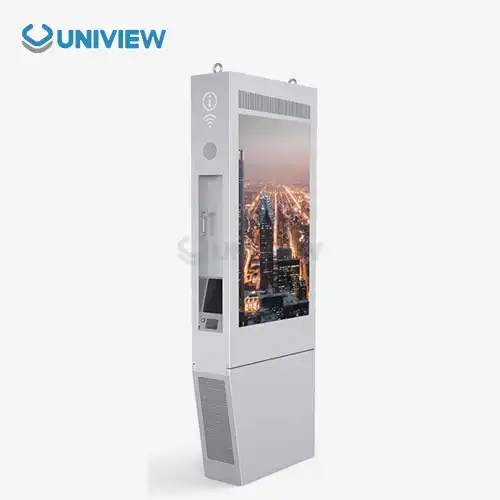
Different types of weather and other environmental factors must not affect the gear in interactive kiosks. Indoor units in climate-controlled business settings don't have to deal with much stress, but outdoor interactive kiosk displays have to deal with temperature extremes from -20°C to +60°C, strong sunlight that can make the screens black out, and the risk of water getting in. When used near the coast, where salt air speeds up material breakdown, corrosion protection becomes very important. Uniview Commercial solves these problems with IP65 and IP66 grades, which offer safety against water and dust along with European-standard surface treatment technology. Our interactive kiosk display units have smart heat management systems and isotropic screens that were made to work in high-light outdoor settings with 2000 to 4000 nits.
Security and Compliance Concerns
Each linked interactive kiosk display is a possible security hole that needs to be filled with strong protection procedures. Payment kiosks that handle private financial information need to follow PCI-DSS rules, and healthcare apps need safety measures that are in line with HIPAA. To keep people from getting in without permission, remote control platforms need secure authentication methods. For B2B clients in controlled industries, extra scrutiny is needed, which is why audit records, encrypted data transfer, and role-based access controls are needed. For buying teams in charge of enterprise-wide deployments, it's a must to choose sellers who build security into both the hardware and software.
Scalability and Integration Complexity
Many times, companies are in charge of hundreds of interactive kiosk displays spread out in different areas. Each of these kiosks may have a different software version and content plan. Scalable management systems are needed to give users similar experiences while still letting them make changes that fit their needs. It gets more complicated technically when you try to connect to other systems like customer relationship management platforms, business resource planning systems, and payment providers. Because old systems might not have current APIs, procurement teams have to look at middleware options. These problems with integration get worse when you have to manage mixed groups that include different types of kiosks or goods from different vendors in the same operational environment.
Modern Approaches to Remote Interactive Kiosk Management
In the old way of managing on-site, techs had to go to each interactive kiosk display spot to do regular maintenance, software updates, and fix problems. This method led to high trip costs, longer service reaction times, and a lack of ability to grow. Modern remote management systems change this by putting all the power in one place through cloud-based panels that can be accessed from anywhere with an internet connection. These systems let you see the performance of the whole fleet in real time, which lets you use preventative maintenance to fix problems before they affect operations that deal with customers.
Cloud-Based Monitoring and Analytics
Modern management platforms keep an eye on the health of all related interactive kiosk displays all the time. They do this by keeping track of measures like screen responsiveness, processor temperature, memory usage, and peripheral functions. Advanced analytics find usage trends, times of peak traffic, and rates of content engagement. This helps with making strategic choices about where to deploy and when to be effective. Scheduled tests are run by automated diagnostic processes on the calibration of touchscreens, network connections, and integrated payment systems. These tests produce thorough reports that help procurement teams find the best total cost of ownership. These cloud ecosystems combine data from multiple interactive kiosk displays into a single dashboard. This gives leaders a level of visibility that wasn't possible with manual management methods.
Real-time warning systems let the right people know right away when certain limits are surpassed. For example, a screen that is too hot could mean that the cooling system is failing, or a lack of activity for a long time could mean that the power is out. Customizable escalation procedures make sure that important problems get the help they need quickly from the right expert resources. By looking at historical trends, you can find problems that keep happening with the same hardware batches or deployment settings. This information can help with insurance claims and help you decide what to buy in the future.
Remote Content Management and Software Updates
When content management systems are connected to remote platforms, advertising screens, promotional messages, and engaging apps can be updated instantly across entire teams of kiosks. Marketing teams can change content in a way that fits with campaigns, seasonal sales, or real-time product availability, and they don't have to involve IT staff or physically access the site. Version control systems make sure that branding is always the same while also letting area changes be made when needed. During off-peak hours, software patches are automatically distributed, so security standards are met, and features are improved without causing service delays.
Interactive kiosk display apps need to be updated on a regular basis to fix bugs, close security holes, and add new features. With remote release, update cycles can be cut from weeks to hours, which greatly improves security and user experience continuity. Rollback features are safety nets that can be used if changes cause problems that were not expected. They can return to stable settings from the past with little trouble. These features are especially useful for transportation and healthcare deployments, where unexpected downtime can have a big effect on safety rules and public services.
Predictive Maintenance and Automated Diagnostics
In order to identify component breakdowns before they happen, machine learning algorithms look at operating data from interactive kiosk displays. Predictive maintenance models find trends in how touchscreens, hard drives, and cooling fans break down. This lets you change parts before they break down, during planned maintenance windows instead of having to call for emergency service. According to standards released by the Interactive Customer Experience Association, this method cuts total upkeep costs by 30 to 40 percent compared to reactive strategies.
Automated diagnostic tools check external devices like paper printers, barcode scanners, and card readers from a distance, making sure they work without any human input. When problems are found, the system either gives specific troubleshooting instructions to people on-site or starts remote resolution processes like reinstalling drivers or making changes to the setup. These features allow non-technical staff to quickly solve common issues, saving expert technical resources for cases that are really hard to solve.
Essential Features and Technologies for Remote Management Systems
For remote control of interactive kiosk displays to work, the advanced hardware needs to work well with the advanced software systems. Embedded connectivity modules, environmental sensors, and flexible designs that allow distant diagnosis must be part of the hardware. Software environments need management interfaces that work on multiple devices, access rules that are very specific, and full analytics engines that give insights that can be used.
Hardware Foundations for Remote Control
Modern interactive kiosk displays have industrial-grade computer units that are made to work 24 hours a day, seven days a week, even in tough circumstances. Embedded IoT devices check the temperature, humidity, and vibration patterns inside a device, sending early warnings about natural risks. Network interface redundancy, which combines Ethernet, Wi-Fi, and cellular links, makes sure that control systems can still join even if the main networks go down. Administrators can restart frozen systems or start controlled shutdowns during maintenance procedures without having to physically enter the system.
As a basic design concept, Uniview Commercial builds interactive kiosk display hardware that can be managed from afar. Our units have a dual-layer security design with encrypted communication routes and verification methods built into the hardware. Modular external links let you diagnose individual parts from afar, which helps you find the broken parts faster and more accurately. At key points in our thermal management systems, temperature sensors send real-time data to tracking tools that let repair teams know when thermal thresholds are getting close to the limits.
Software Platform Capabilities
Comprehensive management systems offer uniform screens that show the state of the whole fleet across locations, deployment types, and operational data. Administrators can access detailed controls for single interactive kiosk displays or run bulk operations that affect groups of kiosks in multiple locations. Role-based access control makes sure that marketing staff can change material without being able to see how the system is set up, and that technical teams can fully diagnose problems. Customizable reporting tools make compliance records, performance analyses, and maintenance logs that help with buying choices and warranty claims.
RESTful APIs let advanced platforms connect to corporate systems, which makes it possible for automatic workflows to connect kiosk operations to larger business processes. When a transaction is processed by an interactive kiosk display, the management platform can change the inventory, make notes in the customer relationship management system, and do financial reconciliation all without having to move data by hand. These connections get rid of practical silos and make sure that data is correct across all of an organization's functions.
Security and Compliance Frameworks
When you use a remote control, you need to think about hacking issues that need multiple layers of protection. End-to-end encryption keeps private customer information or operational data from being intercepted while it's being sent between interactive kiosk displays and management computers. Multi-factor security makes sure that only authorized users can access management areas, and intrusion detection systems watch for activities that look fishy, which could mean that someone is trying to break in. Security checks are done on a regular basis to make sure that they are in line with industry standards like PCI-DSS for payment processing, GDPR for European deployments, and laws that are specific to the sector.
Uniview Commercial uses security procedures throughout the whole lifetime of our interactive kiosk display products. These include secure boot processes that stop illegal firmware changes and tamper-evident hardware designs that let admins know when someone tries to physically get into the kiosk. Our management systems keep full audit logs of all changes to configurations, updates to content, and access events. These logs can be used for forensic investigations and to show that we're following the rules. The fact that China Pacific Insurance Company and third-party brokers offer full coverage shows that our remote management solutions are reliable and safe.
Comparing Remote Management Solutions: How to Pick the Best One
To choose the right remote management platforms, you need to carefully look at their technical features, their ability to grow, their security systems, and how much they will cost overall. When handling fleets of interactive kiosk displays from different makers, procurement teams must make sure that new hardware will work with the ones that are already in place. Stable vendors, good customer service, and the freedom to make changes have a big effect on long-term business success.
Evaluation Criteria for Platforms for Management
The technical features of different options are very different, so it's important to carefully compare them to your organization's needs. Important features include tracking in real time with alert levels that can be changed, managing material remotely in a number of different media forms, and automatically distributing software with rollback options. Some advanced features that you might want to look into are predictive maintenance algorithms, connection APIs for business systems, and mobile apps that let field workers use diagnostic tools on their phones. Scalability shows how well platforms can handle ten interactive kiosk displays or ten thousand units without slowing down or making the costs too high.
Security architectures need to be looked at in great detail, especially for projects that deal with private data. Platforms should show that they follow the rules set by regulators, encrypt data while it's being sent and stored, and offer specific ways to control who can view what. Vendors with mature security stances are open about their security practices, such as regular penetration testing and rules for reporting vulnerabilities. As part of evaluating vendors, procurement teams should ask for security audit reports and certificates.
Cost Considerations and ROI Analysis
When figuring out the total cost, you have to include the original platform fees, the regular membership fees, the costs of integration, and the investments in training. Some sellers charge a license fee for each device, while others offer different levels of price based on the number of features or levels of support. Customization needs, API interface development, and possible hardware changes needed for compatibility can all add up to hidden costs. Procurement teams should make cost models for the next five years that include expected fleet growth and compare them to the costs of standard on-site management methods.
Return on investment is shown by lower trip costs, shorter mean time to fix, longer hardware lifecycles, and higher customer happiness levels. Costs of labor go down because regular site trips are no longer needed because of remote management. Energy costs go down because of intelligent power management, and revenue is protected by minimizing downtime during busy times. Case studies from the industry show that running costs can be cut by 25–35% in the first year after full remote control is put in place for fleets of more than 50 interactive kiosk displays.
Supplier Reliability and Support Quality
Beyond specialized skills, choosing a vendor also involves looking at how stable the company is, how quickly they can help with problems, and how willing they are to work with you as a partner. Suppliers that are well-known and have a history of doing well in B2B markets are less likely to be a risk than new companies that don't have any reference customers or clear financial information. For foreign deployments that need technical help 24 hours a day, 7 days a week, in a number of different languages and time zones, a global support system becomes very important. With Uniview Commercial's global 24-hour live response support, buying teams can get help right away, no matter where they are deployed.
OEM manufacturing choices and the ability to customize give organizations that need branded experiences or specific hardware specs strategic benefits. When it comes to weather conditions, aesthetic needs, or useful needs that go beyond normal catalog goods, suppliers that offer flexible manufacturing can change the designs of interactive kiosk displays. During the planning process, our engineering teams work together with customers to come up with custom solutions that solve their specific operational problems while still taking advantage of economies of scale in production.
Best Practices for Implementing and Maintaining Remote Interactive Kiosk Management
To set up remote management successfully, you need to plan carefully, prepare your system completely, and keep improving it. Before putting in place management tools, companies should make sure they have clear governance frameworks that spell out jobs, responsibilities, and how to handle problems that get out of hand. Technical preparation includes figuring out the network's ability, setting up security protocols, and teaching staff to make sure that teams can make the most of the resources they have.
Infrastructure Preparation and Network Readiness
Setting up remote control starts with making sure that each interactive kiosk display has the right network hardware. How much bandwidth is needed depends on how often tracking is done, how much material is updated, and how much video streaming is needed for remote diagnostics. Minimum requirements usually call for a steady connection speed of 5 Mbps, but 10 Mbps or faster is best for managing high-resolution material. Network reviews should find problems with latency, firewall settings that need to be changed, and possible single points of failure that need multiple ways to join.
Hardware specs must meet the needs of remote control software, such as having enough processing power, memory, and storage for local cache. Older interactive kiosk displays might need to be upgraded or have extra parts added so they can be controlled from a distance. Standardizing hardware settings across deployments makes it easier to integrate control platforms and makes troubleshooting less difficult. Procurement teams should set basic technology requirements for new purchases to make sure they can be managed remotely from the start.
Security Implementation and Compliance
Both the interactive kiosk displays and the management system that controls them are safe when strong security standards are put in place. Network separation keeps traffic from kiosks away from key business systems, which limits the damage that could be caused by a breach. Communication between distributed units and central control computers is encrypted by virtual private networks. This keeps others from reading the messages, even when they are connected to the internet publicly. Only approved devices can connect to control systems with certificate-based authentication. This stops rogue units or man-in-the-middle attacks.
Regular security checks make sure that settings are still in line with changing company policies and regulations. Vulnerability screening finds old versions of software or incorrect settings that need to be fixed. Incident reaction processes lay out clear steps to follow when a suspected security event happens. These steps include how to isolate the area, collect forensic data, and talk to people involved. These steps protect customer data and the organization's image while showing regulatory bodies and insurance companies that you are doing your job.
Ongoing Optimization and Performance Management
Remote management tools generate a lot of practical data that can be used to make improvements all the time. Regular performance reviews find interactive kiosk displays that aren't working well and need to be fixed, areas with a lot of foot traffic that need more space, or content strategies that get people more involved. Maintenance plans change based on how often parts fail instead of how often they should be replaced in theory. This makes the best use of parts inventory and service response time.
Staff training programs make sure that employees know how to use the management tools that are available to them, from basic content changes to advanced diagnostic processes. Cross-functional training lets marketing teams handle material on their own while technology staff works to improve the infrastructure. Documentation libraries store institutional knowledge about common problems, how to solve them, and the best way to set up things. This speeds up the process of solving problems and getting new team members up to speed. These ongoing investments get the most out of remote management technology and help organizations build skills that will support long-term business success.
Uniview Commercial helps adoption go smoothly by offering thorough training, clear technical manuals, and quick engineering advice. Our extended insurance coverage, which lasts from 3 to 5 years, shows that we trust the reliability of interactive kiosk displays and gives clients peace of mind throughout the lifecycle of their deployments. Based on practical experience from hundreds of client deployments, technical support teams help with initial setup, troubleshooting complex integration problems, and making the best use of the management platform.
Conclusion
Remote management changes the way interactive kiosk display work from models of reactive maintenance to models of proactive improvement. Cloud-based systems let you see what's going on in real time, do automatic diagnostics, and have centralized control over multiple deployments. This lowers costs and raises the quality of service. To make execution work, you need to carefully choose a platform that meets your technical needs, fully prepare your infrastructure, and keep improving it by using operating data. When B2B buying teams put remote management skills at the top of their list of priorities, they set up businesses for scalable growth while reducing operational risks. As interactive kiosk technologies get better and more of them are put in place, advanced remote management is needed to keep a competitive edge and keep operations running smoothly.
FAQ
Q: How secure is remote management for interactive kiosk displays?
A: End-to-end encryption, multi-factor authentication, and network segmentation are some of the safety layers that must be used for remote control to be safe. Platforms with a good reputation follow industry standards like PCI-DSS for handling payments and do regular security checks to find holes. Hardware-level security features, such as safe boot processes and tamper monitoring, make security even better. Organizations should make sure that suppliers have clear security practices and provide specific compliance paperwork to back up regulatory requirements.
Q: Can remote management integrate with existing kiosk hardware from different manufacturers?
A: Standardized communication methods and flexible API designs make it possible for modern management tools to work with a wide range of hardware. Compatibility depends on how old the machine is, what operating systems are built in, and what kinds of connections are available. For the remote control to work with legacy units, software solutions or hardware updates may be needed. Before committing to enterprise-wide deployments, procurement teams should ask for compatibility studies and trial tests to make sure that the offered solutions can handle mixed fleets successfully without incurring too many customization costs.
Q: What cost savings can organizations expect from implementing remote kiosk management?
A: Most organizations can cut their operational costs by 25–35% by getting rid of trip costs, cutting down on downtime, and making better repair schedules. The exact savings rely on the size of the fleet, where it is located, and how it was maintained in the past. As a bonus, proactive repair can stretch the life of hardware, intelligent power management can lower energy use, and minimizing service interruptions during peak times can help businesses make more money. When figuring out the return on an investment, you should look at both direct cost savings and secondary benefits, such as happier customers and more flexible operations.
Q: How does remote management improve customer experience at interactive kiosks?
A: Remote management improves the customer experience by reducing downtime through preventative maintenance, making sure that material is always up-to-date and useful, and letting problems be fixed quickly when they happen. Monitoring in real time finds speed problems before they happen, which is helpful for customers who don't like it when things slow down or fail. When software versions are the same across sites, user interfaces are also the same. This makes it easier for customers to use various kiosks without getting confused. Analytics help optimize content based on real-life involvement patterns, which leads to more useful interactions that are in line with what customers want and need.
Q: What training do staff need to effectively use remote kiosk management systems?
A: Training needs depend on the job of the staff and how complicated the platform is. The people who work in marketing need to learn about content management, which includes processes for uploading media, organizing, and getting approval. Technical teams need to learn a lot about security procedures, troubleshooting tools, and managing configurations. Training in how to understand analytics is helpful for management because it lets them make decisions based on facts. Effective training programs include initial hands-on workshops, ongoing reference materials, online tutorials, and quick help from the provider. Cross-functional training makes an organization more resilient by sharing important information among many team members.
Q: How quickly can remote management platforms deploy software updates across kiosk fleets?
A: How fast you can send updates depends on the size of the files, the size of your fleet, and how you plan to schedule them. Small changes to the setup or content can be made to hundreds of units in just a few minutes. Major software updates need to be carefully planned out, and changes are often tested on sample devices before being sent to the whole fleet. Platforms usually plan changes for times when they won't affect as many customers. Before marking updates as full, automated checks make sure they were installed correctly. When rollout strategies are well thought out, they can update entire fleets of vehicles within 24 to 48 hours while keeping service up and running and letting users roll back changes if problems arise.
Partner with Uniview Commercial for Advanced Interactive Kiosk Display Solutions
Uniview Commercial is a reliable company that makes interactive kiosk displays and provides industrial-grade systems that are made to work in tough conditions. Our factories in Shenzhen make unique solutions with high-brightness screens (2000–4000 nits), better IP65/IP66 outdoor protection, and enclosures that don't rust thanks to European surface treatment technology. Every unit has a remote control built in from the start, so it works perfectly with the most popular cloud systems. Our position in more than 100 countries around the world shows that we can be trusted to support advertising campaigns in shopping, transportation, hospitality, and public spaces. Get in touch with our engineering team at sales@univiewlcdisplay.com to talk about your unique needs and find out how our interactive kiosk display solutions can help your investment succeed with top-notch performance, full guarantee coverage, and 24-hour global support.
References
1. Johnson, M., & Chen, L. (2023). Remote Device Management in Digital Signage: Strategies for Enterprise Deployment. International Journal of Retail Technology, 15(3), 112-134.
2. Parker, R. (2022). Cloud-Based Kiosk Management: Operational Efficiency and Cost Reduction Analysis. Journal of Business Technology Solutions, 28(4), 45-67.
3. Williams, S., Thompson, K., & Anderson, J. (2023). Security Frameworks for Connected Self-Service Terminals. Cybersecurity in Retail Technology Quarterly, 9(2), 78-95.
4. Interactive Customer Experience Association. (2023). Best Practices for Remote Kiosk Fleet Management: Industry Standards and Guidelines. ICEA Technical Report Series, Report No. 2023-07.
5. Zhang, H., & Kumar, P. (2022). Predictive Maintenance Applications in Interactive Kiosk Hardware: Machine Learning Approaches. International Conference on IoT and Smart Systems Proceedings, 401-418.
6. Morrison, T. (2023). Total Cost of Ownership Analysis for Digital Kiosk Deployments: Comparative Study of Management Approaches. Journal of Procurement and Supply Chain Management, 31(1), 156-178.
Learn about our latest products and discounts through SMS or email