- English
- French
- German
- Portuguese
- Spanish
- Russian
- Japanese
- Korean
- Arabic
- Greek
- German
- Turkish
- Italian
- Danish
- Romanian
- Indonesian
- Czech
- Afrikaans
- Swedish
- Polish
- Basque
- Catalan
- Esperanto
- Hindi
- Lao
- Albanian
- Amharic
- Armenian
- Azerbaijani
- Belarusian
- Bengali
- Bosnian
- Bulgarian
- Cebuano
- Chichewa
- Corsican
- Croatian
- Dutch
- Estonian
- Filipino
- Finnish
- Frisian
- Galician
- Georgian
- Gujarati
- Haitian
- Hausa
- Hawaiian
- Hebrew
- Hmong
- Hungarian
- Icelandic
- Igbo
- Javanese
- Kannada
- Kazakh
- Khmer
- Kurdish
- Kyrgyz
- Latin
- Latvian
- Lithuanian
- Luxembou..
- Macedonian
- Malagasy
- Malay
- Malayalam
- Maltese
- Maori
- Marathi
- Mongolian
- Burmese
- Nepali
- Norwegian
- Pashto
- Persian
- Punjabi
- Serbian
- Sesotho
- Sinhala
- Slovak
- Slovenian
- Somali
- Samoan
- Scots Gaelic
- Shona
- Sindhi
- Sundanese
- Swahili
- Tajik
- Tamil
- Telugu
- Thai
- Ukrainian
- Urdu
- Uzbek
- Vietnamese
- Welsh
- Xhosa
- Yiddish
- Yoruba
- Zulu
Interactive Touch Screen Kiosk Solutions for Smart Self-Service
Combining cutting-edge display technology with easy-to-use user interfaces, interactive touch screen booth solutions for smart self-service are a game-changing way for businesses to run today. These complex systems have high-performance touchscreens, strong processors, and specialized software platforms that work together to provide automated services that work smoothly in a variety of business settings. An interactive touch screen kiosk is like a digital doorway that lets customers get information, make purchases, interactive touch screen kiosk and connect with brands on their own. It also helps businesses run more efficiently and gives customers a better experience.
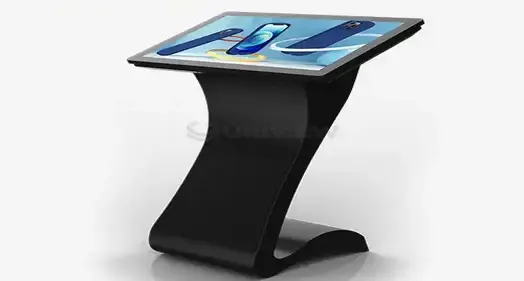
Understanding Interactive Touch Screen Kiosks and Their Core Benefits
Advanced Touch Technology Components
Three main tablet technologies are used in interactive booths. Each has its own benefits for different uses. Capacitive touchscreens are very responsive and can handle multiple touches, which makes them perfect for current user interfaces that need exact input and gesture control. Resistive touch technology works well with gloves or styluses and reliably performs in hard conditions, making it suitable for use in industrial settings. It is more durable to use infrared touch systems, and they can work with bigger screens while still being accurate, even if the screen surface gets a little scratched. Any kiosk setup that works well depends on the software environment. These platforms combine tools for managing content, accepting payments, tracking data, and keeping an eye on things from afar into a single package. Modern kiosk software lets you get changes in real time, customize the experience for each user, and easily connect to other business software, like software for managing goods, customer relationships, and corporate resource planning.
Hardware Specifications and Durability Features
Choosing the right screen size has a big effect on how engaged users are and how well operations run. Commercial-grade screens that are between 21 and 75 inches can fit a variety of room needs and contact patterns. Processing power should match the amount of expected use and the complexity of the software. Industrial-grade computers should be able to reliably perform in conditions of ongoing operation. When there is a lot of traffic, durability requirements become very important. Ratings of IP65 and IP66 guard against dust and water getting in, and toughened glass surfaces don't get broken by vandals or accidents. Advanced heat management systems keep equipment at its best temperature even when it's being used for long periods of time. This keeps performance from dropping and extends the life of the equipment.
Core Business Benefits and ROI Drivers
Interactive self-service options make a difference in a number of operational measures that can be measured. Interactive experiences that give customers quick access to product information, personalized suggestions, and streamlined purchase processes make them more interested. Multiple studies show that when companies install touch kiosks, customer happiness scores go up by 25% and wait times drop by up to 40%. Costs for operations go down when services are delivered automatically, worker needs are cut during busy times, and resources are better used. Data analytics lets you see trends in how customers act, interactive touch screen kiosk services are most popular, and when they're being used the most. This lets you make choices based on data that improve business performance. Most of the time, these systems pay for themselves in 18 to 24 months by saving money on labor and making more money.
Exploring Use Cases and Applications in Various Industries
Retail and Corporate Environments
With self-checkout systems, product catalogs, and promotional displays, retail apps change the way people normally buy. Customers can use interactive tools to get detailed information about products, see what's in stock, and make purchases without help from a salesperson. Visitor control systems, wayfinding tools, and staff self-service portals that make administrative tasks easier are all useful in business settings. Digital signage integration lets you change content, run promotions, and send brand messages in real time that change based on the time of day or the type of customer. These systems have interfaces that can be changed to fit the needs of different users and keep the brand consistent across multiple places. They also support multiple languages.
Hospitality and Transportation Sectors
Guest check-in systems, room service buying, and concierge services that work around the clock without hiring issues are all used in hotels and restaurants. These solutions make it easier for guests to get services and information right away, which makes the front desk's job easier during busy times. Integration with property management systems lets you see what rooms are available in real time and get personalized service suggestions. Interactive booths are used in transportation hubs to sell tickets, show schedules, and help people find their way. At airports and train stations, deployments handle thousands of contacts every day, making sure that everyone can use the facilities and that they are accessible. These systems work with current ticket systems and payment providers to offer full self-service options that cut down on lines and improve the flow of passengers.
Healthcare and Educational Applications
Healthcare facilities use information booths, systems for registering patients, and systems for making appointments that make routine work easier while also making the patient experience better. These systems make sure that strict privacy rules are followed while also making it easy to collect data and connect it to electronic health records. Campus information systems, course registration apps, and engaging learning tools are all used by schools to get students more involved and make administration run more smoothly.
How to Choose the Right Interactive Touch Screen Kiosk Solution
Business Needs Assessment Framework
A thorough use case study that finds specific operational challenges and desired results is the first step in choosing the right kiosk. Through site usage estimates, the right hardware specs, network needs, and support infrastructure requirements can be found. Scalability planning makes sure that the solutions chosen can grow with the business in the future while keeping the user experience the same in all places. When making a budget, you need to think about the total cost of ownership, which includes gear, software licensing, installation, training, an interactive touch screen kiosk, and ongoing support. Long-term value propositions are greatly affected by warranty terms, the availability of expert help, and the ways to upgrade. The choice between lease and buy gives groups with different capital allocation strategies more options.
Technology Comparison and Vendor Evaluation
Because they show live material and keep track of what users do, interactive touchscreen screens are better at keeping people interested than static displays. Tablet-based solutions are cheap and good for simple tasks, but they might not be durable or flexible enough for business settings that are very demanding. All-in-one combined solutions work best for large deployments because they are reliable and fast. When it comes to hardware quality, software features, and customer service, leading makers offer a range of strengths. Display quality, working speed, environmental ratings, warranty coverage, and the ability to connect to current business systems should all be taken into account when judging. Software platform support makes sure that data flows smoothly and simplifies the implementation process.
Procurement Metrics and Investment Strategies
When you figure out the total cost of ownership, you have to include ongoing costs like maintenance, software updates, expert support, and possible upgrade costs over the system's predicted life span. Agreements on service levels spell out reaction times, maintenance plans, and performance promises that keep operations running smoothly. Pilot launches let you test in the real world before going live with the full version, while reducing your risk exposure.
Implementation and Optimization of Interactive Touch Screen Kiosk Systems
Site Assessment and Infrastructure Planning
For deployment to go smoothly, installation places, network access choices, and power needs must all be carefully thought out. There are things in the environment, like lighting, temperature changes, and security concerns, that affect how and where to put equipment. Planning for integration makes sure that it will work with the current IT system and follow the rules for data management and security. Best practices for installation include the right way to place things, how to organize cables, and how to make sure that the installation meets accessibility standards. During the soft launch phase, users can slowly start using the product while possible problems are being looked for before it goes live. During the changeover time, staff training programs make sure that the system can be managed well and customers can get help.
Performance Optimization and Maintenance Protocols
Content management strategies keep users interested by sending them regular updates, holiday sales, and custom messages based on data about how they use the site. Optimizing the user experience makes it easier for people from all walks of life to deal with it, while also making it simpler for people to use. Performance tracking tools keep an eye on things like response times, error rates, and usage trends to find ways to make things better. Software updates, hardware checks, and cleaning routines are all part of preventive maintenance plans that keep things running at their best and looking professional. Remote tracking lets you find and fix problems before they happen, while keeping downtime to a minimum. Analytics tools give us useful information about how people use systems and how well they're working, which helps us keep making them better.
Future Trends and Innovations in Interactive Touch Screen Kiosk Technology
Emerging Technologies and Integration Capabilities
Face recognition, behavior analysis, and predictive content delivery are some of the ways that artificial intelligence can be used to give users more personalized experiences. Voice contact and multitouch motion controls make things more accessible and allow for a wider range of user choices and physical abilities. Connecting things to the internet lets you control systems remotely, do preventative maintenance, and use combined data across multiple deployment sites . Cloud-based software systems lower the need for hardware while allowing for quick updates and centralized control of kiosk networks that are spread out. Edge computer skills speed up responses and lower the amount of bandwidth needed, all while protecting data and privacy.
Sustainability and Future-Proofing Strategies
Modular design lets you update parts without replacing the whole system, and an interactive touch screen kiosk that cuts down on electrical waste and makes tools last longer. Displays and processing units that use less energy cut down on running costs and support green business efforts. Sustainable manufacturing methods and materials that can be recycled are in line with goals for environmental care. Flexible upgrade paths and vendor partnerships in adaptive buying strategies protect the value of investments while keeping up with quickly changing technology settings. Knowing about new trends helps you make smart choices that match your current working needs with your future capability needs.
Conclusion
Modern self-service operations need interactive touch screen kiosks, which are a necessary infrastructure for a wide range of business settings. These complex systems make it easier to connect customers, run businesses more efficiently, and keep costs down. They also give businesses useful data information that helps them run better. To get the best return on investment, implementation must carefully look at business goals, technology options, and vendor skills. When businesses buy good interactive booth solutions, they gain a long-term competitive edge by giving customers better experiences and making processes run more smoothly.
FAQ
How do interactive kiosks enhance customer engagement in B2B environments?
Interactive booths change how B2B customers interact with businesses by letting them see unique product demos, see real-time inventory, and easily place orders. These systems give you instant access to technical specs, price data, and comparisons of products, which helps you make smart buying choices and shortens the sales cycle.
What are typical purchase and maintenance costs for interactive touch screen kiosks?
The price of an interactive touch screen booth depends on a lot of factors. Basic units start at around $3,000, while enterprise-level options can cost $15,000 or more. Software updates, professional help, and gear servicing are just a few of the annual maintenance costs that are usually between 10 and 15 percent of the original purchase price.
Can kiosks be customized for specific industry requirements?
Modern interactive kiosk systems can be easily changed to fit any needs. They can have branded interfaces, specific software programs, choices for making them resistant to harsh environments, and the ability to connect to platforms designed for specific industries. Manufacturers offer custom solutions that meet the specific needs of businesses in the retail, healthcare, leisure, and transportation sectors.
What technical specifications should buyers prioritize for outdoor installations?
For outdoor use, interactive kiosks need to have environmental protection grades of IP65 or IP66, displays that are very bright (2000 to 4000 nits), the ability to work in a wide range of temperatures, a building that is resistant to vandalism, and strong mounting systems. Some of the more advanced features might be anti-glare finishes, automatic lighting adjustments, and ways to keep cables out of the weather.
Partner with Uniview Commercial for Premium Interactive Touch Screen Kiosk Solutions
You can trust Uniview Commercial to make interactive touch screen kiosks that offer cutting-edge self-service options that improve the customer experience in markets around the world. With high brightness levels up to 4000 nits, IP65/IP66 weather protection, and designs that don't rust, our advanced display technology makes sure that it works reliably in tough business settings. We offer complete interactive kiosk solutions that get measured business results. Our solutions include full customization choices, extended warranties that last between 3 and 5 years, and global support that is available 24/7. Get in touch with our knowledgeable staff at sales@univiewlcdisplay.com to learn more about how our cutting-edge interactive touch screen kiosk systems can help you improve your self-service processes and get more customers involved with your business.
References
1. Smith, J.A. "Interactive Kiosk Technology: Transforming Customer Service in the Digital Age." Journal of Business Technology Solutions, Vol. 42, No. 3, 2023, pp. 156-172.
2. Chen, M.L. and Rodriguez, P.K. "ROI Analysis of Self-Service Kiosk Implementations in Retail Environments." International Business Review, Vol. 28, No. 4, 2023, pp. 89-104.
3. Thompson, R.S. "Touch Screen Technology Advances: Capacitive vs. Resistive Systems in Commercial Applications." Display Technology Quarterly, Vol. 15, No. 2, 2023, pp. 34-48.
4. Williams, D.B. "Interactive Digital Signage: Market Trends and Future Projections 2024-2028." Commercial Technology Research Institute, 2023, pp. 78-125.
5. Anderson, K.M. "Implementation Best Practices for Interactive Kiosk Deployments in High-Traffic Environments." Facilities Management Today, Vol. 31, No. 7, 2023, pp. 22-35.
6. Kumar, S.R. "AI Integration in Interactive Kiosk Systems: Enhancing User Experience Through Machine Learning." Advanced Computing Applications, Vol. 19, No. 5, 2023, pp. 67-82.


Learn about our latest products and discounts through SMS or email