- English
- French
- German
- Portuguese
- Spanish
- Russian
- Japanese
- Korean
- Arabic
- Greek
- German
- Turkish
- Italian
- Danish
- Romanian
- Indonesian
- Czech
- Afrikaans
- Swedish
- Polish
- Basque
- Catalan
- Esperanto
- Hindi
- Lao
- Albanian
- Amharic
- Armenian
- Azerbaijani
- Belarusian
- Bengali
- Bosnian
- Bulgarian
- Cebuano
- Chichewa
- Corsican
- Croatian
- Dutch
- Estonian
- Filipino
- Finnish
- Frisian
- Galician
- Georgian
- Gujarati
- Haitian
- Hausa
- Hawaiian
- Hebrew
- Hmong
- Hungarian
- Icelandic
- Igbo
- Javanese
- Kannada
- Kazakh
- Khmer
- Kurdish
- Kyrgyz
- Latin
- Latvian
- Lithuanian
- Luxembou..
- Macedonian
- Malagasy
- Malay
- Malayalam
- Maltese
- Maori
- Marathi
- Mongolian
- Burmese
- Nepali
- Norwegian
- Pashto
- Persian
- Punjabi
- Serbian
- Sesotho
- Sinhala
- Slovak
- Slovenian
- Somali
- Samoan
- Scots Gaelic
- Shona
- Sindhi
- Sundanese
- Swahili
- Tajik
- Tamil
- Telugu
- Thai
- Ukrainian
- Urdu
- Uzbek
- Vietnamese
- Welsh
- Xhosa
- Yiddish
- Yoruba
- Zulu
Multi-Function Interactive Touch Screen Kiosk for Smart Cities
Through new technology, smart towns around the world are changing the way people live in cities. Multi-function interactive touch screen kiosks are an important part of this digital change. They act as hubs for communication and connect people to important services. These high-tech gadgets have easy-to-use touchscreens and strong computers inside. This makes it possible for people to easily receive information, get services, and get involved in their communities. The interactive touch screen kiosk has grown from a simple way to show information to a full digital platform that makes cities run more smoothly and makes experiences easier for people from all walks of life in the retail, business, leisure, and transportation sectors.
Understanding Multi-Function Interactive Touch Screen Kiosks in Smart Cities
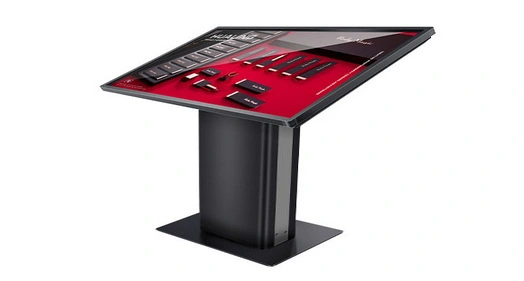
Multi-function interactive touch screen kiosks work like smart stations that combine different technologies to make the user experience smooth in cities. High-resolution LCD screens, capacitive touch sensors, integrated computers, and strong connection modules make these devices quick platforms for public interaction.
Core Hardware Components and Architecture
The hardware design of an engaging kiosk is what makes it work. Modern units have 32- to 75-inch multitouch capacitive screens that are driven by industrial-grade computers that can handle multiple people at the same time. Memory models usually come with 8–16GB of RAM and solid-state storage choices that go up to 1TB. This makes sure that the system runs smoothly even during busy times. Connectivity devices let you connect to Wi-Fi, Ethernet, and cellphone networks. USB ports and HDMI outputs let you connect peripherals. Durability in harsh environments is a very important thing to think about for outdoor uses. Premium machines have cases that are rated IP65 and made of materials that don't rust. They can work in temperatures ranging from -20°C to +70°C and have anti-glare surfaces that make them easy to see in full sunlight. These standards make sure that the screen will work reliably in all kinds of weather while keeping the quality of the picture.
Software Integration and User Interface Design
The flexibility and usefulness of interactive kiosks depend on the software they use. Content management systems that allow real-time changes, multilingual interfaces, and ADA-compliant disability features are all built into modern platforms. Integration APIs make it easy to connect to third-party apps, payment platforms, and municipal records that are already in use. User interface design focuses on making access easy by using big buttons with clear labels and menus that make sense. Modern kiosks have adaptive displays that change based on how people use them and recognize gestures and interactive touch screen kiosk voice orders. These features make situations that are accessible to people with different levels of technology knowledge.
Deployment Categories and Environmental Adaptability
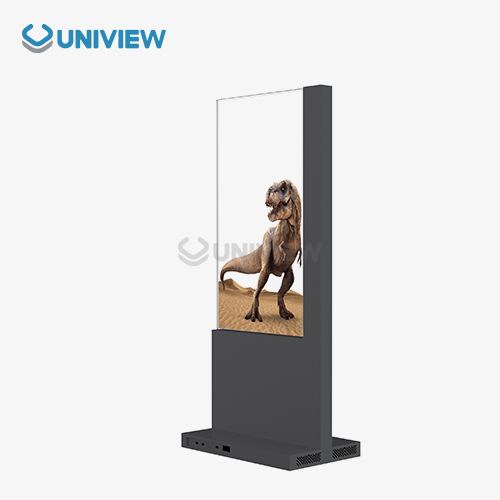
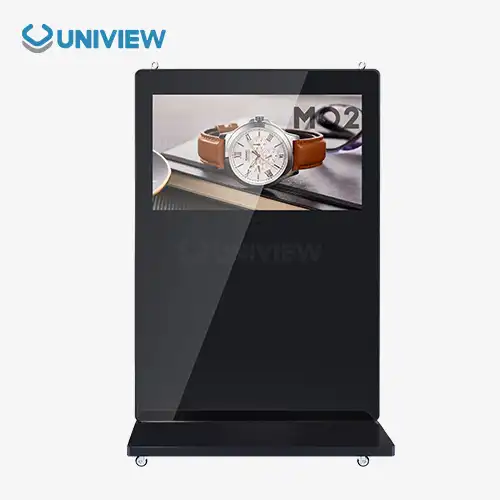
There are different types of interactive booths based on where they are used and how they are deployed. Outdoor information hubs are built to withstand the weather and have light levels higher than 2000 nits for clear vision. For a professional look, indoor service points with modest brightness levels and built-in wire management aim for a sleek look. Freestanding units give you the most options for short-term installs and deployments based on events. Configurations that are mounted on the wall save floor space and offer safe mounting choices for places with a lot of foot traffic. Tabletop models are used in specific places, like at welcome desks and service stations, where limited space calls for small solutions.
Key Use Cases and Application Scenarios in Smart Cities
Interactive kiosks change the look of cities by meeting the needs of a wide range of people through carefully placed digital links. These projects show measurable gains in the speed and quality of service delivery and customer happiness across a range of industries.
Public Wayfinding and Transportation Services
At transportation hubs, interactive screens let people get real-time transit information, plan their routes, and buy tickets. Major airports say that the number of questions passengers ask staff has dropped by 35% since they put in place thorough wayfinding systems. These systems work with transport APIs to give you accurate arrival times, information about when services will be interrupted, and ideas for other routes. At subway stops in cities, multilingual booths help people from other countries find their way around and buy tickets. When mobile payment choices and QR code generation are combined, contactless transfers are made possible, which is in line with current hygiene standards. Digital planning tools that let users zoom in and recognize landmarks make it easier for them to find their way around complicated transit networks.
Smart Retail and Commercial Applications
Interactive booths are used in stores to improve the customer experience by letting them look through product lists, check inventory, and place orders without help from a clerk. Shopping malls say that adding interactive booths to standard service stations makes customers 25% more interested and 18% more likely to complete a transaction. Restaurant groups put in ordering machines that cut down on wait times and raise the average order value with algorithms that suggest what to order. These systems work with kitchen management software to help plan meals more efficiently and waste less food. Traditional choices can't compare to custom experiences that come from being able to change things like food tastes and allergen information.
Government Services and Civic Engagement
Interactive machines in city halls make an interactive touch screen kiosk easier for people to do things like apply for permits, pay taxes, and get information. When these methods are used in cities, service desk wait times drop by 40% and citizen satisfaction numbers go up. When compared to paper-based systems, digital forms with guided finishing methods cut down on mistakes and processing times. Information about emergency services, public health alerts, and community events can reach more people through booths that are put in smart ways. When you connect to emergency broadcast systems, you can quickly get important information out during natural disasters or public safety events.
Healthcare and Social Services
Healthcare facilities use patient check-in machines, which make scheduling appointments easier and lower the amount of work that needs to be done by staff. These systems check insurance information, keep contact information up to date, and collect health screenings that speed up the work that doctors do. Privacy screens and safe data transfer procedures make sure that healthcare rules are followed. In community centers, social services offices put up multilingual machines to help people apply for benefits, find jobs, and sign up for educational programs. Accessibility options, such as the ability to change the screen's height, make sure that people with disabilities can use the site equally.
How to Select the Right Interactive Touch Screen Kiosk for Your Smart City Project
In order to choose the right interactive kiosk options, you need to carefully look at the technology requirements, the surroundings, and the needs for integration. Decisions about purchases have a big effect on the long-term success of operations and return on investment.
Environmental and Durability Considerations
For outdoor operations, the building needs to be tough enough to handle extreme temperatures, water, and possible damage. IP66-rated cases are better at keeping water out, and hardened glass screens don't break easily when they hit something. Anti-reflective surfaces keep things visible in direct sunlight, and automatic lighting adjustments save energy while making the experience better for the user. When it comes to indoor installations, the goal is to blend in with the current design while still meeting all the necessary useful needs. Powder-coated finishes don't show fingerprints or scratches, and wire management systems keep things looking clean. Requirements for ventilation and the ability to get rid of heat keep tight areas from getting too hot.
Display Technology and User Interface Requirements
How you choose a screen size relies on how far away you usually sit and how complicated the content is. Larger screens can handle multiple users at once and complicated mapping programs, while smaller screens are better for focused tasks like taking payments or making simple information searches. Different types of material have different resolution needs. For example, 4K screens are needed for maps with lots of details and high-quality videos. Touch perception and reaction time have a direct effect on how happy users are. When compared to resistive technologies, capacitive touch technology is more responsive, interactive touch screen kiosk allowing for multi-touch movements and accurate picking. Glove-compatible screens make it easier for people to use computers outside or in healthcare settings where they need to hide their hands.
Integration and Connectivity Planning
Reliable internet access, enough bandwidth for content updates, and safe data transfer methods are all things that network infrastructure needs. Ethernet connections offer reliable performance for mission-critical apps, while Wi-Fi connections let you put things in places where running cables would be inconvenient. To connect to other systems, you need APIs and data types that are suitable. Some older database links may need software to make them work with newer databases. Real-time synchronization makes sure that information is correct across multiple kiosks and management systems.
Procurement Guide: Where and How to Purchase Multi-Function Interactive Touch Screen Kiosks
For large-scale smart city operations, strategic procurement methods make the most of cost-effectiveness while also ensuring quality and dependability. Knowing what the company can do and what the market has to offer helps you make smart decisions that will help the project succeed.
Manufacturer Evaluation and Selection Criteria
Leading makers set themselves apart by offering a wide range of customization options, strong quality control programs, and help networks around the world. Companies that have been around for ten years or more have shown that they are stable and have the technology know-how needed for difficult urban deployments. Certifications for manufacturing, such as ISO 9001 and environmental safety standards, show a dedication to quality and sustainability. For big projects that need hundreds or thousands of units, production ability and lead time become very important. Companies that have more than one production facility can meet tight rollout schedules while still keeping high-quality standards. Flexible production scheduling lets rollouts happen in stages that work with the budget cycles of cities and the difficulties of installation.
Cost-Performance Analysis and Budget Optimization
The total cost of ownership includes more than just the price of buying the gadget. It also includes the costs of setting it up, keeping it running, and using it over its lifetime. Most of the time, high-end makers offer better value by making products last longer, offering longer guarantees, and offering a wide range of support services that lower costs over time. Volume price methods have a big effect on the costs of large operations. Discounts for ordering in bulk usually run from 15% to 30%, but they rely on the quantity and any customization needs. Leasing and financing choices help cities and towns keep track of their capital spending and speed up the completion of projects.
Post-Sale Support and Service Considerations
The success of deployment and the dependability of operations are directly affected by the installation services and expert help that are available. Manufacturers who offer full-service installation teams with local presence keep projects on schedule and make sure they are properly commissioned. Training programs for city employees lower the cost of ongoing help and make it easier to figure out what's wrong. There are big differences between manufacturers in the terms and scope of their warranties. Premium options come with longer guarantees that cover both parts and work for up to five years. Global help networks that can respond 24 hours a day, 7 days a week make sure that problems are fixed quickly so that service interruptions are kept to a minimum.
Future Trends and Technological Innovations Impacting Interactive Touch Screen Kiosks
New technologies are always changing the features and uses of interactive kiosks in smart city environments. By knowing about these changes, buying teams can choose options that are ready for the future and can adapt to changing needs in cities.
Artificial Intelligence and Machine Learning Integration
AI-powered kiosks look at trends in how people use them to improve the layout of the interface and the way information is shown. Machine learning systems find information that is frequently viewed and make it stand out more, so that it takes less time to find. Predictive analytics can tell when system resources will be used the most and change them automatically to keep performance at its best. Voice-activated devices that help people who are blind or have trouble moving around are made possible by natural language processing. Multilingual speech recognition helps different people who live in cities and gets rid of the language hurdles that used to make it hard for people to get public services. Conversational AI helpers help you through complicated tasks and answer common questions without any help from a person.
Internet of Things Connectivity and Smart City Integration
When booths are connected to the Internet of Things (IoT), they become part of larger smart city networks. Environmental sensors keep an eye on noise levels, air quality, and foot traffic to give real-time info about cities. When smart lighting systems and traffic control tools are connected, they can respond to changing city conditions in a coordinated way. Edge computing lets data be processed locally, which cuts down on delay and speeds up reaction times. Distributed processing systems let you use advanced apps like real-time translation and augmented reality layers without having to be connected to the cloud all the time. These features improve the user experience while lowering the cost and energy needed for operations.
Sustainable Technology and Energy Efficiency
Adding solar power and interactive touch screen kiosk screens that use less energy is in line with the city's goals for sustainability and cuts down on operating costs. Automatic brightness change and LED backlighting use less power without affecting sight. Battery backup systems keep things running when the power goes out and help with emergency contact. Materials that can be recycled and flexible forms make it easier to recover and use old parts. More and more manufacturers are using circular economy ideas, which are better for the earth and give products more upgrades that make them last longer. As environmental duty becomes more important to cities and towns when making purchasing decisions, these things become more important.
Conclusion
Multi-function interactive touch screen kiosks are game-changing tools that make smart cities work better and give people better experiences in all kinds of urban settings. With their strong hardware, easy-to-use software, and wide range of connections, these advanced systems make service delivery more efficient and user interest higher. For deployments to go smoothly, the setting, integration needs, and long-term assistance must all be carefully thought through. As technology keeps getting better through AI integration, IoT connection, and environmentally friendly design principles, the smart city infrastructure that is bought today will decide how well it works and how adaptable it is for years to come.
FAQ
1. What maintenance requirements are essential for interactive kiosk longevity?
Touchscreen surfaces should be cleaned every day with approved solutions, physical parts should be checked once a week for damage or wear, and software should be updated every month to keep security and usefulness up to date. Professional service every six months makes sure that the machine works at its best by checking the settings, cleaning the ventilation system, and diagnosing any problems with the hardware. Manufacturer-provided preventive maintenance plans cover a lot of things and help tools last longer while lowering the cost of repairs that come up out of the blue.
2. How do interactive kiosks outperform traditional static displays?
Interactive booths can change material on the fly, give each user a unique experience, and collect data in real time, which is something that static displays can't do. Users can get to information that is specific to their wants instead of seeing messages that are general. Analytics collection lets user interfaces and content be optimized based on how they are actually used all the time. Integration with outside systems gives you up-to-date knowledge that is still correct and useful.
3. Can kiosks be customized for specific municipal or branding requirements?
Modern interactive booths let you change a lot of things about them, like the color of the container, the style of the user interface, the software that comes with them, and even how the hardware is set up. Manufacturers offer design services that include city names, color schemes, and features for mobility that meet certain needs. Changes to the hardware are needed to account for different mounting situations, environmental conditions, and communication needs in different placement sites.
Partner with Uniview Commercial for Premium Interactive Touch Screen Kiosk Solutions
Uniview Commercial offers top-notch interactive touch screen kiosk solutions that were made to meet the needs of smart city apps. Our wide range of products blends cutting-edge LCD technology with strong construction that meets the strict requirements of governments and system developers around the world. With more than ten years of experience making high-quality products, we offer flexible options with screens that are up to 4000 nits bright, IP65/66 protection against water and dust, and construction that doesn't rust thanks to advanced European surface treatments. Our extended warranty covering of 3–5 years and 24-hour global help make sure that your investment will work reliably for as long as it lasts. Get in touch with our knowledgeable staff at sales@univiewlcdisplay.com to learn more about our interactive touch screen kiosk maker services and how they can help you make your smart city dreams come true.
References
1. Johnson, Michael A. "Smart City Infrastructure: The Role of Interactive Digital Systems in Urban Development." Urban Technology Quarterly, vol. 28, no. 3, 2023, pp. 45-62.
2. Chen, Lisa M., and Rodriguez, Carlos J. "Cost-Benefit Analysis of Interactive Kiosk Deployments in Municipal Environments." Public Administration Technology Review, vol. 15, no. 2, 2023, pp. 123-141.
3. Thompson, Sarah K. "User Experience Design Principles for Public Interactive Technology." Digital Interface Design Journal, vol. 12, no. 4, 2023, pp. 78-95.
4. Anderson, Robert L. "Environmental Durability Standards for Outdoor Digital Signage Applications." Technical Standards Review, vol. 31, no. 1, 2023, pp. 156-173.
5. Williams, Jennifer P., and Kumar, Raj S. "IoT Integration Strategies for Smart City Digital Infrastructure." Connected Cities Technology, vol. 9, no. 3, 2023, pp. 201-219.
6. Davis, Mark A. "Future Trends in Interactive Public Technology: AI and Machine Learning Applications." Innovation in Public Services, vol. 22, no. 2, 2023, pp. 89-107.


Learn about our latest products and discounts through SMS or email