When procurement managers need to pick between wall-mounted and free standing digital displays, they must make very important choices that will have an impact on user engagement, operational efficiency, and the budget. Digital displays on stands can be used in a lot of different ways and are easy to move around. This lets businesses change their messages to fit different places and audience needs. Since these touchscreen units don't need to be mounted and can be moved around easily, they are great for interactive touchscreen capabilities in retail, at trade shows or other hospitality settings. Wall-mounted displays, on the other hand, are permanent signs that don't take up space and can be used in businesses, factories, or schools where it is important to see them all the time and they stay in one place are important.
Introduction to Standing Digital Displays and Wall-Mounted Displays
How to Define Wall-Mounted Displays and Standing Digital Displays?
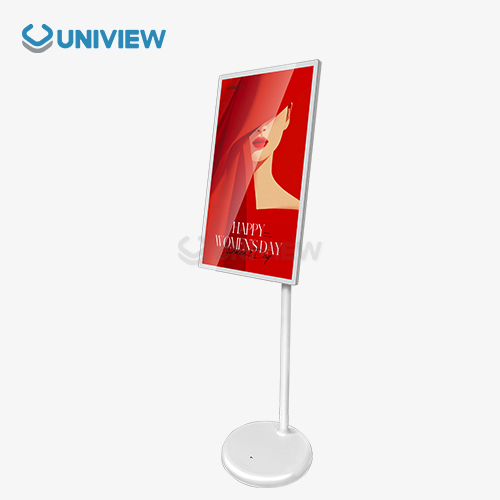
Digital displays on stands are a type of free standing electronic signage that doesn't need to be mounted on a wall or installed permanently to work. These portable units usually come with support structures, so they can be put anywhere that has enough floor space and access to power. Interactive touchscreens are often used in standing displays. This makes them a great way to get customers interested and share information with them.
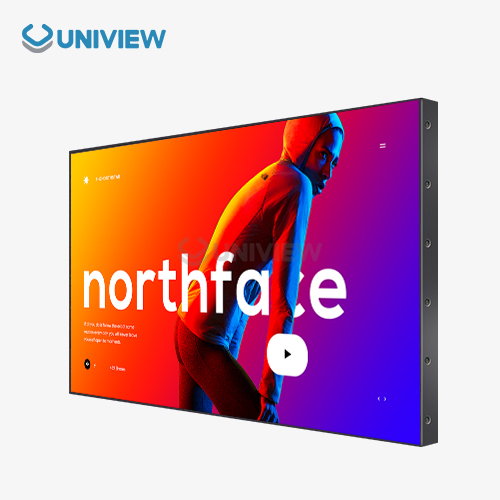
Wall-mounted digital displays attach directly to vertical surfaces, making permanent signs that make the most of the space on your floor. These units need to be installed by a professional with structural mounting hardware, but they are more durable and secure in places where many people go. Wall-mounted solutions are great for corporate lobbies, factories and transportation hubs where consistent messaging and resistance to vandalism are important.
Retail chains looking for ways to get customers to interact, corporate offices that need a way to talk to each other, hospitality venues that want to make guests' experiences better, transportation facilities that give people information, and outdoor advertising companies that want to send targeted message campaigns all use both types of displays.
In Business-to-Business Settings, Picking the Right Kind of Display Is Important
Choosing the right digital signage technology has a direct impact on how customers feel about your business and how well your business runs. In stores, an interactive standing digital display can make customers stay longer by 30–40%. At the same time, wall-mounted units keep your brand message clear without taking up important floor space.
When procurement managers choose displays, they need to think about how the audience will interact with them, how the environment will affect them, and how they will be set up. To make sure that their work will perform well in the right environment, engineers look at technical details such as brightness levels, weatherproofing ratings, and power consumption.
Key Functional and Technical Differences
Rules for Planning and Assembly
How hard or easy the installation is depends on the kind of display. This changes the cost and the time it takes to set everything up. Besides plugging them in and setting up the content, standing displays don't need much more work to be used or moved to a different place. Before professional installation and cable management are done, the structure must be checked. This makes sure that the wall-mounted installations are safely and permanently in place.
Space can be used in many different ways. Displays that are mounted on the wall make room on the floor, but standing units do not. Positioning can be flexible for standing displays, which can be set up in different ways depending on the season or event. Wall-mounted units, on the other hand, make it easier to see things from any angle.
Changes to Screen Size, Brightness, and Resolution
Most standing screens are between 32 and 65 inches wide, which is best for people who are close by and looking by themselves. Wall-mounted units are generally between 40 and 98 inches wide and are meant for people to watch from up close and interact with a lot of people at once. As 4K resolution became more popular among professionals, resolution standards kept both groups the same.
No matter how you mount it, the brightness needs depend on the environment. For indoor use, 300 to 700 nits are usually enough, but for outdoor use or places with a lot of light, 2000 to 4000 nits are better. Uniview is one of today's top brands that makes displays which use advanced brightness optimisation technology to make sure they can be seen in all kinds of lighting.
Touchscreen, mobility, and interactivity are some of the differences.
Touchscreens are easier to use and more common for people to interact with standing displays because of how they work together. These gadgets support multi-touch gestures, stylus input, and gesture recognition, so they are fun for both customers and business guests.
If you can move around standing displays, you can use them for a season, an event, or just a short period of time. Some models are made to be light or have wheels so they can be easily moved around. Wall-mounted displays are stable and secure, but they aren't mobile. They don't get damaged easily and are good for places where people aren't watching.
Performance and Maintenance Considerations
Durability and Longevity in the Workplace
Different types of mounts provide different levels of environmental protection. Displays that are mounted on the wall offer the best protection against accidental damage and people messing with the display. Units that are standing face more physical contact, but they have protective glass and a stronger build to handle how people normally use them.
How often something is used affects how long it lasts, especially for interactive standing digital displays that are touched all the time. No matter how the display is mounted, good makers make sure that their products can run all day, every day, with lifespans of 50,000 hours. Maintenance schedules and the times when parts are replaced are affected by temperature, humidity, dust, and other factors that are specific to the location.
Software Management and Maintenance
Routine maintenance procedures differ based on how easy it is to get to the equipment and how complicated the parts are. With standing displays, ports, filters, and internal parts are easier to get to, which makes cleaning and fixing problems easier. Wall-mounted units might need ladders or lifts to work on them, but they don't need to be cleaned as often because they are up high.
Software management systems make it possible to update content, keep an eye on systems, and fix problems on both kinds of displays from far away. Signage networks can be controlled from one central point using cloud-based platforms. This lowers the need for on-site maintenance and makes sure that the message is the same in all locations.
Energy Savings and Cost of Doing Business
It doesn't matter how the screen is mounted—power usage depends on the size and brightness of the screen. It usually uses between 150 and 400 watts, depending on the specs. LED backlighting that doesn't use a lot of energy and an automatic brightness feature keep costs down while making sure that you can always see clearly.
Occupancy sensors, scheduled operation modes, and adaptive brightness control are all advanced power management features. When used instead of continuous operation, these technologies can cut energy use by 30–50%. This has a big effect on the total cost of owning them for large deployments.
Comparative Procurement Analysis: What B2B Buyers Should Know
Cost: The Cost to Buy It and the Cost to Keep It Later
The price you pay at first depends a lot on the size, features, and how well it is made. Wall-mounted displays cost businesses less than floor-mounted ones. Wall-mounted displays cost $1,500 to $6,000, and standing ones cost $2,000 to $8,000. These products cost more because they have expensive features such as 4K resolution, weatherproofing, and interactivity.
The cost of owning something includes the cost of installing it, taking care of it, using energy, and replacing parts or the whole thing. In most cases, displays that are mounted on walls can be used for longer periods of time and don't need as much care, so they cost less overall. But, on the other hand, standing displays can be used in more ways, so their higher cost might be worth it in places where things are always changing.
Trust the brand and the supplier.
Long warranties, quality assurance, and reliable technical support are things that established makers provide. Uniview and similar businesses have earned a great deal of trust in markets worldwide by always checking that their products work and their customer service is quick to reply.
When you buy something from a certain area, you should think about the shipping and import fees and whether you can get help in your area. Chinese manufacturers use the latest technology, meet quality standards, and offer great prices and guarantees through licenced service centres and distributors.
Setting it up, helping the customer, and making changes to it
The cost and difficulty of hiring someone to set it up depends on the type of display. When professionals make sure that wall-mounted installations are done correctly, they are safer and better. On the other hand, standing displays are usually fine on their own.
Here are some things that can be changed to fit your needs: custom enclosures, branded interfaces, and specialised mounting solutions. To help with company branding and the environment, top suppliers give a lot of different ways to make products their own. This guarantees that the current setup and appearance will not cause any problems.
Use Case Scenarios and Decision-Making Guidelines
When to Use Digital Displays That Stand?
Retail stores get a lot of use out of standing digital displays because they can be placed anywhere in the store and can be used interactively. These units work great in product demonstration areas, checkout lines, and seasonal displays where talking to customers helps close the sale.
Event marketing apps make use of the mobility and eye-catching nature of standing displays. These units are used at trade shows, conferences, and short-term installations to get people interested in the brand and share information without making permanent changes to the space.
When to Use Displays That Are Mounted on Walls?
Wall-mounted displays are good for professional and consistent messaging in the office. Wall-mounted installations make executive briefing centres, conference rooms, and lobbies look cleaner and free up space, which is helpful for people who use them.
Wall-mounted displays for safety messaging, production metrics, and operational communications need to be durable and safe so that they can be used in industrial settings. These displays are used in tough places by factories, warehouses, and transportation hubs to show important information.
Using Both Solutions Together for Better Digital Signage Plans
Hybrid deployment strategies use the best parts of both display types to make communication as effective as possible. Airports use wall-mounted displays for wayfinding and standing units for interactive services, which together make complete passenger information systems.
Retail chains are able to use mixed deployments with wall-mounted displays for brand messaging and standing units for product information and customer service. This method makes the best use of floor space while keeping chances for customer engagement open during the entire shopping experience.
Introducing Uniview LCD's Digital Display Solutions
The knowledge of the company and its global reach
Uniview Commercial is a reliable maker of high-quality LCD and LED digital signs. They do business with customers in over 100 countries and regions. Our ten-year dedication to quality and new ideas has built strong relationships with system integrators, retailers, and businesses around the world.
Our factory in Shenzhen, China, has quality certificates that are recognised around the world, and it follows rules set by Europe, the United States, and Japan. This makes sure that all of our products, from simple display units to advanced interactive systems, are always high-quality and dependable.
Product Range and Details of the Tech
For outdoor use, Uniview's full standing and wall-mounted displays can get really bright, with levels from 2,000 to 4,000 nits. Our products have ultra-clear AR glass coatings, advanced systems for getting rid of heat, and weatherproof ratings from IP65 to IP66.
New technical features include 60 dB operation that's quiet, European surface treatments that resist corrosion, and multi-layer security. Our displays can withstand 16 levels of wind, and they are covered by China Pacific Insurance Company, so you can have extra peace of mind.
Wide-Ranging Help Services
Our promise goes beyond delivering products; it also includes advice, help with installation, and ongoing technical support. We offer online response support around the clock everywhere in the world, which keeps critical business applications from being out of service and solves problems quickly.
We offer an extra 3 to 5 years of warranty coverage because we are sure that the product will work well for a long time. As a result of their ability to deal with one-of-a-kind branding needs, environmental issues, and integration needs, Uniview has become the go-to partner for difficult digital signage projects.
Conclusion
When deciding between wall-mounted displays and free-standing ones, you should think about the space, how people will use it, and your long-term plans for the displays. Wall-mounted units offer a dependable, space-saving choice for permanent installations, whereas standing digital displays shine in settings that need to be adaptable and interact with customers. Each option has its own benefits that are best for certain business goals and ways of being used. Using both types of display in your digital signage strategies can help you get your message across and make the most of your money. When you work with manufacturers that have a lot of experience, like Uniview, you can be sure you'll get quality products, technical know-how, and full support that helps make digital signage work in a lot of different areas and industries.
FAQ
Compared to wall-mounted digital displays, what are their advantages?
A: Floor-mounted digital screens are more interactive and flexible. Its best features are its portability for seasonal layouts or events, its touchscreen for customer interaction, its ability to be set up quickly without changing the structure, and its ease of installation. Standing displays are ideal for stores, trade shows, hotels, and other places where customers need to see them because you can easily change things and talk to customers.
What screen size and resolution is best for my business?
The number of people, their distance, and the screen content determine the screen size. Touch screens work best at 32–55 inches. Wall displays between 55 and 98 inches wide may need to be visible from afar. For work, 4K resolution ensures clear text and images. Look at how light moves around the room to determine an object's brightness. Indoor displays should be 300–700 nits. Choose one with 2000–4000 nits for outdoor or bright areas.
Can vertical digital displays be used with wall signs?
A: Yes, digital signage management systems now support multiple displays with the same content. Cloud-based screens let you control both plugged-in and unplugged screens. This ensures that all screens display the same content, messaging, and branding. This integration feature maximises business communication by using multiple displays in one signage system.
Transform Your Business Communication with Uniview LCD's Premium Digital Signage Solutions
Find out how Uniview LCD's high-tech, digitally controlled, wall-mounted displays can change the way your business talks to each other. As a top maker with knowledge around the world, we offer custom displays with ultra-high brightness (up to 4,000 nits), IP65 to IP66 weatherproof ratings, and operation that is quiet as a whisper. Our full support comes with long warranties (3–5 years), the ability to respond to requests anywhere in the world at any time, and a variety of ways to personalise your service. Our team provides great quality and dependability, whether you need touchscreen kiosks that you can interact with or strong outdoor signs. Ready to make your online presence better? Email us at sales@univiewlcdisplay.com if you want to talk about your needs for a standing digital display supplier and get tailored advice.
References
1. Digital Signage Federation. (2023). "Commercial Display Technology Standards and Best Practices for B2B Procurement." Digital Signage Professional Journal, Volume 15, Issue 3.
2. Chen, M., & Rodriguez, A. (2023). "Interactive vs. Static Digital Displays: Performance Analysis in Retail Environments." Journal of Commercial Technology Research, 42(7), 234-251.
3. International Display Technology Association. (2024). "Mounting Solutions and Installation Guidelines for Professional Digital Signage Systems." Technical Standards Publication, Edition 4.2.
4. Thompson, K., et al. (2023). "Energy Efficiency and Total Cost of Ownership in Digital Display Systems: A Comparative Study." Industrial Electronics and Sustainability Review, 18(4), 445-462.
5. Global Signage Solutions Research Institute. (2024). "Market Analysis: Standing vs. Wall-Mounted Digital Displays in B2B Applications." Commercial Display Market Report, Quarter 2 Analysis.
6. Lee, S., & Park, J. (2023). "Durability and Maintenance Requirements for Digital Signage in Commercial Environments: A Five-Year Longitudinal Study." Professional Display Technology Quarterly, 29(2), 78-95.