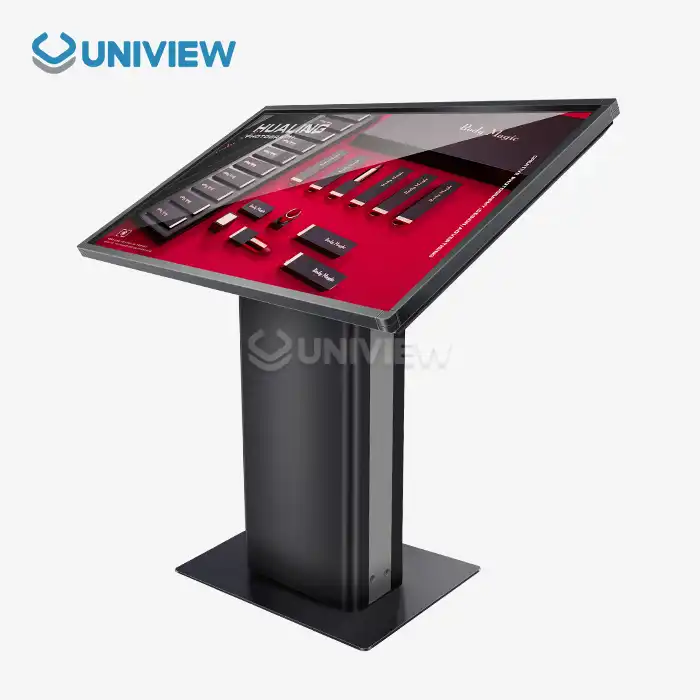
Digital signage stands are a lot of different ways to mount and support displays so that they are in the best position for people to use them in business settings. Some of the important parts that are designed to meet the needs of the business are kiosk-style enclosures, tabletop displays, floor-standing units, wall-mounted brackets, and mobile cart systems. Today’s digital signage stands have built-in ways to manage cables and change the height. They also have security locks and weather-resistant materials so they can be used inside and outside. Businesses can pick the best mounting solutions to make sure their digital communications are as visible as possible, last a long time, and give a great return on investment if they understand these differences.
Understanding Digital Signage Stands: Key Types and Features
Digital signage stands function as the critical foundation for effective visual communication systems, combining structural integrity with aesthetic appeal to create compelling display environments. These mounting solutions turn unchanging spaces into areas for dynamic interaction. This way, businesses can connect with customers, inform audiences, and improve brand experiences.
Standards for Material Construction and Longevity
The materials and engineering standards used in a mounting system make it reliable. Premium display stands use aluminum alloys from the aerospace industry that are very strong and light while also being resistant to corrosion. For bigger displays, steel construction has a better load-bearing capacity and often has powder-coated finishes that stand up to tough conditions. Stainless steel versions are best in places where cleanliness and long-lasting strength are very important.
In modern manufacturing, advanced welding and precision machining are used to make sure that the structure stays strong even when it is used all the time. Quality stands are put through a lot of tests that mimic years of use, like temperature cycling, vibration resistance, and load stress evaluations.
Key Parts That Need to Work
Modern display mounting systems for digital signage stands come with advanced features that make them easier to use and more efficient. Height adjustment mechanisms let you set the right position to fit different viewing angles and types of people in the audience. Cable management systems keep things neat and make sure that installations are easy to get to for repairs and updates.
Hardware that is hard to break, display cases that can be locked and brackets that keep equipment safe from theft are some of the security features that protect your investments. The mobility options include installations that don't move and units with wheels that can be moved to any position based on the needs of the business.
Comparison of Digital Signage Stand Types for Optimal Procurement Decisions
Choosing the right mounting solutions means knowing the pros and cons of each type of configuration. This in-depth study looks at the most important things that affect procurement decisions and the success of operations.
Solutions That Stand on the Floor or Are Mounted on the Wall
Floor-standing units give you the most options for moving displays around in business settings. These stand-alone systems are made to hold displays of different sizes, and they have built-in storage spaces for media players, power supplies, and connectivity equipment. The mobility benefit lets businesses change their layouts for seasonal sales, events, or changes in the flow of traffic.
Wall-mounted solutions make the most out of floor space and give safe installation options for permanent use. These systems work best in places with a lot of foot traffic where things on the floor could make people trip or slow down foot traffic. Advanced wall mounts have moving arms that make it possible to change the angle exactly how you want it and get to the wall mount for maintenance.
Can be used with interactive touch screens
Touch screen applications need special mounting because of the way people interact with them and how they need to be positioned for comfort. Interactive stands have extra support that can handle touch pressures without affecting the stability or accuracy of the display.
Ergonomic design principles make sure that people of all ages and backgrounds can use it comfortably. Mounting heights that can be changed make sure that people in wheelchairs can see while also making sure that people who are standing can see well. Putting the screen in a way that it doesn't glare makes it more responsive to touch and protects your eyes in all kinds of lighting.
How to Choose the Right Digital Signage Stand for Your Business Needs?
To pick a good stand, look closely at the operational needs, the environment, and the business's long-term goals. This way, you know the tools will work well and you will get the best returns on your investments.
Environmental Check and Paperwork That Is Needed
Aluminum is durable indoors, looks nice, and is light. Using acrylic parts and decorative finishes that make a climate-controlled space look more like the style of the building that's already there lets you use more kinds of materials.
Items destined for outdoor installation must be constructed from weather-resistant materials and feature IP65 or IP66 protection ratings against moisture and dust for the digital signage stand. Thanks to coatings that are made for this purpose and materials that don't rust, performance will last even when the temperature changes a lot, when materials are exposed to UV light, and when it rains or snows. For tall displays in places where they can be affected by weather, it is very important to do wind load calculations.
Budgeting and Buying Plans
Cost-effective procurement finds a good middle ground between the price you pay initially and the overall cost of having something. This cost is total because it includes installing, maintaining, and upgrading. A volume purchase agreement usually makes sure that the same products are used in different places, and it makes things a lot cheaper.
Quality certifications, warranty length, technical support, and replacement parts are all things to think about when choosing a supplier. When businesses work with manufacturers they know they can count on, it is less likely that products will fail or services will be interrupted.
Installation and Maintenance Tips for Digital Signage Stands
Installing equipment the right way and doing routine upkeep on it will make sure it works well for as long as you have it. This also makes repairs and doing business less expensive.
Installation by a Professional: How to Be Sure It's Done Correctly
Before the site is ready, the building needs to be checked to make sure it can hold up all the weights that are expected, like the display and the hardware for mounting, as well as any wind that might come. Making sure that power and signals get to the right places, following building codes and safety rules, and following all parts of electrical planning.
Installation teams should use tools that are set up correctly and follow the manufacturer's instructions for spacing, torque values, and alignment tolerances. If you remember how something was put together, it is simpler to fix and maintain it later.
Preventive Maintenance Guidelines
Regular checks help find issues before they get worse and cost a lot to repair or turn into a safety risk. Cleaning rules that keep the materials in good shape and make them look professional help the brand image.
Some mechanical parts need to be oiled and adjusted sometimes so they keep working and don't break. Checking and cleaning up electronic connections makes sure they can send power and signals without any problems.
Industry Insights - Latest Trends and Innovations in Digital Signage Stands
When new needs arise in the market, the display mounting industry uses new technologies that make things more useful, eco-friendly, and simple to use.
Adding tech that boosts intelligence
Today's stands have smart features like remote monitoring, which keeps an eye on performance data and lets operators know when it's time to do maintenance. The device's sensors check on the platform's weather, usage, and security.
If you use modular design, you can change and improve the way that parts fit together without getting a new system. In the long run, this method saves money and makes it easier to adapt to changes in the business.
Earth-Friendly and Eco-Friendly Long-Term Actions
Environmentally conscious manufacturing utilizes energy-efficient techniques and recycled materials for digital signage stands, which are more sustainable for the planet. Sustainable design is about things that last and can be fixed instead of short-term solutions that make trash.
When things aren't useful anymore, recycling programs make sure that old tools are thrown out correctly and that materials that can be used in the next round of manufacturing are found. These programs are good for the business's long-term plans, and they also help customers and stakeholders see that the business cares about the environment.
Uniview Commercial Digital Signage Solutions
Uniview Commercial is a top maker and supplier of high-performance digital signage displays and mounting solutions for a wide range of business uses around the world. Our wide range of products offers great quality and dependability thanks to cutting-edge design and strict quality checks.
We make LCD and LED displays with brightness ratings from 2000 to 4000 nits, which make sure that they can be seen clearly even when the lighting isn't ideal. The IP65 to IP66 weather protection ratings allow for dependable use outdoors, and our 60 dB quiet operation keeps spaces comfortable.
We offer a lot of customization options, such as custom mounting solutions, special finishes, and features that are specific to the application and meet your business's unique needs. We are present in over 100 countries, with support networks that can respond 24 hours a day and extended warranty coverage of 3 to 5 years.
Conclusion
You can purchase many different types of stands for digital signage stand. by businesses in a wide range of industries. Knowing the basic pros and cons of wall-mounted, floor-standing, and interactive mounting solutions helps people make smart purchasing decisions that get the best performance and value. As new technologies make things more capable and efficient, environmental factors, choice of materials, and installation needs are very important for long-termsuccess. WWhen you work with well-known brands, you are sure to get great support and quality products, as well as new solutions that can change as your business needs change.
FAQ
When choosing a digital signage stand, how much weight can it hold?
Display type and size determine weight capacity. LED screens can weigh over 150 pounds, but most LCD screens weigh 30–80 pounds. Select a stand that can support 150% of your display's weight. This ensures the stand can support your display and future changes.
How can I verify my digital sign height?
Displays should be at eye level for viewers. Standing is usually 60–65 inches. Wheelchair users and those who want to touch the screen can use interactive displays 48 to 54 inches off the ground.
Outdoor digital signage stands need maintenance how often?
Check for rust or damage on outdoor installations monthly, clean them every three months, and inspect them annually. This includes checking fastener torque and weather seal integrity.
Partner with Uniview Commercial for Premium Digital Signage Stand Solutions
Uniview Commercial offers the latest digital signage technology, with deep knowledge of the field and great customer support. Our customizable LCD and LED displays are built tough, shine brightly, and are weather-resistant so they can work great in tough commercial settings. We offer full mounting solutions with exact engineering, fine materials, and adaptable setups that are perfect for your needs.
Enjoy the benefits of working with a reputable digital signage stand supplier with great prices, dependable delivery, and excellent customer service. To talk about your project's needs and learn how our new ways of doing things can help you communicate visually, email us at sales@univiewlcdisplay.com.
References
1 Smith, J. & Anderson, K. (2023). "Digital Display Mounting Systems: Engineering Standards and Best Practices." Journal of Commercial Display Technology, 15(3), 42-58.
2. Rodriguez, M. (2024). "Environmental Impact Assessment of Digital Signage Infrastructure." Sustainable Technology Review, 8(2), 112-127.
3. Chen, L. & Williams, P. (2023). "Ergonomic Design Principles for Interactive Digital Displays." Human Factors in Technology, 29(4), 203-218.
4. Thompson, R. (2024). "Market Analysis: Global Digital Signage Hardware Trends and Forecasts." Digital Commerce Quarterly, 11(1), 78-95.
5. Johnson, S. & Davis, A. (2023). "Installation Safety Standards for Commercial Digital Display Systems." Technical Safety Journal, 45(7), 334-349.
6. Kumar, V. (2024). "Smart Technology Integration in Modern Digital Signage Solutions." Advanced Display Systems, 6(2), 156-171.