- English
- French
- German
- Portuguese
- Spanish
- Russian
- Japanese
- Korean
- Arabic
- Greek
- German
- Turkish
- Italian
- Danish
- Romanian
- Indonesian
- Czech
- Afrikaans
- Swedish
- Polish
- Basque
- Catalan
- Esperanto
- Hindi
- Lao
- Albanian
- Amharic
- Armenian
- Azerbaijani
- Belarusian
- Bengali
- Bosnian
- Bulgarian
- Cebuano
- Chichewa
- Corsican
- Croatian
- Dutch
- Estonian
- Filipino
- Finnish
- Frisian
- Galician
- Georgian
- Gujarati
- Haitian
- Hausa
- Hawaiian
- Hebrew
- Hmong
- Hungarian
- Icelandic
- Igbo
- Javanese
- Kannada
- Kazakh
- Khmer
- Kurdish
- Kyrgyz
- Latin
- Latvian
- Lithuanian
- Luxembou..
- Macedonian
- Malagasy
- Malay
- Malayalam
- Maltese
- Maori
- Marathi
- Mongolian
- Burmese
- Nepali
- Norwegian
- Pashto
- Persian
- Punjabi
- Serbian
- Sesotho
- Sinhala
- Slovak
- Slovenian
- Somali
- Samoan
- Scots Gaelic
- Shona
- Sindhi
- Sundanese
- Swahili
- Tajik
- Tamil
- Telugu
- Thai
- Ukrainian
- Urdu
- Uzbek
- Vietnamese
- Welsh
- Xhosa
- Yiddish
- Yoruba
- Zulu
Top features to look for in lcd floor-standing kiosk displays
When evaluating LCD floor-standing kiosk displays for your business, prioritizing the right features can dramatically impact operational efficiency and customer satisfaction. These interactive digital solutions combine robust hardware with intelligent software, delivering reliable self-service capabilities across retail, hospitality, healthcare, and transportation sectors. Modern LCD floor-standing kiosk units feature commercial-grade components, including projected capacitive touch panels, industrial computing modules, and vandal-resistant enclosures designed for continuous operation. Understanding which technical specifications, durability factors, and customization options align with your specific deployment environment ensures maximum return on investment and seamless integration into existing workflows.
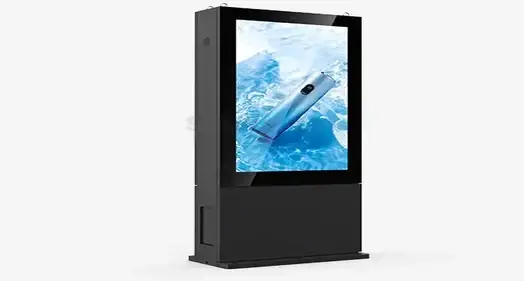
Understanding LCD Floor-Standing Kiosks: Core Components and Technologies
The key to making an LCD floor-standing kiosk work well is to carefully combine display technology, computer power, and user interface design. These units are a big step up from basic digital signs because they use industrial-grade parts that are made to work in harsh business settings.
Display Technology and Visual Performance
Commercial IPS (In-Plane Switching) screens from top brands like LG, Samsung, and BOE are used in modern booth displays. With 178-degree viewing angles, these screens provide excellent color accuracy, ensuring stable image quality no matter where you look at them. The screen's brightness can be as low as 350 nits for normal indoor use and as high as 2500 nits for placements facing a window or places with a lot of natural light.
Resolutions range from Full HD (1920x1080) to 4K UHD (3840x2160), and the pixel density is set to work best at 18–24-inch contact distances. The LCD panels use modern backlighting technology along with LED edge-lighting or direct-lit grids to make the brightness even across the whole screen.
Touch Input Technologies and Responsiveness
Either Projected Capacitive (PCAP) or Infrared (IR) touch technologies are used to make things interactive. PCAP systems have better multi-touch performance, with response times of less than 10 milliseconds and up to 10 touch places at the same time. This technology works great for apps that need to recognize gestures, let you pinch to zoom, and have smooth moving experiences.
Infrared touch devices are very durable and work well with gloved hands or a pen, which makes them perfect for use in factories or outside. The touch screen is covered by toughened glass that is between 3mm and 6mm thick and has a Mohs hardness level 7 to make it resistant to damage.
Computing Platforms and System Architecture
Usually, either Android-based systems (with processors like RK3399 or RK3588) or Windows platforms (with Intel i5/i7 processors) are used in embedded computer design. These motherboards are made to work 24 hours a day, seven days a week, and have an average Mean Time Between Failures (MTBF) of more than 50,000 hours.
Hardware watchdog timers that restart the system immediately if software freezes make the system more reliable. The computer units have different peripheral ports, such as USB, RS232, and Ethernet connections, so you can add gear like thermal printers, barcode readers, and payment terminals.
Top 7 Features to Evaluate When Selecting an LCD Floor-Standing Kiosk
To set up a kiosk successfully, you need to carefully consider the technical details that affect both the user experience and the stability of the system. These seven important factors are the basis for any solid process for choosing an LCD floor-standing kiosk.
High-Brightness Display Performance
One of the most important requirements for kiosk sight in a variety of lighting situations is display brightness. Normal indoor settings need between 350 and 450 nits, but places near windows or in full sunlight need between 800 and 1200 nits. High-brightness panels with 2000 to 4000 nits are needed for outdoor or partially outdoor setups.
LCD screens usually lose 20 to 30 percent of their brightness over the course of their useful life, so the brightness standard needs to take that into account. As a product ages, good makers include brightness compensation algorithms that change the strength of the backlighting automatically to keep the visual performance stable.
Environmental Protection and Durability
Installing a commercial kiosk can be hard because of things like dust, wetness, temperature changes, and the chance of theft. Protection grades for enclosures ranging from IP55 to IP65 guarantee that they will work reliably in a variety of settings. IP55 security against dust and water jets makes it good for most indoor business uses. IP65 protects against dust and water jets coming from any direction, which is important for use outdoors or in factories.
Powder-coated steel or aluminum alloys with surface processes that prevent corrosion are often used to build the container. Modern models come with anti-graffiti coatings and rounded corners that keep them looking nice and deter theft.
Touch Technology and User Interface Responsiveness
Touch response has a direct effect on how happy users are and how well operations run. Modern sensitive touch systems have response times of less than 10 milliseconds and accurate algorithms for palm rejection that stop users from accidentally touching the screen. Depending on the needs of the application, the touch sensor must be able to accept input from a finger, a pointer, and while wearing gloves.
Multitouch lets you make more complicated user experiences with gesture controls, picture editing, and interacting with multiple users at the same time. The touch calibration method should have automatic drift adjustment so that accuracy stays the same over long periods of use without having to be recalibrated by hand.
Thermal Management and Operating Temperature Range
Good thermal management keeps things running smoothly at a lot of different temperatures and keeps the screen from getting damaged by too much heat. Good LCD floor-standing kiosk units have advanced cooling systems with fans that can control the temperature, heat sinks, and designs that make the best use of airflow.
Indoor models can usually work in temperatures between -10°C and +50°C, while outdoor models may be able to work in temperatures between -20°C and +60°C. When the building is outside, the thermal design has to take into account the sun's load and the heat that comes from high-brightness light systems inside.
Connectivity and Integration Capabilities
In today's business world, third-party systems and current IT platforms need to work together without any problems. Gigabit Ethernet for network communication, Wi-Fi for flexible wireless rollout, and 4G/5G cellular access for rural areas are all important connectivity choices.
Standard ports for the industry should be supported by peripheral connectivity, such as USB, RS232, and digital I/O connections. This lets payment systems, printers for receipts, card readers, and biometric scanners link. The design of the system should allow safe API access for integrating custom software and managing it from afar.
Content Management and Software Flexibility
Solid content management systems make it easy to set up and maintain engaging apps in a number of different kiosk sites. The tool should be able to handle different types of material, like video, images, HTML5 apps, and interactive forms.
With remote control, managers can change content, check on the health of the system, and do diagnostics without having to physically reach each unit. Advanced systems give you real-time information about how users interact with the system, how well it works, and how useful the material is.
Warranty Coverage and Technical Support
Broad warranty coverage shields against hardware breakdowns and gives investors peace of mind for big purchases. Leading producers cover display screens, touch systems, and computer parts with warranties that last between 3 and 5 years.
Technical support services should offer online help 24 hours a day, seven days a week, as well as on-site repairs and quick parts replacement programs. Global support networks make sure that the level of service is the same no matter where the technicians are deployed, and local technicians are trained on specific product lines.
Comparing LCD Floor-Standing Kiosks with Alternative Solutions
Procurement workers can make better decisions between LCD floor-standing kiosk options and other technologies when they know what the competition is like. Each display technology has its own benefits that depend on the needs of the program and the limitations of the system.
LCD vs LED Display Technologies
LCD technology is the most popular choice for kiosks because it has great picture quality, uses little power, and is cheap for screens between 21 and 86 inches. Even though LED screens have better brightness and contrast ratios, they usually need bigger pixel pitches, which makes images less clear at normal viewing distances.
LCD screens have pixel pitches that are measured in millimeters, which makes it possible for engaging apps to have clear text and images. LED screens are great for large-format public advertising, but they don't have enough resolution density for close-up text reading and touch contact.
Interactive Kiosks vs Static Digital Signage
Interactive LCD floor-standing kiosk units cost more to buy at first than static digital signs, but they offer a lot more in the way of usefulness and interaction. Interactive kiosks let people do deals, collect data, and have more personalized experiences, while static screens are mostly used for ads.
Interactive kiosks often have a better return on investment than static signs because they cut down on worker costs, improve transaction volume, and make customers happier. Interactive systems also give businesses useful information about how users behave and what they like, which helps them make decisions.
Capacitive vs Resistive Touch Technologies
Capacitive touch systems are better for users because they can handle multiple touches, are very sensitive, and have great visual sharpness. But they need to be touched directly or with special styluses, which limits their use in some workplace settings.
Resistive touch technology can be used with gloved hands, styluses, and different items, so it can be used in difficult settings. Because of this, visual clarity is lower and you can only use a single touch. However, current resistive systems work well enough for many uses.
Procurement Tips: How to Choose and Where to Buy Your LCD Floor-Standing Kiosk
Strategic methods for buying things make sure that kiosk operations go well while also lowering the total cost of ownership. These tips will help you find your way around the complicated world of LCD floor-standing kiosk providers and technical specs.
Matching Specifications to Application Requirements
Retail spaces put a lot of emphasis on good looks, high-resolution screens, and easy-to-use tools that make the customer experience better. Hospitality apps focus on supporting multiple languages, integrating with property management systems, and having beautiful designs that go with the decor of the room.
For healthcare operations to work, the devices must follow medical device laws, have antimicrobial coatings on their surfaces, and be able to connect to electronic medical records systems. Transportation uses need tough materials, a lot of clarity so they can be seen in a variety of lighting conditions, and quick response times so they can quickly process passengers.
Evaluating Supplier Credentials and Support Infrastructure
Suppliers with a good reputation keep certifications like ISO 9001 for quality management, FCC approval for electromagnetic compatibility, and regional safety certifications like CE marking or UL listing. Facilities that make things should be able to show that they can consistently control quality and handle the supply chain.
For multinational operations, global support infrastructure is essential, including local service centers, qualified technicians, and control of parts supplies. If a supplier is financially stable and has a position in the market, it means that they will be able to provide ongoing support and help the product grow.
Understanding Total Cost of Ownership
Initial buy price is only one part of the total cost of ownership, which also includes the costs of setup, training, maintenance, software licensing, and replacement in the future. To figure out long-term running costs, estimates of energy use should take into account local power rates and operational schedules.
Maintenance contracts and choices for longer warranties make costs more regular while still making sure the system works at its best. Remote tracking and troubleshooting tools cut down on the need for service calls and the cost of downtime.
Practical Applications and Case Studies of LCD Floor-Standing Kiosks
Implementations in the real world show how flexible and valuable LCD floor-standing kiosk options are in a wide range of fields. These case studies show deployments that went well and business results that can be measured.
Retail and Quick Service Restaurant Applications
Big fast-food chains have put in interactive ordering machines that use suggestive sale algorithms and visual menu presentations to raise the average transaction value by 15 to 30 percent. By getting rid of misunderstandings between customers and staff, the kiosks cut down on order mistakes and provide consistent upselling possibilities.
In stores, self-checkout machines make it easy to do simple deals quickly, freeing up staff to do customer service tasks that need to be done by people. Integrating with inventory management systems makes sure that all sales platforms have accurate information about what products are available and how much they cost in real time.
Healthcare and Hospital Implementations
Patient check-in booths make it easier for people to register, which means less work for the front desk and shorter wait times. Integration with electronic health records lets people check their insurance, confirm their appointments, and fill out health questionnaires before they even get to clinical staff.
Wayfinding kiosks in big medical centers make things clearer and raise customer happiness scores. Interactive maps with search tools help tourists find departments, doctor's offices, and services. The maps also show how long it would take to walk to certain places and how easy they are to get to.
Transportation and Public Sector Deployments
Check-in, printing boarding passes, and showing flight details are all done by airport booths, which cuts down on wait times for passengers and costs for airlines. Integration with systems that handle bags lets people tag and watch their own bags at any time during their trip.
Kiosks are used in government service centers to update licenses, apply for permits, and hand out information. This makes customers happier and reduces staff stress. Multilingual platforms make sure that everyone can use public services equally and suit a wide range of people.
Conclusion
To choose the best LCD floor-standing kiosk, you need to think about a lot of things, including technical specs, operating needs, and long-term support. The seven important features listed—display brightness, environmental protection, touch response, thermal management, connectivity choices, content management tools, and guarantee coverage—help people make good decisions about where to put their technology. When procurement professionals understand these requirements, they can evaluate solutions carefully and make sure that technical skills match the needs of a particular application. When you compare LCD technology to other options, it's clear that LCD is better for engaging applications that need clear images and fast user interfaces. When you buy something strategically, you should think about the total cost of ownership, the supplier's qualifications, and the needs of the application. This way, you can get the best return on your investment and give users the best experience possible in shopping, healthcare, transportation, and the public sector.
FAQ
Q: What is the typical lifespan of an LCD floor-standing kiosk display?
A: Under normal conditions, commercial-grade LCD floor-standing kiosk screens should work effectively for 50,000 to 70,000 hours. This means that it will work for about 8 to 10 years if it is used 16 hours a day. How long it actually lasts relies on the surroundings, the working temperature, the brightness settings, and how well it is taken care of. Manufacturers of good products give thorough information about how much brightness will fade over time, generally showing that 50% of the brightness is still there after the rated operational hours.
Q: How do I determine the appropriate brightness level for my installation environment?
A: The amount of brightness needed depends on the viewing point and the amount of light in the room. Stores inside need 350 to 450 nits of light, and places near windows need 800 to 1200 nits. For good vision, locations that are in direct sunlight or outside need 2000 to 4000 nits. To find the best specs, you might want to do a site study to measure the amount of light in the area at different times of the day and in different seasons.
Q: What maintenance procedures are required for optimal kiosk performance?
A: Cleaning the screen with the right solution, replacing the air filter every three to six months, and keeping the software up to date are all part of regular upkeep. Hardware checks should be done every three months to find problems with parts before they break. Professional regular checks can make sure that there is enough air flow, that connections are solid, and that the calibration is correct so that the machine keeps working at its best for as long as it is operating.
Q: Can LCD kiosks integrate with existing business management systems?
A: Modern LCD floor-standing kiosk solutions provide extensive integration capabilities through APIs, web services, and database connectivity options. Common integrations include point-of-sale systems, customer relationship management platforms, inventory management software, and enterprise resource planning systems. Custom software development may be required for specialized applications, but standardized protocols enable most business system connections with appropriate technical implementation.
Q: What security features protect against data breaches and physical tampering?
A: Encrypted data transfer, safe boot processes, tamper-evident enclosures, and access control systems are all examples of security measures. Regular changes, user authentication, and encrypting private data are all parts of software security. Physical security features include stronger fixing systems, locks that can't be opened by thieves, and building materials that can't be damaged by vandals. Following industry guidelines, such as PCI DSS for payment handling, makes sure that financial transactions are safe.
Q: How do I evaluate the return on investment for kiosk deployment?
A: When figuring out ROI, you should include things like lower labor costs, faster transactions, higher customer happiness, and the ability to make more money by upselling. Find out how much it costs to run human tasks that kiosks will take over and then compare that to the total cost of ownership, which includes the purchase price, setup, upkeep, and software licensing. Many businesses see a return on investment (ROI) within 12 to 24 months by improving customer service and making operations more efficient.
Partner with Uniview Commercial for Premium LCD Floor-Standing Kiosk Solutions
Uniview Commercial stands as your trusted LCD floor-standing kiosk manufacturer, delivering cutting-edge digital signage solutions engineered for demanding commercial environments. Our industrial-grade kiosks feature high-brightness displays ranging from 2000 to 4000 nits, IP65/66 environmental protection, and robust aluminum alloy construction designed for continuous operation. With over a decade of manufacturing excellence and presence across 100+ countries, we provide comprehensive customization services tailored to your specific deployment requirements. Our commitment extends beyond product delivery through 3-5 year extended warranties, 24/7 global technical support, and comprehensive quality coverage backed by China Pacific Insurance Company. Contact our expert team at sales@univiewlcdisplay.com to discuss your project requirements and discover why leading businesses worldwide choose Uniview Commercial as their preferred LCD floor-standing kiosk supplier for mission-critical interactive display solutions.
References
1. Digital Signage Market Analysis: Interactive Kiosk Technology Trends and Business Impact Assessment, Commercial Display Industry Report, 2024.
2. Touch Screen Technology Comparison: Capacitive vs Resistive Performance Metrics in Commercial Applications, Interactive Technology Research Journal, 2024.
3. Environmental Durability Standards for Commercial Display Systems: IP Rating Requirements and Testing Methodologies, International Electronics Standards Publication, 2023.
4. Return on Investment Analysis for Self-Service Kiosk Deployments in Retail and Hospitality Sectors, Business Technology Investment Review, 2024.
5. LCD Panel Brightness and Longevity Specifications for Commercial Digital Signage Applications, Display Technology Engineering Handbook, 2024.
6. Integration Protocols and Security Standards for Interactive Kiosk Systems in Enterprise Environments, Commercial IT Infrastructure Guidelines, 2023.

Learn about our latest products and discounts through SMS or email