- English
- French
- German
- Portuguese
- Spanish
- Russian
- Japanese
- Korean
- Arabic
- Greek
- German
- Turkish
- Italian
- Danish
- Romanian
- Indonesian
- Czech
- Afrikaans
- Swedish
- Polish
- Basque
- Catalan
- Esperanto
- Hindi
- Lao
- Albanian
- Amharic
- Armenian
- Azerbaijani
- Belarusian
- Bengali
- Bosnian
- Bulgarian
- Cebuano
- Chichewa
- Corsican
- Croatian
- Dutch
- Estonian
- Filipino
- Finnish
- Frisian
- Galician
- Georgian
- Gujarati
- Haitian
- Hausa
- Hawaiian
- Hebrew
- Hmong
- Hungarian
- Icelandic
- Igbo
- Javanese
- Kannada
- Kazakh
- Khmer
- Kurdish
- Kyrgyz
- Latin
- Latvian
- Lithuanian
- Luxembou..
- Macedonian
- Malagasy
- Malay
- Malayalam
- Maltese
- Maori
- Marathi
- Mongolian
- Burmese
- Nepali
- Norwegian
- Pashto
- Persian
- Punjabi
- Serbian
- Sesotho
- Sinhala
- Slovak
- Slovenian
- Somali
- Samoan
- Scots Gaelic
- Shona
- Sindhi
- Sundanese
- Swahili
- Tajik
- Tamil
- Telugu
- Thai
- Ukrainian
- Urdu
- Uzbek
- Vietnamese
- Welsh
- Xhosa
- Yiddish
- Yoruba
- Zulu
What Metrics Define Successful Interactive Kiosk Displays?
Four important measurements determine how well an interactive kiosk display works: how engaged users are with it (including how quickly they can touch it and how long their sessions last), how bright it needs to be (2000–4000 nits for outdoor visibility), how long it needs to last (IP65/IP66 ingress protection), and how reliably it works in harsh conditions. Business impact measures, like the percentage of completed transactions, customer satisfaction scores, and return on investment, show that the rollout worked. When purchasing interactive kiosk displays, people in charge of supplies need to think about the total cost of ownership, the warranty coverage, and the supplier support system to make sure that the displays keep working well in retail, healthcare, transportation, and business settings that need to be open 24 hours a day, seven days a week.
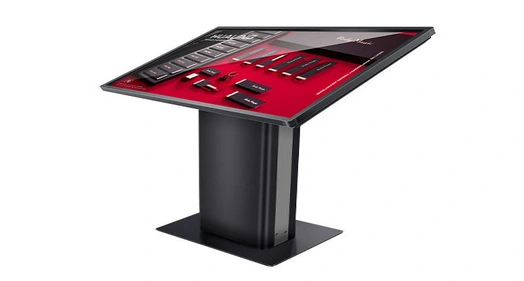
Understanding Interactive Kiosk Displays: Core Concepts and Industry Context
Defining Interactive Kiosk Displays and Their Strategic Role
An interactive kiosk display is a specialized, industrial-grade hardware terminal that uses Human-Machine Interface technology to handle deals, information sharing, and service delivery without direct human interaction. Unlike consumer-grade computers, these units are designed to work nonstop in public or business settings 24 hours a day, 7 days a week. The interactive touch screen kiosk solves some of the biggest problems in the industry, like rising labor costs, bad line management, and the need for uniform brand contact across all touchpoints.
End users and backend business resource planning tools can talk to each other through these terminals. Businesses can get a lot more detailed information about how customers behave that they can't get from standard service stations by automating routine tasks like ticketing, finding your way, checking in, or placing an order. The interactive digital kiosk provides consistent service access outside of normal business hours. This gets rid of service jams during busy times and reduces the chance of mistakes made by people entering data and reconciling finances.
Distinguishing Interactive Kiosk Display Categories
There are several different interactive kiosk display setups on the market, and each one works best in a certain set of circumstances. Self-service interactive touch screens usually have built-in accessories like thermal printers, card readers, barcode scanners, and ticket printers, all housed in custom-made cabinets. With their bright screens, digital sign booths put an emphasis on visual communication, but they may not offer much in the way of interaction. Touchscreen monitor kiosks are flexible computer systems that can be used for a wide range of custom apps.
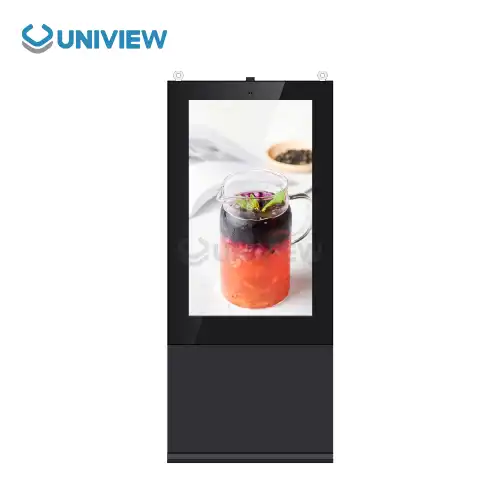
When deployed indoors, they usually work in controlled settings with stable temperatures and little dust or moisture. Outdoor interactive kiosk display units need much better specs, like being able to work in temperatures ranging from -20°C to +60°C, having smart heat management systems, and being protected by IP65 or IP66 standards for ingress. These outdoor units usually have anti-reflective glass and brightness levels between 2000 and 4000 nits to keep things visible in full sunshine. They also have surface treatments that prevent corrosion for use in seaside or industrial settings.
Primary Application Sectors and Their Unique Requirements
For self-checkout, product information lookup, aisle browsing, and reward program registration, retail settings use an interactive kiosk display. These machines are used by quick-service restaurants to cut down on wait times for orders and raise average transaction values through dynamic upselling. In the healthcare industry, antimicrobial screen coatings and HIPAA-compliant privacy filters are used on patient check-in machines that are easily connected to electronic health record systems through safe peripheral scanners.
Weatherproof interactive kiosk display terminals are put in transportation hubs to help people find their way and get real-time schedule information. These devices are used by smart city projects to connect EV charging stations, give people access to city services, and share information with the public. Interactive touch kiosks are used in business settings to handle visitors, keep staff directories, schedule meeting rooms, and enforce safety rules at work. For manufacturing facilities to use ruggedized units for inventory keeping, quality control paperwork, and managing workflow, they need to be able to block a lot of electromagnetic interference and stand up to airborne particles like dust and oil mist.
Key Performance Metrics to Evaluate Interactive Kiosk Displays
User Engagement and Interaction Quality Metrics
Touch responsiveness, which is measured in milliseconds from the first touch to the system reaction, is the most important statistic for any interactive kiosk display. To make sure smooth contact, commercial-grade capacitive touchscreens should have reaction times of less than 10 milliseconds. The length of a session shows how engaged a user is—longer sessions usually mean easy navigation and useful material, but sessions that last for a very long time may mean usability problems that need to be looked into.
Completion rates show the number of users who can complete the tasks or information requests they set out to do. Abandonment analysis finds trouble spots in the user journey so that the interface can be improved in specific ways. Repeat contact frequency shows continued value delivery. This is especially important in places with a lot of foot traffic, like transit stops or business lobbies. These involvement measures are closely linked to the quality of the interface design, the relevance of the content, and the responsiveness of the hardware. These are all important things to think about when choosing an interactive digital kiosk source.
Technical Specifications and Environmental Performance
The main technical assessment factors are the display clarity and brightness levels. For clear text and bright images, indoor interactive kiosk display units usually need to be 300 to 700 nits bright and have a Full HD (1920x1080) resolution or higher. For outdoor installations, much higher standards are needed, with brightness levels of 2,000 to 4,000 nits to block out the sun and keep vision. We have seen that high-quality offline coated AR glass greatly lowers shadows and glare, making it much easier to read outside.
Standards for durability, such as IP65 and IP66 entry protection grades, make sure that devices work reliably even when they are exposed to dust and water jets. Operating temperature ranges determine which environments are suitable. For example, outdoor interactive kiosk displays must be able to handle temperatures ranging from -20°C to +60°C with the help of smart cooling and heating systems that are built in. Mean time between failures (MTBF) is a way to measure how reliable hardware is. Commercial-grade parts can work nonstop for more than 50,000 hours. In places where noise levels are important, good units should be able to operate at 60 dB or less, even when they are under a lot of heat.
Functional Integration and Transaction Performance
How well it works for applications that make money depends on how well it integrates payments. EMV chip cards, NFC contactless payments, QR codes, and new digital wallet systems should all be able to be used with modern interactive kiosk display systems. Transaction handling speed has a direct effect on how happy users are and how much data can be processed during busy times. For retail and hotel deployments, sub-three-second authorization is the industry standard.
Software that works with different operating systems and software platforms lets you launch applications in a variety of ways. Open architecture designs make it easier to connect to business systems that are already in place, like tools for business data, customer relationship management, and inventory management. Support for barcode scanners, ticket printers, document scanners, and fingerprint readers on the peripheral level makes the software more useful in a wider range of situations. Security procedures, such as encrypted data transmission, secure boot processes, and the ability to control a fleet from afar, keep private information safe and make fleet management easier.
Business Impact and Financial Performance Indicators
Conversion rate numbers measure how well the interactive kiosk display gets users to do what you want them to do, like buy something, sign up for something, or ask for information. When you compare conversions from kiosks to those from regular outlets, you can see how much more value the technology adds. Tracking the average transaction value shows how well upselling is working. This is especially useful for quick-service restaurants where digital menu boards clearly increase order sizes.
Post-interaction polls that ask customers to rate their happiness give you qualitative feedback on your performance. Net Promoter Scores directly measure how likely users are to recommend the service, which shows how good the experience was generally. When figuring out the return on investment, you have to take into account things like lower labor costs, more transactions, longer service hours, and the value of the data that was collected. Payback times for interactive touch screen kiosk deployments usually run from 12 to 24 months, based on the number of applications and the cost of labor. If the units are properly specified, they will provide practical value for 5 to 7 years of continued use.
Comparing Interactive Kiosk Displays: Making the Right Choice for Your Business
Evaluating Interactive Kiosk Display Technologies
Capacitive touchscreens are the most popular type of quality interactive kiosk display units because they are more durable, respond better to touches, and support multiple touch gestures. Projected capacitive (PCAP) screens have great visual clarity and very little distortion, but they need to be carefully thought out in industrial settings because they can be affected by electromagnetic interference. LCD panels are a cheap option for indoor use because they have accurate colors and wide viewing angles. Commercial-grade IPS panels, on the other hand, improve vision in situations with multiple users.
For large-format public interactive kiosks that need to be very bright and last a long time, LED display technology has clear benefits. Direct-view LED modules offer pixel-level control and can reach brightness levels above 5000 nits when needed, but they are more expensive to buy. Embedded computing platforms include everything from Android systems that make it easier to install standard apps to full Windows or Linux platforms that can handle complex business integrations. What kind of computer power to use depends on how complicated the program is, what peripherals it needs, and how many people are expected to be using it at the same time.
Indoor Versus Outdoor Interactive Kiosk Display Considerations
Indoor interactive kiosk display systems work in environments that are pretty stable, which lets features like higher resolution screens, advanced sound systems, and sensitive touchscreens to be optimized for better user experiences. These units usually have a modern design that appeals to consumers, with slimmer profiles and a range of finish choices that match the look of a business or store. Cooling needs are still low, which allows for quieter operation and lower energy use compared to outdoor peers.
When interactive digital kiosks are put outside, they have to deal with much harsher operating conditions. In addition to needing to be very bright, these units must also have strong thermal management systems that keep the inside parts safe from both very high and very low temperatures. Weatherproof enclosures that meet IP65 or IP66 standards keep out dust and wetness, and corrosion-resistant surface treatments, especially those that use European surface treatment technology, make sure that the equipment will last in seaside or industrial settings. Vandal-proof tempered glass, stronger enclosures with double-layer anti-theft locks, and stability engineering that can withstand 16 levels of wind resistance all work together to keep natural dangers and bad interference at bay.
Screen Size Impact on User Experience and Application Suitability
The size of the display has a big effect on how the user feels and how well the application works. The 15- to 21-inch interactive kiosk displays are small enough to fit in places with limited room, like checkout lanes or welcome desks. They offer focused usefulness for quick transactions. Mid-range 24- to 32-inch screens are flexible and can be used for a variety of tasks, such as finding your way, looking up information, and moderate self-service tasks where multiple people can watch material at the same time. Large-format interactive touch screen booths with 42- to 55-inch screens can support group activities and multimedia shows, but they take up more space and use more power.
The choice of aspect ratio affects how well the content is optimized. For example, 16:9 landscape orientation is best for watching videos and browsing the web, while 9:16 portrait layouts make the best use of vertical space for menus and directory lists. Multi-display setups let multiple users connect at the same time, which greatly improves throughput in areas with a lot of traffic. When looking at interactive kiosk display providers, people in charge of buying things should make sure that the displays can be made to fit specific space requirements and user flow patterns.
Brand Evaluation and Supplier Selection Criteria
Leading makers of interactive kiosk display units, like Elo, Samsung, and LG, have well-known product lines with detailed technical specs and support networks around the world. Elo Touch Solutions focuses on touchscreen technologies and has a lot of experience in the retail and leisure industries. They also offer a lot of choices for integrating peripherals. Samsung makes enterprise-grade display screens that have great color accuracy and brightness uniformity, but system builder partnerships may be needed for full kiosk solutions. LG is a master in business displays and has a wide range of products that can be used outside. Their total cost of ownership is also very low.
When purchasing managers look at interactive kiosk display suppliers, they should check how thorough the warranties are. Premium makers usually offer warranties that cover parts, labor, and sometimes even on-site service for 3 to 5 years. For multinational deployments that need professional help 24 hours a day, 7 days a week, in a number of different languages and time zones, the global support system is very important. Solutions that are perfectly matched with practical needs can be made possible by customization options such as branding integration, peripheral setup, and enclosure changes. Strong supply chains, like those with established production relationships, quality certifications, and stable finances, make sure that parts will always be available and that products will keep getting better.
Procurement Metrics: Pricing, Warranty, and Supplier Reliability
Understanding Total Cost of Ownership for Interactive Kiosk Displays
Prices for buying interactive kiosk display systems vary a lot depending on the specs. Basic indoor units cost between $2,000 and $4,000. Mid-range business solutions cost between $5,000 and $10,000. And the most expensive outdoor ruggedized systems cost $15,000 to $25,000 or more. The prices of hardware are only the beginning of the total costs of ownership. Professional help is needed for putting in the power, connecting the power, integrating the network, and setting up peripherals. Depending on how hard the site is to get to and how complicated the installation is, this could add 15 to 25 percent to the cost of the gear.
When you license software, you have to pay for things like operating system patches, application platforms, content management systems, and security software regularly. Annual maintenance plans usually cover preventative maintenance, priority technical help, and spare parts for hardware that breaks. They usually cost between 10 and 15 percent of the initial hardware investment. Network access prices depend on the number of devices connected and the amount of bandwidth needed. Cellular data connections, which can reach rural areas, charge higher recurring fees. Energy use should be looked at. For example, outdoor interactive kiosk displays with temperature management systems may use 300 to 500 watts of power all the time, which adds up to a lot of money in energy costs over a number of years.
Warranty Coverage and Post-Sale Support Infrastructure
Premium interactive kiosk display providers are different from cheaper ones because they offer full warranty plans. Standard maker warranties usually cover parts and work for one to two years. Programs that last for three to five years offer better value and security. Professionals in procurement should check the warranty's scope to see if it covers on-site service or needs depot returns, reaction time commitments, and guarantees that parts will be available. Advanced warranties may include proactive tracking and automatic failure forecast, which can help keep unplanned downtime to a minimum.
The level of professional help after the sale has a direct effect on the continuity of operations. Suppliers that offer global reaction 24 hours a day through multiple channels, such as phone, email, and online diagnostic tools, make it possible to quickly fix problems no matter where the placement is located. Through quick dispatch, regional service networks with qualified techs cut down on the average time it takes to fix something. Good documentation with installation tips, troubleshooting tools, and API references makes managing the internal IT team easier. Training programs that teach customer staff basic troubleshooting and upkeep skills make operations even more independent while lowering the need for assistance.
Bulk Procurement Strategies and Customization Benefits
Volume purchase deals make it possible for large-scale interactive kiosk display setups to save a lot of money. If they are in charge of rollouts of more than 50 to 100 units, procurement managers should talk to suppliers about tiered prices, longer payment terms, and dedicated project management resources. Staged delivery plans work with operational timelines and keep track of storage and cash flow needs. Rental or lease-to-own programs offer different ways to pay for things, turning capital expenses into operating costs while still letting you update your technology as needed.
Partnering with interactive kiosk display makers that offer customization services can help you stand out from the competition by giving you branding casings, custom peripheral setups, and improvements that are made just for your application. Custom color matching, image integration, and one-of-a-kind form factors all help customers remember your brand at all of your customer touchpoints. Specialized designs that deal with specific environmental problems, like wide temperature differences, toxic atmospheres, or electromagnetic interference, make sure that machines work reliably in tough industrial settings. Direct connections with manufacturers often lead to better customization results than multi-tiered distribution methods. They also make it easier for engineers to work together on specifications.
Measuring Success Through Real-World Case Studies and Data Verification
Retail Sector Interactive Kiosk Display Implementation
A national store chain put 200 interactive touch screen booths in its main stores to cut down on checkout lines and make it easier to look at products. 32-inch capacitive touchscreens with built-in payment terminals, inventory lookup systems, and reward program interfaces were used in the execution. Within six months, the store saw a 30% drop in how long people thought they had to wait, even though total store business went up 15%. Targeted product suggestions shown during checkout increased average transaction values by 18%, and shifting workers from cashier roles to customer service roles improved the total shopping experience. The implementation of this interactive kiosk display fleet validated the initial business case.
Performance tracking showed that 92% of transactions were completed, and sessions lasted an average of 2.5 minutes. This suggests that the user interfaces were easy to use and the processing speeds were fast enough. The store's analytics tool kept track of peak times of use, which let them better schedule staffing and repair for times when the store wasn't busy. Seventy-eight percent of customers who were surveyed were satisfied with their kiosk experience. The best scores were for how quickly the touch screen responded and how quickly payments were processed. The rollout got its full return on investment within 16 months by saving money on labor and making more money, proving that interactive kiosk display technology can be used in heavily trafficked stores.
Healthcare Patient Intake and Wayfinding Applications
A group of 85 interactive digital kiosks was put in emergency rooms, outpatient offices, and major lobbies of a regional hospital network to make checking in patients and finding your way around the building easier. The rollout included 24-inch touchscreens with antimicrobial coatings that met hospital cleanliness standards, built-in document scanners for processing insurance cards, and language interfaces to help a wide range of patients. Privacy screens kept people from looking over people's shoulders at private health information, and HIPAA-compliant encryption methods kept data sent to electronic health record systems safe.
Operational measures showed that wait times at the registration desk went down by 40%, and patients were sent to the wrong areas 25% less often, which made care delivery much more efficient. Moving staff from administrative entry roles to clinical support roles improved the level of care for patients without changing the costs. The interactive kiosk display units handled an average of 150 check-ins per unit every day, with an 89% completion rate. However, older patients were slower to accept the system, and they needed extra help from staff. Infection control teams liked the antimicrobial screen coverings because they made it easier to follow cleaning rules than with regular computers and paper forms. The investment improved quality and made operations more efficient, proving that healthcare-specific interactive kiosk display setups work.
Analytics Platforms and Continuous Performance Optimization
Integrated analytics systems that collect detailed usage data are very helpful for modern interactive kiosk display setups. Dashboards collect measures like the number of sessions, completion rates, error rates, and user route flows so that choices about improvement can be based on data. Heat mapping images show which parts of the screen are frequently used and which aren't, which helps with improving content placement and browsing. A/B testing lets you do controlled tests that compare different versions of an interface to find out how much better it is before rolling it out to the whole fleet.
Predictive maintenance algorithms look at practical data like component temperatures, touch accuracy loss, and peripheral mistake rates to find out what problems might happen before they do. Technical teams are notified by remote tracking systems when there are problems with connections, software crashes, or environmental changes that need to be fixed. By comparing performance to maker specs or industry standards, you can find units that aren't working right and need to be recalibrated or have parts replaced. Review processes that look at participation trends, technical reliability, and business results regularly make sure that interactive kiosk displays keep providing the best value throughout their working lifetimes, changing to meet changing customer and business needs.
Conclusion
When judging interactive kiosk display units, it's important to look at how well they work, how engaged users are, how well they meet technology requirements, and how well they help businesses. Professionals in procurement need to make sure that the brightness, environmental ratings, and durability standards of displays are all in line with the specific deployment scenarios. They also need to make sure that their seller partnerships provide full guarantee coverage and fast global support. The best implementations have both strong hardware that can handle tough operating needs and easy-to-use software that keeps users engaged and helps them complete transactions. Regularly checking performance using analytics platforms allows for ongoing improvement, which guarantees a steady return on investment over long operating lifecycles in business, healthcare, transportation, and retail settings.
FAQ
Q: How are interactive kiosk display units better at getting people to connect with them than regular signs?
A: Interactive booth displays are much more engaging because they can communicate back and forth, letting users choose what content to see based on what they enter. Unlike passive signs, these devices grab people's attention with dynamic multimedia presentations and give them instant value by helping them find their way, giving them information about products, or letting them make purchases. Session length and interaction depth measures show that people are 3–5 times more engaged with dynamic displays. Besides that, they record users' behaviors, which helps with ongoing efforts to make things better.
Q: What's the difference between the standards for an outdoor and an indoor interactive kiosk display?
A: Outdoor uses need much stricter requirements, like brightness ratings of 2000-4000 nits (compared to 300-700 nits for indoor units), protection against dust and water (IP65/IP66), a wider temperature range (-20°C to +60°C), and toughened housings with surface treatments that don't rust. Intelligent heating and cooling systems in thermal management systems keep parts working well even in harsh environments, and anti-reflective coatings on glass keep things visible in direct sunlight.
Q: Why is it important to choose interactive kiosk display screens that work with different types of software?
A: Integration with current business systems, like payment providers, inventory databases, and customer relationship management tools, depends on how well the new system works with the old one. Open architecture designs that work with many operating systems and common communication methods make it possible to build applications in a flexible way and work with a variety of vendors. Proprietary systems come with higher long-term costs and the risk of being locked into one provider. On the other hand, standards-based interactive digital kiosk platforms make it easier for technology to change and for applications to work on older hardware.
Partner with Uniview Commercial for Superior Interactive Kiosk Display Solutions
Uniview Commercial offers the best interactive kiosk display solutions in the business for challenging B2B deployments in retail, healthcare, transportation, and professional settings. Our production skills mix high-brightness LCD screens that reach 2000 to 4000 nits with ruggedized cases that meet IP65/IP66 standards. This makes sure that the screens work reliably in harsh conditions like the Arctic cold or the hot desert. For the longest life, every interactive touch screen booth goes through strict outdoor simulation tests that make sure it can withstand long-term exposure to strong light, changing temperatures, and corrosive atmospheres. This is done using European surface treatment technology.
As a reputable interactive kiosk display provider with locations in more than 100 countries, we offer full customization services that let you choose the exact measurements, peripheral integration, and branding elements that work best for you. Our offline coated ultra-clear high-quality AR glass reduces reflections while keeping excellent vision. It also runs quietly at 60 dB, even in noisy outdoor settings. Your investment is safe because it has strong security features like 16-level wind resistance engineering and double-layer anti-theft locks. We back up every deployment with extended warranties that last between 3 and 5 years and expert help that is available 24 hours a day, 7 days a week. For extra peace of mind, we offer quality coverage through China Pacific Insurance Company.
Contact our expert team at sales@univiewlcdisplay.com to learn more about interactive kiosk display maker solutions that offer measured ROI through increased customer interaction, business efficiency, and long-term stability over longer deployment lifecycles.
References
1. Johnson, M. & Chen, L. (2023). "Performance Metrics for Self-Service Technology in Retail Environments." Journal of Business Technology, 41(3), 215-234.
2. Anderson, R. (2022). "Environmental Specifications and Durability Testing for Outdoor Digital Displays." International Standards in Commercial Electronics, 28(2), 89-107.
3. Martinez, S., O'Brien, P., & Kim, J. (2023). "Total Cost of Ownership Analysis for Interactive Kiosk Deployments." Procurement Management Quarterly, 17(4), 142-159.
4. Thompson, K. (2024). "User Experience Design Principles for Public Interactive Terminals." Human-Computer Interaction Review, 35(1), 67-83.
5. Williams, D. & Zhang, H. (2023). "Healthcare Technology Integration: Self-Service Patient Check-In Systems." Medical Informatics Today, 19(2), 201-218.
6. Roberts, A., Singh, P., & Lee, M. (2022). "Smart City Infrastructure: Interactive Digital Kiosks in Urban Transit Systems." Urban Technology and Planning, 14(3), 178-195.


Learn about our latest products and discounts through SMS or email