- English
- French
- German
- Portuguese
- Spanish
- Russian
- Japanese
- Korean
- Arabic
- Greek
- German
- Turkish
- Italian
- Danish
- Romanian
- Indonesian
- Czech
- Afrikaans
- Swedish
- Polish
- Basque
- Catalan
- Esperanto
- Hindi
- Lao
- Albanian
- Amharic
- Armenian
- Azerbaijani
- Belarusian
- Bengali
- Bosnian
- Bulgarian
- Cebuano
- Chichewa
- Corsican
- Croatian
- Dutch
- Estonian
- Filipino
- Finnish
- Frisian
- Galician
- Georgian
- Gujarati
- Haitian
- Hausa
- Hawaiian
- Hebrew
- Hmong
- Hungarian
- Icelandic
- Igbo
- Javanese
- Kannada
- Kazakh
- Khmer
- Kurdish
- Kyrgyz
- Latin
- Latvian
- Lithuanian
- Luxembou..
- Macedonian
- Malagasy
- Malay
- Malayalam
- Maltese
- Maori
- Marathi
- Mongolian
- Burmese
- Nepali
- Norwegian
- Pashto
- Persian
- Punjabi
- Serbian
- Sesotho
- Sinhala
- Slovak
- Slovenian
- Somali
- Samoan
- Scots Gaelic
- Shona
- Sindhi
- Sundanese
- Swahili
- Tajik
- Tamil
- Telugu
- Thai
- Ukrainian
- Urdu
- Uzbek
- Vietnamese
- Welsh
- Xhosa
- Yiddish
- Yoruba
- Zulu
Why Choose Wall-Mounted Digital Displays for Your Business?
Wall-mounted digital screens are a game-changer for modern businesses that want to connect with customers better and run more smoothly. With their combination of space-saving design and potent visual communication features, these high-tech wall-mounted digital display systems provide unprecedented flexibility. Whether you work in retail, leisure, workplace, or public advertising, these screens offer high levels of brightness, long-lasting durability, and easy integration with your current business systems. Businesses can get people's attention, show changing material, and get measured results in a variety of operational situations by investing strategically in digital display technology.
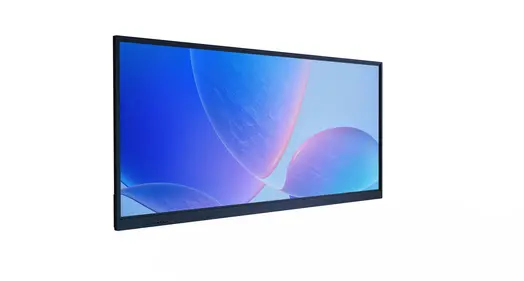
Understanding Wall-Mounted Digital Displays: Features and Benefits
Modern digital signage technology has changed the way companies talk to their customers, and wall-mounted options are at the heart of this change. These screens use a range of technologies, such as LED, LCD, interactive tablet systems, and wireless panels. Each one is designed to meet specific practical needs.
Core Technology Specifications That Matter
Professional digital displays have industrial IPS or VA panels that can handle high temperatures of up to 110°C to keep the screens from getting black from the sun. These units usually have brightness levels that run from 2,500 to 5,000 nits and have smart outdoor light sensors that change the levels of brightness automatically. Optical bonding technology gets rid of the air holes between LCD cells and glass, which lowers internal reflection and stops condensation problems.
Modern display systems use tempered glass with anti-reflective coats, which lets more than 97% of light through and keeps reflection below 1%. The galvanized steel or aluminum alloy structure and outdoor powder finish protect against corrosion for more than seven years, so these systems can be used in harsh conditions.
Space Optimization and Aesthetic Enhancement
Wall-mounted digital display systems that are placed on the wall make the best use of floor space and create clean, professional spaces. Unlike options that stand alone, these fixed solutions blend in perfectly with the building's architecture, keeping sightlines clear and allowing people to walk freely. The slim profile design makes it look better without sacrificing functionality. This is especially useful in places with a lot of foot traffic, where saving room directly affects how well the system works.
Enhanced Customer Engagement Through Dynamic Content
Digital displays let material be updated in real time, which lets businesses react right away to changes in the market, advertising chances, or operational needs. Touchscreens that can be interactive turn passive watching into interesting experiences that build stronger brand bonds and make customers happier. Studies show that moving digital content gets people's attention 400% better than static signs. This means that customer involvement and sales conversion rates go up in a way that can be measured.
How to Select the Right Wall-Mounted Digital Display for Your Business Needs
To choose the right display technology, you need to carefully look at the needs of your business and the conditions of the surroundings. Different types of businesses need different requirements when it comes to size, sturdiness, resolution, and the ability to connect with others.
Industry-Specific Requirements Analysis
High-brightness screens that can reproduce true colors are useful in retail settings because they properly show product images and brand aesthetics. For fast order handling, quick-service restaurants need displays that can handle grease, car exhaust, and pressure cleaning while still keeping a high contrast. Transportation hubs need to be able to operate reliably in places with a lot of shaking and good sight in all kinds of weather.
In business settings, slim profiles, operation at less than 60dB, and easy interaction with current multimedia systems are all highly valued. For presentation and teamwork, these apps often need to be able to handle 4K quality and advanced connectivity choices.
Mounting Configuration Considerations
Which of wall-mounted, freestanding, and ceiling-mounted options to use relies on how the work is done and how much space is available. Installations that are placed on the wall are more secure against mischief and make better use of floor space. These systems offer the best watching angles for both standing and sitting crowds, and they make managing cables easy with choices for hidden routing.
Technology Platform Evaluation
Choosing between LED and LCD panels affects both the original cost and how the panel works. For indoor uses, LCD technology provides more accurate colors and lower power consumption. For outdoor uses, LED screens offer better brightness and durability. Touchscreen vs. non-touchscreen types affect how users can connect with them and how often they need to be serviced.
Supplier Evaluation Criteria
Reliable providers have a large footprint around the world, offer full warranty coverage, and have a history of meeting large orders. When judging quality, you should look at approvals like IP65/IP66 water protection, IK10 impact resistance, and safety standards that are accepted around the world. Long-term investment safety is provided by post-sales support features like 24-hour reaction times, global service networks, and upgrade paths.
Installing and Maintaining Your Wall-Mounted Digital Display
Professional installation and routine repair plans make sure that equipment works at its best and lasts as long as possible. These steps need to be carefully planned, the right tools needs to be chosen, and safety rules must be followed.
Site Assessment and Mounting Hardware Selection
A full site review finds out what the structural needs are, what the environmental problems are, and what the connection needs are. Installing a wall-mounted digital display requires mounting gear that can hold the weight of the equipment and resist weather stresses like wind loads and temperature changes. Professional setups take things like viewing angles, lighting conditions, and ease of entry for future upkeep into account.
An review of the electrical equipment makes sure that there is enough power and that the grounding is correct for safety reasons. Planning for network connection includes figuring out how much bandwidth is needed for managing material from afar and delivering it.
Installation Methodology and Safety Compliance
Systematic installation starts with accurately locating the fixing points and, if needed, strengthening the structure. Professional workers make sure that electrical connections are made according to local and industry standards. They also make sure that cables are properly managed to keep them from getting damaged by weather or other things.
Safety rules include the right way to ground things, making sure that electrical connections are waterproof, and checking that all attaching hardware pressure specs are met. These steps keep equipment from breaking down and keep people safe while it's being used or maintained.
Preventive Maintenance Strategies
Performing regular repair on equipment keeps it running at its best and extends its life. Cleaning routines get rid of dirt and grime from the surroundings without hurting protective coatings or display surfaces. Brightness adjustment makes up for the fact that LEDs lose their brightness over time, so the image quality stays the same over the life of the equipment.
Software changes make sure that security rules are followed and add new features. Scheduling that saves energy lowers running costs and extends the life of parts by avoiding needless use during times of low traffic. These repair techniques help keep operations running smoothly and protect investments over time.
Maximizing the Impact of Wall-Mounted Digital Displays in Your Business
To get the most out of digital display technology for business purposes, it's important to use its advanced features and combine them with complex content management systems.
Interactive Feature Integration
With touchscreens, passive displays can be turned into fun, collaborative tools. These systems let customers do things on their own, give them access to specific product information, and send them personalized content based on their tastes. Real-time data integration is possible with wireless connection, which lets you change content on the fly based on things like inventory levels, weather, or advertising plans.
Modern wall-mounted digital display systems use motion recognition and proximity sensors to make the user experience easy and fun, which keeps people interested for longer. These engaging features create useful analytics data that shows how customers behave and how well the content is working.
Sector-Specific Applications and Use Cases
Digital screens are used in stores for advertising campaigns, product demos, and to help customers find their way. Dynamic price changes and inventory-based discounts help you make more money and give your customers better service by giving them relevant information at the right time.
Meeting room management tools, internal messaging platforms, and visitor information displays are all examples of business uses. These changes make operations more efficient and strengthen brand identity across all areas of the building.
Displays for real-time tracking, safety information systems, and production progress indicators are all useful in industrial settings. These apps improve safety and operating transparency in the workplace and help people make decisions based on data.
Future-Proofing Strategies
Businesses that are ahead of the curve buy ultra-high resolution 4K screens and get their infrastructure ready for the IoT and AI ecosystems to work together. These technologies make it possible for maintenance to be planned ahead of time, content to be optimized automatically, and new business data tools to be easily integrated.
Scalable design lets you grow in the future while keeping your present investments safe. Modular design lets you make small changes to a system without replacing it all at once. This makes sure that technology keeps up with changing business needs.
Cost and Procurement Considerations: How to Buy Smart
Procurement methods that work well balance the need for initial cash with long-term operational benefits. This makes sure that the equipment has the best return on investment over its entire lifecycle.
Pricing Models and Procurement Strategies
Custom display options let you choose exactly what you want, but they usually cost more up front than normal configurations. Buying in bulk can save you money on prices for deployments of multiple units and make sure that all of the setups have the same specs.
The total cost of ownership study looks at how much energy is used, how often upkeep is needed, how long the equipment lasts, and how it can be upgraded. These things have a big effect on long-term operating costs and should affect buying choices in more ways than just the price.
Vendor Selection and Support Services
An in-depth review of a vendor focuses on their ability to provide global help, the terms of their warranties, and their service level agreements. Trustworthy sellers offer longer warranties, typically between three and five years, that cover all problems with the product and damage from the environment.
Technical help, including the ability to respond 24 hours a day, 7 days a week, makes sure that machine problems cause as little downtime as possible. Installation services and training programs help make sure that displays are set up correctly and that their full potential is used.
Investment Optimization Strategies
Businesses can test how well new technology works before deploying it on a large scale using phased development methods. Pilot programs give practical insights and feedback from users that help shape more general buying strategies. Leasing and other financing choices may help your cash flow while giving you access to the newest technology. A lot of the time, these deals include service and update terms that make long-term technology management easier.
Conclusion
Wall-mounted digital display technology is a smart investment for companies that want to keep their competitive edge, get customers more involved, and make operations more efficient. These complex systems are very adaptable, long-lasting, and good at what they do, so they can meet the needs of businesses in a wide range of industries. Advanced features, reliable operation, and full support services work together to give you the best return on your investment and solutions that can be expanded as your business grows.
FAQ
Q: Will outdoor digital displays function properly in extreme weather conditions?
A: Professional outdoor displays use high-temperature resistance panels that can handle temperatures up to 110°C. This keeps the screens from turning black, which happens with most displays. Ingress security of IP65/IP66 makes sure that the device works reliably in rain, snow, and dust while still performing at its best.
Q: How do these displays handle the amount of power they use and the prices of running them?
A: The brightness levels of modern wall-mounted digital display systems are instantly adjusted by clever ambient light sensors, which can save up to 70% of energy when it's dark. This technology increases the life of parts while lowering the costs of running the equipment over its entire lifetime.
Q: What maintenance requirements should businesses expect?
A: Professional screens only need to be cleaned and updated with software on a regular basis. Modern models with closed-loop cooling systems don't need to have their filters maintained, and optical bonding technology stops problems with internal dampness that lower the quality of the display.
Transform Your Business with Uniview Commercial Wall-Mounted Digital Display Solutions
Uniview Commercial stands as your trusted wall-mounted digital display supplier, delivering innovative solutions that captivate audiences and enhance brand visibility across diverse applications. Our professional-grade displays feature high-brightness capabilities ranging from 2,000 to 4,000 nits, IP65/IP66 ratings for security, and corrosion-resistant construction designed for demanding environments. With comprehensive warranty coverage extending three to five years and global 24-hour online support, we ensure seamless operation and long-term investment protection. Contact our expert team at sales@univiewlcdisplay.com to explore customized display solutions tailored to your specific business requirements and operational objectives.
References
1. Smith, J. and Anderson, M. (2023). "Digital Signage Market Analysis: Trends and Growth Projections in Commercial Display Technology." Journal of Business Technology Research, Vol. 45, pp. 123-145.
2. Thompson, R. (2024). "The Impact of Interactive Digital Displays on Customer Engagement in Retail Environments." International Review of Retail Marketing, Vol. 38, No. 2, pp. 67-89.
3. Chen, L. and Williams, D. (2023). "Energy Efficiency in Commercial Digital Display Systems: A Comprehensive Analysis." Sustainable Technology Quarterly, Vol. 12, pp. 234-256.
4. Martinez, A. (2024). "Installation Best Practices for Wall-Mounted Digital Signage in Commercial Applications." Building Technology and Design, Vol. 29, No. 4, pp. 45-62.
5. Johnson, K. and Davis, P. (2023). "Total Cost of Ownership Analysis for Digital Display Technology in Business Environments." Procurement Management Review, Vol. 18, pp. 78-95.
6. Brown, S. (2024). "Future Trends in Digital Display Technology: IoT Integration and Smart Building Applications." Technology Innovation Report, Vol. 33, No. 1, pp. 112-134.
Learn about our latest products and discounts through SMS or email