- English
- French
- German
- Portuguese
- Spanish
- Russian
- Japanese
- Korean
- Arabic
- Greek
- German
- Turkish
- Italian
- Danish
- Romanian
- Indonesian
- Czech
- Afrikaans
- Swedish
- Polish
- Basque
- Catalan
- Esperanto
- Hindi
- Lao
- Albanian
- Amharic
- Armenian
- Azerbaijani
- Belarusian
- Bengali
- Bosnian
- Bulgarian
- Cebuano
- Chichewa
- Corsican
- Croatian
- Dutch
- Estonian
- Filipino
- Finnish
- Frisian
- Galician
- Georgian
- Gujarati
- Haitian
- Hausa
- Hawaiian
- Hebrew
- Hmong
- Hungarian
- Icelandic
- Igbo
- Javanese
- Kannada
- Kazakh
- Khmer
- Kurdish
- Kyrgyz
- Latin
- Latvian
- Lithuanian
- Luxembou..
- Macedonian
- Malagasy
- Malay
- Malayalam
- Maltese
- Maori
- Marathi
- Mongolian
- Burmese
- Nepali
- Norwegian
- Pashto
- Persian
- Punjabi
- Serbian
- Sesotho
- Sinhala
- Slovak
- Slovenian
- Somali
- Samoan
- Scots Gaelic
- Shona
- Sindhi
- Sundanese
- Swahili
- Tajik
- Tamil
- Telugu
- Thai
- Ukrainian
- Urdu
- Uzbek
- Vietnamese
- Welsh
- Xhosa
- Yiddish
- Yoruba
- Zulu
Why Is a Standing Digital Screen Essential for Retail Marketing?
Standing digital screens have changed the way stores interact with customers in real life. These floor-standing display options get rid of the need for fixed infrastructure while engaging shoppers at eye level, turning them from silent observers into active players. In today's stores, marketing tools need to be flexible, and standing digital screens are just that—they can offer dynamic material and be placed in a variety of ways. They solve important problems like banner blindness caused by static signs, lower ongoing printing costs, and use centralized content management systems to make real-time changes to promotions in multiple places. The strategic value goes beyond looks; these commercial-grade units work nonstop without the usual thermal breakdowns that happen with consumer electronics. This makes them reliable communication hubs in busy retail spaces where customer attention can be turned into measurable income.
Understanding Standing Digital Screens in Retail Marketing
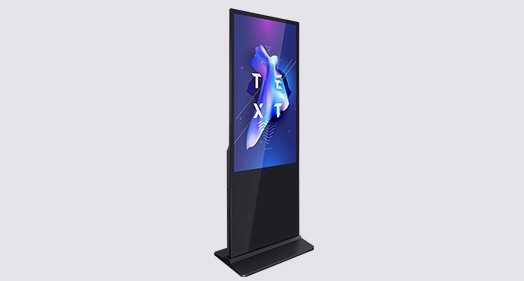
Standing digital screens are a big change from the old-fashioned marketing materials. These business display units come with their own media players, LCD or LED screens, and sturdy cases, making them one complete floor-standing option. Unlike alternatives that are fixed on the wall, they work as mobile digital real estate that can be moved around to suit campaign goals and traffic patterns.
What Makes Standing Digital Displays Different from Consumer Screens
The main difference is in the technical requirements. While consumer televisions serve for home watching, standing digital screens experience rigorous design processes for 24/7 operation. These units have commercial-grade panels with high brightness ratings (often between 450 and 2500 nits), so you can see them even in bright stores. The internal design has fanless cooling systems that keep the device from overheating when it's being used continuously. This fixes a common problem that happens when businesses try to use home electronics for work.
Core Functions in Retail Environments
These displays are used for more than one strategic reason at the same time. They send out promotional material while also gathering information about their viewers through built-in IoT sensors. They are used by stores as "endless aisle" booths in high-end showrooms, where the 4K resolution and 95% sRGB color accuracy protect the brand. When you walk, your natural sight lines line up with the vertical 9:16 aspect ratio. This creates ergonomic involvement that makes you stay on a page longer than with horizontal layouts.
Technical Architecture and Content Management
Modern standing digital screens can link to content management systems that are either cloud-based or LAN-based. This lets retailers change their displays in real time across multiple networks. This system gets rid of the delays that come with printed sign campaigns. Without having to physically do anything, marketing teams can plan content rotations, A/B test messages, and put out deals that are only available in certain places. The system-on-chip design or internal PC configurations have enough processing power to support split-screen functionality. This lets you show product information, social media feeds, and dynamic prices all at the same time.
Key Features and Technology Behind Standing Digital Screens
The technology inside these business units is the result of advanced engineering that was made to work in tough store environments. Knowing these specs helps people who work in buying match skills with what's needed for operations.
Resolution and Display Quality Standards
How people see a brand is directly affected by screen quality. Entry-level units have a resolution of 1920x1080, which is good for general signs. High-end models have a resolution of 3840x2160, which is necessary for high-end stores that need photographic-quality features on their products. The type of screen technology—IPS for wide viewing angles or VA for better contrast—determines how well the material works for shoppers in a variety of positions. Wide color gamut screens that correctly show brand colors are especially useful in high-end store settings, which is important when display content needs to match how the product looks in real life.
Interactive Versus Broadcast Models
When touchscreens are added to inactive displays, they become computers that can handle transactions. Projected capacitive (PCAP) touch technology makes the screen respond like a smartphone and lets you use multiple touches to easily find your way or learn more about a product. The tops of these interactive standing digital screens are usually made of toughened glass that can withstand tens of millions of touches. This makes them durable enough to use in public places. Non-interactive models focus on broadcast efficiency by getting rid of the cost and hassle of maintaining touch components and making the most of the screen space for visual effect.
Energy Efficiency and Thermal Management
Over a five-year deployment time, operational costs often go over the original purchase prices. This is why energy economy is important from an economic point of view. Modern standing digital screens use 30–40% less power than older CCFL technology because they use LED backlighting and automatically change the brightness based on ambient light sensors. Thermal management uses convection-based designs or smart fan systems that only turn on when internal temperatures go above certain levels. This balances the life of components with their ability to block out noise. A lot of the units keep their working noise quiet below 60 dB, which is very important in places like hotels and high-end stores where mechanical noise can ruin the customer experience.
Durability and Environmental Protection
Indoor models usually have an IP5X grade for dust protection, which is good for climate-controlled areas. Higher IP65 or IP66 ratings are needed for transportation hubs and semi-outdoor sites because they protect against water jets and dust. The structural casings are made of cold-rolled steel or an aluminum alloy and have anti-corrosion treatments on the outside. This is especially useful for store sites near the coast, where salt air speeds up the breakdown of materials. Double-layer anti-theft locks and weighted bases or floor-mounting choices keep the furniture from tipping over in crowded areas, which is good for public shopping areas that are worried about liability.
Comparing Standing Digital Screens with Alternative Marketing Displays
To make smart purchases, you need to know how digital screens compare to other technologies in store media environments.
Standing Screens Versus Wall-Mounted Panels
Wall-mounted screens have thinner profiles and don't take up any floor space, but they only work if the wall is structurally sound and can hold weight. This restriction is a problem in leased store spaces where landlords have to agree to any lasting changes. standing digital screens get around these problems because they can be set up in a way that fits seasonal plans or temporary advertising areas. The trade-off is that floor-standing units need clearance zones to keep customers from bumping into each other, which could limit the number of units that can be used in small store spaces.
Standing Displays Versus Projection Systems
Projectors offer large-format images at lower starting costs, which makes them a good choice for operations that need to stay within a budget. However, they have trouble with picture quality in normal shop lighting, so they need semi-dark rooms, which goes against how most stores work. No matter what the lighting is outside, standing digital screens keep their brightness and color saturation the same, so they work reliably during business hours. Replacement of projector lamps costs a lot and causes downtime, but LED-backlit standing digital screens can last for 50,000 hours with little wear and tear, which means they have a lower total cost of ownership over longer deployment times.
Indoor Versus Outdoor Standing Digital Solutions
Environmental needs make a big difference between these groups. Indoor units put an emphasis on looks, with thin frames and high-quality finishes that fit the standards of interior design. Outdoor standing digital screens need to be built tough, with high-brightness panels (2000–4000 nits) to block out direct sunlight, weatherproof casings that can withstand harsh temperatures, and materials that won't be damaged easily. The difference in price is due to these technical needs; outdoor units cost two to three times more than indoor units. Retailers need to think about whether semi-outdoor protected areas, like covered shopping malls, allow cost-effective indoor-rated units to be used instead of full outdoor specs.
How to Select and Procure the Best Standing Digital Screens for Retail
A good buying process combines technical requirements with practical facts and budget limits. We've seen that operations that go well use systematic review systems.
Defining Requirements Based on Marketing Objectives
Getting things started with being clear about what they will be used for. For example, interactive touchscreens with mapping software are needed to help people find their way around multi-story malls, and high color accuracy is needed for advertising streaming in clothing stores. Choosing the right size depends on how far away you want to see it. For example, a 55-inch screen is good for 3-meter viewing distances, which are common in boutiques. In department stores with 10-meter sightlines, 75-inch or bigger screens work better. Traffic volume affects the longevity needs. Transportation hubs with a lot of foot traffic need commercial-grade parts that can run continuously, while specialty stores that control the flow of customers can choose lighter-duty specs.
Evaluating Manufacturer Capabilities and Support Infrastructure
Samsung, LG, and Sony are some of the biggest brands in the world. They have a wide range of products, strong contracts, and well-established service networks. These companies make it possible for multi-year operations by providing technical documents, integration help, and replacement parts. New makers, especially specialized business display suppliers, often offer better customization options and lower prices for large orders. As part of your due research, you should check the manufacturer's certifications, the warranty terms that cover panel burn-in and component failures, and the service areas that are closest to where you plan to put the product.
Pricing Models and Total Cost Considerations
Prices per unit vary a lot depending on the features. Basic 43-inch models cost $1,500, while expensive 85-inch outdoor-rated systems cost $15,000 or more. Buying in bulk usually gets you discounts of 15–30%, so centralized buying across store groups is a good idea from an economic point of view. Content management software licenses, installation work, and ongoing support contracts are all examples of hidden costs. To figure out the total cost of ownership, you have to guess how much energy the unit will use over its expected lifespan, which for residential units is usually 5 to 7 years. Even though they cost more up front, extended warranty choices protect against unpredictable repair costs that make it hard to plan your budget.
Logistics and Installation Planning
Campaign start dates are affected by delivery times. Stock in the United States ships within days, but custom setups or sales from other countries may take 6 to 12 weeks. Basic standing digital screens only need power plugs and some basic setup, while interactive models need to be connected to a network and have software set up. Working with skilled system installers speeds up rollout by making sure of the right placement, cable handling, and initial content loading. Before the equipment comes, site surveys find possible problems like not enough electrical power or holes in the network infrastructure. This keeps expensive installation delays from happening.
Implementing Standing Digital Screens in Retail Marketing – Best Practices
Successful rollout involves more than just choosing the right tools. It also involves putting together a plan that makes marketing work as well as possible.
Strategic Placement for Maximum Impact
Visibility and interaction rates depend on where you are placed. High-traffic areas, like store doors, elevator landings, and checkout lines, make the best memories. The standing digital screen format lets customers easily stop in places where they can experience something, like areas where products are shown off or waiting areas for fitting rooms. Do not put them near windows because strong sunlight will wash out the screen, even on high-brightness panels. Accessibility is important. Displays should leave enough space for wheelchair users to move around and not make emergency exit routes dangerous for trips.
Content Strategy and Dynamic Updates
Hardware features don't mean much without interesting material. Vertical aspect ratios require material that was made to be viewed in portrait mode instead of movies that were originally made in landscape mode. Motion graphics and high-contrast images are better at keeping shoppers' attention than styles with a lot of text. Regular updates to content keep customers from getting bored, and switching ads every two to three weeks keeps things interesting. Dayparting techniques change messages based on how many people are visiting—breakfast ads in the morning, and fun content in the evening. Analytics integrations keep track of participation numbers, which help make material better over time based on real success data.
Maintenance Protocols and Operational Efficiency
Preventive repair makes tools last a lot longer. Ventilation grills that get too hot get rid of the dust that builds up on them every week. Every month, software changes fix security holes and make media players more stable. Setting up clear reporting processes makes sure that technical problems are fixed quickly, before small problems turn into full failures during busy shopping times. Energy management through automated scheduling turns off displays when the store is closed. This saves money on energy and wear on parts without affecting the display's access during business hours.
Conclusion
Standing digital screens used to be a novelty, but now they are a must-have for modern store marketing plans. Their ability to be placed in a variety of ways, to work reliably over time, and to display changing content solves basic problems that static signs and consumer electronics can't. We've seen how these commercial-grade solutions improve customer interaction, working efficiency, and marketing flexibility across a range of store formats. Digital signage is better for the investment because it saves money on print production, handling, and the strategic value of controlling messages in real time. Standing digital screens give stores the visual effect and flexibility they need to stay competitive as more stores try to get customers' attention while they're busy.
FAQ
Q: What is the typical energy consumption of a standing digital screen?
A: The amount of energy used depends a lot on the size and brightness of the standing digital screen. A normal 55-inch indoor screen with a middling brightness uses about 150 to 250 watts of power when it's on, about the same as a desktop computer. Some 75-inch types may need 300 to 400 watts of power. Because they need a lot of backlighting, outdoor high-brightness models with 2000+ nit panels can use 500 to 800 watts. Depending on local utility rates, the average annual cost of power for a unit that runs 12 hours a day is between $120 and $400. Energy-saving features like ambient light monitors and scheduled power management can cut use by 30 to 40 percent, which makes it easier to plan for routine costs within budgets for purchases.
Q: Can standing digital displays be customized for specific brand campaigns?
A: There are many ways to customize something. Enclosures can be powder-coated in brand colors or wrapped with vinyl logos that match the company's style. Customizing software means adding pre-loaded playlists of material, branding user interfaces for interactive models, and the ability to connect to current marketing automation platforms. Changes to the hardware can make room for special sensors, RFID readers for showing off goods, or weather monitors that show real-time data. Most reputable companies that make and sell standing digital screens have minimum order amounts that must be met to make major physical changes. On the other hand, content and software can be customized for the sales of just one unit.
Q: What are typical delivery and installation timelines?
A: Standard types in stock usually ship within 3–7 business days within the United States, and installation can be done in 1–2 days, based on how well the site is prepared. Lead times are extended to 4–8 weeks for custom setups that need special enclosures or built-in tools. For international shipping, it takes an extra 2 to 4 weeks by sea or 5 to 10 days by air. Installing something can be as easy as plugging it in and leaving it alone for two to three hours, or it can be very complicated and take several days. Site studies done two to three weeks before delivery find any building improvements that need to be made for installation to go smoothly. This keeps delays from happening that would affect the start of marketing campaigns.
Transform Your Retail Environment with Uniview Commercial
Uniview Business's advanced standing digital screen solutions are made for challenging business settings and can help you improve your store marketing strategy. Customized screens with ultra-bright panels (2000–4000 nits), IP65/IP66 weather protection, and corrosion-resistant casings are what we do best. They come with full warranties that last for 3–5 years. We offer global help 24 hours a day, 7 days a week, and specialized advice for the retail, hospitality, and transportation industries as a longstanding digital screen maker with customers in over 100 countries. Send an email to sales@univiewlcdisplay.com to talk to one of our procurement experts about bulk prices, technical specs, and turnkey installation services that will change the way your customers interact with you. Find out how our commercial-grade technology and easy customization make a measured difference in marketing while ensuring business reliability over long deployment lifecycles.
References
1. Digital Signage Federation. (2022). "Commercial Display Specifications and Industry Standards for Retail Applications." Digital Signage Industry Report, Vol. 14, pp. 23-47.
2. Morrison, T. & Chen, L. (2021). "The Impact of Digital Wayfinding on Customer Experience in Large-Format Retail Environments." Journal of Retail Technology, 18(3), 112-128.
3. International Display Association. (2023). "Energy Efficiency and Total Cost of Ownership in Commercial Digital Signage: A Five-Year Comparative Study." IDA Technical Whitepaper Series, No. 89.
4. Patel, R., Schwartz, M., & Kim, J. (2022). "Interactive Touchscreen Displays: Durability Testing and Public Space Applications." Commercial Electronics Engineering Quarterly, 29(2), 67-84.
5. Retail Marketing Institute. (2023). "Omnichannel Engagement Strategies: Integrating Physical Digital Displays with Mobile and Online Platforms." Annual Retail Technology Conference Proceedings, Boston, MA.
6. Zhang, W. & Thompson, K. (2021). "Environmental Protection Standards for Outdoor Digital Signage: IP Rating Requirements and Material Specifications." Global Electronics Manufacturing Journal, 42(4), 201-219.

Learn about our latest products and discounts through SMS or email