- English
- French
- German
- Portuguese
- Spanish
- Russian
- Japanese
- Korean
- Arabic
- Greek
- German
- Turkish
- Italian
- Danish
- Romanian
- Indonesian
- Czech
- Afrikaans
- Swedish
- Polish
- Basque
- Catalan
- Esperanto
- Hindi
- Lao
- Albanian
- Amharic
- Armenian
- Azerbaijani
- Belarusian
- Bengali
- Bosnian
- Bulgarian
- Cebuano
- Chichewa
- Corsican
- Croatian
- Dutch
- Estonian
- Filipino
- Finnish
- Frisian
- Galician
- Georgian
- Gujarati
- Haitian
- Hausa
- Hawaiian
- Hebrew
- Hmong
- Hungarian
- Icelandic
- Igbo
- Javanese
- Kannada
- Kazakh
- Khmer
- Kurdish
- Kyrgyz
- Latin
- Latvian
- Lithuanian
- Luxembou..
- Macedonian
- Malagasy
- Malay
- Malayalam
- Maltese
- Maori
- Marathi
- Mongolian
- Burmese
- Nepali
- Norwegian
- Pashto
- Persian
- Punjabi
- Serbian
- Sesotho
- Sinhala
- Slovak
- Slovenian
- Somali
- Samoan
- Scots Gaelic
- Shona
- Sindhi
- Sundanese
- Swahili
- Tajik
- Tamil
- Telugu
- Thai
- Ukrainian
- Urdu
- Uzbek
- Vietnamese
- Welsh
- Xhosa
- Yiddish
- Yoruba
- Zulu
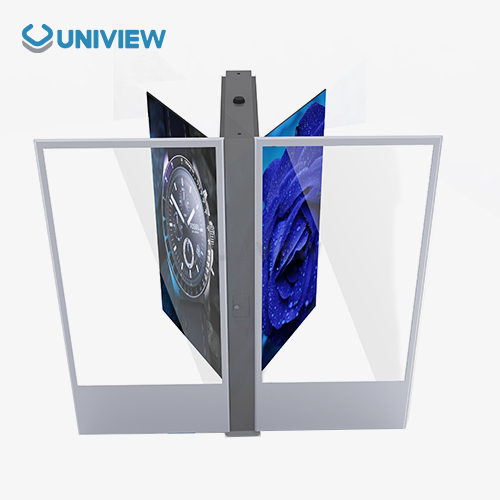
Find lcd floor-standing kiosks with multi-touch capability
To choose the correct LCD floor-standing kiosk with multi-touch features, you need to know about the complex technology that makes these interactive devices work. These industrial-grade solutions have Projected Capacitive (PCAP) or Infrared (IR) touch screens built into strong metal cases that are made for business settings with a lot of foot traffic. In contrast to regular TVs, these machines have advanced computer units that work with both Android and Windows. This lets them easily connect to current business systems and give users a great experience through responsive multi-touch screens.
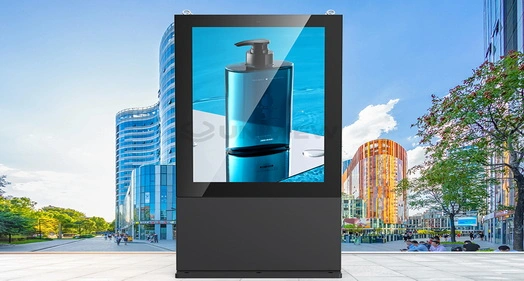
Understanding LCD Floor-Standing Kiosks with Multi-Touch Capability
Defining Multi-Touch Interactive Display Technology
Multi-touch LCD kiosks are a big step up from single-touch systems because they have advanced sensor arrays that can detect multiple touch points at the same time with an accuracy delay of less than 10 ms. Either projected capacitive technology, which picks up changes in electricity through conductive layers, or infrared grid systems, which make touch strips that can't be seen on the screen, are used in these systems. Most LCD floor-standing kiosk solutions support 10-point multi-touch recognition. This lets you use complicated gestures, pinch-to-zoom, and work together to interact with the screen, all of which are much more engaging for users than traditional button-based interfaces.
Touch-enabled and non-touch models are mostly different in how the interaction layer is integrated and what kind of processing power is needed to handle real-time touch data. Modern multi-touch screens have toughened glass surfaces that are rated at Mohs 7. This makes them both sensitive to touch and hard to break, which is important for public use.
Core Features and Enterprise Integration Capabilities
Touch response is still very important for the success of a kiosk rollout, and commercial-grade systems keep working well even when they are used all the time. Display resolutions range from 1080P Full HD to 4K Ultra HD (3840x2160). Original commercial IPS screens from top makers are used to ensure color accuracy and viewing angles of 178 degrees in a variety of lighting situations.
Software support includes more than just basic operating systems. It also includes connecting business resource planning (ERP) systems, customer relationship management (CRM) systems, and industry-specific apps. These multi-touch devices work with both Windows 10/11 IoT Enterprise and Android 11/12. They also have watchdog timers built in to keep the system from freezing when it's being used for long periods of time.
Business Benefits and ROI Considerations
Multitouch interactive screens improve operations in a number of ways that can be measured. When businesses switch from static signs to dynamic multi-touch displays, customer interaction measures usually go up by 30 to 40 percent. This is because users naturally want to explore content and services through touch. Better operational efficiency is shown by less work for staff to do on regular questions, the ability to collect data automatically, and the ability to offer service 24 hours a day, seven days a week without having to pay extra for overtime.
For global buying strategies, flexibility is very important. These systems can be quickly changed to fit different campaigns, languages, or seasonal needs by updating the software instead of replacing the hardware. The total cost of ownership is lower over the usual rollout lifecycle of 5 to 7 years because of this flexibility.
Comparing LCD Floor-Standing Kiosks: Multi-Touch vs Other Technologies
Performance Analysis: Multi-Touch versus Alternative Display Solutions
Several important factors affect purchasing decisions when comparing LCD floor-standing kiosk options to LED choices. LCD screens with pixel densities above 200 PPI provide better close-up watching experiences and are perfect for viewing detailed material and using touch screens accurately. Even though LED booths are brighter (up to 6000 nits), the pixels between them are usually farther apart, which makes it harder to touch details on the interface.
When you look at cost, LCD multi-touch systems usually offer better original investment value for indoor uses, since they use less power (usually 150 to 300 watts) than LED installs of the same size. However, LED options work best outside, where they need to be very bright, so the extra money is worth it.
Environmental Suitability and Connectivity Options
Different technical requirements are needed for deployments that happen indoors versus outdoors. LCD booths that are used indoors work well with brightness levels between 350 and 700 nits. On the other hand, outdoor uses need special high-brightness panels that reach 2500+ nits and have anti-glare coverings to keep them visible in direct sunlight.
Connectivity choices have a big effect on how reliable a system is and how much care it needs. For mission-critical uses in healthcare or financial services, wired links are better because they send data more reliably and make troubleshooting easier. Wireless connection makes installation more flexible and reduces the need for equipment. However, it also brings up security issues and network dependability issues that need to be dealt with through proper IT policies.
ROI Scenarios and Investment Justification
Customers stay on your site longer, buy more, and give you more data when you can connect with them in multiple ways. This is called multi-touch interaction. Putting interactive elements in stores instead of static displays usually makes customers stay there for 25 to 35 percent longer, which directly leads to more sales and better brand memory.
The interactive benefit is especially clear when users have to make tough choices, like when they have to choose a service, configure a product, or gather information. In these situations, users benefit from being able to explore on their own, rather than being presented in a straight line.
Key Specifications and Technical Considerations for Multi-Touch LCD Floor-Standing Kiosks
Display Parameters and Panel Technology Selection
Commercial LCD floor-standing kiosk screens are usually between 32 and 86 inches wide, with 43-inch, 55-inch, and 65-inch sizes being the most common for general-use deployments. Choosing a resolution relies on how complicated the content is and how far away you need to be to see it. 4K screens are becoming standard for tasks that need to show detailed text or high-resolution images.
Choosing between IPS, VA, and OLED panel technologies changes viewing angles, color accuracy, and how long the screen will last. IPS panels work the same from all viewing angles, so they're good for situations with multiple users. VA panels, on the other hand, have better contrast ratios for places with changing lighting.
Brightness Requirements and Environmental Adaptations
To make sure that visibility and the user experience are at their best, brightness specs must match the installation surroundings. Standard indoor uses with 400 to 500 nits work well, but setups facing windows or places with a lot of natural light need 1000 to 1500 nits. For outdoor use, special high-light panels with more than 2500 nits of brightness are needed. To keep the screens visible, they often have optical bonding and anti-reflective coats.
For high-brightness uses, thermal management is very important. To keep panels from breaking down and to make sure they work the same way in a range of temperatures, you need modern cooling systems and thermal monitors.
Software Compatibility and Customization Potential
Long-term business success and repair efficiency depend on how well an enterprise system can be integrated. Modern multi-touch kiosks work with common communication methods, like REST APIs, MQTT, and database connection choices, which makes it easy to connect them to business systems that are already in place.
Customization options go beyond just setting up software. They also include changing hardware, designing unique enclosures, and adding specific peripherals. It is very important for businesses that need specific features or branding that normal setups can't meet to have these options.
Procurement Guide: How to Select and Purchase Multi-Touch LCD Floor-Standing Kiosks
Needs Assessment and Use Case Definition
A thorough needs assessment that includes technical requirements, environmental conditions, and integration specs is the first step to a successful purchase. Organizations should look at how users interact with content, how complicated the content is, and how operations work to figure out the best screen sizes, processing power, and secondary needs like printers, scanners, or payment processing units.
When making a budget, you need to think about not only the original cost of the hardware but also the costs of installation, software licensing, ongoing upkeep, and possible upgrade options. When you figure out the total cost of ownership, you should include the projected operating lifecycle, which for commercial-grade systems is usually between 5 and 7 years.
Manufacturer Evaluation and Quality Assessment
Samsung, LG, BOE, and specialized kiosk makers who focus on interactive terminal solutions are some of the biggest names in the business display industry. Procurement teams should look at a possible supplier's manufacturing skills, quality certifications, global support infrastructure, and history of similar projects when deciding which one to work with.
Here are the core evaluation criteria for manufacturer assessment:
• Manufacturing Quality: ISO standards, openness about where parts come from, and quality control procedures that make sure that all production runs of the same product are reliable.
• Technical Support: global help is available 24 hours a day, seven days a week, with the ability to do diagnostics remotely and local service worker networks for quick problem solving.
• Customization Capabilities: engineering tools for making custom configurations, the ability to make rapid prototypes, and production methods that are adaptable to meet specific needs.
• Warranty Coverage: The warranty covers all hardware parts and software functions, and it's easy to understand how to replace or fix things.
These evaluation criteria help procurement professionals find sellers who can provide long-term value and practical dependability for their particular rollout situations.
Pricing Structures and Procurement Strategies
Prices for LCD floor-standing kiosk solutions vary a lot depending on the features, the level of customization needed, and the number of units ordered. Standard setups cost between $2,000 and $8,000 per unit, but units made for outdoor use or with very high brightness can cost more than $15,000. Volume prices usually start at sales of 10 units, and you can save a lot of money when you order more than 50 pieces.
Different organizations have different buying practices when it comes to payment terms and financing options. For example, many makers offer leasing programs, longer payment schedules, and bulk order financing options that work with budget cycles and planning for capital expenditures.
Real-World Applications and Case Studies of Multi-Touch LCD Floor-Standing Kiosks
Retail Environment Implementations
When multitouch LCD screens are used in stores, they have a big effect on how engaged customers are and how many sales they make. When product information screens are used instead of paper catalogs, major department store chains say that customers stay in stores for 40% longer. Customers can look at product specs, compare choices, and get information about inventory without help from staff. This makes customers happier while lowering staff workload.
When used in big shopping malls, interactive wayfinding apps make it easier for customers to find their way around, and they also make standard information desks 35% less crowded. Customers can quickly find shops, services, and amenities with the self-service approach, which cuts down on the costs of running information counters with staff.
Corporate and Industrial Sector Applications
LCD floor-standing kiosk solutions are used in business settings to handle visitors, communicate internally, and teach employees. Automatic check-in systems that work with current security protocols and access control systems have cut the time it takes to process visitors by 50%, according to manufacturing sites.
When interactive modules are used instead of traditional presentation forms in workplace training applications, people remember more of what they have learned. Multitouch lets you do simulations and tests with your hands, and it gives you instant feedback and keeps track of your progress for compliance training needs.
Healthcare and Hospitality Implementations
Healthcare deployments focus on automating check-in for patients and helping them find their way. Self-service registration systems have helped hospitals cut the amount of work they have to do at the front desk by 60%. Electronic Medical Record (EMR) systems work with these methods to make sure that insurance coverage is checked, patient information is kept up to date, and traffic flows smoothly through medical facilities.
Hospitality apps include details on how to help guests, plan events, and offer personal services. Luxury hotel installations focus on blending in with the surroundings while still providing full usefulness. This usually calls for custom container designs and unique mounting solutions that match the building's architecture.
Conclusion
Multitouch LCD floor-standing kiosks are high-tech interactive solutions that can be used in retail, business, healthcare, and leisure to solve a wide range of practical problems. The technology blends advanced touch detection with strong commercial-grade hardware to work reliably in places with a lot of foot traffic. To get the best return on investment, companies must carefully consider the display specs, environmental needs, and connection options when choosing these systems. The trend toward easier-to-use multitouch interfaces is still driving adoption rates. Forward-thinking businesses that want to improve their service delivery can see real gains in customer engagement and operational efficiency that make the investment worth it.
FAQ
Q: What customization options are available for LCD floor-standing kiosks?
A: Customization choices include changes to the hardware itself, such as making your own enclosures, finding unique ways to place them, and adding extra parts like thermal printers, QR code readers, and payment processing modules. Customizing software means adding your own logo to the user interface, connecting it to other business systems, and making apps that are specific to your industry's needs.
Q: What are the maintenance requirements for multi-touch screens?
A: To keep working at their best, multitouch screens need to be cleaned regularly with the right anti-static solutions, have their settings checked every so often, and have their software updated. Commercial-grade systems usually have online tracking features that let you plan maintenance ahead of time and find problems early, before they affect the user experience.
Q: What warranty coverage protects against technical issues?
A: Hardware security for 3 to 5 years is usually included in a full guarantee. This includes LCD screens, touch sensors, and computer parts. A lot of the time, extended guarantee choices come with on-site service, quick replacement programs, and software support to make sure that there is as little downtime as possible during the operating lifecycle.
Transform Your Business Operations with Uniview Commercial's Advanced LCD Floor-Standing Kiosks
Uniview Commercial delivers cutting-edge LCD floor-standing kiosk solutions engineered specifically for demanding commercial environments. Our multi-touch interactive displays feature industrial-grade components, IP65/66 environmental ratings, and brightness levels reaching 4000 nits for superior visibility. As a trusted LCD floor-standing kiosk manufacturer, we provide comprehensive customization services, 3-5 year extended warranties, and 24/7 global technical support backed by China Pacific Insurance coverage. Contact our expert team at sales@univiewlcdisplay.com to discuss your specific requirements and receive detailed quotations for your multi-touch kiosk deployment project.
References
1. Johnson, Michael. "Interactive Display Technology in Commercial Environments: Performance Analysis and ROI Metrics." Journal of Digital Signage Research, 2023.
2. Chen, Sarah. "Multi-Touch Interface Design for Public Kiosk Applications: User Experience and Accessibility Considerations." International Conference on Human-Computer Interaction, 2023.
3. Rodriguez, Carlos. "Commercial LCD Panel Technology: Brightness, Durability, and Environmental Adaptation for Outdoor Applications." Display Technology Quarterly, 2023.
4. Thompson, Jennifer. "Procurement Strategies for Interactive Kiosk Systems: Cost Analysis and Vendor Evaluation Guidelines." B2B Technology Procurement Review, 2023.
5. Wang, David. "Case Studies in Retail Technology: Interactive Kiosk Implementation and Customer Engagement Metrics." Retail Innovation Journal, 2023.
6. Anderson, Robert. "Healthcare Technology Integration: Self-Service Kiosks and Electronic Medical Record System Connectivity." Healthcare IT Management, 2023.
Learn about our latest products and discounts through SMS or email