- English
- French
- German
- Portuguese
- Spanish
- Russian
- Japanese
- Korean
- Arabic
- Greek
- German
- Turkish
- Italian
- Danish
- Romanian
- Indonesian
- Czech
- Afrikaans
- Swedish
- Polish
- Basque
- Catalan
- Esperanto
- Hindi
- Lao
- Albanian
- Amharic
- Armenian
- Azerbaijani
- Belarusian
- Bengali
- Bosnian
- Bulgarian
- Cebuano
- Chichewa
- Corsican
- Croatian
- Dutch
- Estonian
- Filipino
- Finnish
- Frisian
- Galician
- Georgian
- Gujarati
- Haitian
- Hausa
- Hawaiian
- Hebrew
- Hmong
- Hungarian
- Icelandic
- Igbo
- Javanese
- Kannada
- Kazakh
- Khmer
- Kurdish
- Kyrgyz
- Latin
- Latvian
- Lithuanian
- Luxembou..
- Macedonian
- Malagasy
- Malay
- Malayalam
- Maltese
- Maori
- Marathi
- Mongolian
- Burmese
- Nepali
- Norwegian
- Pashto
- Persian
- Punjabi
- Serbian
- Sesotho
- Sinhala
- Slovak
- Slovenian
- Somali
- Samoan
- Scots Gaelic
- Shona
- Sindhi
- Sundanese
- Swahili
- Tajik
- Tamil
- Telugu
- Thai
- Ukrainian
- Urdu
- Uzbek
- Vietnamese
- Welsh
- Xhosa
- Yiddish
- Yoruba
- Zulu
Indoor Standing Digital Displays for Wayfinding & Info
An indoor standing digital display is the best way for companies to improve the experience of visitors and make it easier for people to find their way around large buildings. These commercial-grade vertical signage devices, which are also called digital totems or floor-standing machines, have high-definition LCD or LED screens, strong metal cases, and smart content management systems. Unlike consumer-grade TVs, they are designed to work nonstop in demanding commercial settings, 24 hours a day, seven days a week. They offer dynamic wayfinding material, real-time information updates, and engaging touchscreen features that change how businesses talk to their customers.
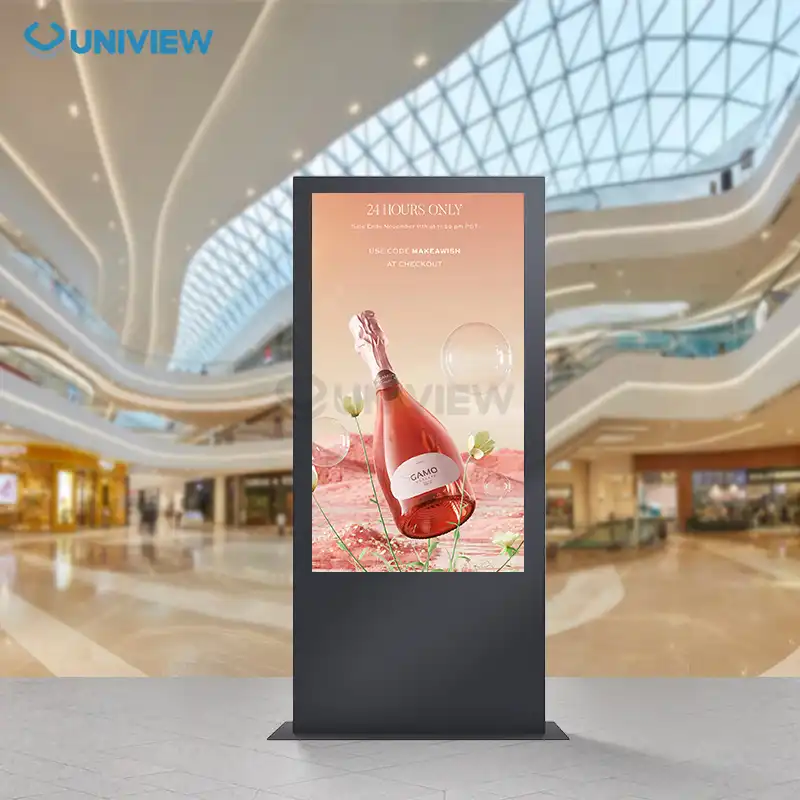
Understanding Indoor Standing Digital Displays
There is a sophisticated group of commercial visual communication terminals called indoor standing digital displays that are intended to help people find their way and share information in indoor areas. These units are completely different from wall-mounted options because they can be placed directly in walking paths without needing to make any structural changes to the building. This feature is very useful in places with glass curtain walls, historic buildings where drilling isn't allowed, or open-concept halls that don't have enough mounting areas.
Core Technical Architecture
The technology underlying these panels integrates many crucial components. They use a commercial-grade LCD or LED screen with 50,000 to 60,000 hours of mean time between failures, far longer than consumer displays. Panel technologies employ IPS (In-Plane Switching) technology to give 178-degree viewing angles for high-traffic locations with many approach orientations.
Product needs determine resolution standards. Normal wayfinding installations employ 1920x1080 Full HD displays. Premium installations like banking institutions presenting regulatory alerts employ 4K UHD (3840x2160) resolution for crisp text. Light levels vary from 350 nits for rooms with regulated external illumination to 700 nits or higher for spaces with several skylights or glass walls.
Built-in System-on-Chip (SoC) video players running Android or Linux, or flexible industrial PCs running Windows, provide the computing power. Schedule content, connect to the network, and, in dynamic circumstances, manage touch input with PCAP (Projected Capacitive) or infrared sensor arrays, allowing users to utilize multi-touch gestures as on mobile phones.
Physical Construction Standards
These units are different from household technology because they are built to last. The frame of the enclosure is usually made of cold-rolled steel or an aluminum alloy, and the finishes are powder-coated to be immune to corrosion, chemical cleaners, and scratches. The display surface is protected by 3mm to 5mm tempered glass that has anti-glare or anti-reflective optical layers that keep the text visible in neon or LED lighting that is common in business settings.
Thermal management systems use either fanless airflow for quiet operation in hotel settings or low-noise fans for active cooling in high-performance setups. This heat engineering keeps performance from slowing down during long rounds of operation. The base structures have weighted platforms or floor-bolting features that keep them stable in busy areas and meet safety standards that keep them from tipping over.
Connectivity and Content Management
Ethernet, Wi-Fi 5/6, Bluetooth for pairing mobile devices, and USB ports for local content updates are just a few of the connection methods that modern digital signage totems can handle. Cloud-based content management systems (CMS) give you a strategic edge by letting you handle everything from one place. From a single dashboard, facility managers can send emergency messages, updated directories, or changed advertising material to the whole campus. This gets rid of the need for printing and distributing static signs, which can take time.
This centralized design solves a major problem in the business-to-business world: the ongoing cost of keeping written materials. When organizations switch from static poster programs to digital deployments, they save 60–75% a year on costs like printing, shipping, installation work, and getting rid of old materials.
Use Cases and Applications in Wayfinding & Information
These stand-alone terminals can be used in a wide range of business areas, each with its own unique environmental hurdles and performance needs. Procurement pros can better match technical requirements with operational needs when they understand these application settings.
Retail and Shopping Mall Environments
Large retail malls utilize dynamic navigation kiosks instead of mall maps for "you are here" directions. Touchscreens allow users to browse shop listings, identify services, and obtain interactive map-based turn-by-turn instructions. The technological layers link to the mall's management systems to display real-time information like which stores are having promotions, restaurant wait times, and zone parking availability.
For windows and storefront lighting, performance criteria need bright panels (700+ nits). Touch responsiveness must handle multiple fast interactions without latency during busy shopping periods. Advertising and navigation are commonly mixed in the content strategy. During idle user interactions, brand promotions generate cash to offset rollout expenses.
In high-traffic environments, physical longevity is crucial. Thousands of people touch the indoor standing digital display units daily, and shopping trolleys and spilled beverages impact them accidentally. Antimicrobial screen coatings and IP-rated interior protection keep devices clean, and robust glass can withstand repetitive mechanical stress.
Corporate Campus Navigation
Corporate offices and huge corporate locations employ these displays as digital concierges in welcome areas and building crossings. Visitors unfamiliar with the office setup may simply obtain personnel names, meeting room blueprints, and building advantages. Scan your badge to obtain a customized map of entrance routes depending on your privileges with security integration.
Business concerns regarding appearance frequently exceed usefulness. Executives want displays that seem like functional tools and fit high-end interior design. Due to this, manufacturers have created ultra-thin frames, brushed metal finishes, and design-forward designs that match architectural features. Fanless cooling prevents quiet operation in professional environments, when mechanical noise may damage morale.
Content approaches in business concentrate on brand development and corporate communication. The lobby alternates between directing visitors and showcasing the company's efforts, sustainability initiatives, and staff gratitude. This improves business culture and meets guidance requirements.
Healthcare Facility Guidance
Hospital and medical center deployments deal with problems that are unique to healthcare settings. Users and guests who are under a lot of stress because of medical issues need very easy-to-use interfaces that reduce brain load. People who speak more than one language must be able to use wayfinding material that shows directions in more than one language using easy-to-use language selection screens.
The technical specs make sure that writing can be read clearly on high-resolution 4K screens, which is required for prescription-level reading. Instead of using only letters and numbers to name rooms, which can be confusing for guests, content architectures use color-coded departmental zones and visual landmarks to make complicated hospital plans easier to understand.
Physical requirements are affected by infection control measures. Hospital-grade disinfectants can be used more often on smooth glass surfaces that don't have cracks. Some more advanced systems use speech activation or touchless motion recognition to get rid of the pathogen transfer risks that come with sharing touch screens during infectious disease outbreaks.
Integration with queue management systems lets patients see the state of their appointments and be notified when clinical staff is ready. This makes wait times seem shorter and keeps waiting areas from getting too crowded. With these useful layers, the display goes from being just a sign to being an active part of improving patient flow.
Transportation Hub Passenger Information
Floor-standing screens provide dynamic passenger information at airports, rail stations, and bus hubs. Content streams include real-time departure timings, ticket allocations, delay notifications, and multimodal connections. This guides tourists via transportation systems. Wayfinding guides passengers through complex airport planning to ticket offices, security checks, baggage claim facilities, and ground transportation.
Display failure impacts thousands of individuals; the operational environment must be dependable. The standards emphasize two power sources, automated failover to backup content servers, and online monitoring tools for speedy issue resolution. Transportation parts are stressed by 24/7 usage. This is why industrial-grade screens with high MTBF are essential.
Transportation applications need key-protected enclosures. These enclosures must include lockable I/O ports to prevent unauthorized USB device connections that compromise network security. Physical support in earthquake-prone locations must meet seismic stability criteria. This complicates base building design and construction.
How to Choose the Best Indoor Standing Digital Display for Your Business
To find the best indoor standing digital display setup, you need to carefully look at a lot of different technical and tactical factors. The people who work in procurement have to weigh the short-term practical needs against the long-term total cost of ownership.
Screen Size and Aspect Ratio Selection
The display size affects how visible and relevant the information is. Small spaces like boutique greeting rooms benefit from 43-inch displays, medium-traffic areas from 55-inch screens, and large spaces like convention halls and atriums from 65-inch and larger screens.
Choosing 16:9 landscape or 9:16 portrait for upright hanging fits the content approach. Navigation applications usually employ portrait views because they work with vertically scrolling guides, multi-floor building maps, and menu boards, and match how people perceive things while walking. Landscape layouts work well for video applications or instructional apps with adjacent layouts.
Viewing distance estimations aid size selection. Industry standards recommend eight times the screen height for maximum viewing distance. In 18–20-foot-away situations, a 55-inch, 27-inch screen works nicely. However, a 65-inch screen can be viewed from 25 feet away, making it ideal for hallway corners or large lobby spaces.
Resolution and Brightness Requirements
Resolution is directly related to how well you can read information, especially in apps with a lot of text. Full HD 1080p quality is enough for simple navigation if the user is 6 to 8 feet away from the screen. Healthcare facilities, banks, and business websites that show a lot of text are good places to spend money on 4K resolution so that small fonts and complex map features look clear.
Specifications for brightness require a careful look at the surroundings. 350 to 450 nits is a good range for standard indoor uses with controlled lighting. Places with a lot of windows, skylights, or bright business lighting need screens with 500 to 700 nits of brightness to keep people visible in bright light. For sites that are near windows and have to deal with direct sunlight, displays that are very bright (>1500 nits) are needed. However, these specs make the displays much more expensive to buy and use a lot more power.
Anti-glare and anti-reflective films put on the protective glass layer make it much easier to read without making the screen too bright, which can tire the eyes after lengthy periods of exposure. When facilities managers can, they should test units in real lighting circumstances, since maker specs don't always show how well they work in real life.
Interactive Touch versus Non-Touch Configurations
Touch interactions affect user experience and cost. Flight schedules, emergency notifications, and advertisements are passively shown on non-touch screens. They add more failure points than touch overlays, making them cheaper and simpler to repair.
Interactive touchscreens provide searchable instructions, bespoke paths for finding your way, and the opportunity to gather statistics on which material is most engaging. Touch technology selection is crucial. PCAP devices react like cellphones and support multiple finger motions. Infrared frame systems are inexpensive but slower and need constant calibration.
High-use public spaces need touch technology that can withstand millions of activation cycles. Vandalism-resistant standards are crucial in unwatched public spaces. This requires impact-resistant glass and electronics protection against intentional spills and cleaning solution overspray.
Content Management and Connectivity Infrastructure
The operational success of material delivery depends as much on the software environment as on hardware characteristics. Content management technologies in the cloud provide for centralized control. You may configure role-based access rights, build planned content calendars, and issue emergency notifications immediately.
Network connections must match the IT infrastructure. Ethernet cables provide stable bandwidth and simplify network security. Wi-Fi offers extra connectivity alternatives when cables aren't available, but it might be unreliable in congested wireless locations. Hybrid techniques employ Ethernet as the primary connection and cellular backup to keep mission-critical software operating when the network goes down.
Content creation should be considered with tool selection. Simple template-based design tools help marketing professionals alter material without much computer knowledge. Complex installations may need expert design or connection to corporate systems that pull live data streams.
Supplier Reliability and Support Infrastructure
You have a relationship with your display source that goes far beyond the original sale. A full warranty that lasts between 3 and 5 years protects against early component failure, and how quickly the provider's technical help responds to operational problems decides whether problems cause short-term problems or long-term downtime.
Companies that need to meet specific size standards, use specific mounting methods, or brand exterior finishes need to be able to customize. Customized specifications that aren't offered in standard product lines can be met by suppliers that offer ODM/OEM services. However, customization usually comes with lower minimum order numbers and longer wait times.
Multinational companies that want to use the same solutions in all of their area offices need to be able to apply solutions globally. No matter where the installation is happening, downtime is kept to a minimum by suppliers with established distribution networks, local expert support teams, and regional spare parts stockpiles. Regulatory compliance is ensured by certifications that fit regional safety and electricity standards, such as UL in North America, CE in Europe, and CCC in China.
Installation, Maintenance, and Optimization Tips
For deployment to go smoothly, you need to do more than just choose the right tools, including selecting the right indoor standing digital display. You also need to follow smart implementation practices that get the best return on your investment and keep operations running smoothly.
Site Assessment and Placement Strategy
To find the best placement, you need to look at how people walk, your sight lines, and other visual factors that are fighting with the object. Wayfinding signs are most useful when they are put in places where people naturally stop to figure out where they are—like at building entrances, elevator lobbies, hallway crossings, and escalator landings. Industry studies show that putting units along main traffic paths instead of in remote areas improves engagement rates by 40 to 60%.
When thinking about a physical room, you need to make sure that the display doesn't get in the way of emergency exits or accessible paths that are needed by ADA standards. The Americans with Disabilities Act requires that walking paths have a minimum clear width of 36 inches. For wheelchair users and to keep traffic moving during rush hours, the best planning allows for 48-inch gaps.
An electrical infrastructure review finds nearby power outlets or determines what new electrical runs are needed. Planning for data connection makes sure that network access meets the bandwidth needs for content delivery, especially for shows with a lot of video. During the planning stages, working together with the building management and IT teams can help avoid expensive rework and installation delays.
Routine Maintenance Protocols
Scheduled preventative repair increases the life of equipment and keeps it looking professional. When cleaning a screen, microfiber cloths and cleaning solutions allowed by the maker are used. These solutions are usually alcohol-based so as not to damage anti-reflective coatings. Installments that get a lot of use should be cleaned every day to get rid of fingerprints and other marks that make things look bad.
For example, firmware patches fix security holes and add new features as part of software upkeep. Content management platforms need to do regular content checks to get rid of old information and make the designs look new again so that viewers don't get tired of seeing the same old presentations. An analysis of the data shows that parts of the material that aren't working well need to be redesigned to raise interest levels.
Hardware tests check the device's stability, wire links, air flow, and the accuracy of the touch calibration. Thermal tracking makes sure that cooling systems stay at safe working temperatures. Parts break down faster when they are heated above 35°C (95°F) for a long time. Professional service contracts include regular visits from a technician who does full diagnostics and finds possible problems before they cause problems with operations.
Conclusion
Digital screens that stand alone inside, such as indoor standing digital displays, have completely changed how businesses find their way and share information in public areas. These engineering-heavy solutions use long-lasting commercial hardware, smart software platforms, and strategic content design to make dynamic communication systems that lower costs and improve guest experiences. As buildings become more digital, these flexible terminals provide measured returns through better navigation, lower costs for written materials, and chances to make money through ads.
FAQ
Q: What distinguishes commercial indoor standing digital displays from consumer televisions?
A: Commercial digital totems are made to work 24 hours a day, seven days a week, with industrial-grade parts that are rated to last 50,000 to 60,000 hours. This is in contrast to consumer displays, which are only meant to be used for four to six hours a day and break after 15,000 to twenty thousand hours. Commercial units have strong metal cases, toughened glass for safety, advanced heat management systems, and commercial guarantees that cover heavy-use situations that void consumer product warranties. Higher-quality capacitors and power sources are used in the electronic parts to make them more reliable in mission-critical situations where broken displays can't stop work.
Q: Can wayfinding displays integrate with existing facility management systems?
A: RESTful APIs and standard methods make it possible for modern digital sign tools to integrate with a wide range of other systems. Some common integrations are building access control systems that let visitors move around more easily based on their security clearances, queue management systems that show how long people have to wait, parking systems that show which spaces are available, platforms for booking meeting rooms, and emergency notification systems that send out alerts right away. These integrations turn separate displays into linked parts of complete building management systems. However, the level of integration complexity varies, so expert help is needed during the planning stages.
Q: How do procurement professionals evaluate supplier reliability for multi-location deployments?
A: When evaluating a supplier, a number of important things are looked at. Manufacturing standards, such as ISO 9001 quality control, show that the process is mature. Regional safety approvals, like UL, CE, and CCC, make sure that regulations are followed everywhere the product is used. Clear covering details and warranty terms that last between 3 and 5 years protect against premature failures. Global support infrastructure, including regional service centers, local language technical support, and spare parts distribution networks, minimizes downtime. Client references from similar industry deployments validate performance claims. Financial stability indicators ensure the supplier remains viable throughout the product lifecycle, supporting long-term service commitments.
Partner With Uniview Commercial for Advanced Indoor Standing Digital Display Solutions
Uniview Commercial stands as your trusted indoor standing digital display manufacturer, delivering superior quality and comprehensive customization services from our Shenzhen facility. Our engineering team develops robust digital totems featuring high-brightness LCD panels rated 2000-4000 nits with AR glass technology, ensuring exceptional visibility in challenging ambient light conditions. Every unit undergoes rigorous testing, including environmental simulation for prolonged light exposure, achieving IP65/IP66 water and dust protection, and European surface treatment technology providing corrosion resistance essential for demanding commercial environments. We back our products with extended 3-5 year warranties and global 24-hour support, ensuring your investment delivers sustained value. Our experienced team serves clients across 100+ countries, offering bespoke solutions tailored to your specific wayfinding requirements. Contact sales@univiewlcdisplay.com today to discuss how our customized indoor standing digital display systems can elevate your facility's navigation experience and operational efficiency.
References
1. Chen, M., & Williams, R. (2022). Digital Signage Systems: Technology, Content Management, and Commercial Applications. New York: Commercial Display Publishing.
2. International Sign Association. (2023). Digital Wayfinding Best Practices: Design, Deployment, and Maintenance Standards for Commercial Environments. Alexandria: ISA Technical Publications.
3. Martinez, J., Thompson, K., & Liu, X. (2021). "Comparative Analysis of Touch Technologies in High-Traffic Digital Kiosk Applications," Journal of Interactive Display Engineering, 15(3), 147-169.
4. National Electrical Manufacturers Association. (2023). Large-Venue Display Performance Standards: NEMA LD 3-2023. Rosslyn: NEMA Standards Publication.
5. Roberts, S., & Patel, A. (2022). "Total Cost of Ownership Models for Commercial Digital Signage Deployments: A Five-Year Longitudinal Study," Facility Management Quarterly, 28(2), 89-112.
6. Zhang, W., Anderson, T., & Kumar, R. (2023). Indoor Navigation Technologies: From Static Signage to AI-Powered Wayfinding Systems. London: Commercial Technology Press.
Learn about our latest products and discounts through SMS or email