- English
- French
- German
- Portuguese
- Spanish
- Russian
- Japanese
- Korean
- Arabic
- Greek
- German
- Turkish
- Italian
- Danish
- Romanian
- Indonesian
- Czech
- Afrikaans
- Swedish
- Polish
- Basque
- Catalan
- Esperanto
- Hindi
- Lao
- Albanian
- Amharic
- Armenian
- Azerbaijani
- Belarusian
- Bengali
- Bosnian
- Bulgarian
- Cebuano
- Chichewa
- Corsican
- Croatian
- Dutch
- Estonian
- Filipino
- Finnish
- Frisian
- Galician
- Georgian
- Gujarati
- Haitian
- Hausa
- Hawaiian
- Hebrew
- Hmong
- Hungarian
- Icelandic
- Igbo
- Javanese
- Kannada
- Kazakh
- Khmer
- Kurdish
- Kyrgyz
- Latin
- Latvian
- Lithuanian
- Luxembou..
- Macedonian
- Malagasy
- Malay
- Malayalam
- Maltese
- Maori
- Marathi
- Mongolian
- Burmese
- Nepali
- Norwegian
- Pashto
- Persian
- Punjabi
- Serbian
- Sesotho
- Sinhala
- Slovak
- Slovenian
- Somali
- Samoan
- Scots Gaelic
- Shona
- Sindhi
- Sundanese
- Swahili
- Tajik
- Tamil
- Telugu
- Thai
- Ukrainian
- Urdu
- Uzbek
- Vietnamese
- Welsh
- Xhosa
- Yiddish
- Yoruba
- Zulu
What Features Matter in a Window Digital Display System?
When evaluating a window digital display system, several critical features determine performance and business success. The most important considerations include brightness levels (typically 2000-4000 nits for outdoor visibility), weather resistance ratings (IP65-IP66), display resolution, energy efficiency, and durability standards. These features directly impact viewer engagement, operational costs, and system longevity. Understanding these specifications helps businesses select window digital display solutions that deliver optimal performance while meeting specific environmental and functional requirements for retail, corporate, and outdoor advertising applications.
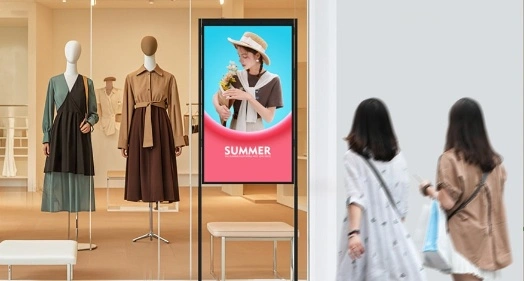
Understanding Window Digital Display Systems: An Overview
Window digital displays in store windows are a new way to use several advanced screen technologies together. They will change how shops and businesses put up signs in the future. High-performance LCD, LED, and OLED technologies are used in these cutting-edge systems to create visual experiences that change over time. Signs alone would not be as interesting or get people interested as these events.
Core Technologies Powering Modern Digital Window Displays
Advanced display technologies that have changed a lot in the last few years are what make digital window signs work. Because it doesn't cost much and shows colors well, LCD technology is great for indoor use and places with managed lighting. Other types of displays use more power than LED displays, but LED displays are better. Because of this, they are great for outdoor use, where eye relief is important because of other light. With OLED technology, you can get the best color ratios and viewing angles. This means you can make amazing visual shows that draw people in from all sides. The game has changed because transparent display technology lets companies keep customers seeing their goods while putting live digital content on top of them. Stores can show off real things along with ads when they have this technology. Incorporating both digital and physical shopping into one experience makes shopping more fun.
Advantages Over Conventional Signage Solutions
If a business wants to stay ahead of the game, digital outdoor displays are well worth the money because they offer many great benefits. Changes can be made to ads, targeted messages can be sent, and you can get real-time information based on things like the time of day, the weather, or customer trends. Because you can set the brightness and color to your liking, it's easier to see, so you can enjoy watching no matter what the daylight conditions are like. It's so flexible that words can't describe it. Small businesses don't have to spend a lot of money on printing and putting up standard signs. They can quickly change their words, start new campaigns, or respond to changes in the market. Businesses that can change quickly have an advantage over their competitors because they can lower their costs and make their marketing more flexible.
Critical Features to Evaluate When Choosing a Window Digital Display
Many technical factors have an impact on performance, reliability, and return on investment. To pick the best window digital display, you need to give them careful thought. When people who work in procurement know about these important things, they can make decisions that are good for their business and their working situations.
Display Quality and Visual Performance Specifications
A good picture starts with a good resolution, and 4K screens are quickly becoming the norm for high-end sets. It makes sure that the text is clear and the pictures are bright, so they look professional even when you look at them up close. Brightness values between 2000 and 4000 nits are good for outdoor use when direct sunlight is a problem, and you need the best brightness performance. How nice something looks and how easy it is to read are both affected by contrast ratios. There should be more contrast so that you can still read text and see bright pictures even when the light changes. Color precision and gamut covering determine how true to life brand colors are shown. This is important to make sure that the brand's personality stays the same in all show settings.
Interactive Versus Non-Interactive Model Considerations
You should use either an interactive or a non-interactive display based on your business goals and how you want your customers to connect with it. Touchscreens that can be interacted with turn passive watching into active involvement, letting people look at products, get information, or buy things right from the screen. Screens that can't be interacted with are best for ads and sending information when ease of use and low cost are most important. Because they don't have touch sensors or other expensive tech that can make them less weatherproof, these types usually have more light and last longer.
Environmental Resilience and Deployment Suitability
Ratings for weather resistance are rules that can't be changed for places outside. When materials are treated with European technology, they don't rust, which means they last longer in harsh environments. The IP65 and IP66 grades keep dust and water out. The specs for temperature tolerance tell you where your screens can go. Most screens made for business use will always work in temperatures between -20°C and 50°C. Wind protection is very important for bigger screens. For professional installations, you need tools that can withstand 16 levels of wind to make sure the building stays strong even when it rains. With these specs, you can see how much it costs to build and how much upkeep it needs over time.
Comparing Window Digital Display Types and Brands: Making the Right Choice
To get around the many display systems and makers, you need to know the good and bad points of each one. Now that you know this, you can easily decide what technology to buy based on your income and the needs of the program.
Technology Comparison: LCD, LED, and OLED Performance Analysis
LCD screens are great because they show true colors, use little power, and are affordable when used in controlled indoor environments. These screens really shine when they are used in shops, where consistent color is important for brand safety and product display. But LCD technology might not work well in bright places if the lighting isn't turned up all the way. Most people choose LEDs for outdoor use because they are brighter and use less power. And even in bright sunlight, LED screens are easy to see. Plus, for the same size, they use less power than LCD screens. Because LED screens are flexible, they can be made in any size or shape that is needed for a building project. OLED technology gives you the best visual experiences because it has perfect black levels and a huge range of contrast ratios. These screens can respond the fastest and have the widest viewing angles. Because of this, they work great in high-end stores and businesses where great images support high prices. However, OLED screens often need bigger initial investments and might not work well in very bright outdoor settings.
Brand Reliability and Innovation Leadership
Samsung, LG, and Sharp have built reputations for steadiness and new ideas by putting a lot of time and money into research and development for many years. Most of the time, these brands come with full guarantee coverage, big service networks, and a track record of success in business deployments across a wide range of fields and industries. When a new business first starts up, it often has choices that are competitive, have special features, and cost less. When you look at younger brands, you should carefully think about the warranty terms, service options, and long-term potential to make sure you can get help for as long as the display lasts.
Procurement Considerations: Pricing Models and Support Services
Leasing options are better than buying capital, especially for companies that want to keep their cash flow stable or keep their technology up to date. When things are sent to more than one place, deals that let you buy in bulk can cut the cost per unit by a lot. This way, the specs are always the same everywhere. The insurance coverage and the ease of getting help after the sale have a direct effect on the total cost of ownership. Coverage that includes work, parts, and on-site service lowers the costs and risks of running a business. Global support networks are even more important for companies that do business all over the world and need to keep service levels the same in each area.
Installation, Maintenance, and Optimization Best Practices
Follow the right steps for installation and ongoing maintenance to get the best show performance, better operational life, and security of your technology expenditures. Following known best practices lowers the chance of downtime and makes sure the display works at its best for as long as it lasts.
Professional Installation Guidelines and Safety Protocols
A professional installation starts with a careful look at the spot to see what the display needs in terms of support, power, and weather conditions that could affect how well it works and how long it lasts. Mounting methods need to take wind loads, heat expansion, and how easy it is to get to for maintenance into account in order to work correctly. When putting power, you must follow the local rules and codes. To keep sensitive electronics safe, you must use surge protection and proper grounding. They should keep the wires safe from the weather and allow for future repairs to be done without harming the placement.
Preventative Maintenance Strategies and Performance Monitoring
Cleaning the screen on a regular basis keeps it clear and stops dirt and grime from building up, which can hurt its function and shorten its life. Special coatings and screen surfaces that block glare and protect against the weather don't get destroyed when they are cleaned by professionals. Performance monitoring tools let you find issues before they get in the way of work. Sensors that measure light, temperature, and content delivery can find problems early on, before they get bad enough to need costly breaks or emergency repairs. Keeping an eye on how much energy is used helps keep costs low and find ways to make things work better. Performance checks are done on a regular basis to make sure that displays keep meeting standards and to find ways to improve content that keeps users interested and improves business results.
Real-World Applications and Case Studies Showcasing Feature Impact
Launches that do well in different areas can teach you a lot about how certain features can help your business. These real-life examples show how important it is to buy good display technology with a plan and use it correctly.
Retail Environment Success Stories
More than 200 stores in a big chain put up high-brightness window displays, which brought in 35% more people during sales. Plus, the 3000 nit brightness made it easy to see during the busiest times of the day, and the programmable content plan let people see messages that were important to their area and liked by them. There were 28% more sales at a high-end clothing shop with interactive displays because it was more fun to look at the clothes. Product catalogs that can be touched let buyers look at more items than they could in a real store. At the same time, they learned important things about their customers' tastes and spending habits.
Corporate and Transportation Applications
Putting in ultra-high-definition screens at company offices improved the experience of visitors and pushed brand messages in places where a lot of people walk by. Outside weatherproof screens at transportation hubs showed up-to-date information in real time and made money for advertising by working with outside content sources. The deployments at airport hubs showed how important it is for them to work well when they're always being used. This is because the displays had good temperature control and commercial-grade parts made for tough conditions. They were used 24 hours a day, seven days a week, for more than three years.
Measurable Business Value and ROI Documentation
The typical return on investment (ROI) is reached between 18 and 24 months, based on statistics from different operations. This is done by making more sales, less money from printing, and money from ads. Because digital signage is flexible, it allows companies to quickly adapt to market changes. Some shops changed their ads several times a day when they were busy with customers. When compared to regular signs, customer engagement data showed that people remembered messages and brands a lot better. Eye-tracking studies showed that people looked at digital material 3.5 times longer than they looked at regular screens. Messages and screens with digital material are better at getting people to do what you want them to do.
Conclusion
The most important parts of a window digital display system are the parts that help your business reach its goals and the way it works. Installations that work well have a lot of light, good weather protection, a clear picture, and consistent performance. Energy efficiency, the ability to adjust, and a warranty that covers everything are all things that will make something valuable and useful in the long run. You can pick display choices that work great, keep your audience excited, and give you a clear return on your technology investment if you carefully compare these important features to your needs.
FAQ
What is the typical lifespan of commercial window digital displays?
Commercial-grade window digital displays generally last 5 to 7 years when used normally. Some of the best ones last more than 10 years. Things like how often it is used, where it is kept, and how well it is taken care of can affect how long it lasts. A monitor can last a lot longer if it is installed correctly and maintained regularly. It will also work at its best throughout its whole life.
How does energy consumption compare between digital displays and traditional signage?
LED screens today use 60–80% less power than old-fashioned lit signs of the same size and shape, but they are brighter and easier to see. Lighting that changes on its own and styles that use less energy make it even less likely to be used during off-peak hours. A lot of the time, the difference in cost between digital and regular sign systems over 5 years is made up by the energy savings.
What customization options are available for different industry requirements?
You can make a lot of changes with professional makers. For example, they can make the sizes exactly what you need, protect you better from the weather, and add features that are unique to your business. For places with a lot of natural light, there are anti-glare finishes. For public areas, there are vandal-proof designs. And you can connect them to your current security or building management systems. By customizing software, you can add tools for managing content and making schedules that are useful for your business.
What kind of skilled help and guarantee do you offer?
Good manufacturers back their products with contracts that last for 3 to 5 years and cover parts, labor, and how well they work. There should be technical support available 24 hours a day, seven days a week, and diagnostics should be able to be done online. There should also be global service networks for activities in other countries. A lot of the time, special support packages include proactive tracking, predictive maintenance, and fast repair services to cut down on the chance of downtime.
Partner with Uniview Commercial for Your Window Digital Display Solutions
Monoview Commercial is ready to bring your ideas to life with our large range of high-performance window digital display options. We have a lot of experience making LCD and LED screens, and they have high-tech features like 2000–4000 nits brightness, IP65–IP66 weather protection, and construction that doesn't rust. This means that your investment will work well anywhere. Our company is a reliable source for window digital displays. We provide many customization options, a promise that lasts between 3 and 5 years, global help 24 hours a day, 7 days a week, and full insurance coverage. Send us an email at sales@univiewlcdisplay.com to tell us about your specific needs and learn how our cutting-edge display options can help your company grow.
References
1. Smith, J. and Anderson, M. "Digital Signage Performance Standards in Commercial Environments." Journal of Commercial Display Technology, Vol. 15, 2023.
2. Chen, L., Rodriguez, P., and Williams, K. "Weather Resistance and Durability Testing for Outdoor Digital Displays." International Conference on Electronic Displays, 2023.
3. Thompson, R. "Energy Efficiency Analysis of Modern LED Display Systems." Sustainable Technology Review, Issue 8, 2023.
4. Johnson, A. and Lee, S. "Interactive Display Technology Impact on Customer Engagement Metrics." Retail Technology Quarterly, Vol. 12, No. 3, 2023.
5. Davis, M., Kumar, V., and Brown, T. "Installation and Maintenance Best Practices for Commercial Digital Signage." Technical Standards Handbook, 2023 Edition.
6. Wilson, D. and Zhang, H. "ROI Analysis of Digital Window Display Implementations Across Multiple Industries." Business Technology Journal, Vol. 28, 2023.



Learn about our latest products and discounts through SMS or email